POI(Point of Interest)搜尋共有三種方式:依範圍與關鍵詞發起的區域檢索 poiSearchInbounds、針對城市的 city 檢索 poiSearchInCity,以及以某點為圓心的周邊檢索 poiSearchNearBy。本文以周邊檢索為例,示範如何進行檢索並把結果以 PoiOverlay 覆蓋物呈現在地圖上。
先看函式簽章:
public int poiSearchNearBy(java.lang.String key, GeoPoint pt, int radius)
它會依「中心點+半徑+關鍵詞」發起周邊檢索。這是個非同步函式,結果會透過 MKSearchListener 的 onGetPoiResult 回呼通知。參數分別是:key 為關鍵詞、pt 為中心點地理座標、radius 為半徑(單位:公尺);成功回傳 0,否則回傳 -1。
Demo:檢索天安門周邊 5000 公尺內的 KFC 餐廳。
[java]
mMKSearch.poiSearchNearBy(KFC, new GeoPoint((int) (39.915 * 1E6), (int) (116.404 * 1E6)), 5000);
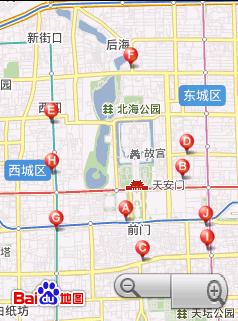
接著實作 MySearchListener 的 onGetPoiResult,並把檢索結果展示出來:
[java]
public void onGetPoiResult(MKPoiResult result, int type, int iError) {
if (result == null) {
return;
}
PoiOverlay poioverlay = new PoiOverlay(MyMapActivity.this, mMapView);
poioverlay.setData(result.getAllPoi());
mMapView.getOverlays().add(poioverlay);
}
以下是完整的實作程式碼:
[java]
package xiaosi.baiduMap;
import android.os.Bundle;
import com.baidu.mapapi.BMapManager;
import com.baidu.mapapi.GeoPoint;
import com.baidu.mapapi.MKAddrInfo;
import com.baidu.mapapi.MKDrivingRouteResult;
import com.baidu.mapapi.MKPoiResult;
import com.baidu.mapapi.MKSearch;
import com.baidu.mapapi.MKSearchListener;
import com.baidu.mapapi.MKTransitRouteResult;
import com.baidu.mapapi.MKWalkingRouteResult;
import com.baidu.mapapi.MapActivity;
import com.baidu.mapapi.MapController;
import com.baidu.mapapi.MapView;
import com.baidu.mapapi.PoiOverlay;
public class BaiduMapActivity extends MapActivity
{
private BMapManager mapManager = null;
private String key = 1B79478DA01F7800AEA8602517A6D89B38151105;
private MapView mapView = null;
@Override
public void onCreate(Bundle savedInstanceState)
{
super.onCreate(savedInstanceState);
setContentView(R.layout.main);
mapManager = new BMapManager(getApplication());
mapManager.init(key, null);
super.initMapActivity(mapManager);
mapView = (MapView) findViewById(R.id.mapsView);
mapView.setBuiltInZoomControls(true);
MapController mapController = mapView.getController();
mapController.setZoom(12);
MKSearch mKSearch = new MKSearch();
mKSearch.init(mapManager, new MySearchListener());
mKSearch.poiSearchNearBy(KFC, new GeoPoint((int) (39.915 * 1E6),
(int) (116.404 * 1E6)), 5000);
}
public class MySearchListener implements MKSearchListener
{
public void onGetAddrResult(MKAddrInfo arg0, int arg1)
{}
public void onGetDrivingRouteResult(MKDrivingRouteResult arg0, int arg1)
{}
public void onGetPoiResult(MKPoiResult arg0, int arg1, int arg2)
{
if (arg0 == null) {
return;
}
PoiOverlay poioverlay = new PoiOverlay(BaiduMapActivity.this, mapView);
poioverlay.setData(arg0.getAllPoi());
mapView.getOverlays().add(poioverlay);
}
public void onGetTransitRouteResult(MKTransitRouteResult arg0, int arg1)
{}
public void onGetWalkingRouteResult(MKWalkingRouteResult arg0, int arg1)
{}
}
@Override
protected boolean isRouteDisplayed()
{
return false;
}
@Override
protected void onDestroy()
{
if (mapManager != null)
{
mapManager.destroy();
mapManager = null;
}
super.onDestroy();
}
@Override
protected void onPause()
{
if (mapManager != null)
{
mapManager.stop();
}
super.onPause();
}
@Override
protected void onResume()
{
if (mapManager != null)
{
mapManager.start();
}
super.onResume();
}
}
實作時要特別注意:MKSearchListener 在同一時間只支援一個,以最後一次設定的為準;此外别忘了在 onDestroy、onPause、onResume 中妥善管理 BMapManager 的生命週期,並在清單檔裡申請網路與定位權限。


 Android 機型適配入門:資源、尺寸與版本差異
 使用二次貝茲曲線實作購物車拋物線加入動畫
 Android 多媒體框架(一):MediaPlayer 的狀態圖與生命周期
 Android AIDL 跨進程通信實戰:用播放器 Service 完整拆解 IPC 流程