

編輯:關於 Android 程式設計
音樂播放器要能「離開 App 仍在播放」,關鍵就在 Service。這一節我們建立 PlayService,把播放、暫停、上一首、下一首、進度查詢全部收攏到服務層,並同步更新通知欄的播放控制按鈕。
import android.app.Notification;
import android.app.NotificationManager;
import android.app.PendingIntent;
import android.app.Service;
import android.content.BroadcastReceiver;
import android.content.Context;
import android.content.Intent;
import android.content.IntentFilter;
import android.graphics.Bitmap;
import android.media.MediaPlayer;
import android.net.Uri;
import android.os.Binder;
import android.os.IBinder;
import android.support.v4.app.NotificationCompat;
import android.view.View;
import android.widget.RemoteViews;
import com.haoxue.zixueplayer.utils.BaseTools;
import com.haoxue.zixueplayer.utils.MediaUtils;
import com.haoxue.zixueplayer.vo.Mp3Info;
import java.io.IOException;
import java.util.ArrayList;
import java.util.Random;
import java.util.concurrent.ExecutorService;
import java.util.concurrent.Executors;

/**
 * 音樂播放的服務元件
 */
public class PlayService extends Service
        implements MediaPlayer.OnCompletionListener, MediaPlayer.OnErrorListener {

    private MediaPlayer mPlayer;
    private int currentPosition;          // 目前播放歌曲的位置
    ArrayList<Mp3Info> mp3Infos;
    private MusicUpdateListener musicUpdateListener;
    private ExecutorService es = Executors.newSingleThreadExecutor();
    private boolean isPause = false;

    // 可切換的播放清單
    public static final int MY_MUSIC_LIST = 1;            // 我的音樂
    public static final int LIKE_MUSIC_LIST = 2;          // 我喜歡的
    public static final int PLAY_RECORD_MUSIC_LIST = 3;   // 最近播放
    private int changePlayList = MY_MUSIC_LIST;

    // 播放模式
    public static final int ORDER_PLAY = 1, RANDOM_PLAY = 2, SINGLE_PLAY = 3;
    private int play_mode = ORDER_PLAY;

    public void setPlay_mode(int play_mode) { this.play_mode = play_mode; }
    public int getPlay_mode() { return play_mode; }
    public boolean isPause() { return isPause; }
    public int getChangePlayList() { return changePlayList; }
    public void setChangePlayList(int changePlayList) { this.changePlayList = changePlayList; }
    public void setMp3Infos(ArrayList<Mp3Info> mp3Infos) { this.mp3Infos = mp3Infos; }
    public ArrayList<Mp3Info> getMp3Infos() { return mp3Infos; }
    public int getCurrentPosition() { return currentPosition; }

    private Random random = new Random();

    /** 一首播完時依播放模式決定下一步 */
    @Override
    public void onCompletion(MediaPlayer mp) {
        switch (play_mode) {
            case ORDER_PLAY:  next(); break;
            case RANDOM_PLAY: play(random.nextInt(mp3Infos.size())); break;
            case SINGLE_PLAY: play(currentPosition); break;
            default: break;
        }
    }

    @Override
    public boolean onError(MediaPlayer mp, int what, int extra) {
        mp.reset();
        return false;
    }

    /** 供 Activity 取得 Service 實例 */
    class PlayBinder extends Binder {
        PlayService getPlayService() { return PlayService.this; }
    }

    @Override
    public IBinder onBind(Intent intent) {
        return new PlayBinder();
    }

    @Override
    public void onCreate() {
        super.onCreate();
        MuyuPlayerApp app = (MuyuPlayerApp) getApplication();
        currentPosition = app.sp.getInt("currentPosition", 0);
        play_mode = app.sp.getInt("play_mode", PlayService.ORDER_PLAY);
        mPlayer = new MediaPlayer();
        mPlayer.setOnCompletionListener(this);
        mPlayer.setOnErrorListener(this);
        mp3Infos = MediaUtils.getMp3Infos(this);
        es.execute(updateStatusRunnable);
        initButtonReceiver();
        initService();
        sendNotification();
    }

    @Override
    public void onDestroy() {
        super.onDestroy();
        if (es != null && !es.isShutdown()) {
            es.shutdown();
            es = null;
        }
        mNotificationManager.cancelAll(); // 移除所有通知
        pause();
        mPlayer = null;
        mp3Infos = null;
        musicUpdateListener = null;
    }

    /** 每 500ms 對外發布一次播放進度 */
    Runnable updateStatusRunnable = new Runnable() {
        @Override
        public void run() {
            while (true) {
                if (musicUpdateListener != null && mPlayer != null && mPlayer.isPlaying()) {
                    musicUpdateListener.onPublish(getcurrentProgress());
                }
                try {
                    Thread.sleep(500);
                } catch (InterruptedException e) {
                    e.printStackTrace();
                }
            }
        }
    };

    // 播放
    public void play(int position) {
        if (mp3Infos == null) { return; }
        if (position < 0 || position >= mp3Infos.size()) { position = 0; }
        Mp3Info mp3Info = mp3Infos.get(position);
        try {
            mPlayer.reset();
            mPlayer.setDataSource(this, Uri.parse(mp3Info.getUrl()));
            mPlayer.prepare();
            mPlayer.start();
            currentPosition = position;
            sendNotification();
        } catch (IOException e) {
            e.printStackTrace();
        }
        if (musicUpdateListener != null) {
            musicUpdateListener.onChange(currentPosition);
        }
    }

    // 暫停
    public void pause() {
        if (mPlayer.isPlaying()) {
            mPlayer.pause();
            isPause = true;
        }
    }

    // 下一首
    public void next() {
        if (currentPosition + 1 >= mp3Infos.size()) {
            currentPosition = 0;
        } else {
            currentPosition++;
        }
        play(currentPosition);
    }

    // 上一首
    public void prev() {
        if (currentPosition - 1 < 0) {
            currentPosition = mp3Infos.size() - 1;
        } else {
            currentPosition--;
        }
        play(currentPosition);
    }

    // 續播
    public void start() {
        if (mPlayer != null && !mPlayer.isPlaying()) {
            mPlayer.start();
            mPlayer.getDuration();
        }
    }

    public boolean isPlaying() {
        return mPlayer != null && mPlayer.isPlaying();
    }

    public int getcurrentProgress() {
        if (mPlayer != null && mPlayer.isPlaying()) {
            return mPlayer.getCurrentPosition();
        }
        return 0;
    }

    public int getDuration() { return mPlayer.getDuration(); }

    public void seekTo(int msec) { mPlayer.seekTo(msec); }

    /** 與 UI 溝通的回呼介面 */
    public interface MusicUpdateListener {
        void onPublish(int progress);
        void onChange(int position);
    }

    public void setMusicUpdateListener(MusicUpdateListener musicUpdateListener) {
        this.musicUpdateListener = musicUpdateListener;
    }
}
通知欄要能放自訂版面,靠的是 RemoteViews;而按鈕點擊無法直接綁 Listener,必須用 PendingIntent.getBroadcast 送出廣播,再由 Service 內部註冊的廣播接收器處理。
/** 通知欄按鈕點擊對應的 ACTION */
public final static String ACTION_BUTTON = "com.notifications.intent.action.ButtonClick";
public final static String INTENT_BUTTONID_TAG = "ButtonId";
public final static int BUTTON_PLAY_ID = 1;  // 播放/暫停
public final static int BUTTON_NEXT_ID = 2;  // 下一首
public final static int BUTTON_EXIT_ID = 3;  // 退出

public ButtonBroadcastReceiver bReceiver;
public NotificationManager mNotificationManager;
private int NID_1 = 0x1;

public void sendNotification() {
    Mp3Info mp3InfoSend = this.mp3Infos.get(currentPosition);
    final NotificationCompat.Builder builder = new NotificationCompat.Builder(this);
    RemoteViews views = new RemoteViews(getPackageName(), R.layout.custom_layout);

    Bitmap albumBitmap = MediaUtils.getArtwork(this, mp3InfoSend.getId(),
            mp3InfoSend.getAlbumId(), false, false);
    if (albumBitmap != null) {
        views.setImageViewBitmap(R.id.custom_song_icon, albumBitmap);
    } else {
        views.setImageViewResource(R.id.custom_song_icon, R.mipmap.app_logo3);
    }
    views.setTextViewText(R.id.tv_custom_song_name, mp3InfoSend.getTitle());
    views.setTextViewText(R.id.tv_custom_song_singer, mp3InfoSend.getArtist());

    // 系統版本過低時不顯示控制按鈕
    if (BaseTools.getSystemVersion() <= 9) {
        views.setViewVisibility(R.id.ll_custom_button, View.GONE);
    } else {
        views.setViewVisibility(R.id.ll_custom_button, View.VISIBLE);
        views.setImageViewResource(R.id.btn_custom_play,
                isPlaying() ? R.mipmap.pause2 : R.mipmap.play2);
    }

    Intent intent = new Intent(this, MainActivity.class);
    PendingIntent pi = PendingIntent.getActivity(this, 0, intent,
            PendingIntent.FLAG_UPDATE_CURRENT);

    Intent buttonIntent = new Intent(ACTION_BUTTON);

    buttonIntent.putExtra(INTENT_BUTTONID_TAG, BUTTON_PLAY_ID);
    views.setOnClickPendingIntent(R.id.btn_custom_play,
            PendingIntent.getBroadcast(this, 1, buttonIntent, PendingIntent.FLAG_UPDATE_CURRENT));

    buttonIntent.putExtra(INTENT_BUTTONID_TAG, BUTTON_NEXT_ID);
    views.setOnClickPendingIntent(R.id.btn_custom_next,
            PendingIntent.getBroadcast(this, 2, buttonIntent, PendingIntent.FLAG_UPDATE_CURRENT));

    buttonIntent.putExtra(INTENT_BUTTONID_TAG, BUTTON_EXIT_ID);
    views.setOnClickPendingIntent(R.id.btn_custom_exit,
            PendingIntent.getBroadcast(this, 3, buttonIntent, PendingIntent.FLAG_UPDATE_CURRENT));

    builder.setContent(views)
            .setContentIntent(pi)
            .setWhen(System.currentTimeMillis())
            .setTicker("木雨音樂")
            .setPriority(Notification.PRIORITY_MAX)
            .setOngoing(true)
            .setSmallIcon(R.mipmap.app_logo3);

    NotificationManager nm = (NotificationManager) getSystemService(Context.NOTIFICATION_SERVICE);
    nm.notify(NID_1, builder.build());
}

private void initService() {
    mNotificationManager = (NotificationManager) getSystemService(NOTIFICATION_SERVICE);
}

/** 註冊通知欄按鈕的廣播接收器 */
public void initButtonReceiver() {
    bReceiver = new ButtonBroadcastReceiver();
    IntentFilter intentFilter = new IntentFilter();
    intentFilter.addAction(ACTION_BUTTON);
    registerReceiver(bReceiver, intentFilter);
}

public class ButtonBroadcastReceiver extends BroadcastReceiver {
    @Override
    public void onReceive(Context context, Intent intent) {
        if (!ACTION_BUTTON.equals(intent.getAction())) { return; }
        int buttonId = intent.getIntExtra(INTENT_BUTTONID_TAG, 0);
        switch (buttonId) {
            case BUTTON_PLAY_ID:
                if (isPlaying()) {
                    pause();
                } else if (isPause()) {
                    start();
                } else {
                    play(getCurrentPosition());
                }
                sendNotification();
                break;
            case BUTTON_NEXT_ID:
                next();
                break;
            case BUTTON_EXIT_ID:
                mNotificationManager.cancelAll();
                intent.setAction("com.muyu_Service");
                stopService(intent);
                int pid = android.os.Process.myPid();
                android.os.Process.killProcess(pid); // 結束應用行程
                break;
            default:
                break;
        }
    }
}
<service
    android:enabled="true"
    android:exported="true"
    android:name=".PlayService">
    <intent-filter></intent-filter>
</service>
/* 啟動播放服務 */
Intent intent = new Intent(this, PlayService.class);
startService(intent);
各個頁面都需要操作同一個播放服務,因此把綁定邏輯抽到抽象基底類別,讓所有 Activity 共用。
public abstract class BaseActivity extends FragmentActivity {

    protected PlayService playService;
    public ArrayList list = new ArrayList();
    private boolean isBound = false;

    @Override
    protected void onCreate(Bundle savedInstanceState) {
        super.onCreate(savedInstanceState);
        list.add(this);
    }

    /** 綁定播放服務 */
    private void bindPlayService() {
        if (!isBound) {
            Intent intent = new Intent(this, PlayService.class);
            bindService(intent, conn, Context.BIND_AUTO_CREATE);
            isBound = true;
        }
    }

    /** 解綁播放服務 */
    private void unbindPlayService() {
        if (isBound) {
            unbindService(conn);
            isBound = false;
        }
    }

    private ServiceConnection conn = new ServiceConnection() {
        @Override
        public void onServiceConnected(ComponentName name, IBinder service) {
            PlayService.PlayBinder playBinder = (PlayService.PlayBinder) service;
            playService = playBinder.getPlayService();
            playService.musicUpdateListener = new MusicUpdateListener() {
                @Override
                public void onPublish(int progress) { }

                @Override
                public void onChange(int position) { }
            };
        }

        @Override
        public void onServiceDisconnected(ComponentName name) { }
    };

    /** 統一退出 */
    public void exit() {
        for (int i = 0; i < list.size(); i++) {
            // 逐一關閉頁面
        }
        android.os.Process.killProcess(android.os.Process.myPid());
    }
}
完成這一步後,播放能力就完全由 Service 承載:Activity 只負責畫面與使用者互動,即使切換頁面或離開前景,音樂也不會中斷。下一節再回頭看本地音樂清單如何掃描與呈現。
 安卓手機如何重設便攜式無線基地台密碼
若要知道或重設安卓手機的便攜式無線基地台密碼,可從設定進入。 1. 開啟手機設定。 2. 選擇「無線和網絡」。 3. 進入「綁定與便攜式熱點」。 4. 選擇「便攜
 《Android 源碼設計模式解析與實戰》讀書筆記(二十二):享元模式 Flyweight
第二十二章 享元模式(Flyweight) 享元模式是結構型設計模式之一,本質上是對象池的一種實現。顧名思義,它強調共享對象、避免重複創建。我們常用的 String 就採
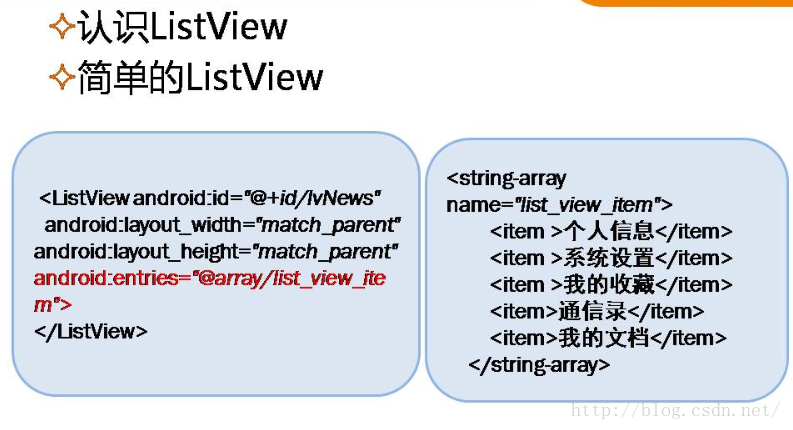 Android——ListView 與適配器(Adapter)實戰
本文從抽屜版面一路帶到複雜的新聞列表,示範 ListView 搭配不同適配器的多種用法,包括 SimpleAdapter、ArrayAdapter、自訂 BaseAdap
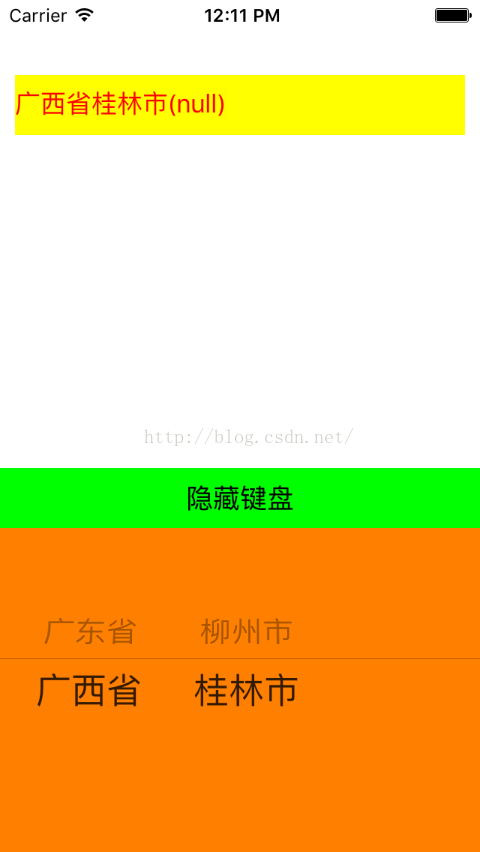 iOS 開發:UIPickerView 滾動選擇器實作教學
UIPickerView 的功能與 UIDatePicker 相似,但更為靈活。初始化時通常只需設定原點座標,無須指定寬高(預設大小為 frame = (0 0; 320