

編輯:關於 Android 程式設計
ContentProvider 是 Android 四大元件之一,用於管理應用程式對結構化資料的存取。它把資料封裝起來(encapsulate the data),同時提供一層安全防護。本質上,ContentProvider 是一個標準介面(standard interface),負責把一個行程中的資料與另一個行程中運行的程式碼連在一起。
使用 ContentProvider 時,你應該在自己的應用程式的 Context 環境中取得一個 ContentResolver 物件,把它作為 client 端與 provider 通訊(實際上是與 ContentProvider 的子類物件通訊)。provider 接收 client 端送來的請求,依請求執行操作,最後把結果回傳。
如果你不打算把自己的資料分享給其他應用,那就不需要建立自己的 provider。但有兩種情況是必要的:需要在自己的程式中提供自訂的搜尋建議;或者需要從自己的應用向其他應用複製、粘貼大型而複雜的資料檔案。
Android 系統本身提供了各式各樣的 provider,涵蓋音訊、視訊、圖片、聯絡人資訊等,你可以在 android.provider 套件中查閱。當然,存取部分 provider 需要權限。
provider 是應用程式的一部分,它提供的資料可以直接用於 UI 展示;但最常見的用途是把本應用的資料提供給其他應用程式使用。也就是說,provider 通常與 resolver 成對出現:provider 提供標準介面,resolver 負責安全地跨行程存取(handles inter-process communication and secure data access)。
ContentProvider 可以向外部應用提供關聯式資料庫中一或多張表的資訊。表中每一列代表一種資料型別或某個人的詳情,每一行代表一個欄位。
Android 系統內建了一個用户字典表(user dictionary),保存用户經常輸入的不標準單詞:
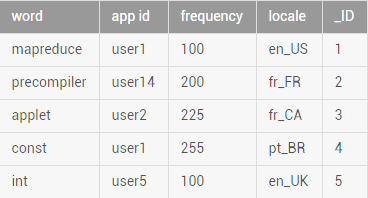
上表中,每一列表示一個單詞的所有資訊;每欄表示該單詞的統計資訊,例如使用頻率。_ID 欄位是表的主鍵,由系統自動賦予。
這裡有個實務上很重要的約定:如果要把 provider 的資料綁到 ListView 上,資料必須有一欄名為 _ID。即使 ListView 不顯示這一欄,Cursor 裡也必須有它。所以建表時一定要為表加上 _ID 欄位。
在應用程式中使用 ContentResolver 物件即可存取其他應用的 provider。該類提供了與 ContentProvider 中命名完全相同的方法,涵蓋增刪改查(CRUD)。
由於 ContentResolver 與 ContentProvider 位於不同行程,這無形中實現了跨行程通訊。而 ContentProvider 同時還充當了抽象層,介於資料倉庫與外部呈現的表格介面之間。
請注意:為了讓 ContentResolver 能存取 ContentProvider 的資料,你可能需要在 manifest 中加入存取權限。
舉例來說,若要取得上表中 word 欄與 locale 欄的資料,需在程式中呼叫 ContentResolver.query(),接著它會轉呼叫用户字典 provider 提供的 ContentProvider.query():
// Queries the user dictionary and returns results
mCursor = getContentResolver().query(
        UserDictionary.Words.CONTENT_URI,  // The content URI of the words table
        mProjection,                       // The columns to return for each row
        mSelectionClause,                  // Selection criteria
        mSelectionArgs,                    // Selection criteria
        mSortOrder);                       // The sort order for the returned rows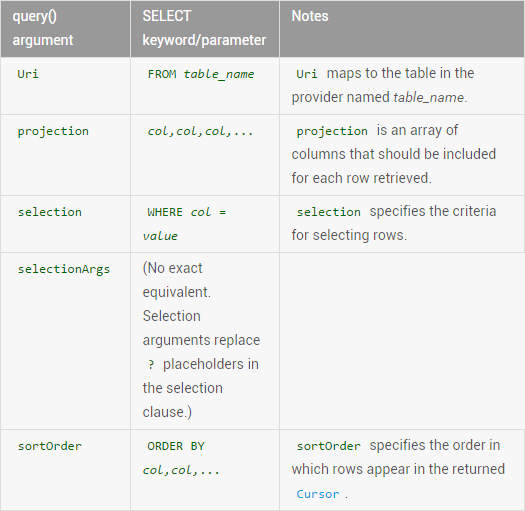
內容 URI 指向 provider 中的一組資料,由兩部分組成:authority 部分指定要存取的 provider 名稱,path 部分指定該 provider 中的某張表。
在上面的程式碼中,CONTENT_URI 指向單詞表。ContentResolver 從 CONTENT_URI 解析出 authority,在系統中查找能與之匹配的 provider;找到後,該 provider 再利用 URI 的 path 部分尋找匹配的表。所以 words 表的 URI 是:
content://user_dictionary/words其中 user_dictionary 是 provider 的 authority,words 是表的 path,前綴 content://(scheme)恆定不變,表示這是一個內容 URI。
你也可以在 URI 後綴一個 _ID 來查詢表中的某一列:
Uri singleUri = ContentUris.withAppendedId(UserDictionary.Words.CONTENT_URI, 4);這表示要查單詞表中 _ID 為 4 的那一列。當你需要刪除或更新某一列時,就該使用這種帶 ID 的 URI。
Uri 類與 Uri.Builder 類提供了把 String 包裝成格式規範 URI 物件的便捷方法,而 ContentUris 類同樣提供了在 URI 後追加 ID 的便捷方法。
為了清晰起見,本節的查詢範例都在 UI 線程中進行。但實務上這應該是非同步操作——查詢應在子線程執行。常見做法之一是使用 CursorLoader 類。
查詢流程分兩步:先声明讀取權限,再送出查詢請求。
要從 provider 檢索資料,應用需要在 manifest 中声明讀的權限:用 <uses-permission> 標籤包含,並指定要存取的 provider。這個權限在程式安裝時被隱式授予。
用户字典 provider 所在應用的 manifest 中定義了 android.permission.READ_USER_DICTIONARY。若你的應用需要存取它,就得声明這個權限。
// A "projection" defines the columns that will be returned for each row
String[] mProjection = {
        UserDictionary.Words._ID,     // Contract class constant for the _ID column name
        UserDictionary.Words.WORD,    // Contract class constant for the word column name
        UserDictionary.Words.LOCALE   // Contract class constant for the locale column name
};

// Defines a string to contain the selection clause
String mSelectionClause = null;

// Initializes an array to contain selection arguments
String[] mSelectionArgs = {""};
下面的範例從 UI 取得用户輸入的單詞,在字典表中查詢是否包含該詞,若包含則用 Cursor 回傳該列資訊(如鍵入頻率):
String[] mSelectionArgs = {""};

// Gets a word from the UI
mSearchString = mSearchWord.getText().toString();

// Remember to insert code here to check for invalid or malicious input.

// If the word is the empty string, gets everything
if (TextUtils.isEmpty(mSearchString)) {
    // Setting the selection clause to null will return all words
    mSelectionClause = null;
    mSelectionArgs[0] = "";
} else {
    // Constructs a selection clause that matches the word the user entered
    mSelectionClause = UserDictionary.Words.WORD + " = ?";
    // Moves the user's input string to the selection arguments
    mSelectionArgs[0] = mSearchString;
}

// Does a query against the table and returns a Cursor object
mCursor = getContentResolver().query(
        UserDictionary.Words.CONTENT_URI,
        mProjection,
        mSelectionClause,
        mSelectionArgs,
        mSortOrder);

// Some providers return null if an error occurs, others throw an exception
if (null == mCursor) {
    // Insert code here to handle the error. Be sure not to use the cursor!
} else if (mCursor.getCount() < 1) {
    // The Cursor is empty, the provider found no matches
} else {
    // Insert code here to do something with the results
}
上述查詢相當於:
SELECT _ID, word, locale FROM words WHERE word = <userinput> ORDER BY word ASC若 provider 管理的是一個 SQL 資料庫,用户輸入的內容可能對資料庫造成破壞。考慮這種寫法:
// Constructs a selection clause by concatenating the user's input to the column name
String mSelectionClause = "var = " + mUserInput;
用戶可以輸入類似 "nothing; DROP TABLE *;" 的內容。程式讀入後,mSelectionClause 的內容會變成 var = nothing; DROP TABLE *;——這張表就被刪掉了。
避免方式是用 "?" 作為占位符,把 SQL 語句與條件篩選參數分離。這樣系統不再把用户輸入當作 SQL 語句的一部分,用戶就無法注入惡意 SQL:
// Constructs a selection clause with a replaceable parameter
String mSelectionClause = "var = ?";

// Defines an array to contain the selection arguments
String[] selectionArgs = {""};

// Sets the selection argument to the user's input
selectionArgs[0] = mUserInput;ContentResolver.query() 回傳一個 Cursor 物件,指向篩選後的結果。呼叫 Cursor 的方法即可遍歷每一列,並依欄位名取得該欄資訊。當 provider 中的資料改變時,Cursor 中的資料會自動更新,或觸發 observer 物件中的方法。
若沒有任何列符合條件,Cursor.getCount() 回傳 0。若查詢發生錯誤,Cursor 回傳 null 或拋出異常。
由於 Cursor 回傳的是一個列表,可以透過 SimpleCursorAdapter 把內容顯示在 ListView 上:
// Defines a list of columns to retrieve from the Cursor
String[] mWordListColumns = {
        UserDictionary.Words.WORD,
        UserDictionary.Words.LOCALE
};

// Defines a list of View IDs that will receive the Cursor columns
int[] mWordListItems = { R.id.dictWord, R.id.locale };

// Creates a new SimpleCursorAdapter
mCursorAdapter = new SimpleCursorAdapter(
        getApplicationContext(),
        R.layout.wordlistrow,
        mCursor,
        mWordListColumns,
        mWordListItems,
        0);

mWordList.setAdapter(mCursorAdapter);// Determine the column index of the column named "word"
int index = mCursor.getColumnIndex(UserDictionary.Words.WORD);
if (mCursor != null) {
/*
* Moves to the next row in the cursor. Before the first movement,
* the "row pointer" is -1, and retrieving data at that position
* will throw an exception.
*/
while (mCursor.moveToNext()) {
newWord = mCursor.getString(index);
// Insert code here to process the retrieved word.
}
} else {
// Report an error if the cursor is null or the provider threw an exception
}應用需要為 provider 設定權限,其他應用只有取得權限才能存取。設定權限確保了用户知道應用將嘗試存取哪些資料,也保障了 provider 所管理資料的安全。
如果 provider 未指定任何權限,其他任何應用都無法存取。不過,無論 provider 是否制定了權限,與 provider 處於同一應用中的元件永遠擁有完整的讀寫權限。
用户字典 provider 需要 android.permission.READ_USER_DICTIONARY 才能被其他應用存取。這只是讀的能力;若要對資料進行新增、刪除、修改,還需要声明 android.permission.WRITE_USER_DICTIONARY。
这些声明要在 manifest 的 <uses-permission> 中進行。声明的權限會在應用安裝時以列表形式呈現給用戶;用戶若反對其中任何一項,安裝就會失敗。
<uses-permission android:name="android.permission.READ_USER_DICTIONARY" />呼叫 ContentResolver.insert() 可向 provider 插入資料。該方法向某張表插入一列,並回傳該列的內容 URI:
// Defines a new Uri object that receives the result of the insertion
Uri mNewUri;

// Defines an object to contain the new values to insert
ContentValues mNewValues = new ContentValues();

mNewValues.put(UserDictionary.Words.APP_ID, "example.user");
mNewValues.put(UserDictionary.Words.LOCALE, "en_US");
mNewValues.put(UserDictionary.Words.WORD, "insert");
mNewValues.put(UserDictionary.Words.FREQUENCY, "100");

mNewUri = getContentResolver().insert(
        UserDictionary.Word.CONTENT_URI,  // the user dictionary content URI
        mNewValues);                      // the values to insert
如果新增一列時不打算為某個欄位填值,可以呼叫 ContentValues.putNull() 傳入空值。
不需要指定 _ID 欄位的值,因為它通常被設為主鍵並自動遞增,會被系統自動賦值。
回傳的 newUri 格式如下:
content://user_dictionary/words/<id_value><id_value> 就是新加入的 _ID。若要從回傳的 URI 中取出該值,呼叫 ContentUris.parseId()。
呼叫 ContentResolver.update() 修改一列,同樣用 ContentValues 承載新值;要把某個欄位清空,直接傳入 null。回傳值是受影響的列數。
// Defines an object to contain the updated values
ContentValues mUpdateValues = new ContentValues();

// Defines selection criteria for the rows you want to update
String mSelectionClause = UserDictionary.Words.LOCALE + "LIKE ?";
String[] mSelectionArgs = {"en_%"};

int mRowsUpdated = 0;

// Sets the updated value and updates the selected words
mUpdateValues.putNull(UserDictionary.Words.LOCALE);

mRowsUpdated = getContentResolver().update(
        UserDictionary.Words.CONTENT_URI,
        mUpdateValues,
        mSelectionClause,
mSelectionArgs);// Defines selection criteria for the rows you want to delete
String mSelectionClause = UserDictionary.Words.APP_ID + " LIKE ?";
String[] mSelectionArgs = {"user"};
int mRowsDeleted = 0;
// Deletes the words that match the selection criteria
mRowsDeleted = getContentResolver().delete(
UserDictionary.Words.CONTENT_URI,
mSelectionClause,
mSelectionArgs);除了用户字典表中的 text 型別,provider 還支援:integer、long integer (long)、floating point、long floating point (double)。
provider 也常用 Binary Large OBject (BLOB) 型別,它是一個最大容量 64KB 的位元組陣列。你可以查閱 Cursor 類的若干 "get" 方法來確認 provider 支援哪些型別。
provider 為每一個 content URI 維護了對應的 MIME 資料型別,透過它可以判斷你的應用是否支援該型別。當 provider 提供複雜的資料結構或檔案時,MIME 型別就特別有用。例如通訊錄應用的 contact provider 包含一張 ContactsContract.Data 表,該表每一列都透過 MIME 型別標記聯絡人的資料型別。要取得 content URI 的 MIME 型別,呼叫 ContentResolver.getType()。
批量存取:使用 ContentProviderOperation 類對 provider 進行批量操作,並在 client 呼叫 ContentResolver.applyBatch()。
非同步查詢:查詢應在子線程執行,可用 CursorLoader 類實作。
透過 Intent 存取:雖然不能直接向 provider 傳遞 Intent,但可以向 provider 所在的應用傳遞。這通常是修改 provider 資料最完備的方式。
需要一次操作多列、跨多表,或者需要實作資料庫事務(原子操作)時,就要用批量模式。做法是準備一組 ContentProviderOperation 物件,在 client 端呼叫 ContentResolver.applyBatch()。注意這裡傳入的是 provider 的 authority 而不是 content URI,因為這樣才能對不同表進行操作。該方法會回傳一組結果。
向應用程式送出 Intent,即使你沒有存取該應用中 provider 的權限,仍可存取 provider 的資料。甚至透過回傳的 Intent 還能獲得 URI 權限。你可以設定 flag 來取得回傳 Intent 中的權限:
讀取權限:FLAG_GRANT_READ_URI_PERMISSION
寫入權限:FLAG_GRANT_WRITE_URI_PERMISSION
provider 在 manifest 中透過 android:grantUriPermission 屬性,以及子標籤 <grant-uri-permission> 來定義 URI 權限。
下面以「不声明 READ_CONTACTS 權限也能讀取聯絡人」為例說明流程:
1. 呼叫 startActivityForResult(),傳入一個 Intent,其 action 為 ACTION_PICK,MIME 型別為 contact 的 CONTENT_ITEM_TYPE。
2. 這會啟動通訊錄應用的 selection activity 並切至前台。
3. 用戶在 selection activity 中選擇某個聯絡人並修改資訊,此時 setResult(resultcode, intent) 被回呼,Intent 回傳至你的應用,其中包含用戶所選聯絡人的 content URI,並在 extra 中帶有 FLAG_GRANT_READ_URI_PERMISSION flag。該 flag 授予你的應用讀取該 content URI 所指聯絡人資料的權限。最後 selection activity 呼叫 finish() 銷毀。
4. 你的 activity 切回前台並回呼 onActivityResult() 取得回傳的 Intent。從中取出的 content URI 可以直接存取聯絡人應用中的 provider 資料,而無需在 manifest 中声明任何權限。
這套臨時授權機制是 Android 在「最小權限」與「可用性」之間的折衷:你不必為了讀一筆聯絡人而索取整個聯絡人庫的權限。
provider 可以回傳標準或定制的 MIME 型別字串。
標準形式:
type/subtype例如常用的 text/html,表示其指向的資料包含 text 型別與 html 子型別。若 provider 回傳的 URI 中 MIME 型別為 text/html,那麼透過該 URI 回傳的結果將包含 HTML 標籤。
定制 MIME 型別(也稱 vendor-specific MIME 型別)結構更複雜,其中 type 部分:
vnd.android.cursor.dir 表示 URI 指向的資料包含多列。
vnd.android.cursor.item 表示包含一列。
而 subtype 由 provider 自行定制。系統自帶的 provider 通常包含一個簡單的 subtype,例如通訊錄應用中指向一列電話號碼記錄的 URI,其 MIME 型別為:
vnd.android.cursor.item/phone_v2把這套規則記住,你就能在實作自訂 provider 時正確填寫 getType(),也能在存取別人的 provider 時判斷回傳的是單筆還是集合。
 Android 自定義加載動畫:仿愛奇藝加載效果
動畫拆解這個仿愛奇藝加載動畫可以拆成兩個階段。第一階段,圓弧順時針逐漸畫出;第二階段,圓弧逐漸消失,同時三角形旋轉。兩段動畫交替循環,形成流暢的加載效果。路徑與座標計算三
 Android 模擬器開啟 GPU 加速:原理、踩坑與虛擬機環境實測
模擬器的 3D 加速架構 Android 模擬器有個 GPU 開關。打開之後,3D 加速的工作會轉交給宿主機(HOST)的 GPU;不開的話就退回 Soft 3D,也就是
 Android 自定義 View 實現進度條指示效果
下圖展示自定義進度條的指示效果。 自定義 ProgressBar 做法是建立自定義 progressDrawable,用 layer-list 定義背景、次要進度與主要
 Behavior 實戰:用 CoordinatorLayout 做出知乎風格的上滑隱藏動畫
這篇要仿的是知乎首頁:向上滑動時 Toolbar、FloatingActionButton 與底部 Tab 導航一起隱藏,向下滑動時再回來。如果你的期望不是這個,那可以直