

編輯:關於 Android 程式設計
Paint:畫筆物件,畫圖用的「筆」。
Color:顏色,相當於調色料。
Canvas:畫布,現實中的紙板。
最常用的是設置與取得畫筆樣式的方法:
paint.setStyle(); 設置畫筆的風格,空心的或者是實心的 paint.setColor(); 設置畫筆的顏色 paint.setStrokeWidth(); 設置邊框線的寬度 paint.setAlpha(); 設置畫筆的Alpha值 paint.setAntiAlias(); 設置畫筆的鋸齒效果 paint.setTextSize(); 設置字體的大小 paint.getAlpha(); 獲取到畫筆的Alpha值 paint.getColor(); 獲取到畫筆的顏色 paint.getTextBounds(); 獲取到最小的能包容字體的邊框 。。。。。。。
透過 Color.顏色名 即可取得想要的顏色。Color 裡面設置了許多常用的顏色枚舉值,例如:
@ColorInt public static final int BLACK = 0xFF000000; @ColorInt public static final int DKGRAY = 0xFF444444; @ColorInt public static final int GRAY = 0xFF888888; @ColorInt public static final int LTGRAY = 0xFFCCCCCC; @ColorInt public static final int WHITE = 0xFFFFFFFF; @ColorInt public static final int RED = 0xFFFF0000; @ColorInt public static final int GREEN = 0xFF00FF00; @ColorInt public static final int BLUE = 0xFF0000FF; @ColorInt public static final int YELLOW = 0xFFFFFF00; @ColorInt public static final int CYAN = 0xFF00FFFF; @ColorInt public static final int MAGENTA = 0xFFFF00FF; @ColorInt public static final int TRANSPARENT = 0;
同樣,也可以自訂想要的顏色:呼叫 Color.argb():
/** * Return a color-int from alpha, red, green, blue components. * These component values should be [0..255], but there is no * range check performed, so if they are out of range, the * returned color is undefined. * @param alpha Alpha component [0..255] of the color * @param red Red component [0..255] of the color * @param green Green component [0..255] of the color * @param blue Blue component [0..255] of the color */ @ColorInt public static int argb(int alpha, int red, int green, int blue) { return (alpha << 24) | (red << 16) | (green << 8) | blue; }
Canvas 可以繪製常見的圖形,比如圓、直線、矩形。
/** * Draw a line segment with the specified start and stop x,y coordinates, * using the specified paint. * Note that since a line is always "framed", the Style is ignored in the paint. * Degenerate lines (length is 0) will not be drawn. * @param startX The x-coordinate of the start point of the line * @param startY The y-coordinate of the start point of the line * @param paint The paint used to draw the line */ public void drawLine(float startX, float startY, float stopX, float stopY, @NonNull Paint paint)
/** * Draw the specified circle using the specified paint. If radius is <= 0, * then nothing will be drawn. The circle will be filled or framed based * on the Style in the paint. * @param cx The x-coordinate of the center of the cirle to be drawn * @param cy The y-coordinate of the center of the cirle to be drawn * @param radius The radius of the cirle to be drawn * @param paint The paint used to draw the circle */ public void drawCircle(float cx, float cy, float radius, @NonNull Paint paint)
/** * Draw the specified Rect using the specified paint. The rectangle will * be filled or framed based on the Style in the paint. * @param left The left side of the rectangle to be drawn * @param top The top side of the rectangle to be drawn * @param right The right side of the rectangle to be drawn * @param bottom The bottom side of the rectangle to be drawn * @param paint The paint used to draw the rect */ public void drawRect(float left, float top, float right, float bottom, @NonNull Paint paint)
/** * Draw the specified bitmap, with its top/left corner at (x,y), using * the specified paint, transformed by the current matrix. * If the bitmap and canvas have different densities, this function * will take care of automatically scaling the bitmap to draw at the * same density as the canvas. * @param bitmap The bitmap to be drawn * @param left The position of the left side of the bitmap being drawn * @param top The position of the top side of the bitmap being drawn * @param paint The paint used to draw the bitmap (may be null) */ public void drawBitmap(@NonNull Bitmap bitmap, float left, float top, @Nullable Paint paint)
/** * Draw the text, with origin at (x,y), using the specified paint. The * origin is interpreted based on the Align setting in the paint. * @param text The text to be drawn * @param x The x-coordinate of the origin of the text being drawn * @param y The y-coordinate of the baseline of the text being drawn * @param paint The paint used for the text (e.g. color, size, style) */ public void drawText(@NonNull String text, float x, float y, @NonNull Paint paint)
/** * Draw the specified arc, which will be scaled to fit inside the * specified oval. * If the start angle is negative or >= 360, the start angle is treated * as start angle modulo 360. * If the sweep angle is >= 360, then the oval is drawn completely. * The arc is drawn clockwise. An angle of 0 degrees correspond to the * geometric angle of 0 degrees (3 o'clock on a watch.) * @param oval The bounds of oval used to define the shape and size * of the arc * @param startAngle Starting angle (in degrees) where the arc begins * @param sweepAngle Sweep angle (in degrees) measured clockwise * @param useCenter If true, include the center of the oval in the arc, and close it if it is being stroked. This will draw a wedge * @param paint The paint used to draw the arc */ public void drawArc(@NonNull RectF oval, float startAngle, float sweepAngle, boolean useCenter, @NonNull Paint paint)
自訂 view 時一般會重寫 onDraw() 方法,而畫圖時的三要素就是 Color、Paint、Canvas。基本流程為:先設置畫筆的樣式,再設置顏色,最後在畫布上作圖。
 Android 自定義控件實現拼圖小遊戲
先看效果: 玩法是把一張圖切成多份打亂,點擊兩塊交換位置,拼回完整圖案。關卡設計也很靈活,3×3、4×4、5×5、6×6 一路遞進即可。加上交換的切換動畫後,手感相當不
 Android 如何讀取手機中已安裝的應用列表
前幾篇 Android 文章介紹了幾個項目裡常用的小功能,這次聊一個更基礎但很實用的需求:讀取手機上已安裝的應用列表。用過金山手機衛士或 360 手機衛士的都熟悉這個畫面
 深入剖析 Android 手機字體庫:從系統默認字體到全角半角
問題一、Android 系統到底支持哪些字體庫?1、Android 系統默認支持三大字體家族,分別是 serif、sans-serif 和 monospace。這話怎麼證
 Android 遊戲開發:攝像頭(Camera)原理與地圖滾動更新實作
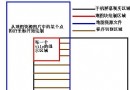
在遊戲開發裡,「攝像頭」不是那個硬體鏡頭,而是一個虛擬的取景框。移動它,畫面上顯示的內容就跟著變——這是 RPG 場景運鏡的基礎。本篇說明它的原理、地圖切割繪製的做法,以