

編輯:關於 Android 程式設計
用 NGUI 做聊天系統,最偷懶的方式是照搬 Example12 裡的 TextList。但一個 UILabel 撐起的聊天界面擴展性太差,想加特殊的點擊事件更是痛苦。
更合理的做法是:一個 UIScrollView 下掛一個 UITable,把 UILabel 和其他元素封裝成 Prefab,逐條加載進 UITable。如果不考慮其他約束,這就是一個普通的 UIScrollView,沒什麼難度。
但真實項目裡有兩個硬骨頭:一是圖文混排,二是循環加載。 世界頻道這種場景,每個玩家都能發言,輕鬆上百條,不可能每條數據都實例化一個 Prefab。本文只聚焦第二點。
循環加載的思路是:在可顯示範圍內,用盡可能少的 Prefab,通過改變裡面的數據來呈現不同內容,而不是為每條數據都實例化對象。
NGUI 官方教程中的做法是 UIScrollView 下掛 UIGrid,UIGrid 下掛 Prefab,且每個 Prefab 高度一致。只有滿足這個前提,才能準確算出:最少需要多少個 Prefab、當前滑到哪一個、每個 Prefab 該填什麼數據。
而聊天系統恰恰不滿足:每個人發的話字數不同,每個 UILabel 高度也就不同。基於高度的種種計算全部失效,原有的循環加載邏輯必須改造。
第一步,把 UIGrid 換成 UITable。 因為 UITable 不要求每一行的間距統一。
第二步,寫一個繼承 UIScrollView 的類,本文命名為 CUIChatScrollView。
標準循環加載需要知道三件事:最多同屏顯示多少條、總共多少數據、每個 Prefab 多高。最優方案是:同屏 6 條就只實例化 7 個。但高度不確定時,這個方案用不了。
於是我們換一種判斷方式:
· 不再依賴邊框計算,改用上下兩個臨界值。 實例化一個預估數量的 Prefab 池,當某個 Prefab 越過臨界值時就把它移到另一邊。
· 不再用位置比例算索引,改用自增自減維護。 把頂部的 Prefab 移到底部就 index++,把底部的移到頂部就 index--。
· 目標位置不再靠固定間距推算,改用 NGUI 提供的測量能力。 先把文字塞進 UILabel,通過 NGUIMath.CalculateRelativeWidgetBounds() 算出它的實際高度,再加上下一個 Prefab 的坐標來確定新位置。
具體取值上,項目中上下最多同時可見 3 條,但為了循環加載需要預留,實際實例化 10 個 Prefab。若每句話只有一行,我的行高是 25 像素,上下臨界值就設為 250。(這些數字都還可以進一步調優,此處只是示意。)
using UnityEngine;
using System.Collections.Generic;

public class CUIChatScrollView : UIScrollView
{
    public delegate void OnMoveCallBack();
    /// <summary>
    /// 每次滑動結束的回調
    /// </summary>
    public OnMoveCallBack mOnMoveCallback;

    public delegate void OnMoveNextPage(int pageindex);
    public OnMoveNextPage mOnMoveNextPage;

    private float mTopOffSetValue = 250;
    private float mBottomOffSetValue = 250;

    /// <summary> 當前數據總數 </summary>
    private int mTotalCount = 0;

    /// <summary> 子物體當前臨時坐標 </summary>
    private float mTempPosition = 0;

    /// <summary>
    /// 子物體當前臨時相對坐標(與 UIPanel 偏移、DynamicComponentTran、
    /// 自身坐標之和;若裁剪區域有偏移,還需加上 UIPanel finalClipRegion 的偏移)
    /// </summary>
    private float mBorderValue = 0;

    /// <summary> 當前顯示出來的物體列表 </summary>
    private List<CBaseComponent> mCurrentComList = new List<CBaseComponent>();

    /// <summary> 達到臨界值需要移動的臨時列表 </summary>
    private List<CBaseComponent> mTempComList = new List<CBaseComponent>();

    /// <summary> components 的父物體,即 UIPanel 的子物體 </summary>
    private Transform DynamicComponentTran;

    /// <summary> 當前 ScrollView 依賴的 UIPanel </summary>
    private UIPanel mUIPanel;

    /// <summary> UIPanel 最終的繪制區域、坐標 </summary>
    private Vector4 mPanelFinalClipRegion;

    /// <summary> 是否需要請求下一頁數據(分頁加載場景) </summary>
    private bool bNeedReqNextPage;

    /// <summary> 每頁數量 </summary>
    private int mPrePageNumber;

    /// <summary> 是否是排行榜模式 </summary>
    private bool bIsRankModel;

    /// <summary> 當前自己的排名 </summary>
    private int mCurrentMyRank;

    /// <summary> 緩存開關 </summary>
    private Dictionary<int, bool> bHasRequestDic = new Dictionary<int, bool>();

    private float xPos;
    private float yPos;

    /// <summary> 是否需要 3D 顯示效果 </summary>
    private bool bShow3DStyle = false;

    /// <summary> 居中的子物體 </summary>
    public Transform mCenterTranform;

    private int mUIPanelDepth = 1;
    private int m_Index = 0;
    private int m_maxShowNum = 0;

    public void Init<T>(List<T> components, int maxShowNum, int totalNumber,
            Transform dyTransorm, Movement moveMent = Movement.Horizontal,
            bool needrequest = false, int prepagenum = 0, bool isrank = false,
            int myrank = 0, bool bshow3d = false) where T : CBaseComponent
    {
        m_Index = maxShowNum - 1;
        m_maxShowNum = maxShowNum;
        mCurrentComList.Clear();
        for (int i = 0, length = components.Count; i < length; i++)
        {
            if (components[i] is CBaseComponent)
            {
                mCurrentComList.Add(components[i]);
            }
        }
        DynamicComponentTran = dyTransorm;
        mTotalCount = totalNumber;
        movement = moveMent;
        mPanelFinalClipRegion = (mUIPanel ?? (mUIPanel = gameObject.GetComponent<UIPanel>())).finalClipRegion;
        // 子物體固定高出父物體 10 個深度單位
        mUIPanelDepth = mUIPanel.depth + 10;
        bNeedReqNextPage = needrequest;
        mPrePageNumber = prepagenum;
        bIsRankModel = isrank;
        mCurrentMyRank = myrank;
        bHasRequestDic.Clear();
        bShow3DStyle = bshow3d;
        momentumAmount = 35f;
    }

    public override void MoveRelative(Vector3 relative)
    {
        base.MoveRelative(relative);
        CheckScrollView(relative);
    }

    public override void AdjustSpring(Vector3 relative)
    {
        base.AdjustSpring(relative);
        CheckScrollView(relative);
    }

    private void CheckScrollView(Vector3 relative)
    {
        if (mCurrentComList == null || mCurrentComList.Count == 0) return;

        if (movement == Movement.Horizontal)
        {
            xPos = relative.x;
            mCurrentComList.Sort(delegate (CBaseComponent a, CBaseComponent b)
            {
                return a.LocalPosition.x.CompareTo(b.LocalPosition.x);
            });
        }
        else if (movement == Movement.Vertical)
        {
            yPos = relative.y;
            mCurrentComList.Sort(delegate (CBaseComponent a, CBaseComponent b)
            {
                return b.LocalPosition.y.CompareTo(a.LocalPosition.y);
            });
        }

        mTempComList.Clear();

        // 向下滑動:頂部的越過上臨界值,移到底部
        if ((yPos > 0 && movement == Movement.Vertical)
                || (xPos < 0 && movement == Movement.Horizontal))
        {
            Transform temptran = mCurrentComList[mCurrentComList.Count - 1].ComTransform;
            mTempPosition = (movement == Movement.Horizontal)
                    ? temptran.localPosition.x : temptran.localPosition.y;
            mTempPosition = Mathf.Abs(mTempPosition);

            for (int i = 0, j = mCurrentComList.Count; i < j; i++)
            {
                temptran = mCurrentComList[i].ComTransform;
                if (movement == Movement.Horizontal)
                {
                    mBorderValue = (temptran.localPosition.x * temptran.localScale.x
                            + transform.localPosition.x
                            + DynamicComponentTran.localPosition.x
                            + Mathf.Abs(mPanelFinalClipRegion.x));
                    if (mBorderValue > -mTopOffSetValue) break;
                }
                else if (movement == Movement.Vertical)
                {
                    mBorderValue = (temptran.localPosition.y * temptran.localScale.y
                            + transform.localPosition.y
                            + DynamicComponentTran.localPosition.y
                            + Mathf.Abs(mPanelFinalClipRegion.y));
                    if (mBorderValue < mTopOffSetValue) break;
                }
                mTempComList.Add(mCurrentComList[i]);
            }

            for (int i = 0, j = mTempComList.Count; i < j; i++)
            {
                if (m_Index >= mTotalCount - 1) break;
                m_Index++;
                mTempComList[i].InitData(m_Index);
                if (movement == Movement.Vertical)
                {
                    // 用 NGUI 測量真實高度,而非依賴固定間距
                    float spriteHeight = NGUIMath.CalculateRelativeWidgetBounds(
                            transform, mCurrentComList[mCurrentComList.Count - 1].ComTransform, true).size.y;
                    mTempComList[i].LocalPosition = new Vector3(0, -(spriteHeight + mTempPosition), 0);
                }
            }
        }
        // 向上滑動:底部的越過下臨界值,移到頂部
        else if ((yPos < 0 && movement == Movement.Vertical)
                || (xPos > 0 && movement == Movement.Horizontal))
        {
            Transform temptran = mCurrentComList[0].ComTransform;
            mTempPosition = (movement == Movement.Horizontal)
                    ? temptran.localPosition.x : temptran.localPosition.y;
            mTempPosition = Mathf.Abs(mTempPosition);

            for (int i = mCurrentComList.Count - 1; i >= 0; i--)
            {
                temptran = mCurrentComList[i].ComTransform;
                if (movement == Movement.Horizontal)
                {
                    mBorderValue = (temptran.localPosition.x
                            + transform.localPosition.x
                            + DynamicComponentTran.localPosition.x
                            + Mathf.Abs(mPanelFinalClipRegion.x));
                    if (mBorderValue < -mBottomOffSetValue) break;
                }
                else if (movement == Movement.Vertical)
                {
                    mBorderValue = (temptran.localPosition.y
                            + transform.localPosition.y
                            + DynamicComponentTran.localPosition.y
                            + Mathf.Abs(mPanelFinalClipRegion.y));
                    if (mBorderValue > -mBottomOffSetValue) break;
                }
                mTempComList.Add(mCurrentComList[i]);
            }

            for (int i = 0, j = mTempComList.Count; i < j; i++)
            {
                if (m_Index <= m_maxShowNum - 1) break;
                m_Index--;
                mTempComList[i].InitData(m_Index - m_maxShowNum + 1);
                if (movement == Movement.Vertical)
                {
                    float spriteHeight = NGUIMath.CalculateRelativeWidgetBounds(
                            transform, mTempComList[i].ComTransform, true).size.y;
                    Vector3 newPosition;
                    if (i == 0)
                        newPosition = new Vector3(0, -(mTempPosition - spriteHeight), 0);
                    else
                        newPosition = new Vector3(0,
                                -(Mathf.Abs(mTempComList[i - 1].LocalPosition.y) - spriteHeight), 0);
                    mTempComList[i].LocalPosition = newPosition;
                }
            }
        }

        if (mOnMoveCallback != null)
        {
            mOnMoveCallback();
        }
    }
}高度不確定時,循環加載的核心轉變有三點:把「按邊框精確計算」換成「按臨界值粗略判斷」,把「按位置比例算索引」換成「按移動方向增減索引」,把「按固定間距推位置」換成「按實際測量結果定位置」。這樣一来,聊天場景下任意高度的文本條目都能被同一套邏輯正確地循環複用。
代碼裡預留了分頁請求(bNeedReqNextPage)、排行榜模式(bIsRankModel)、3D 展示等擴展點,實際項目中可按需接入。圖文混排部分則建議通過自定義富文本組件,配合 NGUI 的 UITexture 與 UILabel 混合排布來實現,本文不再展開。
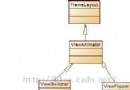 Android 學習筆記(25):ViewAnimator 家族與帶轉場動畫的 View 切換
在介面開發裡,「換一個畫面」往往不只是把 A 藏起來、把 B 擺出來這麼簡單。切換若生硬突兀,使用者一眼就能感覺到跳躍;而加上淡入淡出、滑入滑出這類轉場動畫,同樣的操作立
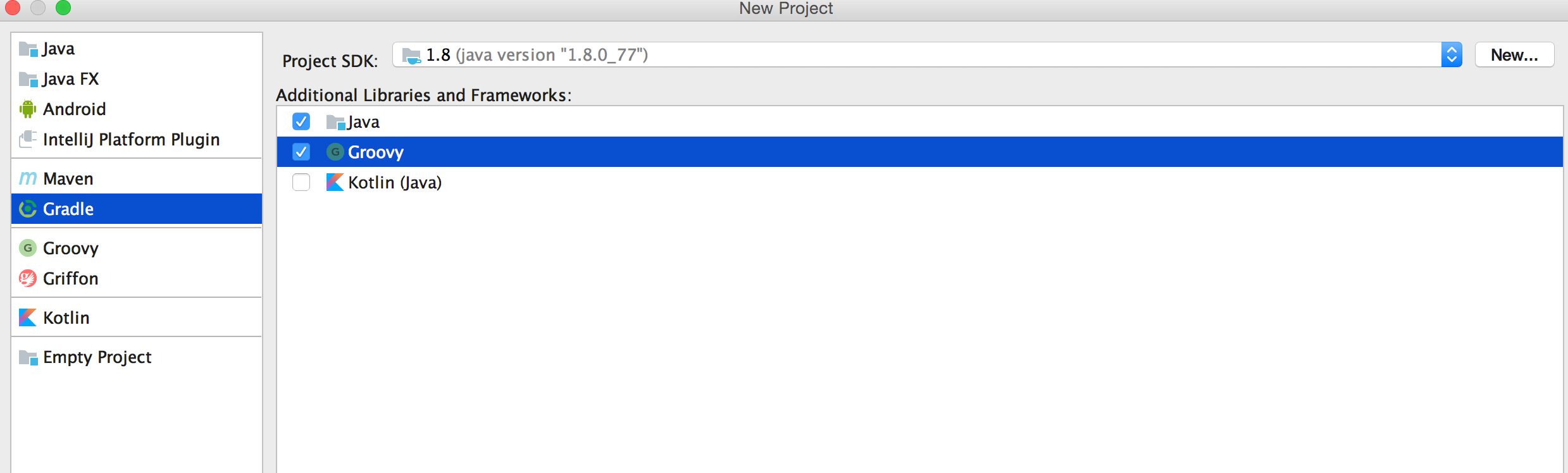 用 IntelliJ IDEA 動手做一個 Android Gradle 自訂插件
Android 的 Gradle 插件我用過不少:官方的應用打包插件 com.android.application、函式庫插件 com.android.library,
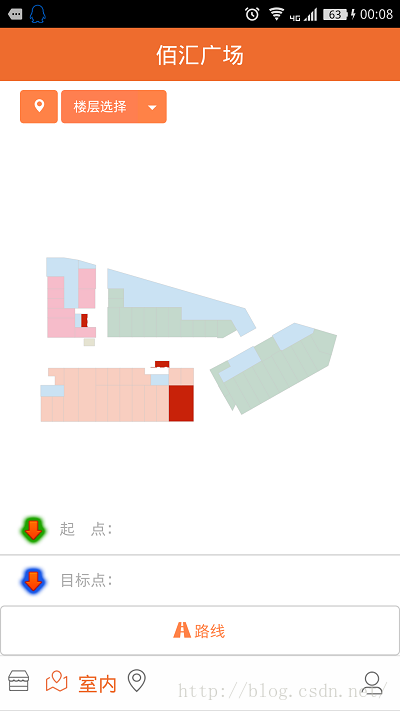 Android 向量化室內地圖開發實戰分享
向量化室內地圖開發因為公司專案需要,得做一套室內地圖,還要能規劃路線。由於我先前沒碰過這塊、相關資料也不多,只能自己一個人摸索。一開始我用一般的點陣圖(位圖)當作地圖,結
 自定義轉輪選擇器 WheelView:動畫設計、選中判定與性能調優
先做出來看效果: 專案是在一個既有開源實作的基礎上改的。除了整體框架沿用之外,內部的滾動邏輯幾乎全部重寫,之所以自己造這個輪子,原因在後文「滑動中的點擊」一節會交代。感