

編輯:關於 Android 程式設計
Fragment 是 Activity 中用戶界面的一部分行為或組成單元,主要用於支持在大屏幕上動態、更靈活地組合或交換 UI 組件。通過將 Activity 的布局拆分為若干個 Fragment,我們可以在運行時調整 Activity 的呈現,而這些變化會被保存在由 Activity 管理的後台棧裡。
Fragment 必須始終嵌入到一個 Activity 之中,它的生命週期直接受宿主 Activity 生命週期的影響。你可以把 Fragment 理解為 Activity 的一個模塊化零件:它有自己獨立的生命週期,能接收自己的輸入事件,並且在 Activity 運行時可以被動態添加或刪除。
在設計上,應把每個 Fragment 做成模塊化、可復用的 Activity 組件。也就是說,同一個 Fragment 可以在多個 Activity 中複用,因為它定義了自己的布局,並通過自身生命週期回調來管理行為。
先來看 Fragment 的生命週期圖:
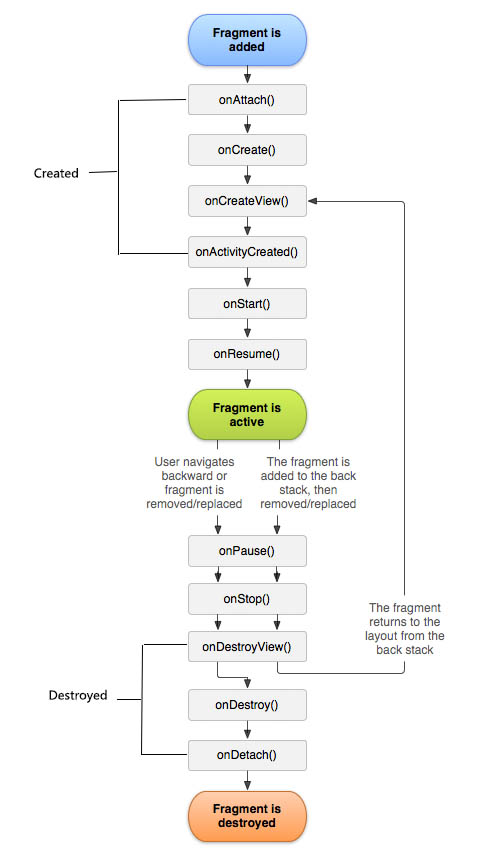
Fragment 所依附的 Activity 生命週期直接影響著 Fragment 的生命週期,Activity 的每一個生命週期回調都會引發 Fragment 類似的回調。例如,當 Activity 收到 onPause() 時,其內部每個 Fragment 也都會收到 onPause()。
Fragment 還有一些額外的生命週期回調方法(用於創建和銷毀 Fragment 界面):
onAttach()
當 Fragment 被綁定到 Activity 時調用(會傳入 Activity)。
onCreateView()
將自身的布局構建到 Activity 中(Fragment 作為 Activity 界面的一部分)。
onActivityCreated()
當 Activity 的 onCreate() 返回時被調用。
onDestroyView()
當與 Fragment 關聯的視圖體系正被移除時被調用。
onDetach()
當 Fragment 正與 Activity 解除關聯時被調用。
當 Activity 收到它的 onCreate() 回調時,其中的 Fragment 會收到 onActivityCreated() 回調。
一旦 Activity 處於 resumed 狀態,就可以在其中自由添加或移除 Fragment。因此,只有在 Activity 處於 resumed 狀態時,Fragment 的生命週期才能獨立變化。當 Activity 離開恢復狀態時,Fragment 會再一次被 Activity 納入它的生命週期管理。
管理 Fragment 生命週期與管理 Activity 生命週期很像。像 Activity 一樣,Fragment 也有三種狀態:
Resumed
Fragment 在運行中的 Activity 裡可見。
Paused
另一個 Activity 處於前台並獲得焦點,但該 Fragment 所在的 Activity 仍然可見(前台 Activity 部分透明,或沒有覆蓋全屏)。
Stopped
Fragment 不可見。要麼宿主 Activity 已經停止,要麼 Fragment 已從 Activity 上移除但被添加到後台棧中。一個停止的 Fragment 仍然活著(所有狀態和成員信息仍由系統保留),但對用戶已不可見,且如果 Activity 被殺掉,它也會隨之被殺掉。
如果 Activity 的進程被殺掉,在 Activity 重新創建時,你需要恢復 Fragment 狀態。可以通過 Fragment 的 onSaveInstanceState() 保存狀態(並在 onCreate()、onCreateView() 或 onActivityCreated() 中恢復)。
在生命週期方面,Activity 與 Fragment 有一個很重要的不同,就是它們在各自後台棧中的存儲方式。當 Activity 停止時,默認情況下它會被安置在由系統管理的 Activity 後台棧中;而 Fragment 只有在一個事務被移除時,通過顯式調用 addToBackStack() 請求保存的實例,才會被置於由宿主 Activity 管理的後台棧。
要創建一個 Fragment,必須先創建 Fragment 的子類。一般情況下,我們至少需要實現以下幾個生命週期方法:
onCreate()
系統在創建 Fragment 時調用此方法。在實現中,你可以初始化那些希望在 Fragment 暫停或停止後重新啟用的必要組件。
onCreateView()
系統在第一次為 Fragment 繪製用戶界面時調用此方法。要為 Fragment 繪製界面,這個函數必須返回所繪製的 Fragment 根 View;如果 Fragment 沒有用戶界面,則可以返回空。
@Override public View onCreateView(LayoutInflater inflater, ViewGroup container,Bundle savedInstanceState) { // Inflate the layout for this fragment return inflater.inflate(R.layout.example_fragment, container, false); }
inflate() 函數需要三個參數:
① 要 inflate 的布局的資源 ID。
② 被 inflate 的布局的父 ViewGroup。
③ 一個布爾值,表明在 inflate 期間被 inflate 的布局是否應該附加到 ViewGroup(即第二個參數 container)。(本例傳入 false,因為系統已經把被 inflate 的布局插入到容器中——傳入 true 會在最終布局裡創建一個多餘的 ViewGroup。)
onPause()
系統回調用該函數作為用戶離開 Fragment 的第一個預兆(儘管這並不總意味著 Fragment 被銷毀)。在當前用戶會話結束之前,通常要在這裡提交任何應該持久化的變化(因為用戶可能不再返回)。
可以通過在 Activity 布局文件中聲明 Fragment(用 <fragment> 標籤插入),也可以用代碼把它添加到一個已存在的 ViewGroup 中。不過,Fragment 並不一定非要作為 Activity 布局的一部分,它也可以為 Activity「隱身」工作。
可以像為 View 一樣為 Fragment 指定布局屬性。例如:
<LinearLayout android:layout_height="match_parent" android:layout_width="match_parent" android:orientation="horizontal" xmlns:android="https://schemas.android.com/apk/res/android"> <fragment android:id="@+id/fo" android:layout_height="match_parent" android:layout_width="match_parent" android:name="com.example.test.FragmentOne" /> </LinearLayout>
<fragment> 標籤中的 android:name 屬性指定了布局中要實例化的 Fragment 類。
當系統創建 Activity 布局時,它會實例化布局文件中指定的每個 Fragment,並為它們調用 onCreateView() 取得各自的布局,然後直接把 Fragment 返回的 View 插入到 <fragment> 元素的位置。
注意:每個 Fragment 都需要一個唯一標識,這樣重啟 Activity 時系統才能用來恢復 Fragment(並捕獲諸如移除的事務處理)。為 Fragment 提供 ID 有三種方法:
用 android:id 屬性提供一個唯一標識。
用 android:tag 屬性提供一個唯一字符串。
如果上述兩個屬性都沒有,系統會使用其容器視圖(View)的 ID。
在 Activity 運行的任何時候,你都可以把 Fragment 添加到 Activity 布局中。要管理 Activity 中的 Fragment,可以使用 FragmentManager,通過在 Activity 中調用 getFragmentManager() 獲得。使用 FragmentManager 可以做以下事情:
使用 findFragmentById()(用於布局中提供界面的 Fragment)或 findFragmentByTag() 取得 Activity 中已存在的 Fragment(有界面或無界面均可)。
使用 popBackStack()(模仿用戶的 BACK 命令)從後台棧彈出 Fragment。
使用 addOnBackStackChangedListener() 註冊一個監聽後台棧變化的監聽器。
在 Android 中,對 Fragment 的事務操作都通過 FragmentTransaction 執行。操作大致分為兩類:
顯示:add()、replace()、show()、attach()
隱藏:remove()、hide()、detach()
說明:
調用 show() 和 hide() 時,Fragment 的生命週期方法並不會被執行,僅僅是 Fragment 的 View 被顯示或隱藏。執行 replace() 時(至少涉及兩個 Fragment),會執行第二個 Fragment 的 onAttach(),並執行第一個 Fragment 的 onPause()、onDetach(),同時 containerView 會 detach 第一個 Fragment 的 View。
add() 會執行 onAttach() 到 onResume() 的生命週期,相對地,remove() 則執行剩下的 onPause() 到 onDetach() 週期。
可以這樣從 Activity 中取得 FragmentTransaction 實例:
FragmentManager fragmentManager = getFragmentManager() FragmentTransaction fragmentTransaction = fragmentManager.beginTransaction();
可以用 add() 添加 Fragment,並指定要添加的 Fragment 以及要插入到哪個視圖之中(注意要 commit 事務):
ExampleFragment fragment = new ExampleFragment(); fragmentTransaction.add(R.id.fragment_container, fragment); fragmentTransaction.commit();
也可以用 Fragment 為 Activity 提供後台動作,卻不呈現多餘的用戶界面。
要添加沒有界面的 Fragment,可以使用 add(Fragment, String)(為 Fragment 提供一個唯一字符串 tag,而不是視圖 ID)。這樣添加後,由於沒有關聯到 Activity 布局中的視圖,就不會收到 onCreateView() 的調用,因此也無需實現該方法。
對於無界面 Fragment,字符串標簽是唯一識別它的方式。如果之後想從 Activity 中取到它,需要使用 findFragmentByTag()。
在調用 commit() 之前,可以通過調用 addToBackStack() 把事務添加到 Fragment 事務後台棧中。這個後台棧由 Activity 管理,允許用戶通過按 BACK 鍵回退到前一個 Fragment 狀態。
下面的代碼用一個 Fragment 替換另一個,並把之前的 Fragment 狀態保留在後台棧中:
Fragment newFragment = new ExampleFragment(); FragmentTransaction transaction = getFragmentManager().beginTransaction(); transaction.replace(R.id.fragment_container, newFragment); transaction.addToBackStack(null); transaction.commit();
注意:
如果添加多個變更事務(例如另一個 add() 或 remove())並調用 addToBackStack(),那麼在 commit() 之前的所有變更會作為一個單獨的事務添加到後台棧中,BACK 鍵可以把它們一起回退。
當移除一個 Fragment 時,如果調用了 addToBackStack(),那麼之後 Fragment 會被停止;如果用戶回退,它會被恢復。
調用 commit() 並不會立即執行事務,而是採取預約方式,一旦 Activity 的界面線程(主線程)準備好便會運行。如果有必要,你可以從界面線程調用 executePendingTransactions() 立即執行由 commit() 提交的事務。
只能在 Activity 保存狀態(即用戶離開 Activity 時)之前用 commit() 提交事務。如果在這之後提交,會拋出異常,這是因為若 Activity 需要被恢復,提交後的狀態會丟失。對於這類可能丟失提交的情況,可使用 commitAllowingStateLoss()。
Activity 中如果已經持有該 Fragment 的引用,直接通過該引用交互即可。
如果沒有引用,可以通過調用 Fragment 的 findFragmentById() 或 findFragmentByTag(),從 FragmentManager 中取得 Fragment 實例,例如:
ExampleFragment fragment = (ExampleFragment) getFragmentManager().findFragmentById(R.id.example_fragment);
在 Fragment 中,可以通過 getActivity() 得到當前綁定的 Activity 實例。
此外,還可以創建 Activity 事件回調函數:在 Fragment 內部定義一個回調接口,由宿主 Activity 來實現它,從而完成 Fragment 向 Activity 的通信。
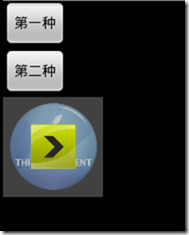 Android 圖片疊加效果的兩種實現方案詳解
圖片疊加是開發中經常冒出的需求,比如給列表圖片加個播放按鈕、給頭像鑲個邊框,或者做多層素材合成。本文整理了兩種在 Android 中實現圖片疊加的經典方案,並附上完整的
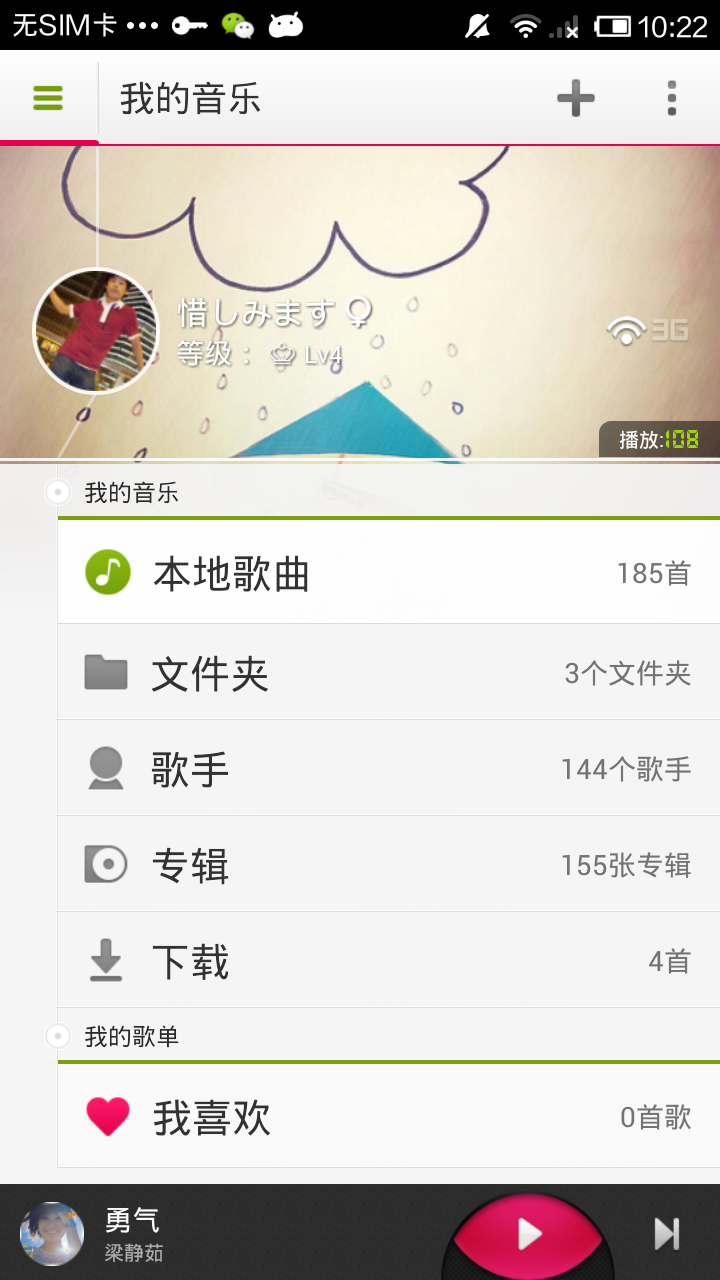 自訂 ScrollView 實作背景圖片伸縮動效:完整思路與程式碼
用過多米音樂的朋友都知道,它的某個 UI 可以上下滑動——作用嘛,無聊時可以劃劃解解悶。這種細節往往被形容成一種「情懷」,不過叫「情味」或許更貼切。如今行動網際網路發
 Android 相機開發:系統相機、自定義相機與大圖加載優化
本篇文章介紹 Android 上實現拍照並顯示的兩種方式——調用系統相機與自定義相機介面,同時會涉及一個繞不開的問題:如何正確地把高解析度照片加載到內存中而不引發 OOM
 Android 高清加載巨圖方案:告別圖片壓縮,輕鬆瀏覽清明上河圖
一、前言 好久沒有更新文章了,最近忙於一些私事,今天就用一篇相對輕鬆的內容來重新找回手感。 說到加載圖片,相信每個 Android 開發者都不陌生。為了盡量避免 OOM(