

編輯:關於 Android 程式設計
通知是 Android 早期就具備的能力,但也是最容易被寫錯的區塊之一——程式編譯通過、執行也不報錯,通知卻遲遲不出現。以下先給出基本寫法,再談最常見的兩個失敗原因。
pushMessageButton = (Button) findViewById(R.id.pushMessage);
final Bitmap largeIcon = ((BitmapDrawable) getResources()
        .getDrawable(R.drawable.stefan)).getBitmap();
final NotificationManager manager =
        (NotificationManager) getSystemService(Context.NOTIFICATION_SERVICE);

pushMessageButton.setOnClickListener(new View.OnClickListener() {
    @Override
    public void onClick(View v) {
        PendingIntent pendingIntent = PendingIntent.getActivity(
                BaiDuMapActivity.this, 0,
                new Intent().setAction(Intent.ACTION_VIEW), 0);

        Notification notify = new Notification.Builder(BaiDuMapActivity.this)
                .setSmallIcon(R.drawable.head_image)
                .setLargeIcon(largeIcon)
                .setTicker("您有新短消息,請注意查收!")
                .setContentTitle("Notification Title")
                .setContentText("This is the notification message")
                .setContentIntent(pendingIntent)
                .setNumber(1)
                .getNotification();

        notify.flags |= Notification.FLAG_AUTO_CANCEL;
        manager.notify(1, notify);
    }
});
這段程式碼拆解開來是幾個要素:以 Notification.Builder 組裝內容、設定小圖示與大圖示、透過 PendingIntent 決定點擊後要跳去哪裡、加上 FLAG_AUTO_CANCEL 讓使用者點擊後通知自動消失,最後交給 NotificationManager 發送。
這是移轉到新寫法時最常遇到的狀況:程式跑起來沒任何錯誤,但下拉通知列卻空空如也。
1. 務必設定小圖示。setSmallIcon() 並非選填項。系統在部分版本上會直接忽略沒有小圖示的通知,有些機型甚至靜默丟棄而不拋例外,這正是「什麼都沒發生」的主因。順帶一提,大圖示(setLargeIcon)才是那個可以省略的。
2. 對齊 API 等級的取用方式。若你的 minSdkVersion 是 16,就該把 getNotification() 換成 build();兩者對應不同 API 等級下的 Builder 終結方法,用錯雖然不一定編譯失敗,卻可能在特定版本上得不到預期結果。
另外幾個值得一併檢查的點:Android 8.0(API 26)之後必須先建立 NotificationChannel 並把 channel id 帶進 Builder,否則通知同樣不會顯示;如果目標應用或系統處於靜音、勿擾模式,也會影響呈現;最後確認 notify() 傳入的 id 是否與先前某筆通知重複——同 id 的通知只會更新,不會新增一條。
 CoordinatorLayout 實作:ActionBar 自動隱藏與懸停標題、滑動刪除
這一篇延續前面的 CoordinatorDemo 系列,示範三件事:ActionBar 隨清單滾動自動收放、TextView 懸停在頂部、以及滑動刪除元件並提供撤銷。 提
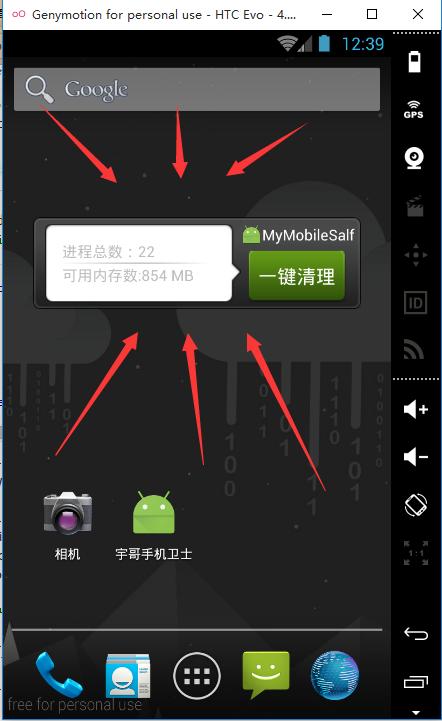 android——App Widget 桌面小工具的完整實作
一、效果展示 在 Android 手機的桌面上,我們常能看到這樣的小元件: 在這些元件上,可以顯示 App 的一些重要交互資訊。以我最近開發的手機衛士為例,widget
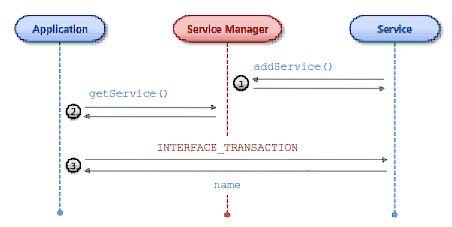 Android Binder 機制全解:從 Framework 到 Linux 驅動
一、Binder 概述 Binder 是 Android 自研的一種 IPC(進程間通信)機制。 傳統 Linux 系統提供了多種進程間通信方式,例如: Message
 Android 二維碼實作:一般二維碼、中央 Logo 二維碼與掃描解析
本文全程採用 Google 開源的 ZXing 框架,要實作的功能有三項:產生一般二維碼、產生中央帶 Logo 的二維碼,以及掃描解析二維碼。先看成果: 一、準備 ZX