

編輯:關於 Android 程式設計
做 Android 開發很難不碰到加載網絡圖片的問題,而加載網絡圖片又常常遇到重複請求同一張圖的情況,這麼一來就導致反覆聯網,既浪費流量資源,又讓用戶覺得加載很慢。從 Android 3.1 開始,API 裡多了一個 LruCache 類,它是一個採用「最近最少使用(LRU)」算法的緩存類。它能夠把上次下載的圖片以鍵值對的形式保存在緩存中,下次加載同一張圖時無須再聯網,而且速度更快。
這裡把 LruCache 源碼貼出來,幾乎每行代碼都有註釋,讀者可以跟著註釋仔細閱讀,理解 LruCache 的原理。
 /**
 * 1.從類名 LruCache 就知道,該類的作用是用最近最少使用算法來維護的一個緩存類。
 * 2.該類用於緩存一定數量的值,並且對緩存對象持有強引用。
 * 3.每當成功 get 一次值時,該值都會移動到鏈表的頭部,標記為最近最新的值。
 * 4.當緩存滿了時,鏈表尾部的值會被認為是最近最少使用的值,會被從鏈表中移除,以便緩存有空間保存新的值。
 * 5.緩存中鏈表的值發生改變時會調用空方法 entryRemoved,開發者可以重寫該方法做相應的操作。
 * 6.開發者應該重寫 sizeOf 方法,該方法返回每個 key 對應 value 的大小,以便該類維護緩存的大小。
 * 7.該類是線程安全的,同時不允許 key 和 value 為空,在 Android 3.1 之後添加到源碼中。
 **/
package android.util;
import java.util.LinkedHashMap;
import java.util.Map;
public class LruCache<K, V> {
 private final LinkedHashMap<K, V> map;
 private int size;//已使用緩存大小
 private int maxSize;//總的緩存大小
 private int putCount;//添加記錄次數
 private int createCount;//創建次數
 private int evictionCount;//移除次數
 private int hitCount;//命中次數
 private int missCount;//未命中次數
 public LruCache(int maxSize) {
 if (maxSize <= 0) {
 throw new IllegalArgumentException("maxSize <= 0");
 }
 this.maxSize = maxSize;
 this.map = new LinkedHashMap<K, V>(0, 0.75f, true);//創建鏈表緩存,該鏈表緩存是整個 LruCache 類的重點
 }
 //重新設置緩存大小
 public void resize(int maxSize) {
 if (maxSize <= 0) {
 throw new IllegalArgumentException("maxSize <= 0");
 }
 synchronized (this) {
 this.maxSize = maxSize;
 }
 trimToSize(maxSize);
 }
 //根據 key 值獲得緩存中對應的數據,該方法是線程安全的
 public final V get(K key) {
 if (key == null) {
 throw new NullPointerException("key == null");
 }
 V mapValue;
 synchronized (this) {//加鎖線程安全
 mapValue = map.get(key);//從鏈表中去取緩存數據
 if (mapValue != null) {//獲取數據成功
 hitCount++;//標記命中的次數
 return mapValue;//返回命中的數據
 }
 missCount++;//標記未命中的次數
 }
 //未命中走以下流程
 V createdValue = create(key);//創建新的數據,默認返回 null,可重寫
 if (createdValue == null) {
 return null;//未命中時默認到這裡結束
 }
 synchronized (this) {
 createCount++;//標記創建新數據的次數
 mapValue = map.put(key, createdValue);
 if (mapValue != null) {
 //防止多線程操作導致數據不同步的安全代碼
 map.put(key, mapValue);
 } else {
 size += safeSizeOf(key, createdValue);//標記已使用的內存大小
 }
 }
 if (mapValue != null) {
 entryRemoved(false, key, createdValue, mapValue);
 return mapValue;
 } else {
 trimToSize(maxSize);
 return createdValue;
 }
 }
 //添加新的鍵值對到鏈表中
 public final V put(K key, V value) {
 if (key == null || value == null) {
 throw new NullPointerException("key == null || value == null");
 }
 V previous;
 synchronized (this) {
 putCount++;//標記添加數據的次數
 size += safeSizeOf(key, value);//標記已使用的內存大小
 previous = map.put(key, value);//保存數據到鏈表
 if (previous != null) {//鏈表中已存在 key 對應的值則替換原來的值
 size -= safeSizeOf(key, previous);
 }
 }
 if (previous != null) {
 entryRemoved(false, key, previous, value);
 }
 trimToSize(maxSize);
 return previous;
 }
 //管理鏈表中內存的大小
 private void trimToSize(int maxSize) {
 while (true) {
 K key;
 V value;
 synchronized (this) {
 if (size < 0 || (map.isEmpty() && size != 0)) {
 throw new IllegalStateException(getClass().getName() + ".sizeOf() is reporting inconsistent results!");
 }
 //當已使用的內存小於申請的最大內存,說明鏈表未滿,還可以添加新的數據
 if (size <= maxSize) {
 break;
 }
 Map.Entry<K, V> toEvict = null;
 //得到鏈表末尾的數據,然後移除它
 for (Map.Entry<K, V> entry : map.entrySet()) {
 toEvict = entry;
 }
 if (toEvict == null) {
 break;
 }
 //移除鏈表末尾的一個數據,該數據就是最近最少使用到的數據
 key = toEvict.getKey();
 value = toEvict.getValue();
 map.remove(key);//移除數據
 size -= safeSizeOf(key, value);//重新計算已使用的內存大小
 evictionCount++;//標記移除數據的次數
 }
 //開發者可以重寫該方法,當移除數據時做相應的操作
 entryRemoved(true, key, value, null);
 }
 }
 //從鏈表中移除數據的方法
 public final V remove(K key) {
 if (key == null) {
 throw new NullPointerException("key == null");
 }
 V previous;
 synchronized (this) {
 previous = map.remove(key);
 if (previous != null) {
 size -= safeSizeOf(key, previous);
 }
 }
 if (previous != null) {
 entryRemoved(false, key, previous, null);
 }
 return previous;
 }
 //該方法默認是一個空方法,鏈表數據變化時調用,可重寫
 protected void entryRemoved(boolean evicted, K key, V oldValue, V newValue) {}
 //該方法默認返回空,可在 get 失敗時創建新數據添加到鏈表
 protected V create(K key) {
 return null;
 }
 private int safeSizeOf(K key, V value) {
 int result = sizeOf(key, value);
 if (result < 0) {
 throw new IllegalStateException("Negative size: " + key + "=" + value);
 }
 return result;
 }
 //該方法默認返回 1,開發者必須重寫,用來計算每個 key 對應 value 的大小
 protected int sizeOf(K key, V value) {
 return 1;
 }
 //移除鏈表中所有的數據
 public final void evictAll() {
 trimToSize(-1); // -1 will evict 0-sized elements
 }
 //得到已經使用緩存中內存的大小
 public synchronized final int size() {
 return size;
 }
 //得到分配給鏈表緩存的大小
 public synchronized final int maxSize() {
 return maxSize;
 }
 //得到命中的次數
 public synchronized final int hitCount() {
 return hitCount;
 }
 //得到未命中的次數
 public synchronized final int missCount() {
 return missCount;
 }
 //得到創建新數據的次數
 public synchronized final int createCount() {
 return createCount;
 }
 //得到添加新數據次數
 public synchronized final int putCount() {
 return putCount;
 }
 //得到移除數據的次數
 public synchronized final int evictionCount() {
 return evictionCount;
 }
 //得到鏈表對象
 public synchronized final Map<K, V> snapshot() {
 return new LinkedHashMap<K, V>(map);
 }
 @Override public synchronized final String toString() {
 int accesses = hitCount + missCount;
 int hitPercent = accesses != 0 ? (100 * hitCount / accesses) : 0;
 return String.format("LruCache[maxSize=%d,hits=%d,misses=%d,hitRate=%d%%]", maxSize, hitCount, missCount, hitPercent);
 }
}
下面是一個圖片緩存類 ImageCache 的示例代碼:
 import android.graphics.Bitmap;
import android.util.LruCache;
public class ImageCache {
 private LruCache mLruCache;
 private static ImageCache instance = new ImageCache();
 public ImageCache() {
 //得到當前應用總的內存大小
 int appTotalCache = (int) Runtime.getRuntime().totalMemory();
 //取當前應用內存的 1/8 作為緩存大小
 int maxSize = appTotalCache / 8;
 mLruCache = new LruCache<String, Bitmap>(maxSize) {
 @Override protected int sizeOf(String key, Bitmap value) {
 //此處返回每個 Bitmap 物件的大小,注意返回值並不是圖片張數,
 // 且單位要和 maxSize 一致,maxSize 單位是 B,此處返回值單位也是 B
 return value.getByteCount();
 }
 @Override protected void entryRemoved(boolean evicted, String key, Bitmap oldValue, Bitmap newValue) {
 //如果緩存中的值被移除,則去回收 Bitmap 內存
 if (evicted) {
 if (oldValue != null && !oldValue.isRecycled()) {
 oldValue.recycle();
 }
 }
 }
 };
 }
 public static ImageCache getInstance() {
 return instance;
 }
 //從緩存中讀取數據
 public Bitmap getBitmapFromCache(String key) {
 if (mLruCache != null) {
 mLruCache.get(key);
 }
 return null;
 }
 //保存數據到緩存中
 public void putBitmapToCache(String key, Bitmap value) {
 if (mLruCache != null) {
 if (mLruCache.get(key) == null) {
 mLruCache.put(key, value);
 }
 }
 }
 //清除緩存中所有數據
 public void clearCache() {
 if (mLruCache != null) {
 mLruCache.evictAll();
 }
 }
}
總結:以後就可以直接用 ImageCache 類來作為圖片緩存了。
 Android 權限機制解析:如何宣告與使用自訂權限
Android 權限機制用於保護敏感資源與功能。若應用要撥打電話、讀取聯絡人、存取相機或網路,通常需要在 AndroidManifest 中宣告對應權限。 系統權限 例
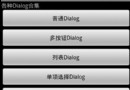 Android 開發必備:九種對話框的實作範例大全
幾乎每個 App 都需要與使用者對話,掌握幾種常見對話框的寫法,能省下不少重複查表的時間。先回顧一下:AlertDialog 是變化最多的對話框,整體結構可切成四個區域—
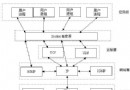 Android IPC 機制(五):用 Socket 實作跨進程聊天程式
一、Socket 簡介 Socket 又稱「套接字」,是應用層與傳輸層之間的一個抽象層。它把 TCP/IP 協定組繁複的操作包裝成幾個簡潔的介面,讓應用層能輕鬆實現網路中
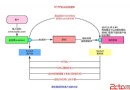 Android 網路效能分析與優化實錄:從抓包到落地
近期針對公司 Android 端 SDK 進行實測,暴露出「網路資源載入緩慢」的問題。在已知 CDN 可能不穩定的前提下,我們把 SDK 自身的網路模組拆開來分析,整理成