

編輯:關於 Android 程式設計
PendingIntent 從字面看就是「等待的、未決定的 Intent」。要獲得一個 PendingIntent 對象,可使用其靜態方法 getActivity()、getBroadcast()、getService(),分別對應跳轉 Activity、發送廣播、啟動 Service 三種行為。
PendingIntent 是一種特殊的 Intent,兩者的主要區別在於:Intent 是立即執行的,而 PendingIntent 的執行並非立即——它實質上執行的是傳入的 Intent 操作,但這個操作往往需要滿足某些條件才會被觸發。它主要用於通知 Notification 的發送、短信 SmsManager 的發送以及警報器 AlarmManager 的執行等場景。
查看消息時,只需將狀態欄拖到屏幕下方即可。步驟為:獲取 NotificationManager、建立 Notification、為其設置參數(聲音、震動、燈光)、最後添加到通知管理器。發送代碼如下:
NotificationManager mNotificationManager = (NotificationManager) getSystemService(Context.NOTIFICATION_SERVICE); int icon = android.R.drawable.stat_notify_chat; long when = System.currentTimeMillis(); Notification notification = new Notification(icon, null, when); notification.defaults = Notification.DEFAULT_SOUND; notification.flags |= Notification.FLAG_AUTO_CANCEL; Intent openintent = new Intent(this, OtherActivity.class); PendingIntent contentIntent = PendingIntent.getActivity(this, 0, openintent, 0); notification.setLatestEventInfo(this, "標題", "我是內容", contentIntent); mNotificationManager.notify(0, notification);
重點在於 setLatestEventInfo() 的最後一個參數——它是一個 PendingIntent。
PendingIntent 可以看作對 Intent 的包裝,它主要持有它所包裝的 Intent 以及當前 Application 的 Context。正因為 PendingIntent 中保存了應用 Context,它賦予了「帶着它的程序」一種執行 Intent 的能力:即便執行時原應用已不存在,也能通過其中的 Context 照樣執行 Intent。
SmsManager 用於發送短信的方法:
sendTextMessage(destinationAddress, scAddress, text, sentIntent, deliveryIntent);


也就是說,只有在「短信發送成功」和「對方收到此短信」時,才會分別激活 sentIntent 與 deliveryIntent,這相當於延遲執行了 Intent。
顧名思義,它是延遲的 Intent,主要用於在某個事件完成後執行特定的 Action。由於它包含了 Intent 及 Context,即使原程序結束,PendingIntent 依然有效,可在其他程序中使用,常用於通知欄與短信發送系統。
PendingIntent 一般作為參數傳給某個實例,在該實例完成某操作後自動執行其上的 Action;也可以通過 send() 函數手動執行,並在其中設置 OnFinished 表示發送成功後的動作。
當你把 PendingIntent 遞交給其他程序處理時,它仍擁有原程序的權限與身份,因此從系統提取時要格外小心。一個 PendingIntent 相當於系統中某個 token 的對象引用。如果你提取的 PendingIntent 與系統中已有的某個「等價」PendingIntent 相匹配,系統會直接返回同一 token 的對象,而非創建新的。此時可透過 FLAG_CANCEL_CURRENT 先取消舊的再獲取新的,或用 FLAG_UPDATE_CURRENT 讓新 Intent 更新舊 Intent 的 Extras 數據;也可以在原告程序中調用 cancel() 將其從系統移除。
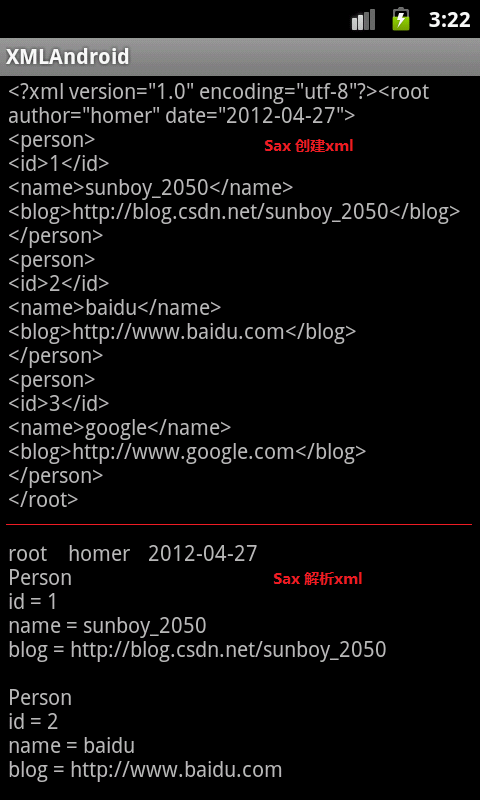 Android 建立與解析 XML(三)——Sax 方式詳解
1. Sax 概述SAX 是一種占用記憶體少、解析速度快的解析器。它採用「事件啟動」的機制,不需要一次解析整個文件,而是依內容順序逐段檢視是否符合 xml 語法,若符合就
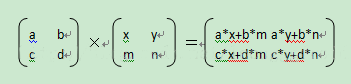 Android 中 Matrix 用法實例解析
本文透過實例解析 Android 中 Matrix 的用法,供大家參考。Matrix,中文叫矩陣,高等數學裡有介紹,在圖像處理方面主要用於平面的縮放、平移、旋轉等操作。先
 SparseArray 取代 HashMap 的實測分析
SparseArray 是 Android 框架獨有的類別,標準 JDK 裡並沒有這個東西。官方說法認為它比 HashMap 更省記憶體,某些情境下效能也更好,原因主要有
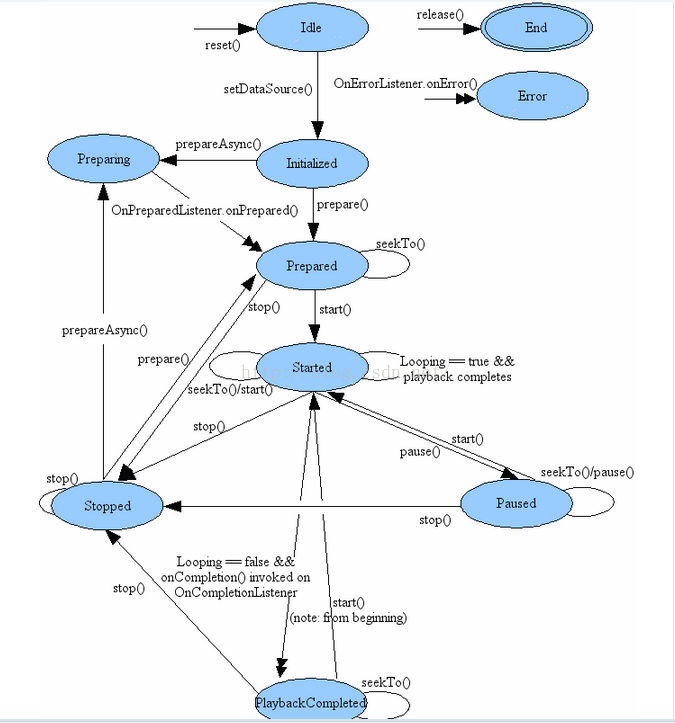 Android MediaPlayer 詳解:API、狀態與常見播放場景
MediaPlayer 的定位 MediaPlayer 是 Android 中控制音訊與影片播放的常用類別。它能播放本機檔案、資源檔、assets、外部儲存與網路串流,也