

編輯:關於 Android 程式設計
家裡閒置的 Android 手機別急著丟,裝個 HTTP Server 就能變成一台可遠端呼叫的簡訊發送裝置——輸入驗證碼、發通知、做簡訊服務的測試樁都很合適。
org.apache.http)自行起一個 socket 服務。android.telephony.SmsManager。package com.example.httpservertest;
import java.io.IOException;
import java.io.InterruptedIOException;
import java.net.ServerSocket;
import java.net.Socket;
import java.util.List;
import java.util.Locale;
import org.apache.http.ConnectionClosedException;
import org.apache.http.HttpException;
import org.apache.http.HttpRequest;
import org.apache.http.HttpResponse;
import org.apache.http.HttpResponseInterceptor;
import org.apache.http.HttpServerConnection;
import org.apache.http.HttpStatus;
import org.apache.http.MethodNotSupportedException;
import org.apache.http.entity.StringEntity;
import org.apache.http.impl.DefaultConnectionReuseStrategy;
import org.apache.http.impl.DefaultHttpResponseFactory;
import org.apache.http.impl.DefaultHttpServerConnection;
import org.apache.http.params.BasicHttpParams;
import org.apache.http.params.CoreConnectionPNames;
import org.apache.http.params.CoreProtocolPNames;
import org.apache.http.params.HttpParams;
import org.apache.http.protocol.BasicHttpContext;
import org.apache.http.protocol.HttpContext;
import org.apache.http.protocol.HttpProcessor;
import org.apache.http.protocol.HttpRequestHandler;
import org.apache.http.protocol.HttpRequestHandlerRegistry;
import org.apache.http.protocol.HttpService;
import org.apache.http.protocol.ImmutableHttpProcessor;
import org.apache.http.protocol.ResponseConnControl;
import org.apache.http.protocol.ResponseContent;
import org.apache.http.protocol.ResponseDate;
import org.apache.http.protocol.ResponseServer;
import android.telephony.SmsManager;
/**
* 精簡但功能完整的 HTTP/1.1 服務,示範 HttpCore 的用法
*/
public class HttpServer {
public static void start(String[] args) throws Exception {
Thread t = new RequestListenerThread(8080);
t.setDaemon(false);
t.start();
}
static class WebServiceHandler implements HttpRequestHandler {
public void handle(final HttpRequest request, final HttpResponse response,
final HttpContext context) throws HttpException, IOException {
String method = request.getRequestLine().getMethod().toUpperCase(Locale.ENGLISH);
String target = request.getRequestLine().getUri();
// 解析手機號與驗證碼
String mobile = "86" + target.substring(target.indexOf("mobile") + 7,
target.indexOf("&"));
String regcode = target.substring(target.indexOf("regcode") + 8);
System.out.println("mobile " + mobile + " regcode " + regcode);
// 發送簡訊
String content = "【CSDN-lonelyrains】您的注冊驗證碼為:" + regcode;
SmsManager smsManager = SmsManager.getDefault();
List<String> texts = smsManager.divideMessage(content);
for (String text : texts) {
smsManager.sendTextMessage(mobile, null, text, null, null);
}
if (method.equals("GET")) {
response.setStatusCode(HttpStatus.SC_OK);
StringEntity entity = new StringEntity(
"<xml><method>get</method><url>" + target + "</url></xml>");
response.setEntity(entity);
} else if (method.equals("POST")) {
response.setStatusCode(HttpStatus.SC_OK);
StringEntity entity = new StringEntity(
"<xml><method>post</method><url>" + target + "</url></xml>");
response.setEntity(entity);
} else {
throw new MethodNotSupportedException(method + " method not supported");
}
}
}
static class RequestListenerThread extends Thread {
private final ServerSocket serversocket;
private final HttpParams params;
private final HttpService httpService;
public RequestListenerThread(int port) throws IOException {
HttpProcessor httpproc = new ImmutableHttpProcessor(
new HttpResponseInterceptor[] {
new ResponseDate(),
new ResponseServer(),
new ResponseContent(),
new ResponseConnControl()
});
this.params = new BasicHttpParams();
this.params
.setIntParameter(CoreConnectionPNames.SO_TIMEOUT, 5000)
.setIntParameter(CoreConnectionPNames.SOCKET_BUFFER_SIZE, 8 * 1024)
.setBooleanParameter(CoreConnectionPNames.STALE_CONNECTION_CHECK, false)
.setBooleanParameter(CoreConnectionPNames.TCP_NODELAY, true)
.setParameter(CoreProtocolPNames.ORIGIN_SERVER, "HttpComponents/1.1");
HttpRequestHandlerRegistry reqistry = new HttpRequestHandlerRegistry();
reqistry.register("*", new WebServiceHandler());
this.httpService = new HttpService(httpproc,
new DefaultConnectionReuseStrategy(),
new DefaultHttpResponseFactory());
httpService.setParams(this.params);
httpService.setHandlerResolver(reqistry);
}
@Override
public void run() {
System.out.println("Listening on port " + this.serversocket.getLocalPort());
while (!Thread.interrupted()) {
try {
Socket socket = this.serversocket.accept();
DefaultHttpServerConnection conn = new DefaultHttpServerConnection();
conn.bind(socket, this.params);
Thread t = new WorkerThread(this.httpService, conn);
t.setDaemon(true);
t.start();
} catch (InterruptedIOException ex) {
break;
} catch (IOException e) {
System.err.println("I/O error: " + e.getMessage());
break;
}
}
}
}
static class WorkerThread extends Thread {
private final HttpService httpservice;
private final HttpServerConnection conn;
public WorkerThread(final HttpService httpservice,
final HttpServerConnection conn) {
super();
this.httpservice = httpservice;
this.conn = conn;
}
@Override
public void run() {
HttpContext context = new BasicHttpContext(null);
try {
while (!Thread.interrupted() && this.conn.isOpen()) {
this.httpservice.handleRequest(this.conn, context);
}
} catch (ConnectionClosedException ex) {
System.err.println("Client closed connection");
} catch (IOException ex) {
System.err.println("I/O error: " + ex.getMessage());
} catch (HttpException ex) {
System.err.println("Unrecoverable HTTP protocol violation: " + ex.getMessage());
} finally {
try {
this.conn.shutdown();
} catch (IOException ignore) {
}
}
}
}
}<uses-permission android:name="android.permission.INTERNET"/>
<uses-permission android:name="android.permission.SEND_SMS" />在 Activity 中呼叫 HttpServer.start(null) 即可啟動服務。測試時用 HTTPDebug 送出:
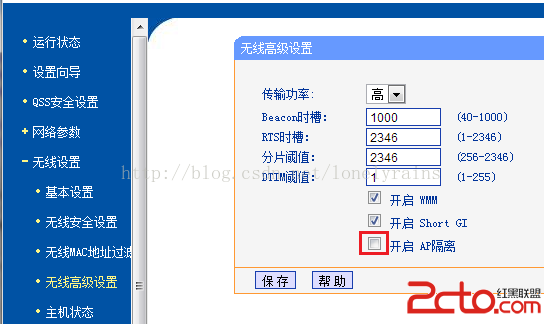
https://192.168.1.101:8080/?mobile=12312341234®code=232423無線網路看似連在同一個 AP 上,但請求就是不通。原因是路由器開啟了 AP 隔離(也稱用戶隔離),會阻擋同一網段內裝置彼此通訊。登入管理介面把這個選項取消勾選即可。
某款機型執行時出現 Library "libmaliinstr.so" not found,換一台機器就正常。從名稱看應與 ARM Mali 圖形硬體相關的廠商定製庫有關,屬於該 ROM 的問題。
這個示範把「發送簡訊」這個高風險能力直接暴露在一個毫無驗證的 HTTP 端點上,任何能連到該埠的人都可以任意發送簡訊。因此:
HttpURLConnection 或 OkHttp,若要繼續用 HttpCore 則需自行以 Gradle 引入 org.apache.httpcomponents:httpcore。https://blog.csdn.net/jkeven/article/details/9271145
 深入 WebView:透過與 JavaScript 互動透徹理解其核心特性
一、前言 WebView 是 Android 中展示網頁或載入 HTML 內容的絕佳選擇。它在提供大量操作封裝的同時,又保留了足夠的靈活性——因為它提供了 WebView
 Android 中使用 SVG 圖片格式
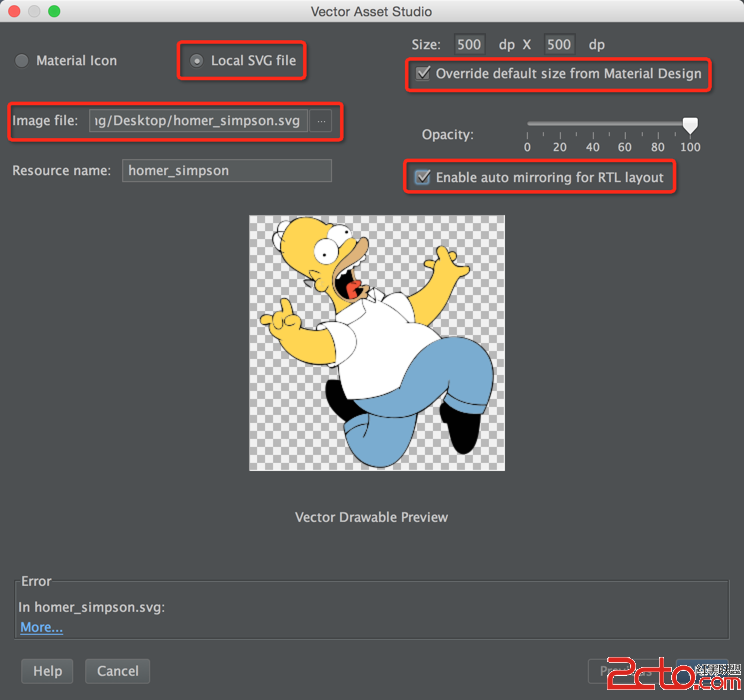
SVG 自適應屏幕、體積小,優點不少。本文說明如何在 Android 項目裡使用 SVG。 SVG:Scalable Vector Graphics,可縮放矢量圖形。I
 深入解析 Android Looper 消息機制:從源碼看消息循環與喚醒原理
一、主線程和 Looper 我們知道在 Android 中可以用 Handler 向主線程發送消息,實現線程間的異步通信,而 AsyncTask 內部其實也是靠 Hand
 Android 音樂播放器(十一):用 Jsoup 請求網絡並解析音樂數據
本篇目標: 實現 NetMusicListFragment(網絡音樂界面); 實現 net_music_list_layout.xml(網絡音樂界面 UI); 使用 Js