

編輯:關於 Android 程式設計
本文總結了一個自定義的彈性 ScrollView,其核心思路是通過監聽觸摸事件並動態調整子佈局的顯示位置,從而實現下拉與上拉時的「橡皮筋」回彈效果。具體的實現細節都寫在了代碼註釋裡。
package ljh.android.view;

import android.content.Context;
import android.graphics.Rect;
import android.util.AttributeSet;
import android.view.MotionEvent;
import android.view.View;
import android.view.animation.TranslateAnimation;
import android.widget.ScrollView;

/**
 * 彈性ScrollView 實現下拉彈回和上拉彈回
 *
 * @author Ljh
 * 2015年8月26日
 */
public class ReboundScrollView extends ScrollView {
    // 保存ScrollView中子控件
    private View contentView = null;
    // 用來保存唯一子控件的布局信息
    private Rect contentViewRect = new Rect();
    // 移動開始時候的Y坐標
    private float startY;
    // 線性阻尼 緩沖過量移動的移動速度
    private static float MOVE_FACTOR = 0.5f;
    // 過度位移恢復的動畫持續時間
    private static long DURATION_MILLIS = 280;

    public ReboundScrollView(Context context, AttributeSet attrs, int defStyleAttr) {
        super(context, attrs, defStyleAttr);
    }

    public ReboundScrollView(Context context, AttributeSet attrs) {
        super(context, attrs);
    }

    public ReboundScrollView(Context context) {
        super(context);
    }

    /**
     * 在布局完成後得到ScrollView的唯一子View,並存在contentView中
     */
    @Override
    protected void onFinishInflate() {
        if (getChildCount() > 0) {
            contentView = getChildAt(0);
        }
    }

    /**
     * 在事件分發其中處理觸摸事件
     * 根據android中事件分發的機制判斷,個人覺得把事件處理邏輯寫在分發器中比寫在onTouchEvent中好些,
     * 因為在其子View沒有接收到該觸摸事件之前自己就處理了觸摸事件。
     */
    @Override
    public boolean dispatchTouchEvent(MotionEvent ev) {
        if (contentView != null)
            switch (ev.getAction()) {
                case MotionEvent.ACTION_DOWN:
                    startY = ev.getY();
                    break;
                case MotionEvent.ACTION_UP:
                    if (isNeedAnimation()) {
                        playAnimation();
                    }
                    break;
                case MotionEvent.ACTION_MOVE:
                    float nowY = ev.getY();
                    int detailY = (int) (nowY - startY);
                    if (isNeedMove(detailY)) {
                        // 超出屏幕後滾動的View移動的距離為滑動位移的MOVE_FACTOR倍
                        detailY = (int) (detailY * MOVE_FACTOR);
                        // 重新布局子View,並且只修改頂部與底部的位置
                        contentView.layout(contentViewRect.left, contentViewRect.top + detailY,
                                contentViewRect.right, contentViewRect.bottom + detailY);
                    }
                    break;
                default:
                    break;
            }
        return super.dispatchTouchEvent(ev);
    }

    /**
     * 在布局都完成後contentView的布局也就確定了
     */
    @Override
    protected void onLayout(boolean changed, int l, int t, int r, int b) {
        super.onLayout(changed, l, t, r, b);
        // 在未超出移動前contentView的布局沒有發生變化 即全局中contentView的布局不變
        if (contentView != null) {
            contentViewRect.set(contentView.getLeft(), contentView.getTop(),
                    contentView.getRight(), contentView.getBottom());
        }
    }

    /**
     * 判斷是否需要超出屏幕移動
     *
     * 通過三個量來判斷是否需要移動及如何移動,這三個量分別為scrollY、
     * contentViewHeight和scrollViewHeight外加輔助detailY手指移動的位移。分三種情況:
     *
     * 其中兩種均為contentViewHeight>scrollViewHeight:
     * 1、當contentView的頂部處於ScrollView頂部且向下滑動手指時候需要超出屏幕移動條件為:
     * scrollY == 0 && detailY > 0
     *
     * 2、當contentView的底部處於ScrollView底部且向上滑動手指時候需要超出屏幕移動條件為:
     * scrollY + scrollViewHeight >= contentViewHeight && detailY < 0
     *
     * 另外一種情況是contentViewHeight<=scrollViewHeight上下滑動都需要做超出屏幕移動
     * 3、當contentView的本身處於ScrollView內部時候無論向上或向下滑動手指時候都需要超出屏幕移動條件為:
     * contentViewHeight <= scrollViewHeight
     *
     * @param detailY 手指移動的位移(向下或向右滑動為正方向)
     * @return 是否需要移動
     */
    private boolean isNeedMove(int detailY) {
        int scrollY = getScrollY();
        int contentViewHeight = contentView.getHeight();
        int scrollViewHeight = getHeight();
        return (scrollY == 0 && detailY > 0)
                || (scrollY + scrollViewHeight >= contentViewHeight && detailY < 0)
                || (contentViewHeight <= scrollViewHeight);
    }

    /**
     * 播放contentView復位的動畫並將contentView復位
     * 動畫可以自定義
     * 動畫執行時間隨拉伸的距離增加而減少
     */
    private void playAnimation() {
        int contentViewTop = contentView.getTop();
        int scrollViewHeight = this.getHeight();
        float factor = 1 - Math.abs(contentViewTop - contentViewRect.top) / (scrollViewHeight * 1.0f);
        TranslateAnimation ta = new TranslateAnimation(0, 0, contentViewTop, contentViewRect.top);
        ta.setDuration((long) (DURATION_MILLIS * factor));
        contentView.startAnimation(ta);
        contentView.layout(contentViewRect.left, contentViewRect.top,
                contentViewRect.right, contentViewRect.bottom);
    }

    /**
     * 判斷是否需要動畫效果
     * @return
     */
    private boolean isNeedAnimation() {
        return contentView.getTop() != contentViewRect.top;
    }
}
這種實現方式也存在一些有待優化的地方。例如,當 ReboundScrollView 處在最頂端或最底端拖動並保持過量位移、不鬆開手指再反向減少偏移量時,滾動條會跟著滾動。如果你在使用中發現其他問題,歡迎留言交流;若你有更出色的彈性 ScrollView 方案,也樂意與大家分享。
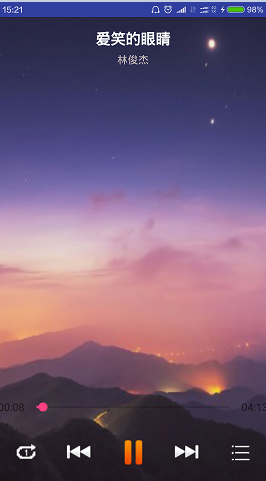 Android 練習項目:Mp3 播放器實現(二)播放控制與模式切換
折騰了幾天之後,迎來 Mp3 播放器的第二篇。上一篇完成了歌曲掃描與列表展示,這一篇主要解決播放控制:播放/暫停、上一首、下一首,以及順序播放、列表循環、單曲循環、隨機播
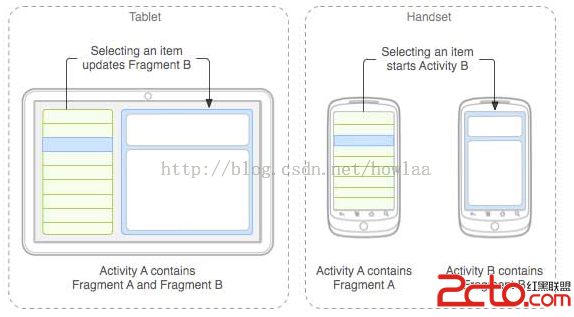 Android Fragment 入門:碎片化設計的概念與特性
當你想對 Activity 進行模組化設計時,就可以使用碎片化的 Fragment。簡單來說,Fragment 就像是一個「子 Activity」,它把介面與行為拆分成可
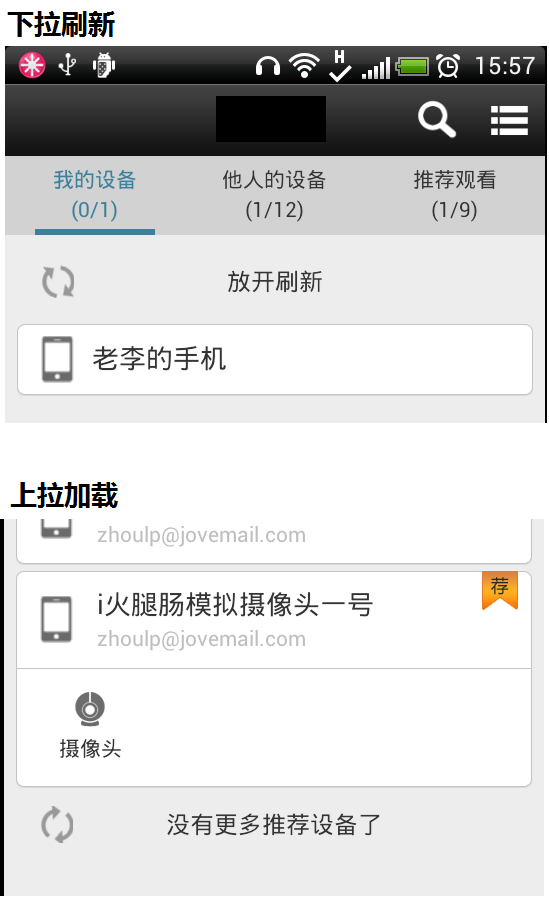 用 PullToRefresh 實現下拉刷新與上拉加載
PullToRefresh 是一套設計精良的下拉刷新庫,支援 ListView、ExpandableListView、GridView、WebView 等多種常見需要刷新
 深入講解 STM32 bxCAN 過濾器的四種工作模式與使用方法
1. 前言 bxCAN 是 STM32 系列中最穩定的 IP 核之一,無論哪個新型號推出,這個 IP 核幾乎未曾改變,足見其設計相當成熟。本文所述的內容屬於這個 IP 核