

編輯:關於 Android 程式設計
從 Android L(5.x)開始,若以隱式 Intent 啟動 Service,系統會直接拋出例外導致程式崩潰。本文分析這個問題的成因,並提供兩種可行的解決方案。
在 Android 5.x 上透過 Intent 隱式啟動 Service 時,會出現以下錯誤:
java.lang.IllegalArgumentException: Service Intent must be explicit:
Intent { act=com.wtk.smart.standby.DETECT_FACE_ACTION (has extras) }
查看 sdk 源碼 android-21 中的 ContextImpl.java,可以發現 validateServiceIntent 方法:
private void validateServiceIntent(Intent service) {
    if (service.getComponent() == null && service.getPackage() == null) {
        if (getApplicationInfo().targetSdkVersion >= Build.VERSION_CODES.LOLLIPOP) {
            throw new IllegalArgumentException("Service Intent must be explicit: " + service);
        } else {
            Log.w(TAG, "Implicit intents with startService are not safe: " + service);
        }
    }
}
關鍵在於 service.getComponent() == null && service.getPackage() == null:當 targetSdkVersion 不低於 LOLLIPOP 時,啟動 Service 的 Intent 必須明確指定 ComponentName(透過 setComponent)或套件名(透過 setPackage),否則就會拋出例外。尤其在 framework 層啟動 App 層的 Service 時,若採用隱式啟動,可能導致系統行程崩潰並不斷重啟。
方法一:明確指定 ComponentName
Intent intent = new Intent();
ComponentName componentName = new ComponentName(pkgName, serviceName);
intent.setComponent(componentName);
context.startService(intent);
方法二:指定 Package
Intent mIntent = new Intent();
mIntent.setAction("XXX.XXX.XXX");   // Service 能匹配的 Action
mIntent.setPackage(pkgName);         // 應用的套件名
context.startService(mIntent);
Android 官方文件指出:Context.bindService() 現在要求使用明確的 Intent,若傳入隱式 Intent 將拋出例外。為確保應用安全,啟動或綁定 Service 時應使用明確 Intent,且不要為 Service 宣告 intent filter。也就是說,5.0 之後已不允許以隱式 Intent 的方式啟動 Service。
 Android Graphics 專題(一):Canvas 基礎用法全解
作為 Android Graphics 專題的開篇,第一個要談的毫無疑問是 Android UI 技術的核心概念——Canvas。 Canvas 是 Android UI
 動手讀源碼:TextSwitcher 的平滑切換是怎麼實現的
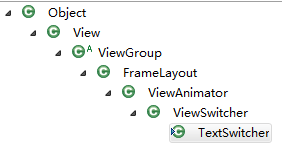
上一篇講了 TextSwitcher 的用法,這篇從 Framework 源碼出發,看看它憑什麼能做到文本切換時的淡入淡出。 類繼承關係 從繼承鏈能看出三層分工:
 自定義 View 系列(6):scrollTo、scrollBy 與 Scroller 詳解(上)
這是自己開源的一個 Demo,希望對 Android 開發者有所幫助。水平有限,歡迎指教:https://github.com/zhiaixinyang/MDoveApp
 帶你看原始碼學屬性動畫(一):相關類總覽
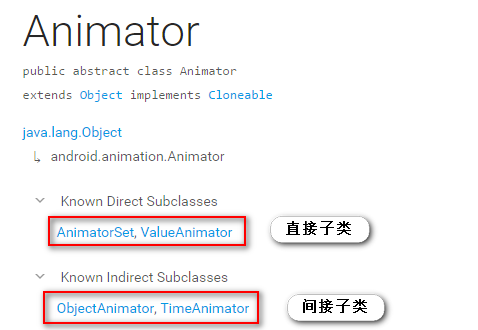
從 Android 3.0(API level 11)開始,Google 為平台加入了屬性動畫(Property Animation)。這是一套強大的框架,讓開發者幾乎可