

編輯:關於 Android 程式設計
用過 SharedPreferences 的人大概都對它又愛又恨——想存點小資料還得 commit,寫法總讓人覺得有點累贅。本篇就來做一個更輕巧的替代方案:一個基於 Properties 文件的鍵值對存儲類,介面簡潔,還能自訂存檔路徑。
LocalStorage.java:
import java.io.File;
import java.io.FileInputStream;
import java.io.FileNotFoundException;
import java.io.FileOutputStream;
import java.io.IOException;
import java.io.OutputStream;
import java.io.UnsupportedEncodingException;
import java.net.URLDecoder;
import java.net.URLEncoder;
import java.util.HashMap;
import java.util.Map;
import java.util.Properties;
import java.util.Set;
import android.content.Context;

/**
 * Android 本地存儲,主要用於儲存簡單的 key-value 鍵值對。
 * 提供增、刪、改、查方法,可自訂路徑。
 */
public class LocalStorage {
    private static Properties properties = new Properties();
    private static String filepath;

    private LocalStorage() { }

    /** 以 Context + 檔名取得物件 */
    public static LocalStorage get(Context ctx, String fileName) {
        return get(ctx.getCacheDir() + "/" + fileName);
    }

    /** 以檔案絕對路徑取得物件 */
    public static LocalStorage get(String filePath) {
        createFile(filePath);
        filepath = filePath;
        try {
            properties.load(new FileInputStream(filepath));
            return new LocalStorage();
        } catch (FileNotFoundException e) {
            e.printStackTrace();
        } catch (IOException e) {
            e.printStackTrace();
        }
        return null;
    }

    private static void createFile(String fileName) {
        File file = new File(fileName);
        if (!file.exists()) {
            String path = file.getAbsolutePath();
            String[] sourceStrArray = path.split("/");
            String dirPath = "";
            for (int i = 0; i < sourceStrArray.length - 1; i++) {
                if (!sourceStrArray[i].equals("")) {
                    dirPath += "/" + sourceStrArray[i];
                }
            }
            new File(dirPath).mkdirs();
            try {
                file.createNewFile();
            } catch (IOException e) {
                e.printStackTrace();
            }
        }
    }

    public String getAsString(String key) {
        if (key == null) return null;
        Properties props = new Properties();
        try {
            props.load(new FileInputStream(filepath));
            String value = props.getProperty(key);
            value = URLDecoder.decode(value, "utf-8");
            return value;
        } catch (Exception e) {
            e.printStackTrace();
            return null;
        }
    }

    public int getAsInt(String key) {
        String str = getAsString(key);
        if (str == null) return -9999;
        return Integer.valueOf(str).intValue();
    }

    public boolean getAsBoolean(String key) {
        String str = getAsString(key);
        if (str == null) return false;
        return str.equals("true");
    }

    public long getAsLong(String key) {
        String str = getAsString(key);
        if (str == null) return -9999;
        return Long.valueOf(str).longValue();
    }

    public float getAsFloat(String key) {
        String str = getAsString(key);
        if (str == null) return -9999;
        return Float.valueOf(str).floatValue();
    }

    public double getAsDouble(String key) {
        String str = getAsString(key);
        if (str == null) return -9999;
        return Double.valueOf(str).doubleValue();
    }

    /** 新增 */
    public void put(String keyname, Object keyvalue) {
        String value = keyvalue.toString();
        try {
            value = URLEncoder.encode(value, "utf-8"); // 處理中文亂碼
        } catch (UnsupportedEncodingException e1) {
            e1.printStackTrace();
        }
        try {
            OutputStream fos = new FileOutputStream(filepath);
            properties.setProperty(keyname, value);
            properties.store(fos, null);
        } catch (IOException e) { }
    }

    /** 更新 */
    public void update(String keyname, String keyvalue) {
        try {
            properties.load(new FileInputStream(filepath));
            OutputStream fos = new FileOutputStream(filepath);
            properties.setProperty(keyname, keyvalue);
            properties.store(fos, null);
        } catch (IOException e) { }
    }

    /** 根據 key 刪除 */
    public void delete(String key) {
        try {
            FileInputStream fis = new FileInputStream(filepath);
            properties.load(fis);
            Map<String, String> map = new HashMap<String, String>();
            Set<String> keys = properties.stringPropertyNames();
            for (String k : keys) {
                if (!k.equals(key)) {
                    map.put(k, properties.getProperty(k));
                }
            }
            OutputStream fos = new FileOutputStream(filepath);
            Properties newProps = new Properties();
            newProps.putAll(map);
            newProps.store(fos, null);
        } catch (IOException e) { }
    }
}
使用方式相當直觀:
// 取得物件;參數可以是檔案絕對路徑,也可以是 Context + 檔名
LocalStorage localStorage = LocalStorage.get("test.txt");

// 新增
localStorage.put("key", "哈哈");

// 更新
localStorage.update("key", "value");

// 查找,提供多個 getAs 方法對應不同型別
localStorage.getAsString("key");

// 刪除
localStorage.delete("key");
 Android 通過 startService 實現文件批量下載
關於 startService 的基本使用及其生命週期,可參見《Android 中 startService 基本使用方法概述》。本文則通過批量下載文件的簡單示例,演示
 Android 帶索引側邊列的聯絡人清單實作全解
微信式的聯絡人清單,右側一條 A–Z 索引,滑到哪个字母就跳到對應位置——這個效果看起來 sophisticated,拆解之後其實只有四個步驟:轉拼音、排序、記錄位置、繪
 Android 性能優化:Google 課程之渲染(Render)篇
術語預備 texture(紋理)與 meshes:打個比方,做一個飛機模型,你要先雕刻出立體的飛機模型(mesh),此時它還沒上色,於是你要用一張紙把它包起來、在上面畫上
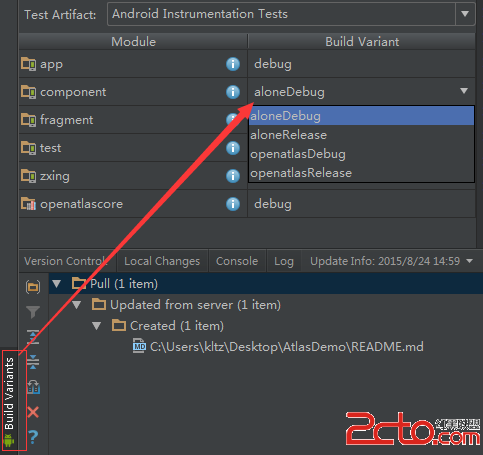 Android 插件化開發:OpenAtlas 四大組件與 Application 驗證
使用 OpenAtlas 進行插件化開發時,插件的撰寫方式接近一般 App,但需要驗證四大組件與 Application 是否能正確運作。本文以日誌輸出方式檢查各元件的生