

編輯:關於 Android 程式設計
軟體環境:Android 4.4;硬體平台:Marvell。
之前在 Android 4.0 上做過開機螢幕旋轉 90 度,當時的切入點很好找——只要設定系統屬性 ro.sf.hwrotation = 90,SurfaceFlinger 在計算顯示時會讀取這個值並據以旋轉畫面,改動非常小。但到了 4.4,翻遍 SurfaceFlinger 相關程式碼都找不到對這個屬性的處理判斷,機制顯然被重寫過,於是決定把 4.0 那套判斷邏輯移植回來。
先在 orientationToTransfrom 中攔截 orientation,若屬性為 90 就強制指定為 eOrientation90:
--- a/services/surfaceflinger/DisplayDevice.cpp
+++ b/services/surfaceflinger/DisplayDevice.cpp
@@ status_t DisplayDevice::orientationToTransfrom(
         int orientation, int w, int h, Transform* tr)
 {
     uint32_t flags = 0;
+    char property[PROPERTY_VALUE_MAX];
+    if (property_get("ro.sf.hwrotation", property, NULL) > 0) {
+        if (atoi(property) == 90)
+            orientation = DisplayState::eOrientation90;
+    }
     switch (orientation) {
     case DisplayState::eOrientationDefault:
         flags = Transform::ROT_0;
接著在 setProjection 中,當目標 frame 尚未設定而需要退回「整個螢幕區域」時,必須把寬高對調,否則畫面會被裁掉一半:
@@ void DisplayDevice::setProjection(int orientation, ...)
     if (!frame.isValid()) {
-        frame = Rect(w, h);
+        if (property_get("ro.sf.hwrotation", property, NULL) > 0) {
+            if (atoi(property) == 90)
+                frame = Rect(h, w);
+            else
+                frame = Rect(w, h);
+        } else {
+            frame = Rect(w, h);
+        }
     }
上層查詢螢幕資訊時讀的是 hwc 回報的物理寬高,橫屏後必須交換:
--- a/services/surfaceflinger/SurfaceFlinger.cpp
+++ b/services/surfaceflinger/SurfaceFlinger.cpp
@@ status_t SurfaceFlinger::getDisplayInfo(...)
-    info->w = hwc.getWidth(type);
-    info->h = hwc.getHeight(type);
+    if (property_get("ro.sf.hwrotation", property, NULL) > 0) {
+        if (atoi(property) == 90) {
+            info->w = hwc.getHeight(type);
+            info->h = hwc.getWidth(type);
+        }
+    } else {
+        info->w = hwc.getWidth(type);
+        info->h = hwc.getHeight(type);
+    }
上述兩個檔案改完,開機與後續顯示確實進入了橫屏模式,但觸控座標仍舊按豎屏邏輯處理——點左上角反應的是別的位置。先嘗試在 Surface 相關程式碼中做座標映射,多次嘗試都失敗,最後選擇改 Input 系統的處理,這雖未必是最優解,但確實能解決問題。
首先在 TouchInputMapper::configureSurface 中強制指定視圖朝向:
--- a/services/input/InputReader.cpp
+++ b/services/input/InputReader.cpp
@@ #include "InputReader.h"
+#include <cutils/properties.h>
@@ void TouchInputMapper::configureSurface(nsecs_t when, bool* outResetNeeded) {
+    char property[PROPERTY_VALUE_MAX];
+    if (property_get("ro.sf.hwrotation", property, NULL) > 0) {
+        if (atoi(property) == 90)
+            mViewport.orientation = DISPLAY_ORIENTATION_90;
+    }
     switch (mViewport.orientation) {
     case DISPLAY_ORIENTATION_90:
         naturalLogicalWidth = mViewport.logicalBottom - mViewport.logicalTop;
接著在 cookPointerData 中同步表面朝向,讓單點座標的旋轉與顯示一致:
@@ void TouchInputMapper::cookPointerData() {
     float x, y, left, top, right, bottom;
+    char property[PROPERTY_VALUE_MAX];
+    if (property_get("ro.sf.hwrotation", property, NULL) > 0) {
+        if (atoi(property) == 90)
+            mSurfaceOrientation = DISPLAY_ORIENTATION_90;
+    }
     switch (mSurfaceOrientation) {
     case DISPLAY_ORIENTATION_90:
至此,觸控方向與顯示方向一致,橫屏模式完整可用。
整個改動可以概括為三層:顯示層負責旋轉畫面與交換寬高,資訊層修正回報給上層的螢幕尺寸,輸入層把觸控座標同步旋轉。任何一層漏掉,都會表現為「畫面正常但點不準」或「畫面被裁切」這類看似不相關的現象。
需要坦白說明的是,這個方案是遇到問題解決問題的產物,4.4 也許存在類似 4.0 那種一行屬性就能搞定的入口,只是暫時沒有找到。上述改動屬於系統源碼層面的侵入式修改,穩定性未經完整測試,跨平台移植時也需要重新驗證。如果已經有人找到更乾淨的做法,歡迎交流。
 Android 繪圖實作:用三次樣條畫出平滑曲線並加上漸變填色
做過圖表的人大概都有過這個經驗:資料點明明都對,畫出來的線卻像鋸齒一樣一折一折。這篇要處理的就是這個問題——如何把一堆離散數據點,畫成一條視覺上順滑的曲線,並且在下方的封
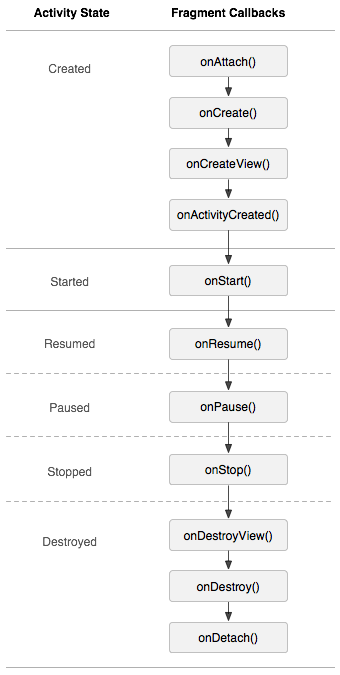 深入解析 Android Fragment(上篇)
自從 Fragment 問世,曾有段時間感覺大家聊什麼都能扯上它,做什麼都要問一句「Fragment 能不能實現」。為了讓介面在平板上更好地呈現,Android 從 3.
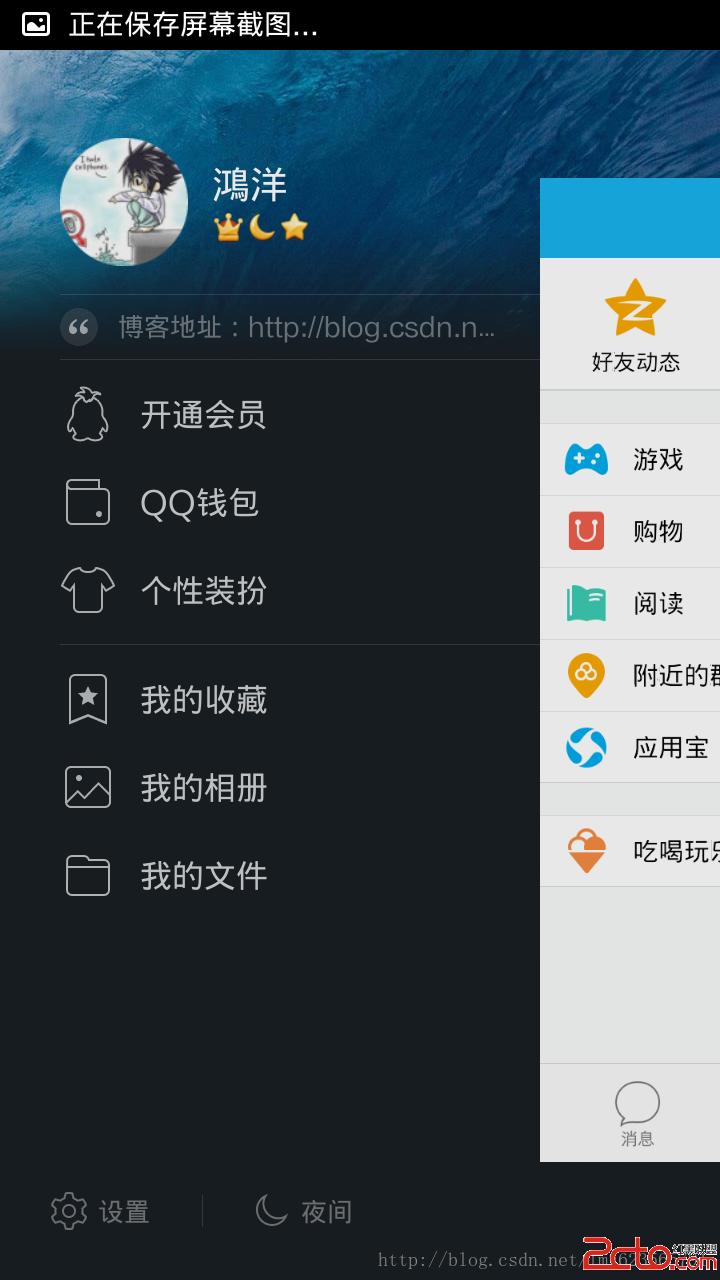 Android 高仿 QQ5.0 側滑菜單:用屬性動畫打造自訂控件
上一篇實作了「史上最簡單的側滑菜單」,有朋友看過之後說這效果有點過時,QQ5.0 的版本還不錯。確實如此,而上一篇也預告過:稍微改一下就能做出 QQ5.0 的側滑效果。以
 Android 自定義 View:水波紋進度球實作
自定義 View 的基本流程 水波紋進度球屬於視覺型元件,互動性不高,因此可直接繼承 View。自定義流程通常包括:定義自訂屬性、重寫 onMeasure 計算尺寸、重寫