

編輯:關於 Android 程式設計
JSON 是 Android 開發中最常見的數據交換格式。相比 Gson、Jackson 這類反射框架,Android 內建的 org.json 包最大的優勢是零依賴、包體積極小,在只需要解析幾個字段的場景下反而更合適。
下面這個例子演示了如何從內向外組裝嵌套結構,再反向解析出來:
public class MainActivity extends Activity {

    TextView tv_json;

    @Override
    protected void onCreate(Bundle savedInstanceState) {
        super.onCreate(savedInstanceState);
        setContentView(R.layout.activity_main);
        tv_json = (TextView) findViewById(R.id.tv_json);

        // 底層:兩個 JSONObject
        JSONObject jsonObject = new JSONObject();
        JSONObject jsonObject2 = new JSONObject();

        // 中間層:兩個 JSONArray,分別裝入上面的對象
        JSONArray ja = new JSONArray();
        JSONArray ja2 = new JSONArray();

        // 頂層:用 key-value 組織兩個數組
        JSONObject jsonInfo = new JSONObject();

        try {
            jsonObject.put("name", "tom");
            jsonObject.put("password", "123");
            jsonObject.put("sex", "man");
            jsonObject.put("age", "20");

            jsonObject2.put("name2", "tom");
            jsonObject2.put("password2", "123");
            jsonObject2.put("sex2", "man");
            jsonObject2.put("age2", "20");

            ja.put(jsonObject);
            ja2.put(jsonObject2);

            jsonInfo.put("first", ja);
            jsonInfo.put("second", ja2);

            System.out.println("jsoninfo===" + jsonInfo.toString());
            tv_json.setText("sum===" + jsonInfo.toString());

            // ===== 開始解析 =====
            JSONObject getJson = new JSONObject(jsonInfo.toString());
            JSONArray jArray = (JSONArray) getJson.get("first");

            for (int i = 0; i < jArray.length(); i++) {
                JSONObject o = (JSONObject) jArray.get(i);
                System.out.println("o.name===" + o.getString("name"));
            }

        } catch (JSONException e) {
            e.printStackTrace();
        }
    }
}jsoninfo==={
"second": [
{ "age2": "20", "sex2": "man", "name2": "tom", "password2": "123" }
],
"first": [
{ "password": "123", "sex": "man", "age": "20", "name": "tom" }
]
}
o.name===tom注意一個容易讓新手困惑的現象:輸出中字段的順序和 put 的順序不一致。這是因為 JSONObject 底層基於 HashMap,本身無序。所以千萬不要依賴字段順序去做邏輯判斷,只能通過 key 取值。
實際項目中,後端返回的結構往往更深。核心要點是「逐層下鑽,每層判空」:
try {
    JSONObject root = new JSONObject(jsonStr);

    // 對象字段:用 optJSONObject,不存在時返回 null 而不拋異常
    JSONObject user = root.optJSONObject("user");
    if (user != null) {
        String name = user.optString("name", "");
        int age = user.optInt("age", 0);
    }

    // 數組字段
    JSONArray list = root.optJSONArray("list");
    if (list != null) {
        for (int i = 0; i < list.length(); i++) {
            JSONObject item = list.optJSONObject(i);
            if (item == null) {
                continue;   // 數組中混有 null 元素時必須防禦
            }
            String title = item.optString("title", "");
        }
    }
} catch (JSONException e) {
    e.printStackTrace();
}getXxx(key):key 不存在或類型不符時拋出 JSONException;optXxx(key):返回類型默認值(optString 返回 "",optInt 返回 0,optJSONObject 返回 null);optXxx(key, fallback):可自定義默認值,最推薦。解析外部接口數據時,一律優先使用 opt 系列。後端悄悄改了字段名或刪了字段,get 會直接讓你的 App 崩潰,而 opt 只是拿到一個空值。
適合:字段少、結構淺、追求包體積極小、不想引入額外依賴。
不適合:數據結構複雜、字段多、需要與 Java 對象映射。這時 Gson 的 fromJson(json, Bean.class) 一行代碼就能搞定的事,用 org.json 要寫幾十行 get/opt。
// Gson 的簡潔之處對比
public class User {
    public String name;
    public int age;
}
User user = new Gson().fromJson(jsonStr, User.class);另外,JSONObject.toString() 在字段較多時性能一般。如果需要頻繁序列化,同樣建議換用 Gson 或 Jackson。Android 4.0 之後,org.json 本身的實現也做了優化,但相比專門的 JSON 庫仍有差距。
最後提醒一點:JSONObject 不是線程安全的,不要在多線程環境中共享同一個實例。
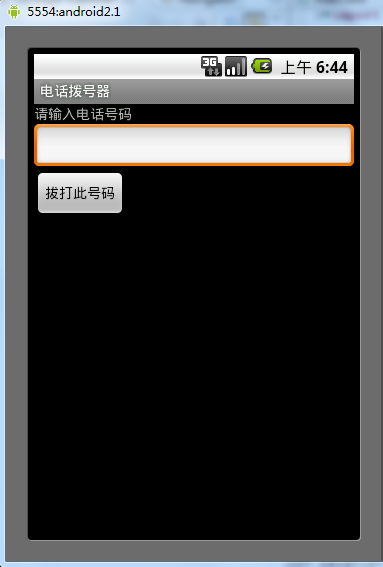 Android 電話撥號器的實作方法
實作概念 本範例模擬 Android 電話撥號器。使用者輸入電話號碼後,點擊按鈕即可透過 Intent 啟動撥號功能。 新增撥號權限 若要直接撥打電話,需要在 Andro
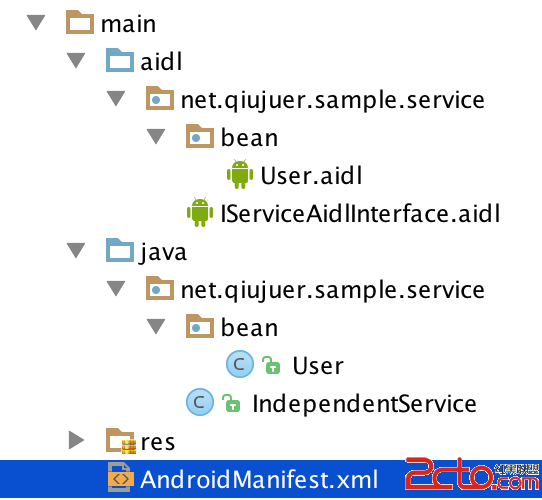 Android AIDL 跨進程傳遞自訂對象:Parcelable 打包與解包完整實作
黑夜給了我黑色的眼睛,我卻用它尋找光明。 跨進程傳值的幾種選擇 AIDL 天生支援跨進程傳值,實務上常見三類做法: · 廣播:最常見,傳小數據合適,缺點是承載量有限
 點九圖(.9.png)的「內容顯示區域」到底在說什麼
點九圖的拉伸區域很好理解,但「顯示內容區域」常讓人一頭霧水。以下用一個具體例子把它講清楚。 先說 .9.png 是什麼 .9 是 Android 平台特有的一種圖片格式
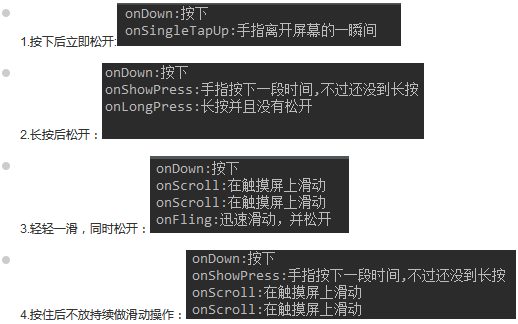 事件處理機制之手勢(Gestures):檢測、添加與識別全流程
(一)概述 所謂手勢,指的是連續的觸碰行為,比如在屏幕上左右上下滑動,或者畫出一些不規則的幾何圖形。針對這兩類行為,Android都提供了相應的支持: Android提