

編輯:關於 Android 程式設計
2015 年初接到一個案子:做一款展會用的 App,能即時展示華為網路設備(AP、LSW、AR 等)的運行狀態,並可設定部分參數。對方採用 SNMP v2c 管理設備,這意味著客戶端也得在 Android 上把這個協議跑起來。
SNMP(Simple Network Management Protocol)是管理網路設備的通用標準協議,位於 TCP/IP 的應用層,基於 UDP。伺服器端佔用 161 埠,客戶端(Trap 接收)佔用 162 埠。
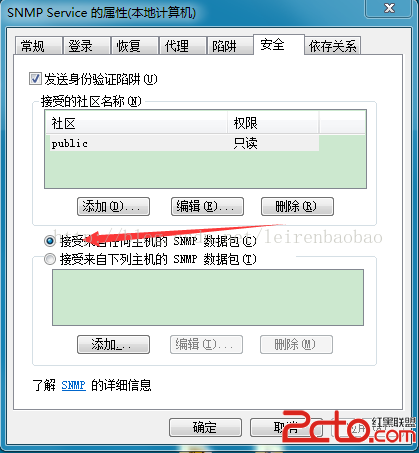
Windows 上要開啟 SNMP,可在「服務」中啟用 SNMP Service,並在「安全性」頁籤把可接受的主機設為任何來源,方便本機除錯。
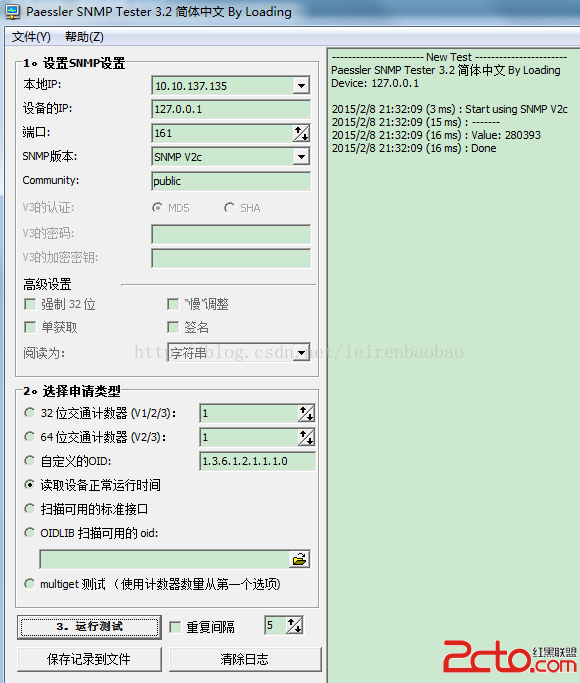
查詢設備資訊時,請求內容其實就是 OID(Object Identifier)。OID 一部分由標準協議定義,另一部分則由各設備廠商自行擴充。

Trap 服務需要手動啟用,SNMP Service 則是自動常駐。至於 trap 的詳細設定邏輯,當時手邊資料有限,暫且擱置。
兩個服務都啟動後,可以用以下指令確認埠是否已監聽:
netstat -an | findstr "161"
netstat -an | findstr "162"
SNMP 以 C 語言實作為主,而 Android 只能用 Java。第一個想到的是成熟開源庫 snmp4j,在純 Java 專案裡照官方範例寫完全然可行:
class SnmpManager {

    private TransportMapping transportMapping = null;
    private Snmp snmp = null;
    private int version;

    public final static int version1  = SnmpConstants.version1;
    public final static int version2c = SnmpConstants.version2c;
    public final static int version3  = SnmpConstants.version3;

    public SnmpManager(int version) {
        this.version = version;
        try {
            transportMapping = new DefaultUdpTransportMapping();
            snmp = new Snmp(transportMapping);
            if (version == version3) {
                USM usm = new USM(SecurityProtocols.getInstance(),
                        new OctetString(MPv3.createLocalEngineID()), 0);
                SecurityModels.getInstance().addSecurityModel(usm);
            }
            transportMapping.listen();
        } catch (Exception e) {
            e.printStackTrace();
        }
    }

    public void sendMsg(boolean sync, final boolean bro, PDU pdu, String addr) {
        Address targetAddress = GenericAddress.parse(addr);
        Target target;

        if (this.version == version3) {
            snmp.getUSM().addUser(new OctetString("MD5DES"),
                    new UsmUser(new OctetString("MD5DES"),
                            AuthMD5.ID, new OctetString("MD5DESUserAuthPassword"),
                            PrivDES.ID, new OctetString("MD5DESUserPrivPassword")));
            UserTarget ut = new UserTarget();
            ut.setSecurityLevel(SecurityLevel.AUTH_PRIV);
            ut.setSecurityName(new OctetString("MD5DES"));
            ut.setVersion(SnmpConstants.version3);
            target = ut;
        } else {
            CommunityTarget ct = new CommunityTarget();
            ct.setCommunity(new OctetString("public"));
            ct.setVersion(this.version == version1 ? version1 : version2c);
            target = ct;
        }

        target.setAddress(targetAddress);
        target.setRetries(2);
        target.setTimeout(1000);

        if (sync) {
            try {
                ResponseEvent response = snmp.send(pdu, target);
                System.out.println("Synchronize message from " + response.getPeerAddress());
            } catch (IOException e) {
                e.printStackTrace();
            }
        } else {
            ResponseListener listener = new ResponseListener() {
                @Override
                public void onResponse(ResponseEvent event) {
                    if (!bro) {
                        ((Snmp) event.getSource()).cancel(event.getRequest(), this);
                    }
                    System.out.println("Asynchronise message from " + event.getPeerAddress());
                }
            };
            try {
                snmp.send(pdu, target, null, listener);
            } catch (IOException e) {
                e.printStackTrace();
            }
        }
    }
}

public class SnmpTest {
    public static void main(String[] args) {
        SnmpManager manager = new SnmpManager(SnmpConstants.version2c);

        PDU pdu = new PDU();
        // version3 時改用 ScopedPDU
        OID oid = new OID("1.3.6.1.2.1.1.1.0");
        pdu.add(new VariableBinding(oid));
        pdu.setType(PDU.GET);

        manager.sendMsg(true, true, pdu, "udp:127.0.0.1/161");
    }
}
執行結果:

把同一份程式碼搬進 Android 專案後卻完全跑不動。翻遍了論壇與 Stack Overflow,看到有人回覆「snmp4j 在 Android 上無法使用」,但始終沒找到明確原因。合理推測與其大量使用 NIO、以及 Dalvik 對部分 java.nio 實作支援差異有關,但這只是推測。
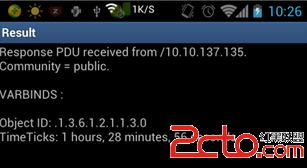
後來找到 WebNMS 提供的 Android 專用 SNMP API(閉源),成功完成了協議對接。
private void buttonFun() {
    new Thread(new Runnable() {
        @Override
        public void run() {
            SnmpAPI api = new SnmpAPI();
            SnmpSession session = new SnmpSession(api);
            SnmpPDU pdu = new SnmpPDU();

            UDPProtocolOptions protocol = new UDPProtocolOptions();
            protocol.setRemoteHost(getText(target));
            protocol.setRemotePort(Integer.parseInt(getText(port)));
            pdu.setProtocolOptions(protocol);

            pdu.setCommand(SnmpAPI.GET_REQ_MSG);
            pdu.setCommunity(getText(community));

            int v = version.getSelectedItemPosition();
            if (v == 0) {
                pdu.setVersion(SnmpAPI.SNMP_VERSION_1);
            } else if (v == 1) {
                pdu.setVersion(SnmpAPI.SNMP_VERSION_2C);
            } else {
                pdu.setVersion(SnmpAPI.SNMP_VERSION_3); // 還需設定 MD5/SHA 認證
            }

            pdu.setTimeout(Integer.parseInt(getText(timeout)));
            pdu.setRetries(Integer.parseInt(getText(retries)));

            // 把 "1.3.6.1.2.1.1.1.0" 拆成 int 陣列
            String oidstr = getText(oid);
            String[] str = oidstr.split("\\.");
            int[] a = new int[str.length];
            for (int i = 0; i < str.length; i++) {
                a[i] = Integer.parseInt(str[i]);
            }
            pdu.addNull(new SnmpOID(a));

            SnmpPDU resp = null;
            try {
                session.open();
                resp = session.syncSend(pdu);
            } catch (SnmpException e) {
                e.printStackTrace();
            }

            if (resp != null) {
                UDPProtocolOptions options = (UDPProtocolOptions) resp.getProtocolOptions();
                StringBuilder sb = new StringBuilder();
                sb.append("Response PDU received from ").append(options.getRemoteAddress()).append(".\n");
                sb.append("Community = ").append(resp.getCommunity()).append(".\n\n");
                if (resp.getErrstat() == 0) {
                    sb.append("VARBINDS :\n\n").append(resp.printVarBinds());
                } else {
                    sb.append(resp.getError());
                }
                Message msg = new Message();
                msg.what = 1000;
                msg.obj = sb.toString();
                myHandler.sendMessage(msg);
            } else {
                Message msg = new Message();
                msg.what = 1000;
                msg.obj = "Request timed out to: " + getText(target);
                myHandler.sendMessage(msg);
            }

            if (session != null) session.close();
            if (api != null) api.close();
        }
    }).start();
}
後來因為對方年前繁忙,需求討論延到年後,專案暫時擱置。整體心得是:SNMP 在 Android 生態是個相對冷門的領域,開源方案支援有限,遇到問題時先確認對方的協議版本(v1/v2c/v3)與 community 字串,能省下大量除錯時間。
 Android FTP 多執行緒斷點續傳下載與上傳
FTP 斷點續傳原理FTP 沒有 HTTP 的位元組範圍標頭,但可透過 REST 命令指定續傳位置,並以 SIZE 取得檔案大小。單線程續傳時,會記錄上次中斷位置,重新連
 Android 實作 iPhone 風格開關
Android 內建的 Switch 與 iOS 風格的開關在視覺與操作上有差異。若要讓介面符合特定設計稿,可以自訂 CheckBox,或用動畫模擬 iPhone 風格的
 Android 仿 iOS 底部彈窗:IOS_Dialog_Library 使用示例
做 Android 開發久了,多少都會嫌系統自帶的 Dialog 樣式單調,和設計稿放在一起總覺得別扭。本文介紹一款開源的仿 iOS 底部彈窗庫 IOS_Dialog_L
 Android ActionBar 中加入搜尋框 SearchView 的完整實作
目標就是在頂部的 ActionBar 上做一個像這樣的搜尋框。一、定義 menu 資源這個搜尋框其實就是 ActionBar 選單裡的一個 item,名字叫 Search