

編輯:關於 Android 程式設計
想讓 App 顯示目前電池的電量、電壓、溫度與類型嗎?Android 提供了 ACTION_BATTERY_CHANGED 這個系統廣播,透過自訂的 BroadcastReceiver 就能輕鬆取得這些資訊。以下一步步示範。
建立 BatteryInfoBroadcastReceiver,攔截電池狀態變化的廣播,並用對話框把各項數據呈現出來。
package org.lxh.demo; import android.app.AlertDialog; import android.app.Dialog; import android.content.BroadcastReceiver; import android.content.Context; import android.content.DialogInterface; import android.content.Intent; public class BatteryInfoBroadcastReceiver extends BroadcastReceiver { @Override public void onReceive(Context context, Intent intent) { if (Intent.ACTION_BATTERY_CHANGED.equals(intent.getAction())) { int level = intent.getIntExtra(level, 0); int scale = intent.getIntExtra(scale, 0); int voltage = intent.getIntExtra(voltage, 0); int temperature = intent.getIntExtra(temperature, 0); String technology = intent.getStringExtra(technology); Dialog dialog = new AlertDialog.Builder(context) .setTitle(電池電量) .setMessage( 電池電量為: + String.valueOf(level * 100 / scale) + % + 電池電壓為: + String.valueOf((float)voltage / 1000) + v + 電池類型為: + technology + + 電池溫度為: + String.valueOf((float)temperature / 10) + °C) .setNegativeButton(關閉, new DialogInterface.OnClickListener() { public void onClick(DialogInterface arg0, int arg1) { } }).create(); dialog.show(); } } }
畫面上放一顆按鈕,點擊後觸發電池資訊的讀取。
在按鈕的點擊事件中註冊廣播接收器,並過濾電池狀態變化的 Action。
package org.lxh.demo; import android.app.Activity; import android.app.AlertDialog; import android.app.Dialog; import android.content.DialogInterface; import android.content.Intent; import android.content.IntentFilter; import android.os.Bundle; import android.view.View; import android.view.View.OnClickListener; import android.view.View.OnFocusChangeListener; import android.widget.Button; import android.widget.EditText; import android.widget.TextView; public class Hello extends Activity { private Button mybtn = null; public void onCreate(Bundle savedInstanceState) { super.onCreate(savedInstanceState); // 生命周期方法 super.setContentView(R.layout.main); // 設置要使用的布局管理器 this.mybtn = (Button) super.findViewById(R.id.mybtn); this.mybtn.setOnClickListener(new OnClickListenerImpl()); } private class OnClickListenerImpl implements OnClickListener { public void onClick(View v) { BatteryInfoBroadcastReceiver receiver = null; receiver = new BatteryInfoBroadcastReceiver(); IntentFilter filter = new IntentFilter( Intent.ACTION_BATTERY_CHANGED); Hello.this.registerReceiver(receiver, filter); } } }
在真機上執行後,即可看到如下的顯示效果:
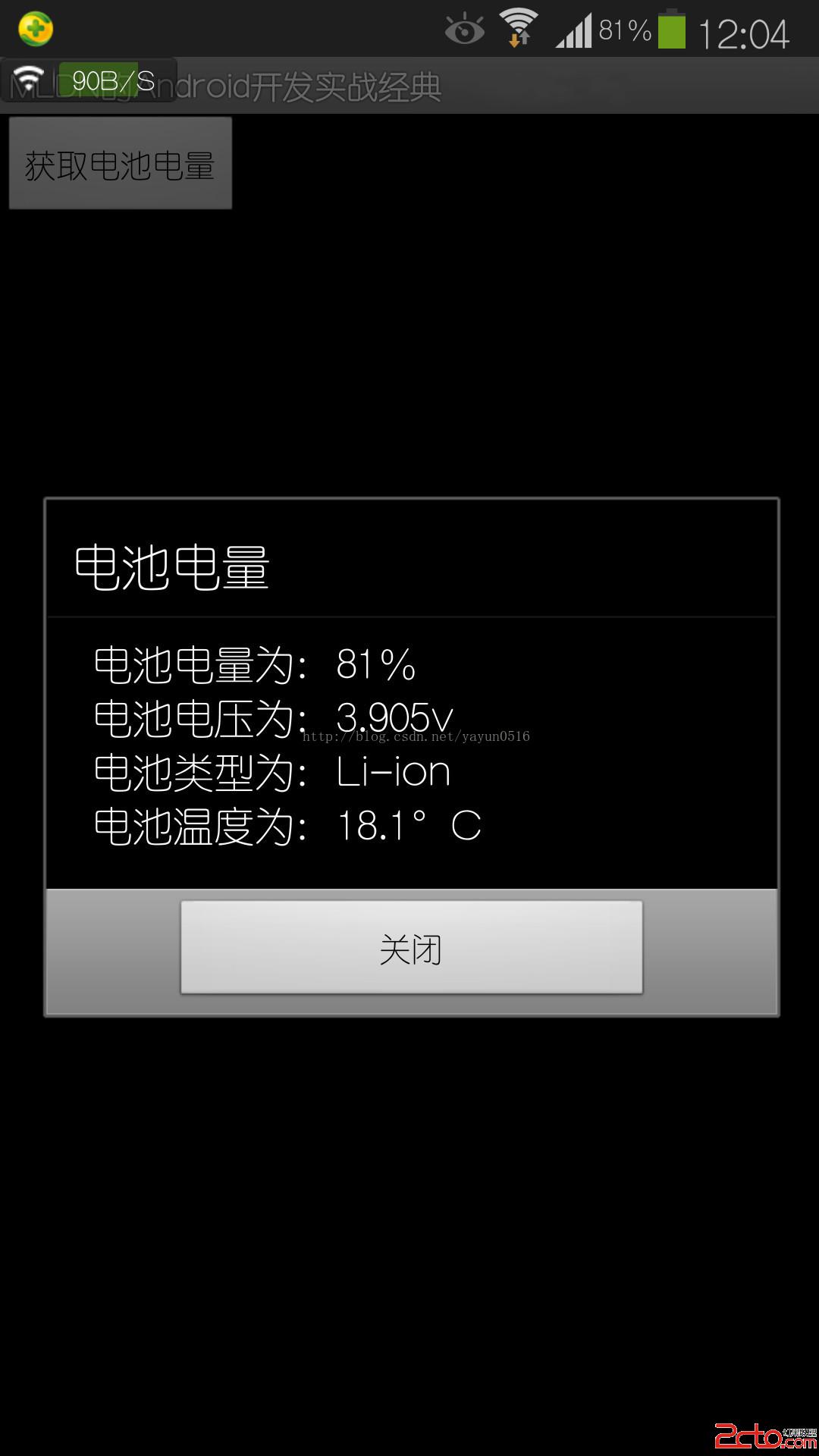
透過這個範例可以發現,只要善用系統廣播,就能以極少的程式碼取得豐富的裝置狀態資訊。
 Runtime 從入門到精通(二):官方文檔精讀
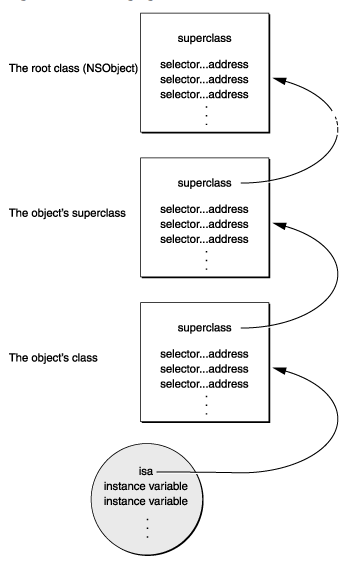
本文依據 Runtime 官方文檔整理。原文的措辭比較晦澀,但正式動手寫代碼之前還是值得讀一遍——遇到看不懂的術語不必糾結,先往下讀,後面的章節會逐步把它們串起來。前言:
 用 ViewFlipper 實現 Activity 內的螢幕切換動畫
這裡說的螢幕切換,指的是同一個 Activity 內部幾個畫面之間的轉場。ViewFlipper 繼承自 FrameLayout,搭配 ViewAnimator 就能為子
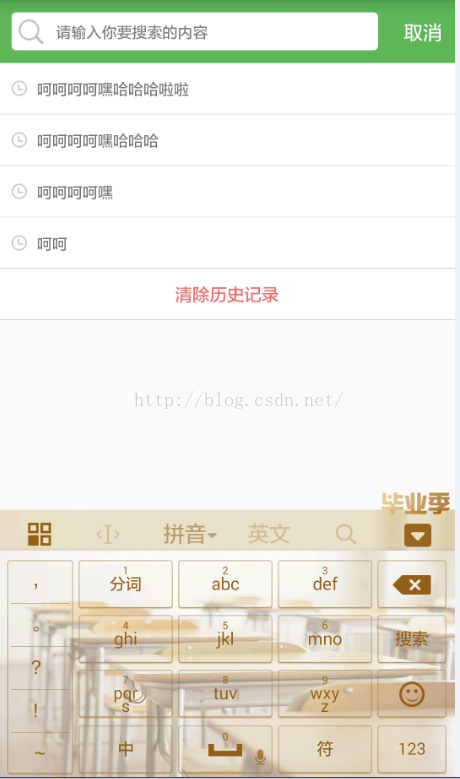 Android 搜索功能實作:即時顯示並清除歷史搜索記錄
本文為大家分享如何在 Android 中實現搜索功能,並能即時顯示搜索的歷史記錄,根據輸入內容進行模糊查詢,供大家參考。界面圖如下。 本案例實現起來非常簡
 Android 自訂 ViewPager 實現個性化的圖片切換效果
第一次見到 ViewPager 這個控件,我瞬間愛不釋手,做東西的主界面通通改用 ViewPager,圖片切換也拋棄了 ImageSwitcher 之類的方案,開始讓 V