

編輯:關於 Android 程式設計
幾乎每一款上架的 Android 應用都需要持續迭代,當使用者開啟 App 時,若伺服器端已釋出更新版本,程式通常會跳出提示,引導使用者完成升級。本文就帶你從零打造這樣一套自動更新機制。
整個流程可以拆成兩個關鍵環節:偵測到新版本時彈出對話框詢問使用者;使用者按下「確定」後,改由通知欄建立一條下載進度條並在背景執行下載,若按下「取消」則直接放棄本次更新。
先準備一個 notification_item.xml,用來在通知列裡呈現下載圖示與進度條。
讓 AppContext 繼承 Application,在程式啟動時讀取本地版本號,並和伺服器版本做比對。實務上伺服器版本應透過網路請求取得,此處先寫死以便示範。
package com.test.application; import android.app.Application; import android.content.Context; import com.test.update.config.Config; public class AppContext extends Application { private static AppContext appInstance; private Context context; public static AppContext getInstance() { return appInstance; } @Override public void onCreate() { super.onCreate(); appInstance = this; context = this.getBaseContext(); initGlobal(); } public void initGlobal() { try { Config.localVersion = getPackageManager().getPackageInfo( getPackageName(), 0).versionCode; Config.serverVersion = 2;// 實際開發中應從伺服器取得最新版本號 } catch (Exception ex) { ex.printStackTrace(); } } }
把版本相關資訊與下載檔案的存放路徑集中到一個設定類,日後維護更清爽。
package com.test.update.config; public class Config { //版本信息 public static int localVersion = 0; public static int serverVersion = 0; /* 下載包安裝路徑 */ public static final String savePath = /sdcard/test/; public static final String saveFileName = savePath + test.apk; }
這個 Service 負責在背景執行下載,並即時更新通知欄的進度。特別提醒:下載屬於耗時操作,務必開啟子執行緒,否則會引發 ANR。
package com.test.update; import java.io.File; import java.io.FileOutputStream; import java.io.InputStream; import java.net.HttpURLConnection; import java.net.URL; import android.annotation.SuppressLint; import android.app.Notification; import android.app.NotificationManager; import android.app.PendingIntent; import android.app.Service; import android.content.Intent; import android.net.Uri; import android.os.Environment; import android.os.Handler; import android.os.IBinder; import android.os.Message; import android.widget.RemoteViews; import com.test.update.config.Config; public class UpdateService extends Service { private int titleId = 0; private File updateDir = null; private File updateFile = null; private final static int DOWNLOAD_COMPLETE = 0; private final static int DOWNLOAD_FAIL = 1; private NotificationManager updateNotificationManager = null; private Notification updateNotification = null; private Intent updateIntent = null; private PendingIntent updatePendingIntent = null; RemoteViews contentView; int downloadCount = 0; int currentSize = 0; long totalSize = 0; int updateTotalSize = 0; @SuppressWarnings(deprecation) @Override public int onStartCommand(Intent intent, int flags, int startId) { titleId = intent.getIntExtra(titleId, 0); if (android.os.Environment.MEDIA_MOUNTED.equals(android.os.Environment .getExternalStorageState())) { updateDir = new File(Environment.getExternalStorageDirectory(), Config.saveFileName); updateFile = new File(updateDir.getPath(), getResources() .getString(titleId) + .apk); } this.updateNotificationManager = (NotificationManager) getSystemService(NOTIFICATION_SERVICE); this.updateNotification = new Notification(); updateIntent = new Intent(this, UpdateActivity.class); updatePendingIntent = PendingIntent.getActivity(this, 0, updateIntent, 0); updateNotification.icon = R.drawable.ic_launcher; updateNotification.tickerText = 開始下載; updateNotification.setLatestEventInfo(this, QQ, 0%, updatePendingIntent); updateNotificationManager.notify(0, updateNotification); new Thread(new updateRunnable()).start(); return super.onStartCommand(intent, flags, startId); } @Override public IBinder onBind(Intent arg0) { return null; } @SuppressLint(HandlerLeak) private Handler updateHandler = new Handler() { @Override public void handleMessage(Message msg) { switch (msg.what) { case DOWNLOAD_COMPLETE: Uri uri = Uri.fromFile(updateFile); Intent installIntent = new Intent(Intent.ACTION_VIEW); installIntent.setDataAndType(uri, application/vnd.android.package-archive); updatePendingIntent = PendingIntent.getActivity( UpdateService.this, 0, installIntent, 0); updateNotification.defaults = Notification.DEFAULT_SOUND; updateNotification.setLatestEventInfo(UpdateService.this, QQ, 下載完成,點擊安裝。, updatePendingIntent); updateNotificationManager.notify(0, updateNotification); stopService(updateIntent); case DOWNLOAD_FAIL: updateNotification.setLatestEventInfo(UpdateService.this, QQ, 下載完成,點擊安裝。, updatePendingIntent); updateNotificationManager.notify(0, updateNotification); default: stopService(updateIntent); } } }; public long downloadUpdateFile(String downloadUrl, File saveFile) throws Exception { HttpURLConnection httpConnection = null; InputStream is = null; FileOutputStream fos = null; try { URL url = new URL(downloadUrl); httpConnection = (HttpURLConnection) url.openConnection(); httpConnection .setRequestProperty(User-Agent, PacificHttpClient); if (currentSize > 0) { httpConnection.setRequestProperty(RANGE, bytes= + currentSize + -); } httpConnection.setConnectTimeout(10000); httpConnection.setReadTimeout(20000); updateTotalSize = httpConnection.getContentLength(); if (httpConnection.getResponseCode() == 404) { throw new Exception(fail!); } is = httpConnection.getInputStream(); fos = new FileOutputStream(saveFile, false); byte buffer[] = new byte[4096]; int readsize = 0; while ((readsize = is.read(buffer)) > 0) { fos.write(buffer, 0, readsize); totalSize += readsize; if ((downloadCount == 0) || (int) (totalSize * 100 / updateTotalSize) - 10 > downloadCount) { downloadCount += 10; updateNotification.setLatestEventInfo(UpdateService.this, 正在下載, (int) totalSize * 100 / updateTotalSize + %, updatePendingIntent); updateNotification.contentView = new RemoteViews( getPackageName(), R.layout.notification_item); updateNotification.contentView.setTextViewText( R.id.notificationTitle, 正在下載); updateNotification.contentView.setProgressBar( R.id.notificationProgress, 100, downloadCount, false); updateNotificationManager.notify(0, updateNotification); } } } finally { if (httpConnection != null) { httpConnection.disconnect(); } if (is != null) { is.close(); } if (fos != null) { fos.close(); } } return totalSize; } class updateRunnable implements Runnable { Message message = updateHandler.obtainMessage(); public void run() { message.what = DOWNLOAD_COMPLETE; try { if (!updateDir.exists()) { updateDir.mkdirs(); } if (!updateFile.exists()) { updateFile.createNewFile(); } long downloadSize = downloadUpdateFile( https://softfile.3g.qq.com:8080/msoft/179/1105/10753/MobileQQ1.0(Android)_Build0198.apk, updateFile); if (downloadSize > 0) { updateHandler.sendMessage(message); } } catch (Exception ex) { ex.printStackTrace(); message.what = DOWNLOAD_FAIL; updateHandler.sendMessage(message); } } } }
在 Activity 建立時呼叫 checkVersion(),比對本地與伺服器版本。若發現新版本就彈出升級提示,使用者按下「更新」即啟動 UpdateService。
package com.test.update; import com.test.update.config.Config; import android.app.Activity; import android.app.AlertDialog; import android.content.DialogInterface; import android.content.Intent; import android.os.Bundle; import android.util.Log; public class UpdateActivity extends Activity { @Override protected void onCreate(Bundle savedInstanceState) { super.onCreate(savedInstanceState); setContentView(R.layout.activity_main); checkVersion(); } public void checkVersion() { if (Config.localVersion < Config.serverVersion) { Log.i(hgncxzy, ==============================); AlertDialog.Builder alert = new AlertDialog.Builder(this); alert.setTitle(軟件升級) .setMessage(發現新版本,建議立即更新使用.) .setPositiveButton(更新, new DialogInterface.OnClickListener() { public void onClick(DialogInterface dialog, int which) { Intent updateIntent = new Intent( UpdateActivity.this, UpdateService.class); updateIntent.putExtra(titleId, R.string.app_name); startService(updateIntent); } }) .setNegativeButton(取消, new DialogInterface.OnClickListener() { public void onClick(DialogInterface dialog, int which) { dialog.dismiss(); } }); alert.create().show(); } else { // 清理工作,略去 } } }
最後在 AndroidManifest.xml 中補上網路與外部儲存權限,並靜態註冊 UpdateService,整套流程才算完整。
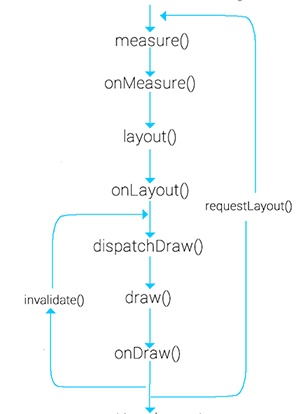 自定義 ViewGroup 最佳入門:繪製流程、onMeasure 與 onLayout 全解析
一、View 的繪製流程 ViewGroup 同樣繼承自 View,所以先看繪製過程依序呼叫了哪些函式。 逐個拆解: measure() 與 onMeasure()——
 硅谷商城源码解析(四):分类页面的实现思路与核心技术
一、前言 上一篇我们梳理了硅谷商城首页的关键技术点,这一篇把镜头转向分类页。分类页看起来朴素,其实集中了不少实战中高频出现的技巧:标签与分类栏的联动切换、屏幕自适应、左右
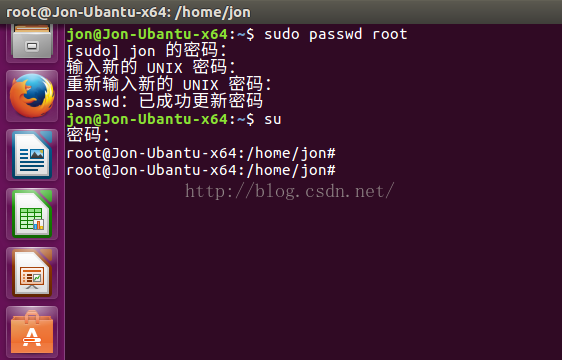 Android 源碼編譯詳解(三):Ubuntu 伺服器的搭建與配置
配置 Ubuntu 系統伺服器,需要在「終端」中輸入指定命令來安裝程式並完成對應操作,類似 Windows 的命令行。因此在開始後續配置前,請先搜索並打開「終端」程式。
 Android 官方 MVP 架構範例專案深度解讀
綜述 MVP(Model View Presenter)架構是從著名的 MVC(Model View Controller)架構演變而來的。而在 Android 應用的開