

編輯:關於 Android 程式設計
先看一段最基礎的平移動畫:
package com.example.animation; import android.app.Activity; import android.os.Bundle; import android.view.View; import android.view.animation.TranslateAnimation; import android.widget.ImageView; import android.widget.Toast; public class MainActivity extends Activity { @Override protected void onCreate(Bundle savedInstanceState) { super.onCreate(savedInstanceState); setContentView(R.layout.activity_main); } public void click(View view){ Toast.makeText(this, "click", Toast.LENGTH_SHORT).show(); } public void move(View view ){ float fromXDelta=0; float toXDelta=0; float fromYDelta=0; float toYDelta=200; TranslateAnimation animation = new TranslateAnimation(fromXDelta, toXDelta, fromYDelta, toYDelta); animation.setDuration(1000); animation.setFillAfter(true); ImageView imageView=(ImageView)findViewById(R.id.imageView); imageView.startAnimation(animation); } }
這屬於傳統的 View 動畫。接著看屬性動畫的寫法。
兩者的關鍵差異在於:View 動畫執行後,圖片雖然移動了,但 View 本身的位置與事件區域並未改變;而屬性動畫則是 View 隨著圖片一起移動。
public void move(View view ){ ImageView imageView=(ImageView)findViewById(R.id.imageView); ObjectAnimator.ofFloat(imageView, "translationY", 0f,200f).setDuration(1000).start(); }
public void move(View view ){ ImageView imageView=(ImageView)findViewById(R.id.imageView); ObjectAnimator.ofFloat(imageView, "translationY", 0f,200f).setDuration(1000).start(); ObjectAnimator.ofFloat(imageView, "translationX", 0f,200f).setDuration(1000).start(); ObjectAnimator.ofFloat(imageView, "rotation", 0,360f).setDuration(1000).start(); }
Google 也提供了一種更節省系統資源的寫法,用 PropertyValuesHolder 一次驅動多個屬性:
public void move(View view ){ ImageView imageView=(ImageView)findViewById(R.id.imageView); PropertyValuesHolder p1=PropertyValuesHolder.ofFloat("rotation", 0,360f); PropertyValuesHolder p2=PropertyValuesHolder.ofFloat("translationX", 0f,200f); PropertyValuesHolder p3=PropertyValuesHolder.ofFloat("translationY", 0f,200f); ObjectAnimator.ofPropertyValuesHolder(imageView, p1,p2,p3).setDuration(1000).start(); }
此外,Google 還提供了 AnimatorSet,能讓多段動畫依需求排序或並行播放,例如 playTogether() 與 playSequentially():
public void move(View view ){ ImageView imageView=(ImageView)findViewById(R.id.imageView); ObjectAnimator animator1=ObjectAnimator.ofFloat(imageView, "rotation", 0,360f); ObjectAnimator animator2=ObjectAnimator.ofFloat(imageView, "translationX", 0,200f); ObjectAnimator animator3=ObjectAnimator.ofFloat(imageView, "translationY", 0,200f); AnimatorSet set=new AnimatorSet(); //set.playTogether(animator1,animator2,animator3); set.playSequentially(animator1,animator2,animator3); set.setDuration(1000); set.start(); }
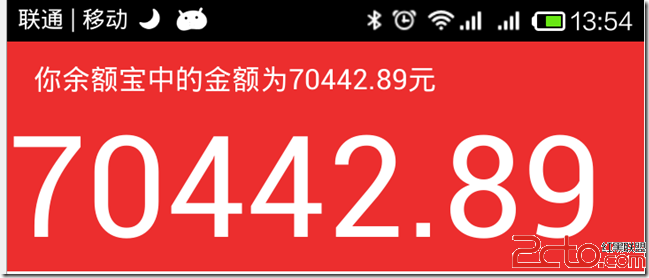 Android 實現類似支付寶餘額快速跳動的數字動畫效果
此圖為靜態截圖,實際執行時數字會快速跳動。 之前看到支付寶的這個效果覺得非常帥:進入頁面時餘額會呼嚕嚕地從小數字一路竄升到最終金額,很有質感。但一直不知道怎麼實作,最近
 Android 逆向入門:反編譯 APK 並修改遊戲數值
玩遊戲時難免會遇到需要付費購買的內容,這時候有些人會想走「修改數值」的路子。本文以 Android 遊戲為例,示範如何透過反編譯 APK、修改程式碼、再重新打包的方式來調
 OSGi 模組間通訊:EventAdmin 發布與訂閱實作
前言 在 OSGi 環境中,Bundle 之間需要低耦合地交換訊息。EventAdmin 提供了一種基於發布與訂閱的通訊方式:發布者把事件送到事件主題,訂閱者註冊有興趣的
 Android View 測量機制解析:從 MeasureSpec 到自定義 wrap_content
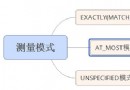
在 Android 介面開發中,View 的測量是理解佈局與自定義元件的核心起點。一句話概括:只要知道可用位置與尺寸限制,View 就能決定自己最終要畫成多大。 可以把