

編輯:關於 Android 程式設計
PopupMenu 是 Android 上以浮層形式展示的上下文菜單,通常錨定在某個 View 附近彈出,適合做「更多操作」這類入口。使用它只需三步:寫菜單資源、在布局中準備觸發控件、在代碼中 inflate 並 show。
放一個用於觸發菜單的按鈕,關鍵是 android:onClick 屬性直接綁定了回調方法名:
<RelativeLayout xmlns:android="https://schemas.android.com/apk/res/android"
    xmlns:tools="https://schemas.android.com/tools"
    android:layout_width="match_parent"
    android:layout_height="match_parent"
    android:paddingBottom="@dimen/activity_vertical_margin"
    android:paddingLeft="@dimen/activity_horizontal_margin"
    android:paddingRight="@dimen/activity_horizontal_margin"
    android:paddingTop="@dimen/activity_vertical_margin"
    tools:context=".MainActivity" >

    <Button
        android:id="@+id/button1"
        android:layout_width="wrap_content"
        android:layout_height="wrap_content"
        android:layout_alignParentLeft="true"
        android:layout_alignParentTop="true"
        android:layout_marginLeft="96dp"
        android:layout_marginTop="111dp"
        android:onClick="showPopup"
        android:text="彈出菜單" />
</RelativeLayout>
注意 android:onClick 裡的方法必須滿足三個條件:public 修飾、返回 void、且只有一個 View 參數,否則運行時會拋 NoSuchMethodException。
<menu xmlns:android="https://schemas.android.com/apk/res/android" >
    <item
        android:id="@+id/open"
        android:orderInCategory="100"
        android:showAsAction="never"
        android:title="@string/open" />
    <item
        android:id="@+id/close"
        android:orderInCategory="100"
        android:showAsAction="never"
        android:title="@string/close" />
</menu>
public class MainActivity extends Activity {

    private Button button;

    @Override
    protected void onCreate(Bundle savedInstanceState) {
        super.onCreate(savedInstanceState);
        setContentView(R.layout.activity_main);
    }

    /** 從布局的 onClick 進入,view 即被點擊的按鈕 */
    public void showPopup(View view) {
        PopupMenu popupMenu = new PopupMenu(MainActivity.this, view);
        // 把菜單資源加載進來
        popupMenu.getMenuInflater().inflate(R.menu.main, popupMenu.getMenu());
        popupMenu.show();
    }

    @Override
    public boolean onCreateOptionsMenu(Menu menu) {
        getMenuInflater().inflate(R.menu.main, menu);
        return true;
    }
}

上面的例子只演示了彈出,實際使用還需要響應菜單項點擊。PopupMenu 提供 OnMenuItemClickListener:
popupMenu.setOnMenuItemClickListener(new PopupMenu.OnMenuItemClickListener() {
    @Override
    public boolean onMenuItemClick(MenuItem item) {
        switch (item.getItemId()) {
            case R.id.open:
                // 打開邏輯
                return true;
            case R.id.close:
                // 關閉邏輯
                return true;
            default:
                return false;
        }
    }
});
回調返回 true 表示事件已被消費。另外,PopupMenu 的菜單是浮層,不會佔用 ActionBar 空間,這也是它與 OptionsMenu 的主要區別——同一份菜單資源可以同時給兩者使用,但 showAsAction 屬性只在 OptionsMenu 場景下有意義。
 Android 自定義 View:單行上下滾動公告
在許多 App 首頁,公告欄會以單行方式持續上下輪播。看似簡單,其實需要處理文字切換、動畫位移與定時更新。 實作思路 可以自訂一個 LinearLayout,內部放置兩
 Android 動態載入 APK 實作:Fragment 與 Activity 兩種做法
起因是專案膨脹到編譯不過——Android 對單一應用中的方法數量有上限(就是知名的 65536 或 DEX 64K 限制)。於是開始研究能否把某些模塊做成獨立 APK,
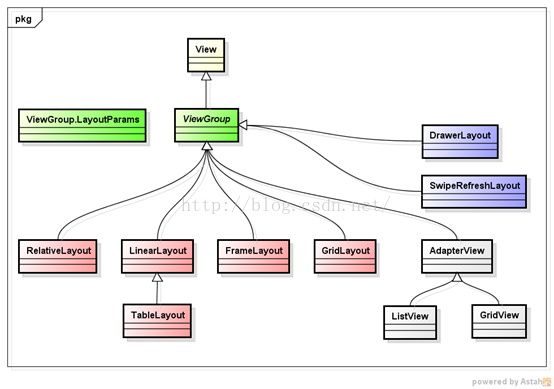 Android 布局詳解:五大常用布局全面梳理
引言——概述 布局是不可見的容器(ViewGroup),用於定義 UI 的可視化結構,並透過布局參數(LayoutParams)定義子元素的尺寸與位置。 Android
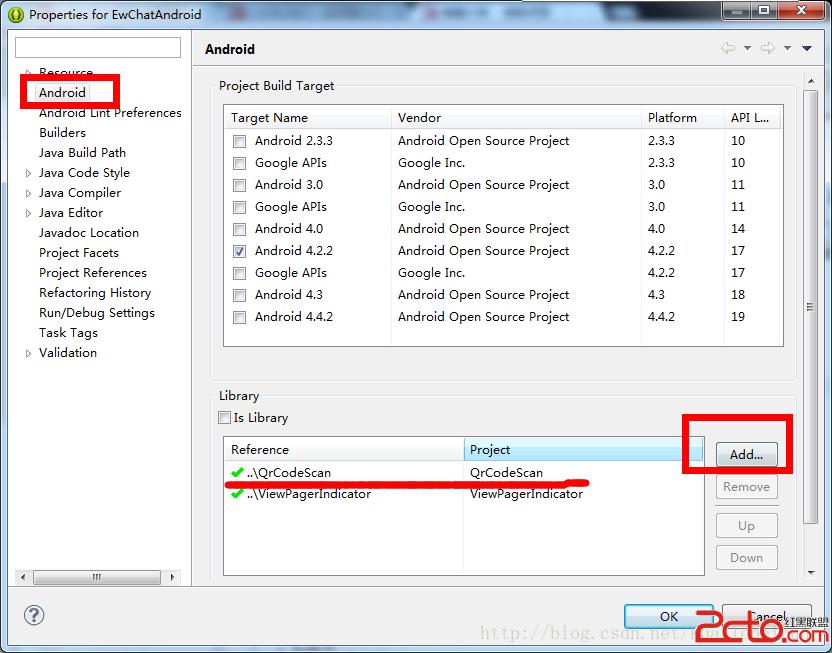 Android 外部庫引用:把 Library 項目接入主工程的完整步驟
Android 的庫項目(Library Project)是一個包含源碼和資源的項目,它可以被其他項目引用,讓引用方使用其中的代碼和資源。多個應用可以引用同一個庫,一個應