

編輯:關於 Android 程式設計
網上查了一些相關文章,自以為看懂了,但實際測試時卻和網上說的並不一樣(後來研究發現,那個人寫的是錯的)。所以在此提醒大家,要勇於質疑,勇於提出問題。
首先說明 Camera 類,它位於 android.graphics 包下,用於圖像 3D 變換,透過旋轉、偏移等方式,最終透過 getMatrix(Matrix) 方法拿到矩陣,作用於 Canvas,使得畫面呈現出立體效果。
Camera 的源碼沒什麼可看的,這裡列舉它的主要方法:
public native void save(); public native void restore(); public native void translate(float x, float y, float z); public native void rotateX(float deg); public native void rotateY(float deg); public native void rotateZ(float deg); public native void rotate(float x, float y, float z); public native float getLocationX(); public native float getLocationY(); public native float getLocationZ(); public native void setLocation(float x, float y, float z); public void getMatrix(Matrix matrix) { nativeGetMatrix(matrix.native_instance); } public void applyToCanvas(Canvas canvas) { nativeApplyToCanvas(canvas.mNativeCanvas); } public native float dotWithNormal(float dx, float dy, float dz);這些方法看起來都不難,透過字面意思可以大致了解,其中最後幾個方法目前還未研究,後面研究了補上。
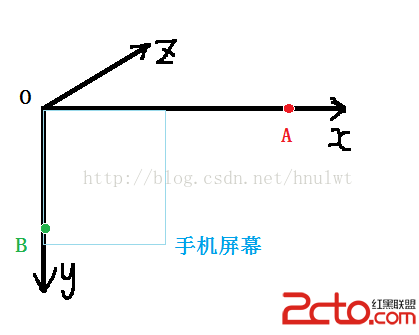
接著我們來看看 Camera 變換的幾個軸坐標。下圖才是正確的 x、y、z 軸坐標,而另一篇文章所說的左手坐標系,經過我的驗證,那個作者寫的是錯誤的。
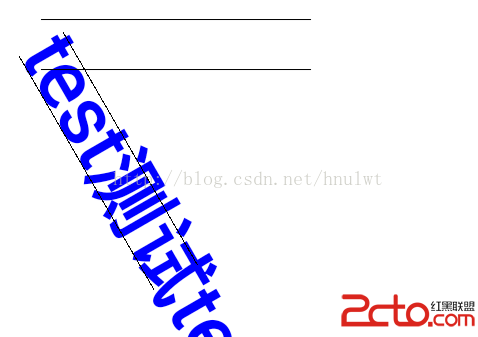
以下分別對 camera 進行不同軸向的旋轉與位移變換:
進行變換:camera.rotateX(60);

進行變換:camera.rotateY(60);

進行變換:camera.rotateZ(-60);(這裡是 -60)
translate 和 canvas 的偏移類似,這裡不再上圖示意。
 Android Activity 啟動模式:singleInstance 是什麼?
singleInstance 的核心規則 singleInstance 表示該 Activity 在系統中只能有一個實例,並且這個實例會獨自運行在一個任務棧中。這個任務棧
 Android 簡易實戰:透過廣播接收器為撥打電話加上 IP 前綴
範例目標 這篇實戰以「IP 撥號」為例,說明如何利用自定義廣播接收器,在使用者撥打電話時,於號碼前自動加上預先設定的 IP 線路。 畫面與資料保存 畫面中只需要一個輸入框
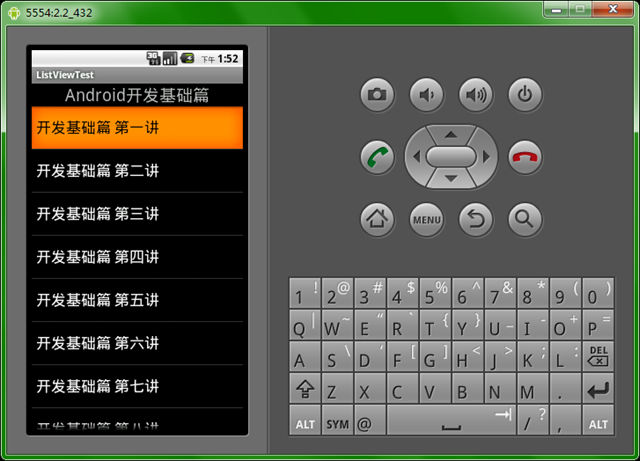 Android ListView 元件詳解與範例程式碼
Android 列表元件 ListView 列表元件是開發中經常使用的元件,使用時需要為它提供一個 Adapter,由 Adapter 決定顯示樣式與資料來源。 以下看一
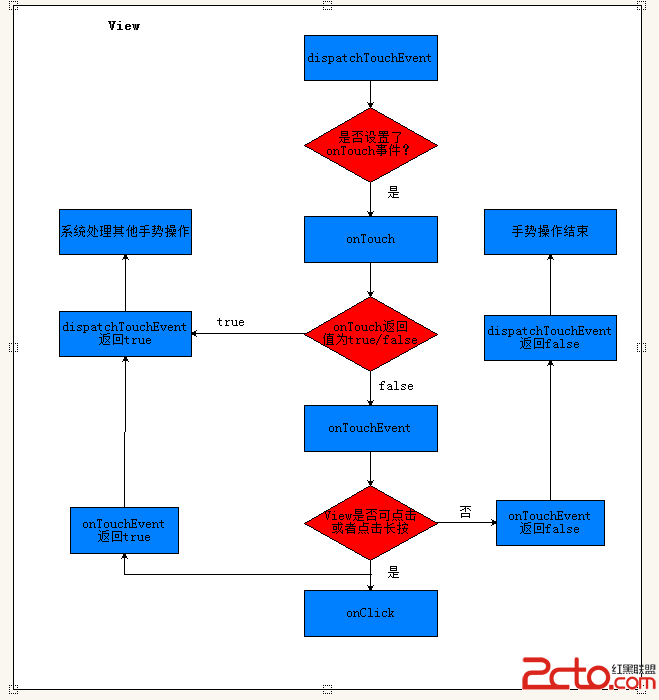 從源碼看 Android View 的觸摸事件傳遞機制
以現在的眼光回頭看早年寫的博客,總覺得寫得粗糙;說不定一段時間之後再看今天寫的東西,又會有同樣的感想。所以還是得不停地學、不停地推翻自己。 為什麼要重寫這篇 之前寫過一篇