

編輯:關於 Android 程式設計
在此前的《Android 大圖加載內存優化》一文中,講解了加載圖片時如何避免直接加載原圖、如何預估圖片尺寸,從而在內存中加載合適大小的圖片以防止 OOM。本文則著重探討圖片文件的本地緩存問題。網絡圖片只有經過本地緩存,才能提升資源的訪問速度;而內存緩存也必須配合存儲卡緩存,才能充分發揮優勢。本文採用 LRU 本地緩存策略,由於側重於文件緩存,暫未引入內存緩存,後續將在系列文章中不斷完善整個項目。
在圖片加載中,網絡圖片的本地緩存同樣是關鍵一步。由於緩存文件往往不知道該在何時刪除,因此需要一套合理的本地緩存策略,避免圖片文件無限占用存儲空間而造成浪費。LRU(Least Recently Used,最近最少使用)算法在計算機操作系統的任務調度中被廣泛應用,通俗地講,就是把最長時間未被使用的資源優先級降到最低,優先保證使用頻率高的資源。
先增加一個配置類,用於設置緩存位置、大小等參數,後續擴展也都在此進行:
/**
 * Created by CJstar on 15/8/24.
 */
public final class FileCacheOptions {
    private String cacheRootPath;      // 緩存根路徑
    private int maxFileCount;          // 緩存文件數量
    private int maxCacheSize;          // 緩存最大容量(字節)
    private boolean isUseFileCache = true; // 是否啟用文件緩存

    public String getCacheRootPath() { return cacheRootPath; }
    public void setCacheRootPath(String cacheRootPath) { this.cacheRootPath = cacheRootPath; }
    public int getMaxFileCount() { return maxFileCount; }
    public void setMaxFileCount(int maxFileCount) { this.maxFileCount = maxFileCount; }
    public int getMaxCacheSize() { return maxCacheSize; }
    public void setMaxCacheSize(int maxCacheSize) { this.maxCacheSize = maxCacheSize; }
    public boolean isUseFileCache() { return isUseFileCache; }
    public void setIsUseFileCache(boolean isUseFileCache) { this.isUseFileCache = isUseFileCache; }

    private FileCacheOptions(Builder builder) {
        setCacheRootPath(builder.getCacheRootPath());
        setIsUseFileCache(builder.isUseFileCache());
        setMaxCacheSize(builder.getMaxCacheSize());
        setMaxFileCount(builder.getMaxFileCount());
    }

    /** 通過 Builder 創建配置對象 */
    public static class Builder {
        private String cacheRootPath;
        private int maxFileCount;
        private int maxCacheSize;
        private boolean isUseFileCache;

        public Builder() { }

        public String getCacheRootPath() { return cacheRootPath; }
        public Builder setCacheRootPath(String cacheRootPath) {
            this.cacheRootPath = cacheRootPath;
            return this;
        }
        public int getMaxFileCount() { return maxFileCount; }
        public Builder setMaxFileCount(int maxFileCount) {
            this.maxFileCount = maxFileCount;
            return this;
        }
        public int getMaxCacheSize() { return maxCacheSize; }
        public Builder setMaxCacheSize(int maxCacheSize) {
            this.maxCacheSize = maxCacheSize;
            return this;
        }
        public boolean isUseFileCache() { return isUseFileCache; }
        public Builder setIsUseFileCache(boolean isUseFileCache) {
            this.isUseFileCache = isUseFileCache;
            return this;
        }
        public FileCacheOptions builder() {
            return new FileCacheOptions(this);
        }
    }
}
接著是核心的緩存處理類,實現了文件的增刪查、LRU 淘汰以及剩餘空間檢測:
/**
 * Created by CJstar on 15/8/24.
 */
public class LRUFileCache implements FileCache {
    private FileCacheOptions options;                     // 緩存配置
    private static final String WHOLESALE_CONV = ".cach"; // 緩存文件後綴
    private static final int FREE_SD_SPACE_NEEDED_TO_CACHE = 10 * 1024 * 1024; // 最小可用空間
    private static LRUFileCache mLRUFileCache;

    public static LRUFileCache getInstance() {
        if (mLRUFileCache == null) {
            synchronized (LRUFileCache.class) {
                if (mLRUFileCache == null) {
                    mLRUFileCache = new LRUFileCache();
                }
            }
        }
        return mLRUFileCache;
    }

    public void setFileLoadOptions(FileCacheOptions options) {
        this.options = options;
    }

    /** 使用默認配置 */
    private LRUFileCache() {
        this.options = new FileCacheOptions.Builder()
                .setCacheRootPath("FileCache")
                .setIsUseFileCache(true)
                .setMaxCacheSize(10 * 1024 * 1024)// 10MB
                .setMaxFileCount(100)
                .builder();
    }

    @Override
    public void addDiskFile(String key, InputStream inputStream) {
        if (TextUtils.isEmpty(key) || inputStream == null) {
            return;
        }
        String filename = convertUrlToFileName(key);
        String dir = options.getCacheRootPath();
        File dirFile = new File(dir);
        if (!dirFile.exists()) dirFile.mkdirs();
        File file = new File(dir + "/" + filename);
        OutputStream outStream;
        try {
            if (file.exists()) {
                file.delete();
            }
            file.createNewFile();
            outStream = new FileOutputStream(file);
            while (inputStream.available() != 0) {
                outStream.write(inputStream.read());
            }
            outStream.flush();
            outStream.close();
            inputStream.close();
        } catch (Throwable e) {
            Log.w("LRUFileCache", e.getMessage());
        }
        // 每添加一個新文件後都檢查並釋放空間
        freeSpaceIfNeeded();
    }

    @Override
    public File getDiskFile(String key) {
        File file = new File(getFilePathByKey(key));
        if (file != null && file.exists()) {
            updateFileTime(file);
        } else {
            file = null;
        }
        return file;
    }

    @Override
    public boolean isExist(String key) {
        if (URLUtil.isNetworkUrl(key)) {
            return new File(options.getCacheRootPath() + "/" + convertUrlToFileName(key)).exists();
        } else if (URLUtil.isFileUrl(key)) {
            return new File(key).exists();
        } else {
            return false;
        }
    }

    @Override
    public void removeDiskFile(String key) {
        File file = getDiskFile(key);
        if (file != null && file.exists()) {
            file.delete();
        }
    }

    @Override
    public void removeAllDiskFiles() {
        new File(options.getCacheRootPath()).delete();
    }

    /** 釋放長期未使用的文件 */
    private void freeSpaceIfNeeded() {
        File dir = new File(options.getCacheRootPath());
        File[] files = dir.listFiles();
        if (files == null) {
            return;
        }
        int dirSize = 0;
        for (int i = 0; i < files.length; i++) {
            if (files[i].getName().contains(WHOLESALE_CONV)) {
                dirSize += files[i].length();
            }
        }
        // 若目錄超過最大容量,或SD卡可用空間不足10MB,則按LRU釋放40%空間
        if (dirSize > options.getMaxCacheSize() || FREE_SD_SPACE_NEEDED_TO_CACHE > freeSpaceOnSd()) {
            int removeFactor = (int) ((0.4 * files.length) + 1);
            Arrays.sort(files, new FileLastModifSort());
            for (int i = 0; i < removeFactor; i++) {
                if (files[i].getName().contains(WHOLESALE_CONV)) {
                    files[i].delete();
                }
            }
        }
        // 若文件數量超過上限,刪除多出的部分
        if (files.length > options.getMaxFileCount()) {
            Arrays.sort(files, new FileLastModifSort());
            for (int i = options.getMaxFileCount(); i < files.length; i++) {
                if (files[i].getName().contains(WHOLESALE_CONV)) {
                    files[i].delete();
                }
            }
        }
    }

    /** 更新文件的最後修改時間 */
    public void updateFileTime(File file) {
        if (file != null && file.exists()) {
            long newModifiedTime = System.currentTimeMillis();
            file.setLastModified(newModifiedTime);
        }
    }

    /** 獲取SD卡剩餘空間 */
    private int freeSpaceOnSd() {
        StatFs stat = new StatFs(Environment.getExternalStorageDirectory().getPath());
        double sdFreeMB = ((double) stat.getAvailableBlocks() * (double) stat.getBlockSize());
        return (int) sdFreeMB;
    }

    /** 根據url獲取文件名 */
    private String convertUrlToFileName(String url) {
        String[] strs = url.split("/");
        return strs[strs.length - 1] + WHOLESALE_CONV;
    }

    public String getFilePathByKey(String key) {
        if (URLUtil.isFileUrl(key)) {
            return key;
        } else if (URLUtil.isNetworkUrl(key)) {
            return options.getCacheRootPath() + "/" + convertUrlToFileName(key);
        } else {
            return null;
        }
    }

    /** 按修改時間排序的比較器 */
    private class FileLastModifSort implements Comparator<File> {
        public int compare(File arg0, File arg1) {
            if (arg0.lastModified() > arg1.lastModified()) {
                return 1;
            } else if (arg0.lastModified() == arg1.lastModified()) {
                return 0;
            } else {
                return -1;
            }
        }
    }
}
通過這套機制,緩存目錄始終維持在可控的大小與數量範圍內,既提升了圖片加載效率,又避免了存儲空間被無限占用。
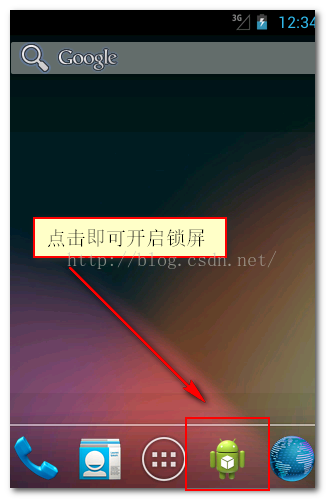 Android 簡易實戰教程——第六話《開發一鍵鎖屏應用(完成篇)》
上一篇留下兩個尾巴:一是仍然無法卸載;二是必須手動點開 App 再點按鈕才能鎖屏,操作太繞。 這篇把兩個問題都解決掉。 一、解決無法卸載的問題 在清單文件中,再配置一個「
 Android 多線程性能優化(一):從 Thread 到 UI 線程與 AsyncTask
原生 Thread 的問題在 Android 中直接建立 Thread 很直觀,但也很難管理。若任務耗時,沒有句柄就無法中止;若線程是 Activity 的內部類,又可能
 用 NineOldAndroids 實作絢麗的 ListView 左右滑動刪除效果
今天繼續帶來自訂控制項的實作——為 ListView 加上左右滑動刪除 Item 的效果。之前曾用 Scroller 類別實作過類似功能,但借鏡通知欄的滑動刪除後,我發現
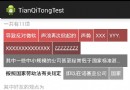 Android 如何實現投票/觀點表達界面:標籤流式佈局與狀態切換
先上效果圖: 這個界面有兩個核心技術點:一是把一堆「觀點標籤」按屏幕寬度自動換行排列;二是點擊後有按下態的視覺反饋。 一、容器:一個豎向 LinearLayout