

編輯:關於 Android 程式設計
在圖表類需求裡,最常見的莫過於折線圖、柱形圖與餅圖。上周已分享過柱形圖的實作,而項目裡其實還用到餅圖,只是沒機會用折線圖。其實學會其中一個,再寫其他的大致也就知道該怎麼下手——原理都是自己繪制圖形,再透過獲取觸摸位置判定點擊事件。
廢話不多說,先看今天的餅圖效果:
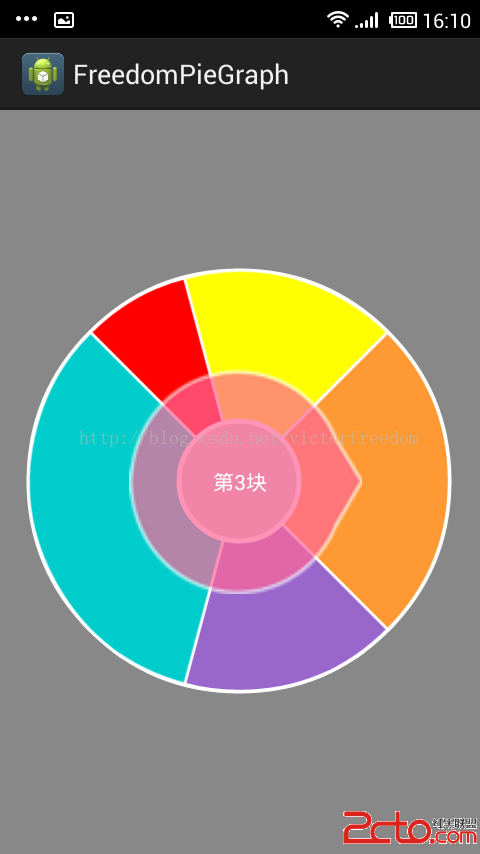
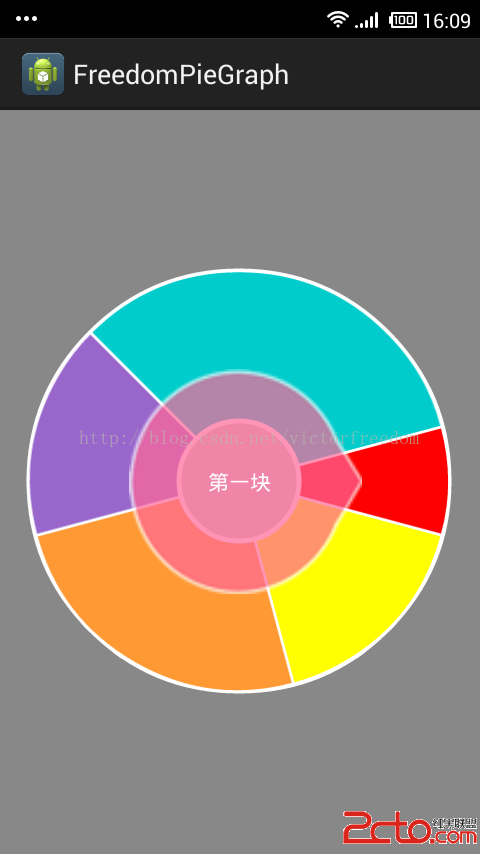
這次同樣是從項目中抽離出來的,註釋會比上次柱形圖更詳細,方便有興趣的朋友一起學習。圖中那個圓形指向箭頭並不屬於餅圖本身,是在布局文件中為了美化另外加上去的,感興趣可以下載完整項目研究。
以下直接貼出自定義餅圖的核心代碼,同時支援 XML 構造與 new 構造:
package com.freedom.piegraph;

import android.annotation.SuppressLint;
import android.content.Context;
import android.content.res.TypedArray;
import android.graphics.Canvas;
import android.graphics.Color;
import android.graphics.Paint;
import android.graphics.RectF;
import android.os.Handler;
import android.util.AttributeSet;
import android.view.MotionEvent;
import android.view.View;

/**
 * 自定義餅狀圖
 */
@SuppressLint("DrawAllocation")
public class PiegraphView extends View implements Runnable {
    private float moveSpeed = 3.0F;      // 動畫速度
    private double total;                // 總數值
    private Double[] itemValuesTemp;     // 各餅塊數值(臨時)
    private Double[] itemsValues;        // 各餅塊數值
    private String[] itemColors;         // 各餅塊顏色
    private float[] itemsAngle;          // 各餅塊角度
    private float[] itemsStartAngle;     // 各餅塊起始角度
    private float[] itemsPercent;        // 各餅塊占比
    private float rotateStartAng = 0.0F; // 旋轉起始角度
    private float rotateEndAng = 0.0F;   // 旋轉結束角度
    private boolean isClockWise;         // 正轉或反轉
    private boolean isRotating;          // 是否正在旋轉
    private boolean isAnimEnabled = true;// 是否開啟動畫
    private String loopStrokeColor;      // 邊緣圓環顏色
    private float strokeWidth = 0.0F;    // 圓環寬度
    private float radius;                // 餅圖半徑(不含圓環)
    private int itemPostion = -1;        // 當前 item 位置
    private int stopPosition = 0;        // 停靠位置

    public static final int TO_RIGHT  = 0;
    public static final int TO_BOTTOM = 1;
    public static final int TO_LEFT   = 2;
    public static final int TO_TOP    = 3;

    // 默認調色板
    private final String[] DEFAULT_ITEMS_COLORS = {
        "#FF0000", "#FFFF01", "#FF9933", "#9967CC", "#00CCCC",
        "#00CC33", "#0066CC", "#FF6799", "#99FF01", "#FF67FF",
        "#4876FF", "#FF00FF", "#FF83FA", "#0000FF", "#363636",
        "#FFDAB9", "#90EE90", "#8B008B", "#00BFFF", "#FFFF00",
        "#00FF00", "#006400", "#00FFFF", "#668B8B", "#000080",
        "#008B8B" };

    private Handler piegraphHandler = new Handler();
    private OnPiegraphItemSelectedListener itemSelectedListener;

    public PiegraphView(Context context, String[] itemColors, Double[] itemSizes,
            float total, int radius, int strokeWidth, String strokeColor,
            int stopPosition, int separateDistence) {
        super(context);
        this.stopPosition = stopPosition;
        if (itemSizes != null && itemSizes.length > 0) {
            itemValuesTemp = itemSizes;
            this.total = total;
            reSetTotal();
            refreshItemsAngs();
        }
        this.radius = radius < 0 ? 100.0F : radius;
        this.strokeWidth = strokeWidth < 0 ? 2 : strokeWidth;
        loopStrokeColor = strokeColor;
        if (itemColors == null) {
            setDefaultColor();
        } else if (itemColors.length < itemSizes.length) {
            itemColors = itemColors;
            setDifferentColor();
        } else {
            this.itemColors = itemColors;
        }
        invalidate();
    }

    public PiegraphView(Context context, AttributeSet attrs) {
        super(context, attrs);
        loopStrokeColor = "#000000";
        TypedArray a = context.obtainStyledAttributes(attrs, R.styleable.PiegraphView);
        radius = ScreenUtil.dip2px(getContext(),
                a.getFloat(R.styleable.PiegraphView_radius, 100));
        strokeWidth = ScreenUtil.dip2px(getContext(),
                a.getFloat(R.styleable.PiegraphView_strokeWidth, 2));
        moveSpeed = a.getFloat(R.styleable.PiegraphView_moveSpeed, 5);
        if (moveSpeed < 1F) moveSpeed = 1F;
        if (moveSpeed > 5.0F) moveSpeed = 5.0F;
        invalidate();
        a.recycle();
    }

    // ---- 一組 getter/setter:半徑、圓環寬度與顏色、餅塊顏色與數值、總值、動畫開關 ----
    // setRaduis / setStrokeWidth / setStrokeColor / setitemColors
    // setitemsValues / setTotal / setAnimEnabled / setmoveSpeed

    /** 旋轉到指定位置的 item */
    public void setShowItem(int position, boolean anim) {
        if (itemsValues != null && position < itemsValues.length && position >= 0) {
            rotateEndAng = getLastrotateStartAngle(position);
            itemPostion = position;
            if (anim) {
                rotateStartAng = 0.0F;
                isClockWise = rotateEndAng > 0.0F;
                isRotating = true;
            } else {
                rotateStartAng = rotateEndAng;
            }
            if (null != itemSelectedListener) {
                itemSelectedListener.onPieChartItemSelected(position,
                        itemColors[position], itemsValues[position],
                        itemsPercent[position],
                        getAnimTime(Math.abs(rotateEndAng - rotateStartAng)));
            }
            piegraphHandler.postDelayed(this, 1L);
        }
    }

    private float getLastrotateStartAngle(int position) {
        float result = itemsStartAngle[position] + itemsAngle[position] / 2.0F
                + getstopPositionAngle();
        if (result >= 360.0F) result -= 360.0F;
        if (result <= 180.0F) result = -result;
        else result = 360.0F - result;
        return result;
    }

    private float getstopPositionAngle() {
        switch (stopPosition) {
            case TO_RIGHT:  return 0.0F;
            case TO_LEFT:   return 180.0F;
            case TO_TOP:    return 90.0F;
            case TO_BOTTOM: return 270.0F;
        }
        return 0.0F;
    }

    /** 依占比初始化各餅塊的角度與起始角 */
    private void refreshItemsAngs() {
        if (itemValuesTemp != null && itemValuesTemp.length > 0) {
            if (getTotal() > getAllSizes()) {
                itemsValues = new Double[itemValuesTemp.length + 1];
                for (int i = 0; i < itemValuesTemp.length; i++) {
                    itemsValues[i] = itemValuesTemp[i];
                }
                itemsValues[itemsValues.length - 1] = getTotal() - getAllSizes();
            } else {
                itemsValues = new Double[itemValuesTemp.length];
                itemsValues = itemValuesTemp;
            }
            itemsPercent = new float[itemsValues.length];
            itemsStartAngle = new float[itemsValues.length];
            itemsAngle = new float[itemsValues.length];

            for (int i = 0; i < itemsValues.length; i++) {
                itemsPercent[i] = (float) (itemsValues[i] * 1.0D / getTotal());
            }
            float startAngle = 0.0F;
            for (int i = 0; i < itemsPercent.length; i++) {
                itemsAngle[i] = 360.0F * itemsPercent[i];
                if (i != 0) {
                    itemsStartAngle[i] = startAngle + itemsAngle[i - 1];
                    startAngle = 360.0F * itemsPercent[i - 1] + startAngle;
                } else {
                    // Android 默認起始位置在右側水平方向
                    itemsStartAngle[i] = -itemsAngle[i] / 2;
                    startAngle = itemsStartAngle[i];
                }
            }
        }
    }

    @Override
    protected void onDraw(Canvas canvas) {
        super.onDraw(canvas);
        float realRadius = radius + strokeWidth;
        Paint paint = new Paint();
        paint.setAntiAlias(true);
        float lineLength = 2.0F * radius + strokeWidth;

        if (strokeWidth != 0.0F) {
            paint.setStyle(Paint.Style.STROKE);
            paint.setColor(Color.parseColor(loopStrokeColor));
            paint.setStrokeWidth(strokeWidth);
            canvas.drawCircle(realRadius, realRadius, realRadius - 5, paint);
        }

        if (itemsAngle != null && itemsStartAngle != null) {
            canvas.rotate(rotateStartAng, realRadius, realRadius);
            RectF oval = new RectF(strokeWidth, strokeWidth, lineLength, lineLength);
            for (int i = 0; i < itemsAngle.length; i++) {
                oval = new RectF(strokeWidth, strokeWidth, lineLength, lineLength);
                paint.setStyle(Paint.Style.FILL);
                paint.setColor(Color.parseColor(itemColors[i]));
                canvas.drawArc(oval, itemsStartAngle[i], itemsAngle[i], true, paint);
                // 白色描邊分隔各扇區
                paint.setStyle(Paint.Style.STROKE);
                paint.setStrokeWidth(strokeWidth / 2);
                paint.setColor(Color.WHITE);
                canvas.drawArc(oval, itemsStartAngle[i], itemsAngle[i], true, paint);
            }
        }

        // 中心小圓
        paint.setStyle(Paint.Style.FILL);
        paint.setColor(Color.LTGRAY);
        canvas.drawCircle(realRadius, realRadius, ScreenUtil.dip2px(getContext(), 40), paint);
        paint.setStyle(Paint.Style.STROKE);
        paint.setColor(Color.WHITE);
        paint.setStrokeWidth(strokeWidth);
        canvas.drawCircle(realRadius, realRadius, ScreenUtil.dip2px(getContext(), 40), paint);
    }

    @Override
    public boolean onTouchEvent(MotionEvent event) {
        if (!isRotating && itemsValues != null && itemsValues.length > 0) {
            if (event.getAction() == MotionEvent.ACTION_DOWN) {
                float x1 = event.getX();
                float y1 = event.getY();
                float r = radius + strokeWidth;
                // 判斷是否落在圓內
                if ((x1 - r) * (x1 - r) + (y1 - r) * (y1 - r) - r * r <= 0.0F) {
                    int position = getShowItem(getTouchedPointAngle(r, r, x1, y1));
                    setShowItem(position, isAnimEnabled());
                }
            }
        }
        return super.onTouchEvent(event);
    }

    /** 計算觸摸點對應的角度 */
    private float getTouchedPointAngle(float radiusX, float radiusY, float x1, float y1) {
        float differentX = x1 - radiusX;
        float differentY = y1 - radiusY;
        double a = 0.0D;
        double t = differentY / Math.sqrt(differentX * differentX + differentY * differentY);
        if (differentX > 0.0F) {
            a = (differentY > 0.0F) ? 6.283185307179586D - Math.asin(t) : -Math.asin(t);
        } else {
            a = 3.141592653589793D + Math.asin(t);
        }
        return (float) (360.0D - a * 180.0D / 3.141592653589793D % 360.0D);
    }

    /** 依觸摸角度找出所屬扇區 */
    private int getShowItem(float touchAngle) {
        for (int i = 0; i < itemsStartAngle.length; i++) {
            if (i != itemsStartAngle.length - 1) {
                if (touchAngle >= itemsStartAngle[i]
                        && touchAngle < itemsStartAngle[i + 1]) {
                    return i;
                }
            } else if (touchAngle > itemsStartAngle[itemsStartAngle.length - 1]
                    || touchAngle < itemsStartAngle[0]) {
                return itemsValues.length - 1;
            } else {
                return getPointItem(itemsStartAngle);
            }
        }
        return 0;
    }

    @Override
    protected void onDetachedFromWindow() {
        super.onDetachedFromWindow();
        piegraphHandler.removeCallbacks(this);
    }

    @Override
    protected void onMeasure(int widthMeasureSpec, int heightMeasureSpec) {
        super.onMeasure(widthMeasureSpec, heightMeasureSpec);
        float widthHeight = 2.0F * (radius + strokeWidth + 1.0F);
        setMeasuredDimension((int) widthHeight, (int) widthHeight);
    }

    /** 旋轉動畫 */
    public void run() {
        if (isClockWise) {
            rotateStartAng += moveSpeed;
            invalidate();
            piegraphHandler.postDelayed(this, 10L);
            if (rotateStartAng - rotateEndAng >= 0.0F) {
                rotateStartAng = 0.0F;
                piegraphHandler.removeCallbacks(this);
                resetStartAngle(rotateEndAng);
                isRotating = false;
            }
        } else {
            rotateStartAng -= moveSpeed;
            invalidate();
            piegraphHandler.postDelayed(this, 10L);
            if (rotateStartAng - rotateEndAng <= 0.0F) {
                rotateStartAng = 0.0F;
                piegraphHandler.removeCallbacks(this);
                resetStartAngle(rotateEndAng);
                isRotating = false;
            }
        }
    }

    private void resetStartAngle(float angle) {
        for (int i = 0; i < itemsStartAngle.length; i++) {
            float newStartAngle = itemsStartAngle[i] + angle;
            if (newStartAngle < 0.0F) itemsStartAngle[i] = newStartAngle + 360.0F;
            else if (newStartAngle > 360.0F) itemsStartAngle[i] = newStartAngle - 360.0F;
            else itemsStartAngle[i] = newStartAngle;
        }
    }

    private void setDefaultColor() {
        if (itemsValues != null && itemsValues.length > 0 && itemColors == null) {
            itemColors = new String[itemsValues.length];
            if (itemColors.length <= DEFAULT_ITEMS_COLORS.length) {
                System.arraycopy(DEFAULT_ITEMS_COLORS, 0, itemColors, 0, itemColors.length);
            } else {
                int multiple = itemColors.length / DEFAULT_ITEMS_COLORS.length;
                int difference = itemColors.length % DEFAULT_ITEMS_COLORS.length;
                for (int a = 0; a < multiple; a++) {
                    System.arraycopy(DEFAULT_ITEMS_COLORS, 0, itemColors,
                            a * DEFAULT_ITEMS_COLORS.length, DEFAULT_ITEMS_COLORS.length);
                }
                if (difference > 0) {
                    System.arraycopy(DEFAULT_ITEMS_COLORS, 0, itemColors,
                            multiple * DEFAULT_ITEMS_COLORS.length, difference);
                }
            }
        }
    }

    private void reSetTotal() {
        double totalSizes = getAllSizes();
        if (getTotal() < totalSizes) total = totalSizes;
    }

    private double getAllSizes() {
        float tempAll = 0.0F;
        if (itemValuesTemp != null && itemValuesTemp.length > 0) {
            for (double itemsize : itemValuesTemp) {
                tempAll += itemsize;
            }
        }
        return tempAll;
    }

    public void setItemSelectedListener(OnPiegraphItemSelectedListener l) {
        this.itemSelectedListener = l;
    }
}
自定義 View 專題的報表類控件到這裡就講完了。我沒寫過自定義折線圖,但學會這兩個圖形之後,再自己寫折線圖應該也不難。
後續還有兩期自定義 View 專題:一期是關於自定義 GridView(可拖動 GridView,但不是網上常見的那種拖動 item,而是把 item 裡的內容拖動切換位置),另一期是關於自定義 ViewGroup(類似線性布局、相對布局那種,可以往裡面添加控件)。希望對看到這篇文章的人有所幫助。
 Android 架構模式解析:MVC 與 MVP 如何選擇
為什麼 Android 專案需要關注架構許多開發者在剛開始建立 Android 應用時,會把邏輯、資料請求與畫面更新都寫在 Activity 或 Fragment 中。短
 Android 屬性動畫完全解析:從 ValueAnimator 到 ViewPropertyAnimator
一、什麼是屬性動畫 屬性動畫(Property Animation)是 Android 3.0 才引入的動畫框架。它與早期的補間動畫(View Animation / T
 深入解析 Android Service 的概念、生命週期與通訊
Service 是 Android 四大元件之一,是一種在後台執行、不與使用者直接互動的服務。它沒有介面,卻能在應用退出後依然存活,因而廣泛應用於音樂播放、資料定時更新等
 無線點餐系統:使用者登入的客戶端與伺服器端實作
無線點餐系統的登入功能,需要同時設計伺服器端與 Android 客戶端。伺服器端負責驗證帳號密碼,客戶端則透過 HTTP 送出請求並顯示結果。 伺服器端 可使用 Jav