

編輯:關於 Android 程式設計
Activity 之間傳字串、傳基本型別很簡單,但要在頁與頁之間搬運自訂物件,就需要序列化的幫忙。以下用一個 People 類作為示範,裡面有姓名與年齡兩個欄位。
public class People {
    public String strName;
    public int iAge;

    public People(String strName, int iAge) {
        this.strName = strName;
        this.iAge = iAge;
    }

    public String getName() { return strName; }
    public int getAge() { return iAge; }
}
前提很簡單,讓類別實作 Serializable 介面即可:
public class People implements Serializable {
    private static final long serialVersionUID = 1L;
    public String strName;
    public int iAge;

    public People(String strName, int iAge) {
        this.strName = strName;
        this.iAge = iAge;
    }

    public String getName() { return strName; }
    public int getAge() { return iAge; }
}
發送端:
People people = new People("John", 21);
Intent intent = new Intent(SendActivity.this, RcvActivity.class);
Bundle bundle = new Bundle();
bundle.putSerializable("people", people);
intent.putExtras(bundle);
startActivity(intent);
接收端:
People people = (People) this.getIntent().getSerializableExtra("people");
String strData = people.getName() + " " + people.getAge();
Toast.makeText(getApplication(), strData, Toast.LENGTH_SHORT).show();
發送端:
List<People> people = new ArrayList<People>();
people.add(new People("John", 21));
people.add(new People("Amy", 20));

Bundle bundle = new Bundle();
bundle.putSerializable("people", (Serializable) people);
Intent intent = new Intent(SendActivity.this, RcvActivity.class);
intent.putExtras(bundle);
startActivity(intent);
接收端:
List<People> resultList = (List<People>) this.getIntent().getSerializableExtra("people");
String strData = "";
for (People p : resultList) {
    strData = strData + p.strName + " " + p.iAge + "\n";
}
Toast.makeText(getApplication(), strData, Toast.LENGTH_SHORT).show();
Parcelable 是 Android 專屬機制,效能明顯優於 Serializable,代價是要多寫一些樣板程式碼。
public class People implements Parcelable {
    public String strName;
    public int iAge;

    public People(String strName, int iAge) {
        this.strName = strName;
        this.iAge = iAge;
    }

    public String getName() { return strName; }
    public int getAge() { return iAge; }

    @Override
    public int describeContents() {
        return 0;
    }

    @Override
    public void writeToParcel(Parcel parcel, int arg1) {
        parcel.writeString(strName);
        parcel.writeInt(iAge);
    }

    public static final Parcelable.Creator<People> CREATOR = new Creator<People>() {
        public People createFromParcel(Parcel source) {
            People pTemp = new People("", 0);
            pTemp.strName = source.readString();
            pTemp.iAge = source.readInt();
            return pTemp;
        }

        public People[] newArray(int size) {
            return new People[size];
        }
    };
}
發送端:
People people = new People("John", 21);
Intent intent = new Intent(SendActivity.this, RcvActivity.class);
Bundle bundle = new Bundle();
bundle.putParcelable("people", people);
intent.putExtras(bundle);
startActivity(intent);
接收端:
People people = (People) this.getIntent().getParcelableExtra("people");
String strData = people.getName() + " " + people.getAge();
Toast.makeText(getApplication(), strData, Toast.LENGTH_SHORT).show();
發送端:
List<People> peopleList = new ArrayList<People>();
peopleList.add(new People("John", 21));
peopleList.add(new People("Amy", 20));

Intent intent = new Intent(SendActivity.this, RcvActivity.class);
Bundle bundle = new Bundle();
bundle.putParcelableArrayList("People", (ArrayList<? extends Parcelable>) peopleList);
intent.putExtras(bundle);
startActivity(intent);
接收端:
List<People> resultList = this.getIntent().getExtras().getParcelableArrayList("People");
String strData = "";
for (People p : resultList) {
    strData = strData + p.strName + " " + p.iAge + "\n";
}
Toast.makeText(getApplication(), strData, Toast.LENGTH_SHORT).show();
Serializable 只需 implements Serializable,等於幫物件打個標記,序列化由系統自動完成,寫起來輕鬆。
Parcelable 除了實作介面,還必須補上 describeContents()、writeToParcel(),以及一個靜態成員 CREATOR(需實作 Parcelable.Creator)。程式碼量明顯較多。
效能上的差異才是重點:Parcelable 在記憶體中的表現優於 Serializable,因此 Android 官方推薦使用 Parcelable。此外 Serializable 序列化時會產生大量臨時物件,容易造成頻繁的 GC。
但 Parcelable 並非萬用——它依賴這種序列化方式無法保證資料的持續性,所以當你需要把資料寫到磁碟保存時,還是應該選 Serializable。
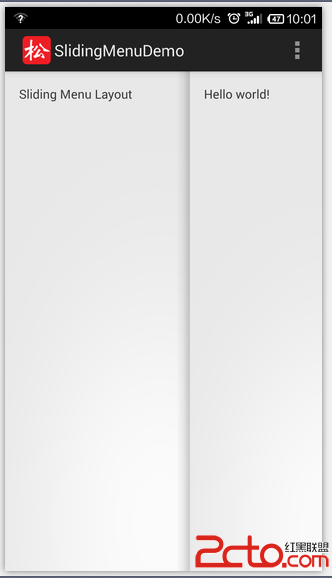 Android SlidingMenu 側滑菜單實作
SlidingMenu 是什麼 SlidingMenu 是一種常見的側滑菜單方案,使用者可從畫面左側或右側滑出設定或導覽區。許多應用會使用這種互動方式,讓主內容保持簡潔。
 Android 筆記(三):專案檔案結構逐項說明
第一次打開 Android 專案時,那一堆資料夾實在不太友善。這篇筆記把每個目錄與關鍵檔案的用途整理清楚,後續開發會順手很多。 1. src 資料夾 存放所有 Ja
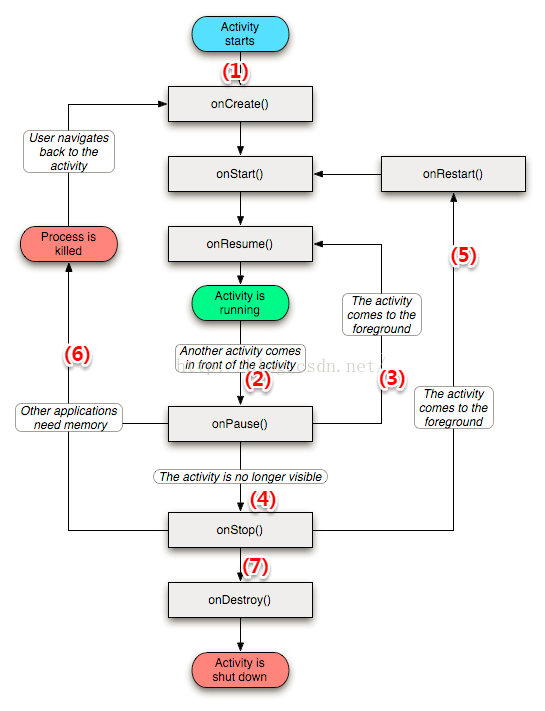 Activity 基礎全景整理:生命週期、Fragment、啟動模式與 Window/View 關係
一、Activity 生命週期 這張流程圖大家應該都不陌生。與其背誦,不如把常見操作對應到回撥鏈上來記: 操作場景回撥順序 啟動 ActivityonCreate
 Android UI 優化:用 ViewStub 實現布局延遲加載
問題場景 界面裡有些元素並不是首屏就需要:例如「展開更多篩選條件」的面板、只在特定狀態下出現的浮層、用戶點擊後才展示的詳情區塊。如果把它們和主布局一起 inflate,不