

編輯:關於 Android 程式設計
BLE 是 Bluetooth Low Energy 的縮寫,也是藍牙 4.0 規範最重要的特性。低功耗意味著裝置可以靠一顆鈕扣電池運作數年,這讓它在手錶、遙控器、醫療保健與運動感測器等領域有相當可觀的應用空間。Google 從 Android 4.3 開始提供藍牙 4.0 支援,本文以一個 demo 為入口,追一次 BLE 掃描的呼叫鏈。
public class MainActivity extends Activity {
    private static final String TAG = "BLE";
    private Button scanBtn;
    private BluetoothAdapter bluetoothAdapter;

    @Override
    protected void onCreate(Bundle savedInstanceState) {
        super.onCreate(savedInstanceState);
        setContentView(R.layout.main);
        bluetoothAdapter = BluetoothAdapter.getDefaultAdapter();
        if (!bluetoothAdapter.isEnabled()) {
            bluetoothAdapter.enable();
        }
        scanBtn = (Button) this.findViewById(R.id.btn_scan);
        scanBtn.setOnClickListener(new OnClickListener() {
            @Override
            public void onClick(View arg0) {
                if (bluetoothAdapter.isEnabled()) {
                    bluetoothAdapter.startLeScan(callback);
                }
            }
        });
    }

    private BluetoothAdapter.LeScanCallback callback = new BluetoothAdapter.LeScanCallback() {
        @Override
        public void onLeScan(BluetoothDevice device, int rssi, byte[] scanRecord) {
            Log.d(TAG, "onLeScan device = " + device + ", rssi = " + rssi
                    + ", scanRecord = " + scanRecord);
        }
    };
}
點擊按鈕即開始掃描,每發現一個裝置就會觸發 onLeScan 回呼,並從參數中取得裝置物件、訊號強度 rssi 與廣播資料 scanRecord。三項資訊各有用途:device 提供名稱與位址,rssi 可用來估算距離粗排序,scanRecord 則承載裝置廣播的服務 UUID 與自訂資料。
public boolean startLeScan(LeScanCallback callback) {
    return startLeScan(null, callback);
}
這只是轉呼同名的方法,第二個參數是 serviceUuids。
public boolean startLeScan(UUID[] serviceUuids, LeScanCallback callback) {
    if (callback == null) {
        return false;
    }
    synchronized (mLeScanClients) {
        if (mLeScanClients.containsKey(callback)) {
            // 同一個 callback 重複註冊會直接失敗
            return false;
        }
        try {
            IBluetoothGatt iGatt = mManagerService.getBluetoothGatt();
            if (iGatt == null) {
                // BLE is not supported
                return false;
            }
            UUID uuid = UUID.randomUUID();
            GattCallbackWrapper wrapper = new GattCallbackWrapper(this, callback, serviceUuids);
            iGatt.registerClient(new ParcelUuid(uuid), wrapper);
            if (wrapper.scanStarted()) {
                mLeScanClients.put(callback, wrapper);
                return true;
            }
        } catch (RemoteException e) {
            Log.e(TAG, "", e);
        }
    }
    return false;
}
這個方法需要 BLUETOOTH_ADMIN 權限。幾個值得注意的地方:
第一個參數是服務 UUID 陣列。UUID 是 Universally Unique Identifier 的縮寫,通用唯一識別碼。對藍牙裝置而言,每一項服務都有對應且唯一的 UUID,因此在同一時間同一空間,不會有兩個標識不同服務的相同 UUID。若只想掃特定服務的裝置,可以在這裡過濾,傳 null 則掃描全部。
第二個參數是前面傳進來的 LeScanCallback。
實作上會先用 mManagerService.getBluetoothGatt() 取得 GATT 介面;若為 null 代表裝置不支援 BLE,直接回傳 false。接著為這次掃描產生一個隨機 UUID,包裝成 GattCallbackWrapper 後透過 registerClient() 註冊到 GATT 服務。只有 wrapper.scanStarted() 回傳 true 時,才會把 callback 放進 mLeScanClients 這個 Map 中——這個 Map 同時肩幸亏去重的作用,避免同一個 callback 被重複註冊。
整段流程用 synchronized 包住 mLeScanClients,可見 framework 對併發狀態相當謹慎。
再往下一層就是 Binder 跨進程呼叫,進入 system_server 之後由 GATT 服務與藍牙協議堆疊接手,最終把 scan result 透過 callback 回送到應用層。掃描完成後別忘了呼叫 stopLeScan(),BLE 掃描相當耗電,長時間開著會明顯影響待機表現。
 用 ViewPager 實現 Android 應用引導頁效果
許多 App 在首次安裝打開時,都會有一組功能介紹的引導頁——就像剛裝完微信時那樣,一張張圖片滑過,底部還有一排小圓點提示目前位置。本文示範如何用 ViewPager 實
 Android 單例模式七種常見寫法與實踐要點
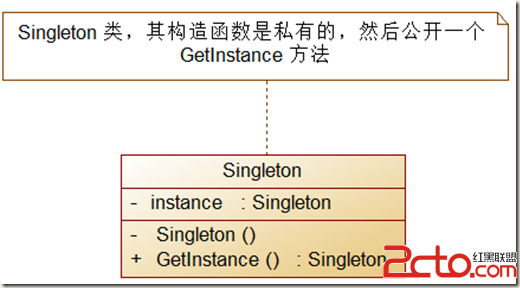
單例模式的核心價值 在 Android 開發中,單例模式常用於管理需要全域唯一且資源消耗較高的物件,例如圖片載入器、網路請求器、資料庫 helper 等。以 ImageL
 Adapter 中 EditText、CheckBox 狀態記住方案(二):內容保存與錯位修正
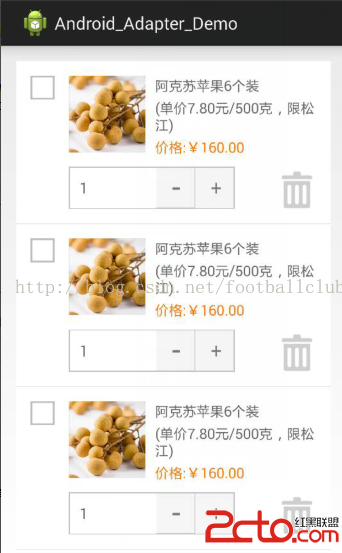
上一篇已經解決了 Adapter 中 CheckBox 記住狀態、EditText 可編輯的問題,這次則要進一步處理:如何記住 EditText 的內容,以及在點擊加減
 Android 5.x Notification 解析:普通、折疊與懸掛式通知
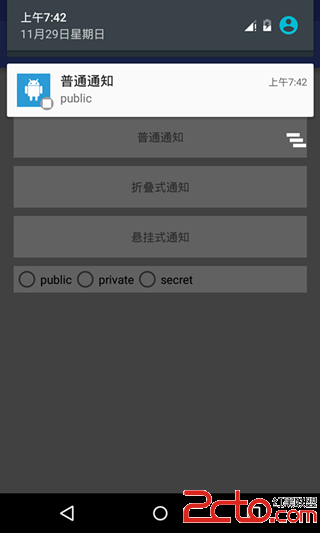
很難想像沒有 Notification 的手機生活:QQ、微信、各種 App 都靠它主動提醒我們,否則每分鐘都得自己解鎖檢查有沒有新訊息。以下介紹三種通知形式,以及 An