

編輯:關於 Android 程式設計
這個 Demo 想解決的是內網裝置之間的通訊問題。基本思路:以 servlet 伺服器作為中繼站負責資料轉發,Android 端則用常駐服務搭配定時器「模擬」長連線——每隔一段時間主動向伺服器拉一次狀態。兩台手機因此得以互相傳遞資料。
public class RunningServiceByPowerOn extends Service {

    private SharedPreferences mPreferences;

    @Override
    public IBinder onBind(Intent intent) { return null; }

    @Override
    public void onCreate() {
        super.onCreate();
        mPreferences = getSharedPreferences("Config", MODE_PRIVATE);
        timerTaskforGpsSwitch();
    }

    /** 每 5 秒查詢一次伺服器狀態 */
    private void timerTaskforGpsSwitch() {
        Timer timer = new Timer();
        Date d2 = new Date(System.currentTimeMillis());
        timer.schedule(new TimerTask() {
            @Override
            public void run() {
                String spec = "https://" + ConentValues.serverIp
                        + ":8080/MyServer/StartAction?mAction=find_gps_switcher1";
                try {
                    URL url = new URL(spec);
                    String str = HttpToServierUtils.connect(url);

                    if (str != null && str.equals("GPS_start")) {
                        // 收到指令,拉起 GPS 收集 App
                        if (mPreferences.getBoolean("isStop", true)) {
                            Intent intent = new Intent(Intent.ACTION_MAIN);
                            intent.addFlags(Intent.FLAG_ACTIVITY_NEW_TASK);
                            intent.addCategory(Intent.CATEGORY_LAUNCHER);
                            ComponentName cn = new ComponentName(
                                    "com.yqq.gpsinfolocationstartreceiver",
                                    "com.yqq.gpsinfolocationstartreceiver.MainActivity");
                            intent.setComponent(cn);
                            startActivity(intent);
                            mPreferences.edit().putBoolean("isStop", false).commit();
                        }
                    }
                    if (str != null && str.equals("GPS_stop")) {
                        mPreferences.edit().putBoolean("isStop", true).commit();
                    }
                } catch (MalformedURLException e) {
                    e.printStackTrace();
                }
            }
        }, d2, 5000);
    }
}
這個 Service 透過 LocationManager 取得位置,回呼中再用 AsyncTask 把座標送到伺服器:
public class GpsInfoCollectionService extends Service {

    private GPSinfoDao mGpSinfoDao;
    private LocationManager mLocationManager;
    private Location mLocation;
    private Criteria criteria;
    private String provider;

    @Override
    public IBinder onBind(Intent intent) { return null; }

    @Override
    public void onCreate() {
        super.onCreate();
        mLocationManager = (LocationManager) getSystemService(Context.LOCATION_SERVICE);
        criteria = new Criteria();
        criteria.setAccuracy(Criteria.ACCURACY_FINE);
        criteria.setAltitudeRequired(true);
        criteria.setBearingRequired(true);
        criteria.setCostAllowed(true);
        criteria.setPowerRequirement(Criteria.POWER_LOW);
        criteria.setSpeedRequired(true);

        // GPS 未開啟時,引導使用者去系統設定
        if (!mLocationManager.isProviderEnabled(LocationManager.GPS_PROVIDER)) {
            Toast.makeText(this, "請開啟 GPS 導航...", Toast.LENGTH_SHORT).show();
            Intent intent = new Intent(Settings.ACTION_LOCATION_SOURCE_SETTINGS);
            intent.addFlags(Intent.FLAG_ACTIVITY_NEW_TASK);
            startActivity(intent);
        }

        mGpSinfoDao = new GPSinfoDao(getApplicationContext());
        timerTaskforGpsSwitch();
    }

    @Override
    public int onStartCommand(Intent intent, int flags, int startId) {
        provider = mLocationManager.getBestProvider(criteria, true);
        mLocationManager.requestLocationUpdates(provider, 300, 0.01f, new LocationListener() {
            @Override public void onStatusChanged(String p, int s, Bundle e) {}
            @Override public void onProviderEnabled(String p) {}
            @Override public void onProviderDisabled(String p) {}

            @Override
            public void onLocationChanged(Location location) {
                if (location == null) return;
                mLocation = location;

                new AsyncTask<Void, Void, Void>() {
                    private String str = null;

                    @Override
                    protected Void doInBackground(Void... params) {
                        String height = mLocation.getAltitude() + "";
                        String longitude = mLocation.getLongitude() + "";
                        String latitude = mLocation.getLatitude() + "";
                        String name = "Test";
                        String spec = "https://" + ConentValues.serverIp
                                + ":8080/MyServer/MyTest?longitude=" + longitude
                                + "&latitude=" + latitude
                                + "&height=" + height
                                + "&name=" + name;
                        try {
                            URL url = new URL(spec);
                            str = HttpToServierUtils.connect(url);
                        } catch (MalformedURLException e) {
                            e.printStackTrace();
                        }
                        return null;
                    }

                    @Override
                    protected void onPostExecute(Void result) {
                        Toast.makeText(getApplicationContext(), str, 0).show();
                    }
                }.execute();
            }
        });
        return super.onStartCommand(intent, flags, startId);
    }

    @Override
    public void onDestroy() {
        mGpSinfoDao = null;
        mLocationManager = null;
        mLocation = null;
        super.onDestroy();
    }

    /** 每 5 秒確認是否該停止收集 */
    private void timerTaskforGpsSwitch() {
        Timer timer = new Timer();
        Date d2 = new Date(System.currentTimeMillis());
        timer.schedule(new TimerTask() {
            @Override
            public void run() {
                String spec = "https://" + ConentValues.serverIp
                        + ":8080/MyServer/MyTest?mAction=find_gps_switcher";
                try {
                    URL url = new URL(spec);
                    String str = HttpToServierUtils.connect(url);
                    if (str != null && str.equals("GPS_stop")) {
                        stopSelf();
                        System.exit(0);
                    }
                } catch (MalformedURLException e) {
                    e.printStackTrace();
                }
            }
        }, d2, 5000);
    }
}
public class MyTest extends HttpServlet {
    private GpsInfo info;

    @Override
    protected void doGet(HttpServletRequest req, HttpServletResponse resp)
            throws ServletException, IOException {
        doPost(req, resp);
    }

    @Override
    protected void doPost(HttpServletRequest req, HttpServletResponse resp)
            throws ServletException, IOException {
        req.setCharacterEncoding("UTF-8");
        resp.setContentType("text/html;charset=utf-8");
        PrintWriter out = resp.getWriter();

        String longitude = req.getParameter("longitude");
        String latitude = req.getParameter("latitude");
        String height = req.getParameter("height");
        String name = req.getParameter("name");
        String mAction = req.getParameter("mAction");

        // 定時器查詢開關狀態
        if (mAction != null && mAction.equals("find_gps_switcher")) {
            String result = DbUtis.getGPSStaus();
            if (result != null && result.equals("start_gps")) {
                out.write("GPS_start");
                out.flush();
            }
            if (result != null && result.equals("end_gps")) {
                out.write("GPS_stop");
                out.flush();
            }
        }

        // 寫入上傳的座標
        if (longitude != null && latitude != null && height != null) {
            info = new GpsInfo();
            info.setLongitude(longitude);
            info.setLatitude(latitude);
            info.setHeight(height);
            info.setName(name);
            DbUtis.insertGpsInfos(info);
            out.write("GPS 資料已上傳到伺服器");
            out.flush();
        }
    }
}
/** 處理 GPS 開關狀態的 servlet */
public class GpsOnOffAction extends HttpServlet {

    @Override
    protected void doPost(HttpServletRequest req, HttpServletResponse resp)
            throws ServletException, IOException {
        String gpsSend = req.getParameter("namegpsend");    // 開啟
        String gpsstop = req.getParameter("namegpsstop");   // 關閉
        PrintWriter out = resp.getWriter();

        if (gpsSend != null && gpsSend.equals("start_gps")) {
            out.write("終端 GPS 資訊收集開啟");
            DbUtis.deleteGpsSatus();
            DbUtis.insertGpsSatus("start_gps");
        } else if (gpsstop != null && gpsstop.equals("end_gps")) {
            out.write("終端 GPS 資訊收集關閉");
            DbUtis.deleteGpsSatus();
            DbUtis.insertGpsSatus("end_gps");
        }
        out.flush();
    }

    @Override
    protected void doGet(HttpServletRequest req, HttpServletResponse resp)
            throws ServletException, IOException {
        doPost(req, resp);
    }
}
/** 查詢 GPS 軌跡 */
public class QurAction extends HttpServlet {

    private JSONArray infos;

    @Override
    protected void doPost(HttpServletRequest req, HttpServletResponse resp)
            throws ServletException, IOException {
        String s = req.getParameter("namereq");
        PrintWriter out = resp.getWriter();

        if (s != null) {
            infos = DbUtis.getData(s);
            out.write(infos.toString());
            out.flush();
            out.close();
        }
    }

    @Override
    protected void doGet(HttpServletRequest req, HttpServletResponse resp)
            throws ServletException, IOException {
        doPost(req, resp);
    }
}
DbUtis 負責 MySQL 連線與 CRUD,這裡列出幾個關鍵方法(連線字串與帳密請依環境調整,切勿把正式憑證寫死在原始碼中):
public class DbUtis {

    private static String ip = "192.168.1.134";
    private static Connection conn;

    /** 查詢軌跡,組裝成 JSON 陣列 */
    public static JSONArray getData(String name) throws SQLException {
        JSONArray array = new JSONArray();
        PreparedStatement pstmt = null;
        ResultSet rs = null;
        try {
            Class.forName("com.mysql.jdbc.Driver");
            conn = DriverManager.getConnection("jdbc:mysql://" + ip + ":3306/test", "root", "admin");
            String sql = "select name,longitude,latitude from gpsinfos where name=?";
            pstmt = conn.prepareStatement(sql);
            pstmt.setString(1, name);
            rs = pstmt.executeQuery();
            while (rs.next()) {
                JSONObject jsonObject = new JSONObject();
                jsonObject.put("name", rs.getString("name"));
                jsonObject.put("longitude", rs.getString("longitude"));
                jsonObject.put("latitude", rs.getString("latitude"));
                array.put(jsonObject);
            }
        } catch (Exception e) {
            e.printStackTrace();
        } finally {
            if (rs != null) rs.close();
            if (pstmt != null) pstmt.close();
            if (conn != null) conn.close();
        }
        return array;
    }

    /** 讀取目前的 GPS 開關狀態 */
    public static String getGPSStaus() throws SQLException {
        String result = null;
        PreparedStatement pstmt = null;
        ResultSet rs = null;
        try {
            Class.forName("com.mysql.jdbc.Driver");
            conn = DriverManager.getConnection("jdbc:mysql://" + ip + ":3306/test", "root", "admin");
            pstmt = conn.prepareStatement("select gps_staus from gps_switcher");
            rs = pstmt.executeQuery();
            while (rs.next()) {
                result = rs.getString("gps_staus");
            }
        } catch (Exception e) {
            e.printStackTrace();
        } finally {
            if (rs != null) rs.close();
            if (pstmt != null) pstmt.close();
            if (conn != null) conn.close();
        }
        return result;
    }

    /** 寫入一筆座標 */
    public static void insertGpsInfos(GpsInfo info) throws SQLException {
        PreparedStatement pstmt = null;
        try {
            Class.forName("com.mysql.jdbc.Driver");
            conn = DriverManager.getConnection("jdbc:mysql://" + ip + ":3306/test", "root", "admin");
            String sql = "insert into gpsinfos (name,longitude,latitude) values (?,?,?)";
            pstmt = conn.prepareStatement(sql);
            pstmt.setString(1, info.getName());
            pstmt.setString(2, info.getLongitude());
            pstmt.setString(3, info.getLatitude());
            pstmt.execute();
        } catch (Exception e) {
            e.printStackTrace();
        } finally {
            if (pstmt != null) pstmt.close();
            if (conn != null) conn.close();
        }
    }

    /** 更新開關狀態 */
    public static void insertGpsSatus(String staus) throws SQLException {
        PreparedStatement pstmt = null;
        try {
            Class.forName("com.mysql.jdbc.Driver");
            conn = DriverManager.getConnection("jdbc:mysql://" + ip + ":3306/test", "root", "admin");
            pstmt = conn.prepareStatement("insert into gps_switcher (gps_staus) values (?)");
            pstmt.setString(1, staus);
            pstmt.execute();
        } catch (Exception e) {
            e.printStackTrace();
        } finally {
            if (pstmt != null) pstmt.close();
            if (conn != null) conn.close();
        }
    }

    /** 清空開關狀態 */
    public static void deleteGpsSatus() throws SQLException {
        PreparedStatement pstmt = null;
        try {
            Class.forName("com.mysql.jdbc.Driver");
            conn = DriverManager.getConnection("jdbc:mysql://" + ip + ":3306/test", "root", "admin");
            pstmt = conn.prepareStatement("delete from gps_switcher");
            pstmt.execute();
        } catch (Exception e) {
            e.printStackTrace();
        } finally {
            if (pstmt != null) pstmt.close();
            if (conn != null) conn.close();
        }
    }
}
// 終端查詢是否該啟動收集
https://{serverIp}:8080/MyServer/StartAction?mAction=find_gps_switcher1

// GPS 服務查詢是否該停止
https://{serverIp}:8080/MyServer/MyTest?mAction=find_gps_switcher

// 上報座標
https://{serverIp}:8080/MyServer/MyTest?longitude=111&latitude=222&height=1000&name=Test

// 查詢軌跡
https://{serverIp}:8080/MyServer/MyTest?namereq=Test
值得誠實指出幾點。輪詢式「模擬長連線」在實務上問題不少:5 秒一次的高頻請求既耗電又耗流量,在真實網路環境下也很容易被系統的 Doze 模式與背景執行限制掐斷。若要正式上線,應改用 Firebase Cloud Messaging 這類推送服務,或自行維持 TCP/WebSocket 長連線並處理心跳與斷線重連。
此外,把資料庫帳密寫在 servlet 原始碼中、用 GET 傳座標、以 System.exit(0) 結束服務,都是不建議帶進正式環境的寫法。將它當作理解「裝置—伺服器—裝置」資料流的教學範例,價值/), 但別直接搬上 production。
 深入解析 Android Fragment(下篇)
在上篇《深入淺析 Android Fragment(上篇)》中,我們介紹了 Fragment 的基本用法與各類 API。如果想更深入地掌握 Fragment,就接著往下看
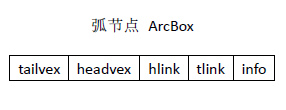 有向圖的十字鏈結串列:建圖、增刪弧與雙向遍歷輸出
本文討論有向圖的十字鏈結串列(Orthogonal List)表示法,涵蓋建圖、新增弧、刪除弧,以及以鄰接表格式輸出圖形(分為兩種視角:同尾弧串成的鏈、同頭弧串成的鏈),
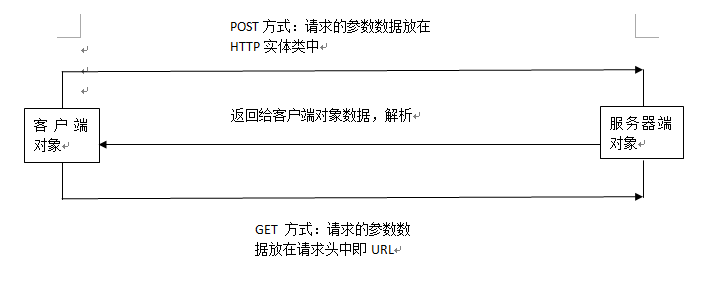 Android 客戶端 POST 請求服務端:HttpPost 與 JSON 解析
Android 客戶端與伺服器溝通時,POST 是常見方式。相較於 GET 把參數放在 URL,POST 會把資料放在請求本文中,適合傳送較長或較敏感的內容。實作時,通常
 Android RocooFix 熱修復框架詳解
本文從熱修復技術的由來講起,回顧 Facebook 的 Dalvik 補丁經驗與 dex 分包方案,最後聚焦到 QQ 空間的熱補丁思路與 RocooFix 框架的實際使用