

編輯:關於 Android 程式設計
使用 AsyncTaskLoader 時,只要手機螢幕關閉再解鎖,清單資料就會重複載入一次。這個現象看起來莫名其妙,但原因其實很單純:Loader 的生命週期回呼沒有被正確實作。
原本的寫法如下,onStartLoading() 直接無條件呼叫 forceLoad():
static class CouponShopQueryLoader extends AsyncTaskLoader<List<CouponStore>> {
    private int couponId;

    public CouponShopQueryLoader(Context context, int couponId) {
        super(context);
        this.couponId = couponId;
    }

    @Override
    protected void onStartLoading() {
        forceLoad();
    }

    @Override
    public List<CouponStore> loadInBackground() {
        // 查詢並回傳資料
    }
}
結果就是每解鎖一次,資料就重複載入一次。
翻過 CursorLoader 的源碼後才發現,問題出在自己沒有照官方範例的思維去寫。正確的版本需要多維護一份「已載入的資料」,並在停止與重置時妥善處理狀態:
static class CouponShopQueryLoader2 extends AsyncTaskLoader<List<CouponStore>> {
    private List<CouponStore> mData;
    private int couponId;

    public CouponShopQueryLoader2(Context context, int couponId) {
        super(context);
        this.couponId = couponId;
    }

    /* 在背景執行緒中執行 */
    @Override
    public List<CouponStore> loadInBackground() {
        mData = ds.queryShopByCoupon(couponId, pageNo, PAGE_SIZE);
        return mData;
    }

    /* 在 UI 執行緒中執行 */
    @Override
    public void deliverResult(List<CouponStore> data) {
        if (isReset()) {
            return;
        }
        if (isStarted()) {
            super.deliverResult(data);
        }
    }

    /* 必須在 UI 執行緒呼叫 */
    @Override
    protected void onStartLoading() {
        if (mData != null) {
            deliverResult(mData);
        }
        if (takeContentChanged() || mData == null) {
            forceLoad();
        }
    }

    @Override
    protected void onStopLoading() {
        cancelLoad();
    }

    @Override
    public void onCanceled(List<CouponStore> data) {
    }

    @Override
    protected void onReset() {
        super.onReset();
        onStopLoading();
        mData = null;
    }
}
改完之後重複載入的問題就消失了。真正的原因在於少了這一段:
@Override
protected void onStopLoading() {
    // 嘗試取消當前的載入工作
    cancelLoad();
}
流程是這樣的:螢幕關閉時系統會呼叫 onStopLoading(),此時應該主動取消進行中的載入;螢幕解鎖時則會走到 onStartLoading(),在這裡判斷手上已有的資料是否仍然有效,只有真的需要時才觸發 forceLoad()。
如果 onStartLoading() 少了這層狀態判斷,等於每次回到前台都重新打一次後端,重複載入自然無可避免。
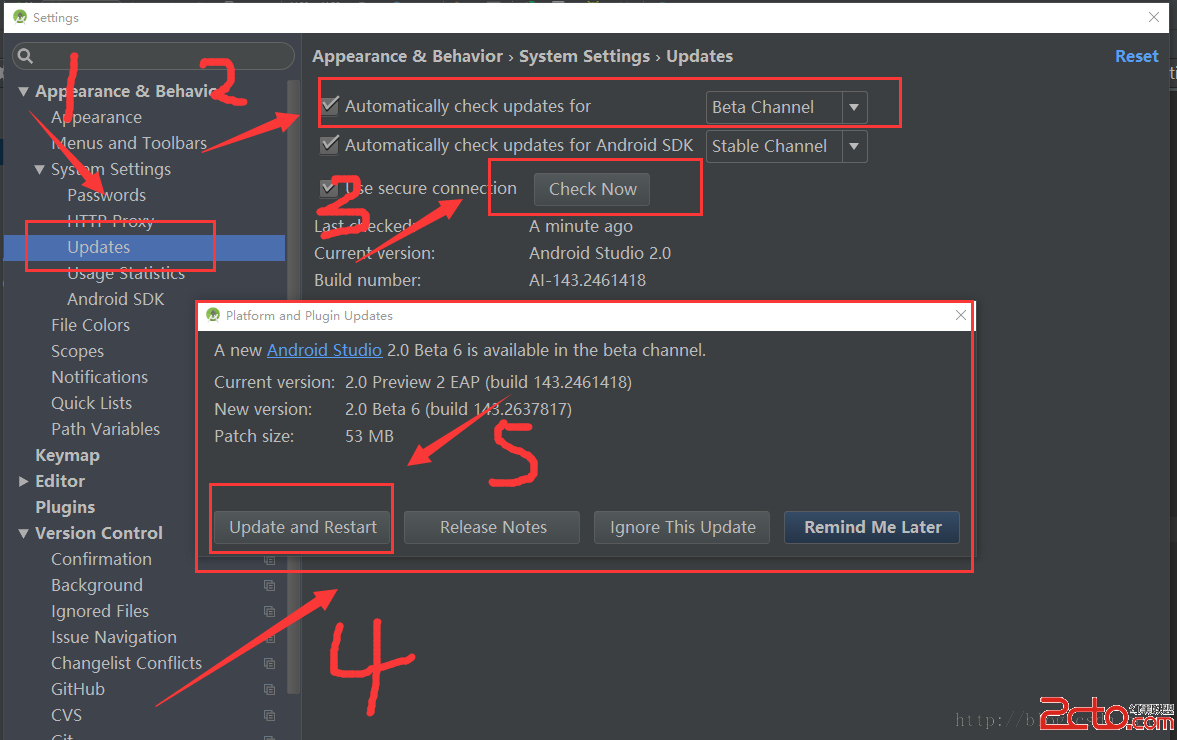 快速自動更新 Android Studio 版本
開發中若遇到 Android Studio 版本過舊提示,可直接在 IDE 內完成更新,不必手動下載安裝包。打開 Settings,進入 System Settings
 Android AlertDialog 進階玩法:做出分享、退出、下載風格彈窗
摘要 彈窗常用來引導使用者做某個操作:點分享鈕彈出分享面板、雙擊返回鈕彈出退出確認、點下載彈出下載提示。這三種情境都能直接用 AlertDialog 完成。 一、Ale
 Android 5.0 期待功能:八個值得實現的改進
Android 5.0 在當時被視為重要更新。外界除了關注介面改版,也期待系統能在功能、生態與使用細節上更成熟。介面與功能傳聞新版介面被期待更扁平,圖標設計向 Chrom
 Android 動態載入自訂控制項
動態載入自訂控制項時,若大量使用 new 建立物件,容易增加記憶體壓力。改以 XML 版面配置透過 LayoutInflater 載入,可讓結構更清楚,也便於統一管理樣式