

編輯:關於 Android 程式設計
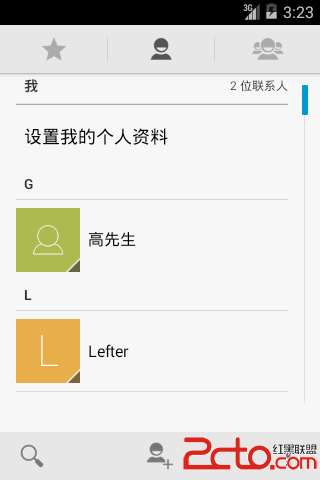
在 Android 4.4.3 上,聯絡人頭像預設會顯示姓名首字母,但卻不支援中文字元,如下圖所示:

當聯絡人名字的第一位是英文字元(a-z 或 A-Z)時,預設頭像會顯示該首字母。如果能改成中文時顯示第一個漢字,那就完美了。下面我們就來看看如何透過修改原始碼來實現這一小功能。
在 Contacts 中,頭像的異步加載是由 ContactPhotoManager 類別(嚴格來說是其子類別)來完成的,它還使用 LruCache 來緩存圖片,對圖像異步加載與緩存有興趣的朋友可以研究一下。
以主頁面的聯絡人列表加載頭像為例(僅針對沒有設定頭像、即 photoUri 為 null 的聯絡人),大致呼叫流程如下:
DefaultContactListAdapter->bindView() ContactEntryListAdapter->buildQuickContact() ContactEntryListAdapter->getDefaultImageRequestFromCursor() ContactPhotoManagerImpl->loadPhoto()->provider:LetterTileDefaultImageProvider // 使用DEFAULT_AVATAR物件 LetterTileDefaultImageProvider->applyDefaultImage() LetterTileDefaultImageProvider->getDefaultImageForContact() LetterTileDrawable->drawLetterTile()->first char
在 drawLetterTile 函式中,執行 drawText 之前會先呼叫 isEnglishLetter 判斷首字元是否為英文字元,若是則把首字母畫上去:
否則就使用預設頭像。可見正是 isEnglishLetter 這個函式導致中文字元不被描畫:
private static boolean isEnglishLetter(final char c) { return ('A' <= c && c <= 'Z') || ('a' <= c && c <= 'z'); }我們只要讓它同時接受中文字元即可:
private static boolean isEnglishLetter(final char c) { return ('A' <= c && c <= 'Z') || ('a' <= c && c <= 'z') || isChineseLetter(c); }如此一來,預設頭像就能顯示中文名字的第一個漢字了!具體修改如下:
private static boolean isEnglishLetter(final char c) { return ('A' <= c && c <= 'Z') || ('a' <= c && c <= 'z'); } private static boolean isChineseLetter(final char c) { return isChinese(c); } private static boolean isChinese(char c) { Character.UnicodeBlock ub = Character.UnicodeBlock.of(c); if (ub == Character.UnicodeBlock.CJK_UNIFIED_IDEOGRAPHS || ub == Character.UnicodeBlock.CJK_COMPATIBILITY_IDEOGRAPHS || ub == Character.UnicodeBlock.CJK_UNIFIED_IDEOGRAPHS_EXTENSION_A || ub == Character.UnicodeBlock.GENERAL_PUNCTUATION || ub == Character.UnicodeBlock.CJK_SYMBOLS_AND_PUNCTUATION || ub == Character.UnicodeBlock.HALFWIDTH_AND_FULLWIDTH_FORMS) { return true; } return false; }具體檔案路徑為 com.android.contacts.common.lettertiles 下的 LetterTileDrawable.java。同時在 drawLetterTile 中調整判斷條件,讓中文字元也能進入描畫流程:
private void drawLetterTile(final Canvas canvas) { sPaint.setColor(pickColor(mIdentifier)); sPaint.setAlpha(mPaint.getAlpha()); canvas.drawRect(getBounds(), sPaint); // 首字元為英文或中文時才描畫 if (mDisplayName != null && (isEnglishLetter(mDisplayName.charAt(0)) || isChineseLetter(mDisplayName.charAt(0)))) { sFirstChar[0] = Character.toUpperCase(mDisplayName.charAt(0)); final int minDimension = Math.min(getBounds().width(), getBounds().height()); sPaint.setTextSize(mScale * sLetterToTileRatio * minDimension); sPaint.getTextBounds(sFirstChar, 0, 1, sRect); sPaint.setColor(sTileFontColor); final Rect bounds = getBounds(); canvas.drawText(sFirstChar, 0, 1, bounds.centerX(), bounds.centerY() + mOffset * bounds.height() + sRect.height() / 2, sPaint); } else { final Bitmap bitmap = getBitmapForContactType(mContactType); drawBitmap(bitmap, bitmap.getWidth(), bitmap.getHeight(), canvas); } }至於頭像背景為何會有八種顏色,是由 colors.xml 中定義的顏色陣列決定的,並透過 pickColor 依識別字串(如信箱)的 hashCode 對顏色總數取餘數,保證同一聯絡人永遠對應同一顏色:
/** This should match the total number of colors defined in colors.xml */ private static final int NUM_OF_TILE_COLORS = 8; private int pickColor(final String identifier) { if (TextUtils.isEmpty(identifier) || mContactType == TYPE_VOICEMAIL) { return sDefaultColor; } final int color = Math.abs(identifier.hashCode()) % NUM_OF_TILE_COLORS; return sColors.getColor(color, sDefaultColor); }經過這番改造,聯絡人預設頭像就能顯示中文姓名的一個漢字了。
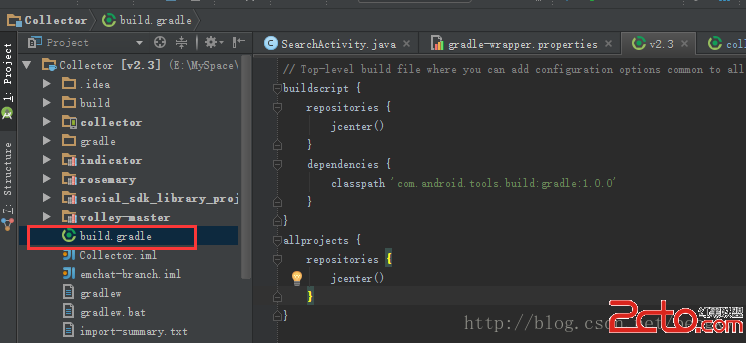 Android Studio 導入 GitHub 開源專案常見問題排查
下載與匯入專案 GitHub 上有許多好用的開源專案,但直接匯入 Android Studio 時,常會遇到 Gradle 版本、SDK 設定或專案結構問題。本文以圖片輪
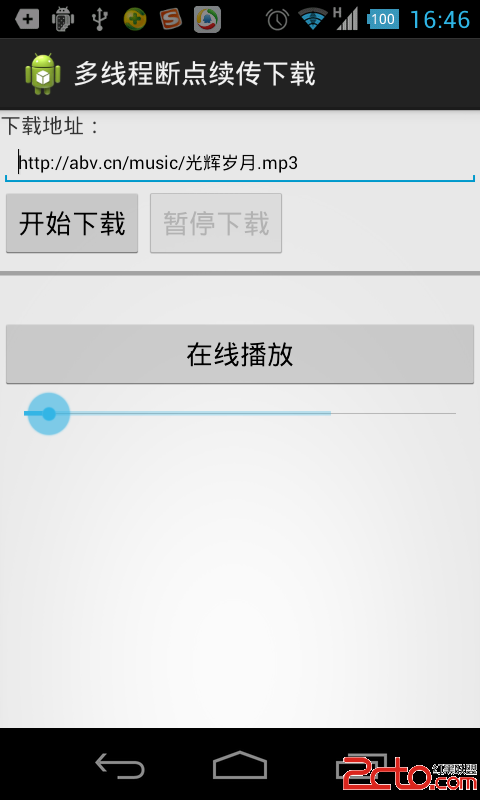 Android 實現在線音樂播放:MediaPlayer 與緩衝進度
在 Android 中播放網路音樂,通常會使用 MediaPlayer。若希望使用者看到緩衝情形,可搭配 SeekBar 的次要進度與 MediaPlayer 的緩衝更新
 Android Socket 通信詳解:TCP 與 UDP 的實作全解析
一、Socket 通信簡介Android 與服務器的通信方式主要有兩種:HTTP 通信與 Socket 通信。兩者最大的差異在於:HTTP 採用「請求—響應」方式,在請求
 Android 學習路線(十三):Activity 生命週期之暫停與恢復
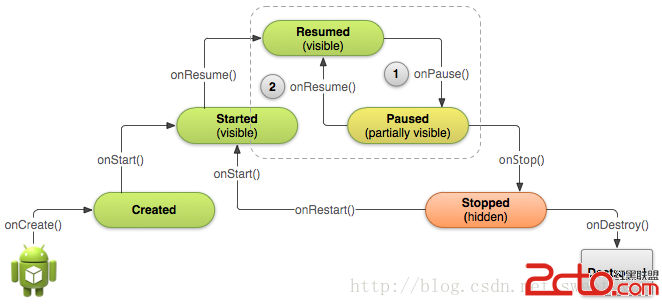
在正常的使用流程中,前景 Activity 偶爾會被其他視覺元件遮擋,導致它進入暫停(paused)狀態。最典型的例子是打開一個半透明的 Activity(例如以對話框樣