

編輯:關於 Android 程式設計
在 Android 系統與 Linux 環境開發中,難免會遇到需要自行編譯第三方 C/C++ 函式庫的情況,而這類專案大多採用 Autotools 作為建置系統。本文整理 Autotools 各元件的職責,並示範一次完整的編譯與安裝流程。
掃描原始碼目錄,產生 configure.scan 檔案。裡面是一堆宏定義與系統配置的基本選項,我們需要把它改名為 configure.in(或較新的 configure.ac)。
這是一個 Perl 腳本。它依據 configure.in 的內容自動產生 aclocal.m4,也就是所謂的巨集展開檔。
用來產生最終的 configure 腳本。configure.in 裡的巨集經過 autoconf 處理後,會變成負責檢查系統特性、環境變數與必要參數的 shell 腳本。
自動產生 config.h.in。
搭配 automake --add-missing 使用,由 Makefile.am 產生 Makefile.in。
官方文件:https://www.gnu.org/software/autoconf/manual/autoconf.html
僅使用 Autoconf 時,準備發佈用的檔案流向如下:
your source files --> [autoscan*] --> [configure.scan] --> configure.ac

configure.ac --.
               |------> autoconf* -----> configure
[aclocal.m4] --+---+
               |   `------> [autoheader*] --> [config.h.in]
[acsite.m4] ---'

Makefile.in
若再加上 Automake,還會多出以下產物:
[acinclude.m4] --.
                 |
[local macros] --+---> aclocal* --> aclocal.m4
                 |
configure.ac ----'

configure.ac --.
               +---> automake* --> Makefile.in
Makefile.am ---'
設定(configure)階段所牽涉的檔案:
             .-------------> [config.cache]
configure* ---+------------> config.log
             | [config.h.in] -.      .---> [config.h] -.
             |                 v                   |
             +---> config.status* -+               +---> make*
             |                                      |
Makefile.in ---'            `---> Makefile ---'
第一步,執行 autoscan 產生 configure.scan:

接著把檔名改為 configure.ac(或 configure.in),並填入專案名稱、版本與 Makefile 相關資訊:
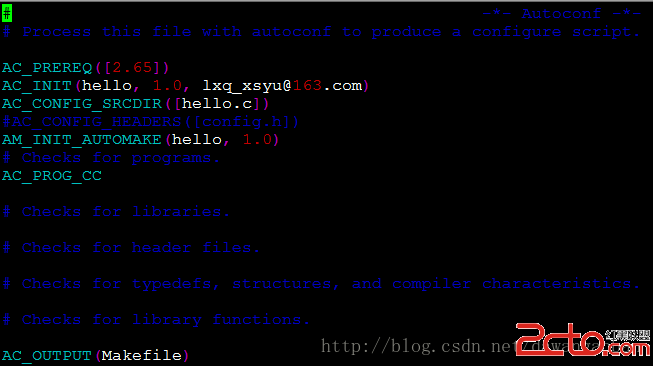
第二步,依序執行 aclocal 與 autoconf,產出可執行的 configure;同時建立 Makefile.am 並描述編譯目標:
bin_PROGRAMS = hello
hello_SOURCES = hello.c

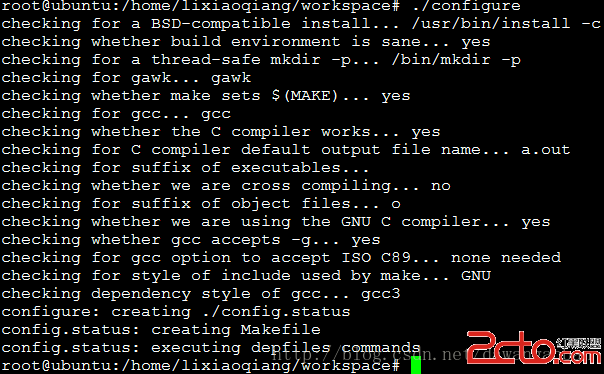
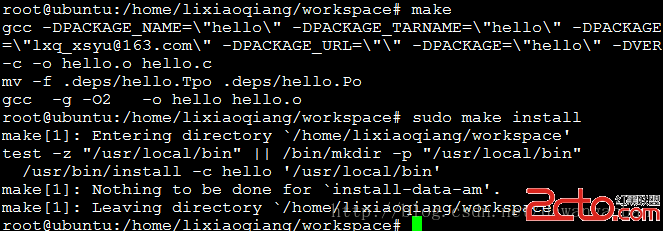
先讓 configure 依實際環境產生 Makefile,再執行 make 與 sudo make install:
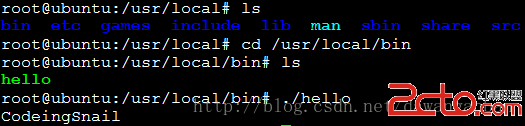
安裝完成後,切到 /usr/local/bin 執行我們的 hello,看到輸出即代表流程成功:
若要把專案做成可分發的壓縮檔,執行 make dist 即可:
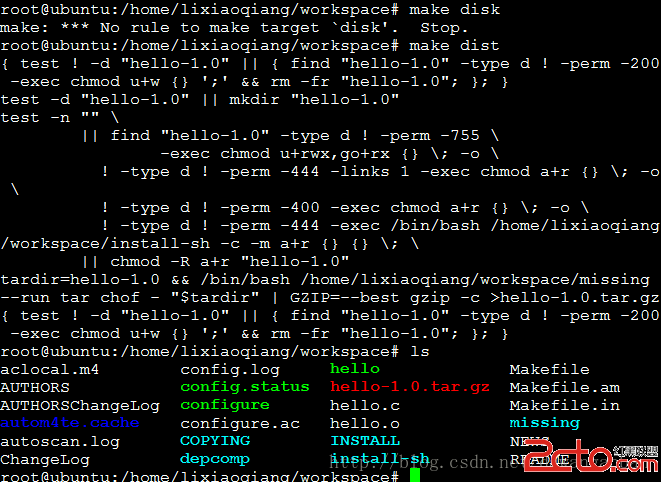
整體流程可以記成一句口訣:autoscan 起頭、aclocal 鋪路、autoconf 與 autoheader 分工、automake 收尾,最後交給 configure 與 make 完成編譯安裝。
 Android 實現 ViewPager 花屏(翻頁)效果的基本用法
本篇示範如何用 ViewPager 實作類似「花屏」的多頁滑動切換效果,並搭配 PagerTitleStrip 顯示每一頁的標題。 1. 運行效果圖 2. 程式碼實現
 仿音樂播放器:加入時間顯示與進度條同步的完整實作
上一篇我們做了能播放、能暫停的播放器,但還少了個關鍵元素——時間顯示。一個聽起來完整、看起來完整的播放器,必須讓使用者知道「現在放到哪裡」以及「總共多長」。本文在原本的基
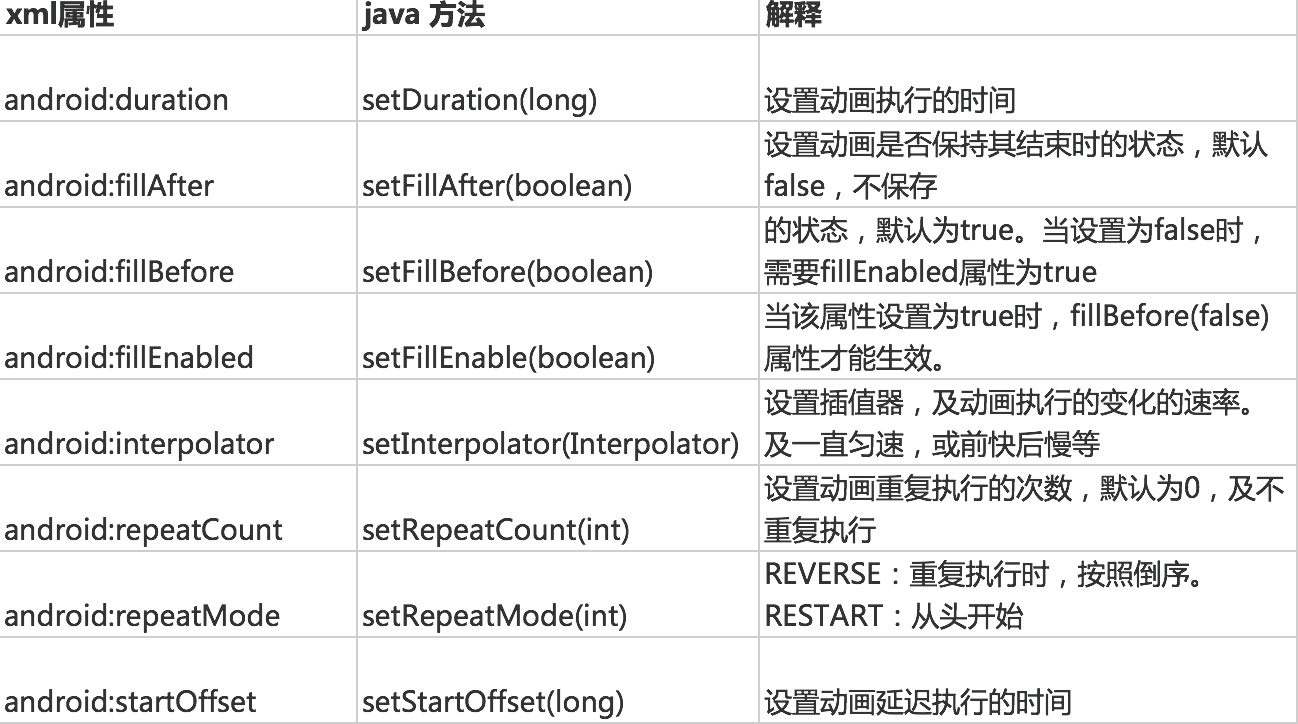 Android 動畫全解:變換動畫、幀動畫與佈局動畫
面試中經常被問到的一個問題是:Android 一共有哪幾類動畫?先記住這份清單——變換動畫(透明度、縮放、平移、旋轉)、逐幀動畫、佈局動畫、屬性動畫。 一、變換動畫(V
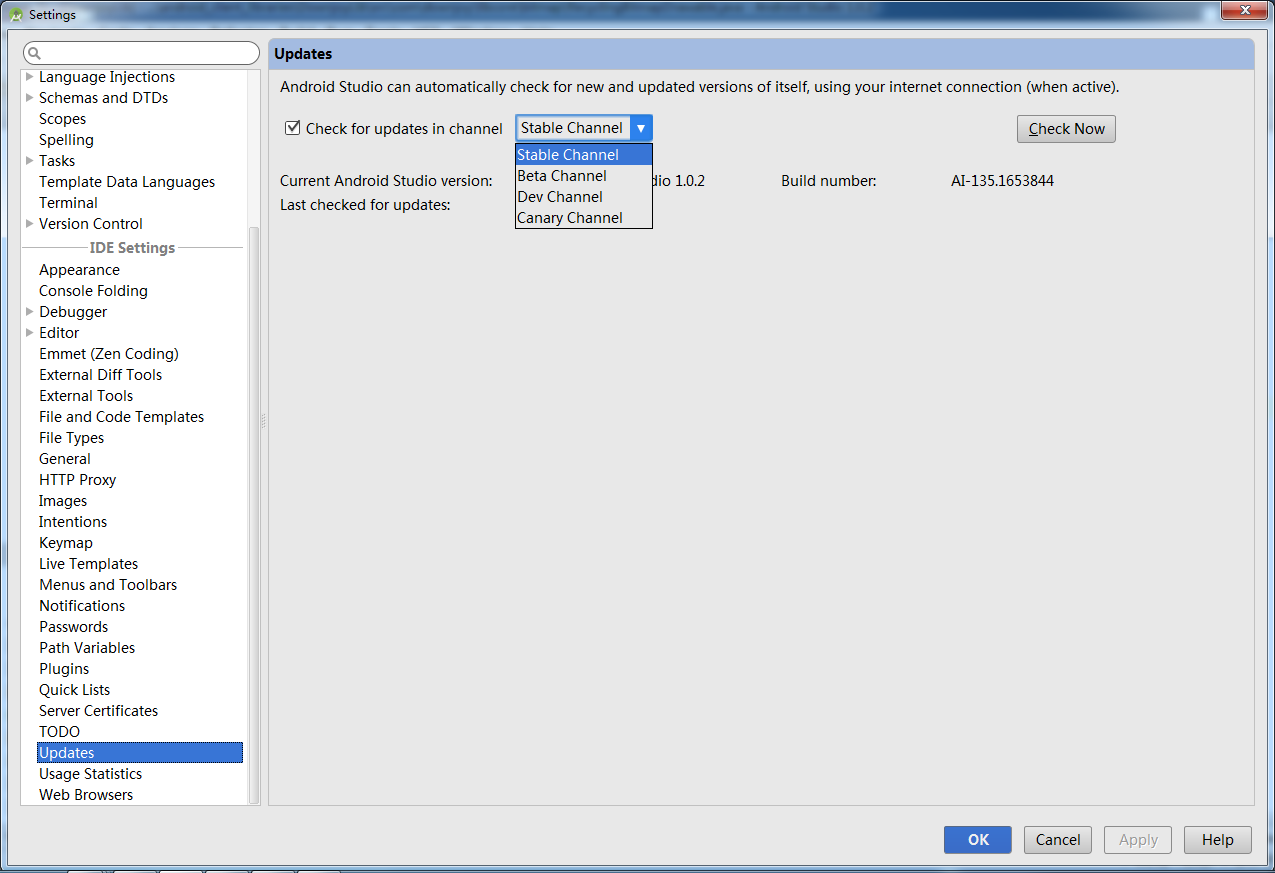 將 Eclipse 專案遷移到 Android Studio 的方法(圖文最新版)
前言近來 Android Studio(以下簡稱 AS)推出了正式版,火得不行。主要還是因為 Android 是 Google 自家的產品,AS 也是它自己搞的 IDE,