

編輯:關於 Android 程式設計
用 Eclipse 開發時,按住 Ctrl 點進 framework 類別卻只跳出「Source not found」,是每個人都遇過的尷尬。其實只要把源碼關聯好,這個問題幾分鐘就能解決。
先在專案上按右鍵,依序進入 Properties → Java Build Path → Libraries,找到 android.jar 並展開它。
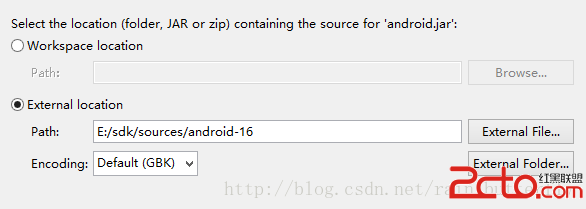
展開後會看到一個 Source attachment 欄位,雙擊它就能指定源碼位置。這裡可以關聯 zip 檔或資料夾皆可。
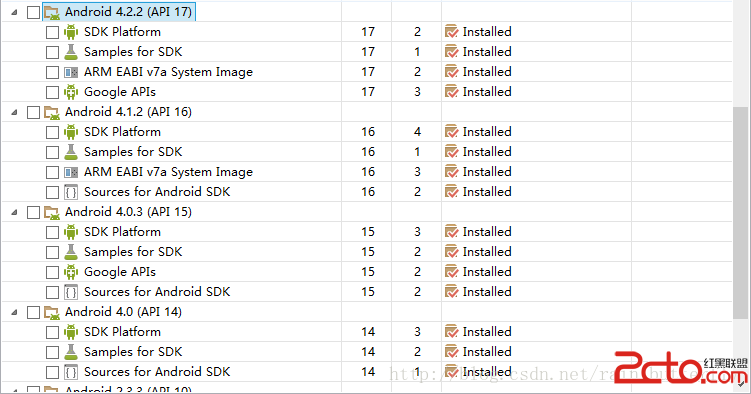
最省事的方式是用 SDK Manager 下載對應 API Level 的「Sources for Android SDK」項目。下載完成後,源碼會落在 sdk/sources 目錄底下,裡面按平台版本分資料夾,挑一個跟你專案相符的選進去就可以了。
設定完畢後,隨便點開一個 framework 類別試試。以下就是 Button 的源碼:
@RemoteView
public class Button extends TextView {
    public Button(Context context) {
        this(context, null);
    }

    public Button(Context context, AttributeSet attrs) {
        this(context, attrs, com.android.internal.R.attr.buttonStyle);
    }

    public Button(Context context, AttributeSet attrs, int defStyle) {
        super(context, attrs, defStyle);
    }

    @Override
    public void onInitializeAccessibilityEvent(AccessibilityEvent event) {
        super.onInitializeAccessibilityEvent(event);
        event.setClassName(Button.class.getName());
    }

    @Override
    public void onInitializeAccessibilityNodeInfo(AccessibilityNodeInfo info) {
        super.onInitializeAccessibilityNodeInfo(info);
        info.setClassName(Button.class.getName());
    }
}
看到這段程式碼,就代表關聯成功了。往後追 framework 的實作細節,不必再對著空白頁發呆。
從 Button 這個例子不難看出幾件事:它其實是 TextView 的子類別,這解釋了為什麼 Button 天生就支援文字與樣式設定;三個建構子層層退化,最終都指向系統內部的預設樣式;而它就只是把無障礙事件的類別名稱回報出去,沒有更多魔法。有源碼在手,這類「為什麼」都能自己找到答案。
 用 ViewPager 實作跑馬燈輪播:支援多種切換動畫
最近接的專案需要一個跑馬燈式的圖片展示。上網翻了一圈,總覺得差那麼一點意思,索然自己動手寫一個。核心原理其實很單純:直接複用 ViewPager 這個控制項。它天生支援左
 用 alpha 值做出透明與漸變效果:Android 顏色透明度實例
Android 的顏色由四個分量組成:前三個是 RGB,也就是我們熟悉的紅、綠、藍三原色;最後一個是 A,也就是 Alpha。這四個值的範圍都在 0 到 255 之間。
 Android 效能優化(上):UI 渲染、過度繪製與布局層次
流暢畫面的底層節奏 使用者感受到的順暢,通常意味著畫面更新達到每秒四十到六十幀。以六十幀而言,每一幀大約只有 16.67 毫秒的處理時間。Android 的 UI 繪製由
 Android 仿微信朋友圈九宮格多圖展示控件
一、簡介 這是一個用來實作類似微信朋友圈、微博那種九宮格圖片展示的控件,透過自訂 ViewGroup 完成,使用方式單純。 多張圖片時會依螢幕寬度自動適配;只有單張圖片時