

編輯:關於 Android 程式設計
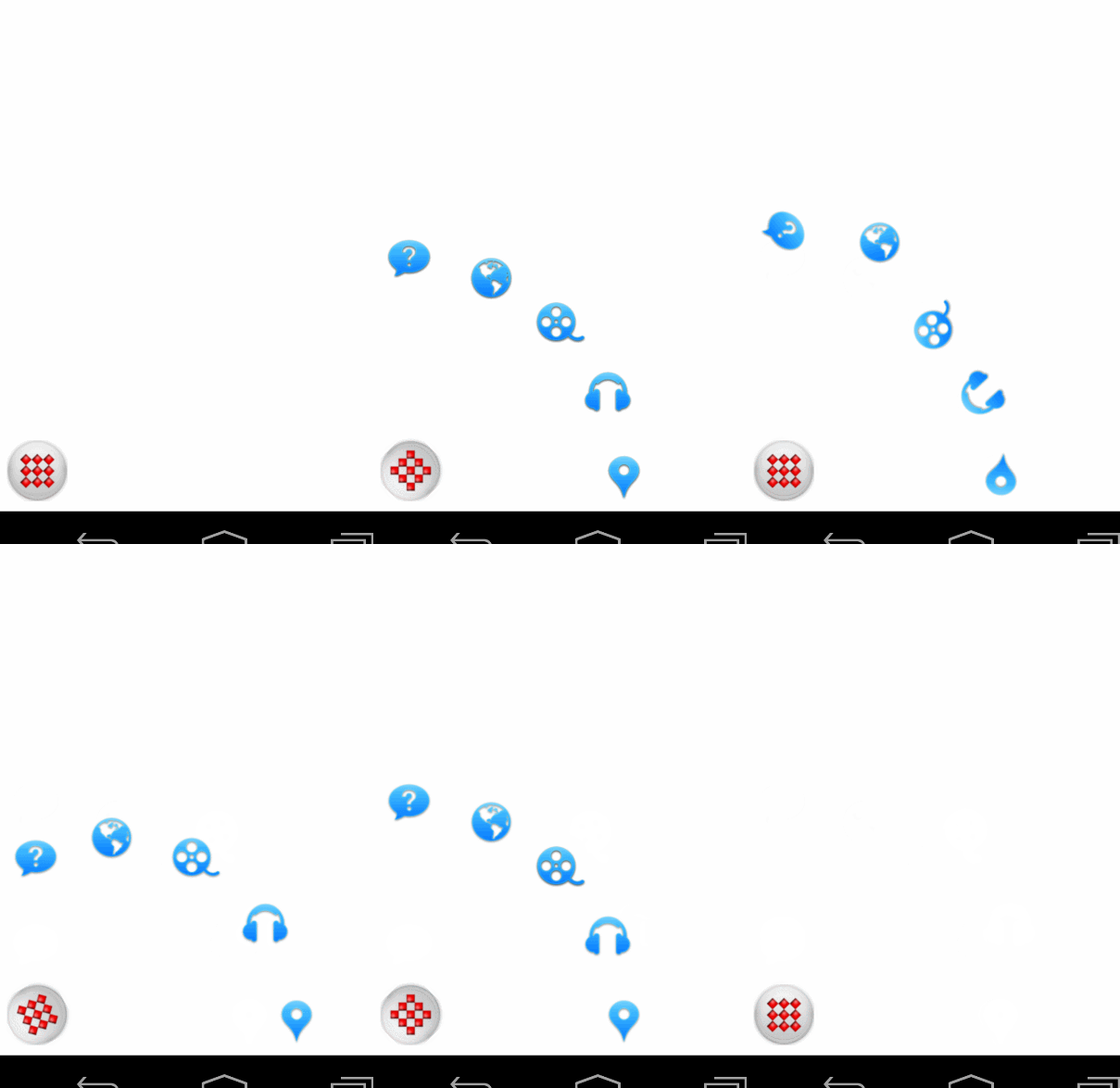
上一篇講了思路,這篇直接寫程式。我們要做一個類似衛星環繞的彈出菜單:SatelliteMenu extends FrameLayout,主按鈕在左下角,點擊後子項以弧形散開。
private void init(Context context, AttributeSet attrs, int defStyle) {
    inflate(context, R.layout.sat_main, this);
    imgMain = (ImageView) findViewById(R.id.sat_main);

    if (attrs != null) {
        TypedArray typedArray = context.obtainStyledAttributes(
                attrs, R.styleable.SatelliteMenu, defStyle, 0);

        satelliteDistance = typedArray.getDimensionPixelSize(
                R.styleable.SatelliteMenu_satelliteDistance, DEFAULT_SATELLITE_DISTANCE);
        totalSpacingDegree = typedArray.getFloat(
                R.styleable.SatelliteMenu_totalSpacingDegree, DEFAULT_TOTAL_SPACING_DEGREES);
        closeItemsOnClick = typedArray.getBoolean(
                R.styleable.SatelliteMenu_closeOnClick, DEFAULT_CLOSE_ON_CLICK);
        expandDuration = typedArray.getInt(
                R.styleable.SatelliteMenu_expandDuration, DEFAULT_EXPAND_DURATION);

        typedArray.recycle();
    }

    mainRotateLeft = SatelliteAnimationCreator.createMainButtonAnimation(context);
    mainRotateRight = SatelliteAnimationCreator.createMainButtonInverseAnimation(context);

    Animation.AnimationListener plusAnimationListener = new Animation.AnimationListener() {
        @Override
        public void onAnimationStart(Animation animation) {}
        @Override
        public void onAnimationRepeat(Animation animation) {}
        @Override
        public void onAnimationEnd(Animation animation) {
            plusAnimationActive.set(false);
        }
    };
    mainRotateLeft.setAnimationListener(plusAnimationListener);
    mainRotateRight.setAnimationListener(plusAnimationListener);

    imgMain.setOnClickListener(new View.OnClickListener() {
        @Override
        public void onClick(View v) {
            SatelliteMenu.this.onClick();
        }
    });

    internalItemClickListener = new InternalSatelliteOnClickListener(this);
}
對應的佈局與自訂屬性宣告:
<merge xmlns:android="https://schemas.android.com/apk/res/android">
    <ImageView android:id="@+id/sat_main"
        android:layout_width="wrap_content"
        android:layout_height="wrap_content"
        android:src="@drawable/sat_main"
        android:layout_gravity="bottom|left" />
</merge>

<resources>
    <declare-styleable name="SatelliteMenu">
        <!-- 這裡宣告 sat_distance、totalSpacingDegree 等屬性 -->
    </declare-styleable>
</resources>
這段程式碼有個關鍵設計:為每個 item 建立兩個 ImageView——一個負責播放進場動畫,另一個(cloneView)預先放在動畫的終點位置。動畫結束後切換可見性,就能避免中途中斷造成的閃爍。
public void addItems(List<SatelliteMenuItem> items) {
    menuItems.addAll(items);
    this.removeView(imgMain);

    TextView tmpView = new TextView(getContext());
    tmpView.setLayoutParams(new FrameLayout.LayoutParams(0, 0));

    float[] degrees = getDegrees(menuItems.size());
    int index = 0;

    for (SatelliteMenuItem menuItem : menuItems) {
        int finalX = SatelliteAnimationCreator.getTranslateX(degrees[index], satelliteDistance);
        int finalY = SatelliteAnimationCreator.getTranslateY(degrees[index], satelliteDistance);

        ImageView itemView = (ImageView) LayoutInflater.from(getContext())
                .inflate(R.layout.sat_item_cr, this, false);
        ImageView cloneView = (ImageView) LayoutInflater.from(getContext())
                .inflate(R.layout.sat_item_cr, this, false);

        itemView.setTag(menuItem.getId());
        cloneView.setVisibility(View.GONE);
        itemView.setVisibility(View.GONE);
        cloneView.setOnClickListener(internalItemClickListener);
        cloneView.setTag(Integer.valueOf(menuItem.getId()));

        FrameLayout.LayoutParams layoutParams = getLayoutParams(cloneView);
        layoutParams.bottomMargin = Math.abs(finalY);
        layoutParams.leftMargin = Math.abs(finalX);
        cloneView.setLayoutParams(layoutParams);
        // 這裡是把 cloneView 放在 itemView 動畫結束的位置

        if (menuItem.getImgResourceId() > 0) {
            itemView.setImageResource(menuItem.getImgResourceId());
            cloneView.setImageResource(menuItem.getImgResourceId());
        } else if (menuItem.getImgDrawable() != null) {
            itemView.setImageDrawable(menuItem.getImgDrawable());
            cloneView.setImageDrawable(menuItem.getImgDrawable());
        }

        Animation itemOut = SatelliteAnimationCreator.createItemOutAnimation(
                getContext(), index, expandDuration, finalX, finalY);
        Animation itemIn = SatelliteAnimationCreator.createItemInAnimation(
                getContext(), index, expandDuration, finalX, finalY);
        Animation itemClick = SatelliteAnimationCreator.createItemClickAnimation(getContext());

        menuItem.setView(itemView);
        menuItem.setCloneView(cloneView);
        menuItem.setInAnimation(itemIn);
        menuItem.setOutAnimation(itemOut);
        menuItem.setClickAnimation(itemClick);
        menuItem.setFinalX(finalX);
        menuItem.setFinalY(finalY);

        itemIn.setAnimationListener(new SatelliteAnimationListener(itemView, true, viewToItemMap));
        itemOut.setAnimationListener(new SatelliteAnimationListener(itemView, false, viewToItemMap));
        itemClick.setAnimationListener(
                new SatelliteItemClickAnimationListener(this, menuItem.getId()));

        this.addView(itemView);
        this.addView(cloneView);

        viewToItemMap.put(itemView, menuItem);
        viewToItemMap.put(cloneView, menuItem);
        index++;
    }

    this.addView(imgMain);
}
private static class SatelliteAnimationListener implements Animation.AnimationListener {

    private WeakReference<View> viewRef;
    private boolean isInAnimation;
    private Map<View, SatelliteMenuItem> viewToItemMap;

    public SatelliteAnimationListener(View view, boolean isIn,
                                      Map<View, SatelliteMenuItem> viewToItemMap) {
        this.viewRef = new WeakReference<View>(view);
        this.isInAnimation = isIn;
        this.viewToItemMap = viewToItemMap;
    }

    @Override
    public void onAnimationStart(Animation animation) {
        if (viewRef != null) {
            View view = viewRef.get();
            if (view != null) {
                SatelliteMenuItem menuItem = viewToItemMap.get(view);
                if (isInAnimation) {
                    menuItem.getView().setVisibility(View.VISIBLE);
                    menuItem.getCloneView().setVisibility(View.GONE);
                } else {
                    menuItem.getCloneView().setVisibility(View.GONE);
                    menuItem.getView().setVisibility(View.VISIBLE);
                }
            }
        }
    }

    @Override
    public void onAnimationRepeat(Animation animation) {}

    @Override
    public void onAnimationEnd(Animation animation) {
        if (viewRef != null) {
            View view = viewRef.get();
            if (view != null) {
                SatelliteMenuItem menuItem = viewToItemMap.get(view);
                if (isInAnimation) {
                    // 進場動畫結束,交棒給 cloneView
                    menuItem.getView().setVisibility(View.GONE);
                    menuItem.getCloneView().setVisibility(View.GONE);
                } else {
                    menuItem.getCloneView().setVisibility(View.VISIBLE);
                    menuItem.getView().setVisibility(View.GONE);
                }
            }
        }
    }
}
因為子項會散開到主按鈕的周圍,容器的測量尺寸必須把 satelliteDistance 與邊界餘量都算進去,否則子項會被裁掉。
private void recalculateMeasureDiff() {
    int itemWidth = 0;
    if (menuItems.size() > 0) {
        itemWidth = menuItems.get(0).getView().getWidth();
    }
    measureDiff = Float.valueOf(satelliteDistance * 0.2f).intValue() + itemWidth;
}

@Override
protected void onMeasure(int widthMeasureSpec, int heightMeasureSpec) {
    super.onMeasure(widthMeasureSpec, heightMeasureSpec);
    recalculateMeasureDiff();

    int totalHeight = imgMain.getHeight() + satelliteDistance + measureDiff;
    int totalWidth = imgMain.getWidth() + satelliteDistance + measureDiff;

    setMeasuredDimension(totalWidth, totalHeight);
}
旋轉螢幕會導致自訂 View 重建,散開狀態與各項參數都要保存下來:
@Override
protected Parcelable onSaveInstanceState() {
    Parcelable superState = super.onSaveInstanceState();
    SavedState ss = new SavedState(superState);
    ss.rotated = rotated;
    ss.totalSpacingDegree = totalSpacingDegree;
    ss.satelliteDistance = satelliteDistance;
    ss.measureDiff = measureDiff;
    ss.expandDuration = expandDuration;
    ss.closeItemsOnClick = closeItemsOnClick;
    return ss;
}

@Override
protected void onRestoreInstanceState(Parcelable state) {
    SavedState ss = (SavedState) state;
    rotated = ss.rotated;
    totalSpacingDegree = ss.totalSpacingDegree;
    satelliteDistance = ss.satelliteDistance;
    measureDiff = ss.measureDiff;
    expandDuration = ss.expandDuration;
    closeItemsOnClick = ss.closeItemsOnClick;
    super.onRestoreInstanceState(ss.getSuperState());
}

static class SavedState extends BaseSavedState {
    boolean rotated;
    private float totalSpacingDegree;
    private int satelliteDistance;
    private int measureDiff;
    private int expandDuration;
    private boolean closeItemsOnClick;

    SavedState(Parcelable superState) {
        super(superState);
    }

    public SavedState(Parcel in) {
        super(in);
        rotated = Boolean.valueOf(in.readString());
        totalSpacingDegree = in.readFloat();
        satelliteDistance = in.readInt();
        measureDiff = in.readInt();
        expandDuration = in.readInt();
        closeItemsOnClick = Boolean.valueOf(in.readString());
    }

    @Override
    public int describeContents() {
        return 0;
    }

    @Override
    public void writeToParcel(Parcel out, int flags) {
        out.writeString(Boolean.toString(rotated));
        out.writeFloat(totalSpacingDegree);
        out.writeInt(satelliteDistance);
        out.writeInt(measureDiff);
        out.writeInt(expandDuration);
        out.writeString(Boolean.toString(closeItemsOnClick));
    }

    public static final Parcelable.Creator<SavedState> CREATOR =
            new Parcelable.Creator<SavedState>() {
        public SavedState createFromParcel(Parcel in) {
            return new SavedState(in);
        }
        public SavedState[] newArray(int size) {
            return new SavedState[size];
        }
    };
}
效果圖:
程式碼下載:https://download.csdn.net/detail/baidu_nod/7731115
回頭看這套實作,雙 View 交接是整個方案的核心。一般做法只用一个 ImageView 播放位移動畫,但使用者若在動畫途中再次點擊,視覺上就會出現跳動。預先佈置一個靜態的 cloneView 作為「終點站」,動畫結束瞬間切換可見性,就能做到完全無感的銜接。這個技巧在任何需要「動畫 + 可點擊」的自訂控件裡都能套用。
 Android 向伺服器發送 JSON 資料的實作教學
本文講解如何從 Android 端把 JSON 資料送到伺服器,內容偏向基礎入門。核心步驟包括:使用 Gson 將物件序列化為 JSON、透過 HttpClient 送出
 手把手教你用 ViewPager 自定義實現 Banner 輪播
歡迎關注 Android 開源網絡框架 NoHttp:https://github.com/yanzhenjie/NoHttp實際開發中,很多 App 都會做一個廣告輪播
 Android 自定義 Toast:可自由設定顯示時間
Android 標準 Toast 僅支援 LENGTH_SHORT 與 LENGTH_LONG,無法精準控制顯示時間。若需要自訂時長,可透過 WindowManager
 Android 懸浮窗實作全攻略:從 WindowManager 到 6.0 動態權限
在 Android 的視窗體系中,WindowManager 佔有舉足輕重的地位。它封裝了新增、移除、更新視窗的方法,是比 Activity、View 更底層的管理類。使