

編輯:關於 Android 程式設計
企業電話網常需要在撥號號碼前自動加上 IP 卡的前綴號碼。Android 提供 ACTION_NEW_OUTGOING_CALL 這個系統廣播,正是為此設計:當使用者按下撥號鍵、通話尚未真正建立時,系統會發出這個廣播,我們可以在裡面改寫要撥出的號碼。
UI 很簡單:一個輸入框與一顆儲存按鈕,用來設定前綴號碼。
<LinearLayout xmlns:android="https://schemas.android.com/apk/res/android"
    xmlns:tools="https://schemas.android.com/tools"
    android:layout_width="match_parent"
    android:layout_height="match_parent"
    android:orientation="vertical"
    tools:context=".MainActivity">

    <TextView
        android:layout_width="wrap_content"
        android:layout_height="wrap_content"
        android:text="請輸入 IP 前綴號碼" />

    <EditText
        android:id="@+id/et_number"
        android:layout_width="fill_parent"
        android:layout_height="wrap_content"
        android:inputType="phone" />

    <Button
        android:layout_width="fill_parent"
        android:layout_height="wrap_content"
        android:onClick="save"
        android:text="儲存 IP 號碼" />

</LinearLayout>這裡用 SharedPreferences 持久化,確保重開 App 或行程被回收後設定仍在。
package com.wzw.ipdial;

import android.app.Activity;
import android.content.SharedPreferences;
import android.content.SharedPreferences.Editor;
import android.os.Bundle;
import android.text.TextUtils;
import android.view.View;
import android.widget.EditText;
import android.widget.Toast;

public class MainActivity extends Activity {

    private EditText etNumber;
    private SharedPreferences sp;

    @Override
    protected void onCreate(Bundle savedInstanceState) {
        super.onCreate(savedInstanceState);
        setContentView(R.layout.activity_main);

        etNumber = (EditText) findViewById(R.id.et_number);
        sp = getSharedPreferences("config", MODE_PRIVATE);

        // 把已存的值回填到輸入框,方便使用者確認目前設定
        etNumber.setText(sp.getString("ipnumber", ""));
    }

    public void save(View v) {
        String ipnumber = etNumber.getText().toString().trim();
        if (TextUtils.isEmpty(ipnumber)) {
            Toast.makeText(this, "已清除 IP 號碼", Toast.LENGTH_SHORT).show();
        } else {
            Toast.makeText(this, "已設定 IP 號碼", Toast.LENGTH_SHORT).show();
        }
        Editor editor = sp.edit();
        editor.putString("ipnumber", ipnumber);
        editor.apply();
    }
}關鍵是 getResultData() 取得原始號碼,再用 setResultData() 寫回加上前綴後的新號碼。
package com.wzw.ipdial;

import android.content.BroadcastReceiver;
import android.content.Context;
import android.content.Intent;
import android.content.SharedPreferences;

/** 攔截撥號廣播,在前面加上 IP 前綴 */
public class Ipdial extends BroadcastReceiver {

    @Override
    public void onReceive(Context context, Intent intent) {
        String number = getResultData();     // 使用者原本要撥的號碼
        if (number == null) return;

        SharedPreferences sp = context.getSharedPreferences("config", context.MODE_PRIVATE);
        String ipnumber = sp.getString("ipnumber", "");

        // 前綴為空時保持原號碼不變
        setResultData(ipnumber + number);
    }
}<?xml version="1.0" encoding="utf-8"?>
<manifest xmlns:android="https://schemas.android.com/apk/res/android"
package="com.wzw.ipdial"
android:versionCode="1"
android:versionName="1.0">
<uses-sdk android:minSdkVersion="8" android:targetSdkVersion="17" />
<!-- 攔截撥號的必要權限 -->
<uses-permission android:name="android.permission.PROCESS_OUTGOING_CALLS" />
<application
android:icon="@drawable/ic_launcher"
android:label="@string/app_name">
<activity
android:name=".MainActivity"
android:label="@string/app_name">
<intent-filter>
<action android:name="android.intent.action.MAIN" />
<category android:name="android.intent.category.LAUNCHER" />
</intent-filter>
</activity>
<!-- 註冊廣播接收器,指定攔截撥號動作 -->
<receiver android:name="com.wzw.ipdial.Ipdial">
<intent-filter>
<action android:name="android.intent.action.NEW_OUTGOING_CALL" />
</intent-filter>
</receiver>
</application>
</manifest>PROCESS_OUTGOING_CALLS 屬於危險等級,Android 6.0 以上必須在執行期動態向使用者申請,否則 onReceive 根本不會被觸發。null 給 setResultData() 的行為在各版本上不一致,不要依賴它來「取消通話」。17951,。CallRedirectionService(綁定 android.telecom.action.CALL_REDIRECTION_SERVICE)才是官方建議的替代方案,新專案請直接採用後者。 Android Drawable 進階:GradientDrawable 與 shape 標籤完整解析
GradientDrawable 是 Android 中常用的 Drawable 之一,可在 res/drawable 下以 shape 標籤定義。它能描述矩形、橢圓、線
 Android 視圖動畫屬性詳解:Alpha、Translate、Rotate、Scale 與 AnimationSet
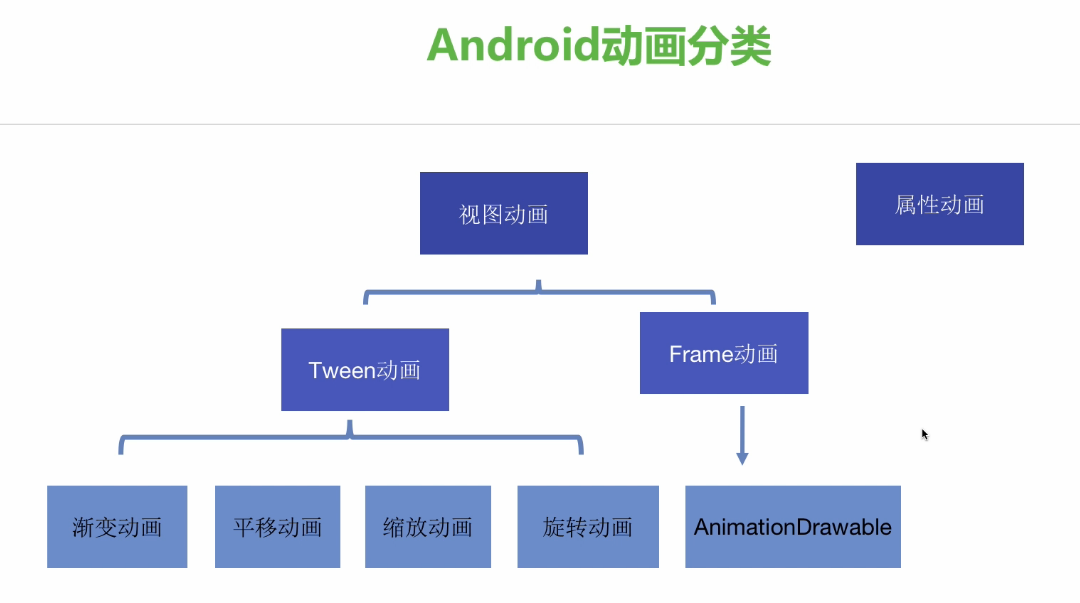
Android 動畫概覽 Android 動畫可分為視圖動畫與屬性動畫。視圖動畫常用於透明度、位置、旋轉與縮放等效果,可透過 XML 或程式碼建立。 Animatio
 打造酷炫 AndroidStudio 插件:字元動畫與狀態持久化
AndroidStudio 插件除了提升開發效率,也能做出有趣的視覺效果。本文以「輸入字元時出現動畫」為例,說明如何透過 Editor、DocumentListener、
 Android 使用 HttpURLConnection 實現多線程斷點續傳下載
多線程下載能將大型檔案拆成多段,由多個線程同時取得,再合併寫入同一個檔案。若再搭配斷點續傳,即使下載中斷,也能從已完成的片段繼續,而不必從頭開始。 基本原理 先透過