

編輯:關於 Android 程式設計
在 Android 中做截圖其實相當容易。View 提供了一個 getDrawingCache() 介面,能取得呼叫當下的位圖畫面。截圖抓取的是 View 在某一刻的影像,會包含所有 addView 進去的子 View;值得注意的是,若截取 Activity,畫面不會包含浮在其上的對話框。
以下範例展示如何截圖並透過 HTTP POST 上傳到伺服器,核心程式碼如下:
Screenshot.java
package com.example.scrmdemo; import java.io.BufferedReader; import java.io.ByteArrayOutputStream; import java.io.File; import java.io.FileNotFoundException; import java.io.FileOutputStream; import java.io.IOException; import java.io.InputStreamReader; import java.io.OutputStream; import java.net.HttpURLConnection; import java.net.URL; import android.app.Activity; import android.graphics.Bitmap; import android.graphics.Rect; import android.graphics.drawable.BitmapDrawable; import android.graphics.drawable.Drawable; import android.view.View; public class Screenshot { public static Bitmap takeScreenshotForView(View view) { view.setDrawingCacheEnabled(true); view.buildDrawingCache(); Bitmap tempBit = view.getDrawingCache(); Rect frame = new Rect(); view.getWindowVisibleDisplayFrame(frame); int width = view.getWidth(); int height = view.getHeight(); Bitmap bitmap = Bitmap.createBitmap(tempBit, 0, 0, width, height); view.destroyDrawingCache(); return bitmap; } public static Bitmap takeScreenshotForActivity(Activity activity) { View view = activity.getWindow().getDecorView(); view.setDrawingCacheEnabled(true); view.buildDrawingCache(); Bitmap tempBit = view.getDrawingCache(); Rect frame = new Rect(); view.getWindowVisibleDisplayFrame(frame); int statusBarHeight = frame.top; int width = view.getWidth(); int height = view.getHeight(); Bitmap bitmap = Bitmap.createBitmap(tempBit, 0, statusBarHeight, width, height - statusBarHeight); view.destroyDrawingCache(); return bitmap; } public static Drawable BitmapToDrawable(Bitmap bitmap) { @SuppressWarnings("deprecation") BitmapDrawable bd = new BitmapDrawable(bitmap); Drawable drawable = (Drawable) bd; return drawable; } public static boolean savePic(Bitmap bitmap, String fileName) { try { File file = new File(fileName); if (!file.getParentFile().exists()) { file.getParentFile().mkdirs(); } FileOutputStream fos = null; fos = new FileOutputStream(file); bitmap.compress(Bitmap.CompressFormat.JPEG, 100, fos); fos.flush(); fos.close(); return true; } catch (FileNotFoundException e) { e.printStackTrace(); return false; } catch (IOException e) { e.printStackTrace(); return false; } } public static byte[] getBytes(Bitmap bitmap) { ByteArrayOutputStream out = new ByteArrayOutputStream(); bitmap.compress(Bitmap.CompressFormat.JPEG, 100, out); try { out.flush(); out.close(); } catch (IOException e) { e.printStackTrace(); } return out.toByteArray(); } interface ISharePicCallBack { public final static int SHARE_OK = 1; public final static int SHARE_NOTOK = 2; public void shareResult(int resultCode, String output); } public static void share(final String urlStr, final Bitmap bitmap, final ISharePicCallBack callBack) { new Thread() { public void run() { try { URL url = new URL(urlStr); HttpURLConnection httpConn = (HttpURLConnection) url .openConnection(); httpConn.setDoOutput(true); httpConn.setDoInput(true); httpConn.setUseCaches(false); httpConn.setRequestMethod("POST"); byte[] requestStringBytes = getBytes(bitmap); httpConn.setRequestProperty("Content-length", "" + requestStringBytes.length); httpConn.setRequestProperty("Content-Type", "application/octet-stream"); httpConn.setRequestProperty("Connection", "Keep-Alive"); httpConn.setRequestProperty("Charset", "UTF-8"); OutputStream outputStream = httpConn.getOutputStream(); outputStream.write(requestStringBytes); outputStream.flush(); outputStream.close(); if (HttpURLConnection.HTTP_OK == httpConn.getResponseCode()) { StringBuffer sb = new StringBuffer(); String readLine; BufferedReader responseReader; responseReader = new BufferedReader( new InputStreamReader( httpConn.getInputStream(), "UTF-8")); while ((readLine = responseReader.readLine()) != null) { sb.append(readLine).append("\n"); } responseReader.close(); callBack.shareResult(ISharePicCallBack.SHARE_OK, sb.toString()); } else { callBack.shareResult(ISharePicCallBack.SHARE_NOTOK, "" + httpConn.getResponseCode()); } } catch (IOException e) { callBack.shareResult(ISharePicCallBack.SHARE_NOTOK, ""); e.printStackTrace(); } }; }.start(); } } 使用此工具類時,別忘了在 AndroidManifest.xml 中加入寫入外部儲存與網路這兩個權限:
整體流程是:開啟 drawing cache、擷取 Bitmap、壓縮成 JPEG 位元組,再於背景執行緒以 POST 上傳,最後透過回呼介面回報成功或失敗。
 Android OkHttp 框架全面解析與實戰
OkHttp 是由 Square 公司開發的開源網絡訪問庫,也是目前相當火熱的網絡框架。它替開發者處理了許多網絡疑難雜症:能從各種常見的連接問題中自動恢復——若服務器配置
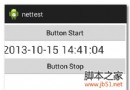 Android Timer 定時輪詢實作:定期抓取伺服器時間的完整範例
這個範例示範如何用 Timer 做定時輪詢:按下開始鈕之後,每 2 秒向後端請求一次時間,透過 Handler 把結果回送到主執行緒更新畫面,按下停止鈕則取消排程。 一、
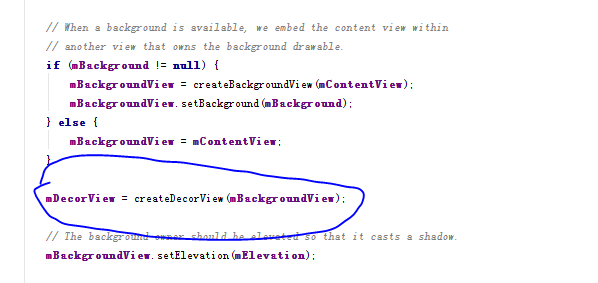 Android PopupWindow 使用詳解與 6.0 源碼差異
本文參考〈Android PopupWindow 用法解析〉一文進行學習,透過實例與源碼分析掌握了 PopupWindow 的使用方式。原文最後「補充案例:彈窗不消失,但
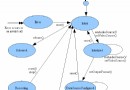 Android 多媒體:六步完成 MediaRecorder 錄音功能
MediaRecorder 是 Android 常見的錄音元件。使用前要先理解其生命週期,才能避免狀態錯誤。 權限與參數 需要加入 RECORD_AUDIO 與 WRI