

編輯:關於 Android 程式設計
項目開發中,我們常常需要把用戶信息按「組」來分層展示,同時支持按關鍵字搜索、並用顏色選擇器為列表項設置背景色。本文用 ExpandableListView 打造一個仿 QQ 的分組聯繫人列表,附上完整代碼與效果圖。
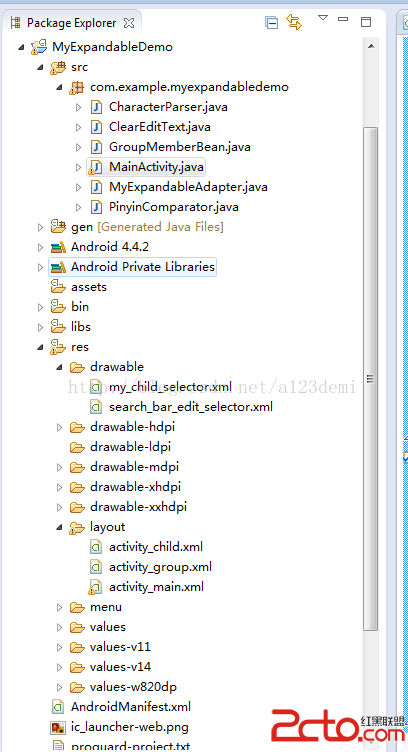
先看運行效果與代碼結構:

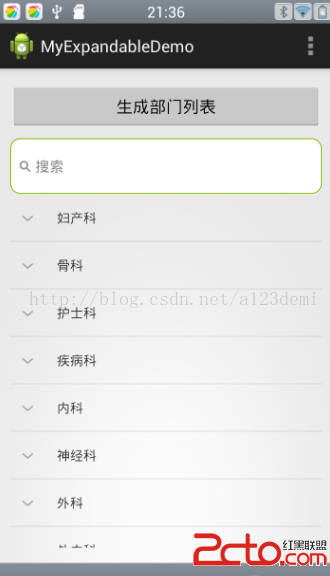
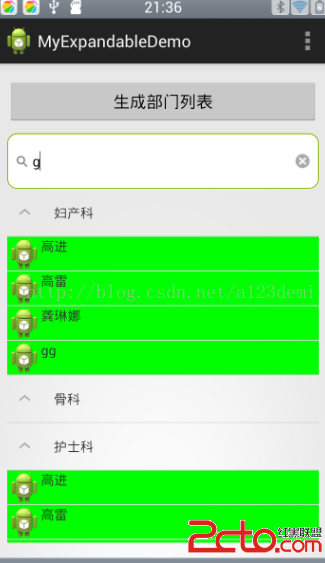
主界面包含一個 Button(生成列表)、一個自定義搜索框 ClearEditText、一個「未搜索到結果」的 TextView,以及展示分組的 ExpandableListView。
<LinearLayout ...
    android:orientation="vertical" >

    <Button
        android:id="@+id/my_btn"
        android:layout_width="match_parent"
        android:layout_height="wrap_content"
        android:text="生成部門列表" />

    <com.example.myexpandabledemo.ClearEditText
        android:id="@+id/filter_edit"
        android:layout_width="fill_parent"
        android:layout_height="60dp"
        android:background="@drawable/search_bar_edit_selector"
        android:drawableLeft="@drawable/search_bar_icon_normal"
        android:hint="搜索"
        android:singleline="true" />

    <TextView
        android:id="@+id/no_search_result_tv"
        android:layout_width="match_parent"
        android:layout_height="wrap_content"
        android:text="未搜索到結果"
        android:visibility="gone" />

    <ExpandableListView
        android:id="@+id/my_expand_lv"
        android:layout_width="match_parent"
        android:layout_height="wrap_content" />
</LinearLayout>
它繼承 EditText,實現了焦點變化監聽與文本變化監聽,並通過 onTouchEvent 模擬點擊右側清除圖標的事件,同時提供晃動動畫:
public class ClearEditText extends EditText implements OnFocusChangeListener, TextWatcher {
    private Drawable mClearDrawable;

    public ClearEditText(Context context, AttributeSet attrs) {
        // 不加這個構造方法,很多屬性不能在 XML 裡定義
        this(context, attrs, android.R.attr.editTextStyle);
    }

    public ClearEditText(Context context, AttributeSet attrs, int defStyle) {
        super(context, attrs, defStyle);
        init();
    }

    private void init() {
        // 獲取 EditText 的 DrawableRight,若沒有設置則用默認圖片
        mClearDrawable = getCompoundDrawables()[2];
        if (mClearDrawable == null) {
            mClearDrawable = getResources().getDrawable(R.drawable.emotionstore_progresscancelbtn);
        }
        mClearDrawable.setBounds(0, 0, mClearDrawable.getIntrinsicWidth(), mClearDrawable.getIntrinsicHeight());
        setClearIconVisible(false);
        setOnFocusChangeListener(this);
        addTextChangedListener(this);
    }

    // 用記住按下的位置來模擬點擊清除圖標
    @Override
    public boolean onTouchEvent(MotionEvent event) {
        if (getCompoundDrawables()[2] != null) {
            if (event.getAction() == MotionEvent.ACTION_UP) {
                boolean touchable = event.getX() > (getWidth() - getPaddingRight() - mClearDrawable.getIntrinsicWidth())
                        && (event.getX() < (getWidth() - getPaddingRight()));
                if (touchable) {
                    this.setText("");
                }
            }
        }
        return super.onTouchEvent(event);
    }

    @Override
    public void onFocusChange(View v, boolean hasFocus) {
        setClearIconVisible(hasFocus && getText().length() > 0);
    }

    protected void setClearIconVisible(boolean visible) {
        Drawable right = visible ? mClearDrawable : null;
        setCompoundDrawables(getCompoundDrawables()[0], getCompoundDrawables()[1], right, getCompoundDrawables()[3]);
    }

    @Override
    public void onTextChanged(CharSequence s, int start, int count, int after) {
        setClearIconVisible(s.length() > 0);
    }

    @Override public void beforeTextChanged(CharSequence s, int start, int count, int after) {}
    @Override public void afterTextChanged(Editable s) {}
}
為了支持按拼音首字母排序與搜索,需要一個漢字轉拼音的工具類 CharacterParser。它基於 GB2312 編碼,把每個漢字映射到對應的拼音,並提供單例的 getSelling() 方法返回拼音串。由於核心是查表映射,這裡不再貼出龐大的碼表數組,只呈現調用方式:
// 獲取單例並轉換
CharacterParser parser = CharacterParser.getInstance();
String pinyin = parser.getSelling("張三"); // 返回類似 "zhangsan" 的拼音
用於對分組與成員按首字母 a–z 排序,特殊字符排在前面:
public class PinyinComparator implements Comparator<GroupMemberBean> {
    public int compare(GroupMemberBean o1, GroupMemberBean o2) {
        String s1 = o1.getSortLetters();
        String s2 = o2.getSortLetters();
        if (s1.equals("@") || s2.equals("#")) {
            return -1;
        } else if (s1.equals("#") || s2.equals("@")) {
            return 1;
        } else {
            return s1.compareTo(s2);
        }
    }
}
public class GroupMemberBean {
    private String name;        // 顯示的數據
    private String sortLetters; // 顯示數據拼音的首字母
    // getter / setter 略
}
繼承 BaseExpandableListAdapter,用兩個 Holder(GroupHolderView 與 ChildHolderView)配合 convertView 復用;mGroup 存分組,mChild 存各組下成員。關鍵是提供了 updateListView() 方法,通過 notifyDataSetChanged() 在搜索後刷新列表:
public void updateListView(List<GroupMemberBean> mGroup, List<List<GroupMemberBean>> mChild) {
    this.mGroup = mGroup;
    this.mChild = mChild;
    notifyDataSetChanged();
}
其中 getGroupView 綁定分組名,getChildView 綁定成員名並設置點擊事件。
activity_group.xml 對應分組項,activity_child.xml 對應成員項(含一個 LinearLayout、一個 ImageView、一個 TextView)。成員項通過 android:background="@drawable/my_child_selector" 引用顏色選擇器,實現選中/常態的背景切換:
<selector xmlns:android="https://schemas.android.com/apk/res/android">
    <item android:drawable="@color/press_color" android:state_focused="true"></item>
    <item android:drawable="@color/press_color" android:state_pressed="true"></item>
    <item android:drawable="@color/normal_color"></item>
</selector>
初始化時把字符串數組轉為 List<GroupMemberBean>(filledData),並按拼音排序;點擊 Button 生成列表;搜索框的 TextWatcher 實時調用 filterData 過濾數據。核心的搜索邏輯是:
private void filterData(String filterStr) {
    // 1. 條件為空,直接更新列表初始狀態
    // 2. 結果為空,給出「未搜索到結果」提示
    // 3. Group 命中 filterStr,直接加入 groupFilterList,並標記 isAddGroup = true
    // 4. Child 命中 filterStr,加入臨時 tempFilterList,若其父組不在 groupFilterList 則補入父組
    // 5. isAddGroup 為 true 時,把 tempFilterList 加入 childFilterList
    // 6. 通過 myAdapter.updateListView(groupFilterList, childFilterList) 刷新列表
    if (myAdapter != null) {
        myAdapter.updateListView(groupFilterList, childFilterList);
        // 搜索時全部展開,清空時僅展開第一組
    }
    // groupFilterList 為 0 時顯示「未搜索到結果」
}
整個方案的亮點在於:既用 ExpandableListView 天然的分層能力呈現「部門—成員」結構,又借助拼音工具實現了按首字母排序與實時模糊搜索,還用顏色選擇器打磨了交互細節——一個仿 QQ 的分組聯繫人列表就這樣完成了。
 Android Studio 搭配 Genymotion 模擬器的實戰組合
(一)關於 Android Studio 的安裝:安裝完成後,再從官方下載所需的 SDK 套件(也可透過 SDK Manager 下載,只是偶爾會遇到連線受阻的情況),基
 Android Activity 啟動模式:singleInstance 是什麼?
singleInstance 的核心規則 singleInstance 表示該 Activity 在系統中只能有一個實例,並且這個實例會獨自運行在一個任務棧中。這個任務棧
 從零做一個彈跳小球:SurfaceView 與物理引擎的入門實作
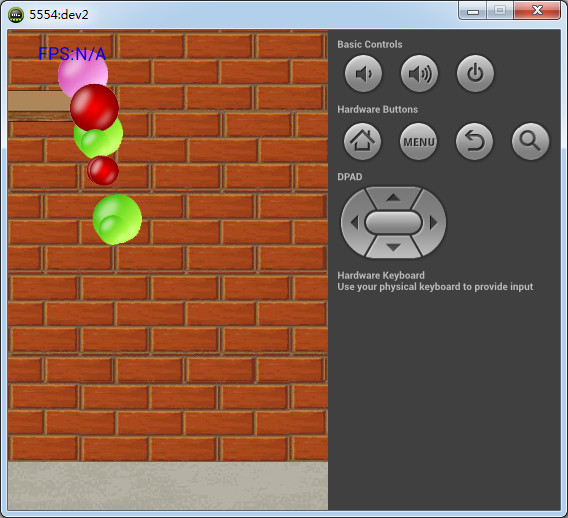
這是 Android 遊戲開發系列的第一篇。目標很小:讓幾顆大小不一的球從一塊木板右端滾落,受重力加速下墜、撞地反彈、能量逐次衰減直到靜止。看似簡單,卻涵蓋了遊戲開發的四
 Android 實現 ListView 滑動時頂部欄漸隱漸現
做項目時碰到這麼個需求:列表滑動過程中,頂部欄要從全透明平滑過渡到不透明。效果如下: 思路其實很直白——監聽 ListView 的滑動距離,按距離折算出一個 0~1 的