

編輯:關於 Android 程式設計
昨天把 Android Studio 升級到 0.8.1,結果 App 竟然跑不起來了。
Run 視窗裡一直停在:
Waiting for device.
Target device: lge-nexus_4-0262fa6d9d51c2e8
而 Event Log 視窗則是:
NoSuchMethodError: com.android.builder.model.AndroidArtifact.getOutputs()Ljava/util/Collection;
折騰了很久都抓不到頭緒。後來想到 Android Studio 是用「解壓覆蓋原目錄」的方式升級的,那麼很可能某個檔案出現了新舊衝突。於是一個一個去比對檔案的時間戳,最後發現只要刪掉 Android Studio 目錄下的這個「舊」檔案,重啟就能恢復:
\android-studio\plugins\android\lib\builder-model-0.11.0.jar
原因在於 Android Studio 0.8.1 使用的 Gradle 已經是 0.12.+ 了,舊版 builder-model 殘留下來自然會與新版 API 對不上,於是拋出 NoSuchMethodError。
根專案的 build.gradle 對應長這樣:
// Top-level build file where you can add configuration options common to all sub-projects/modules.
buildscript {
    repositories {
        mavenCentral()
    }
    dependencies {
        classpath 'com.android.tools.build:gradle:0.12.+'

        // NOTE: Do not place your application dependencies here; they belong
        // in the individual module build.gradle files
    }
}

allprojects {
    repositories {
        mavenCentral()
    }
}
總結一下這類問題的排查思路:升級 IDE 之後出現莫名的 NoSuchMethodError,先懷疑舊版 jar 是否殘留,比對檔案時間戳往往比盲目重裝更快。
 EventBus 源碼深度剖析:反射訂閱與粘性事件的運作奧秘
讀完這篇文章,你將能徹底搞懂兩個常被提及卻又容易含糊的問題:1、為什麼 EventBus 的事件處理方法通常要求聲明為 public?可我把它寫成 protected 也
 Android 自定義圖形單點移動與縮放效果
單點拖曳在單指操作時,可透過 MotionEvent 取得目前座標,並更新檢視的 LayoutParams 邊距,讓圖形跟著手指移動。這種方式適合需要直接操控位置的簡單互
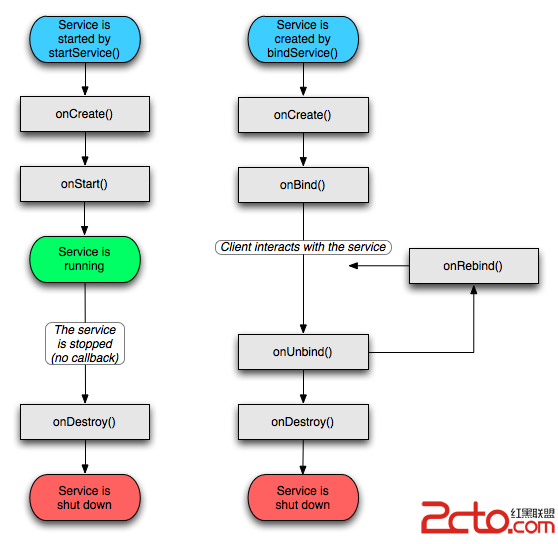 Android Service 的非綁定式啟動與生命週期解析
Service 若採用非綁定式(unbound)的方式啟動,建立之後就無法再與它取得聯繫——不能傳遞參數、不能取得回傳值,只能單向下指令。 如果你希望在服務啟動後仍能與
 Android 七大佈局方式完整解析:Linear、Relative、Table、List、Grid、Absolute、Tab
前面我們已經對 Android 程式的執行原理與佈局檔有了基本認識,也用「Hello World!」驗證過一次。在往下深入之前,有個該補的基礎得先補完:View 的幾種佈