

編輯:關於 Android 程式設計
以下程式碼示範如何獲取當前螢幕截圖,並將其儲存到 SD 卡指定路徑下。核心思路是:先建立 Bitmap,再透過 decorView 的 drawing cache 取得畫面,最後壓縮寫入檔案。
/**
 * 獲取並儲存當前螢幕截圖
 */
private void GetandSaveCurrentImage() {
    // 1. 建立 Bitmap
    WindowManager windowManager = getWindowManager();
    Display display = windowManager.getDefaultDisplay();
    int w = display.getWidth();
    int h = display.getHeight();
    Bitmap Bmp = Bitmap.createBitmap(w, h, Config.ARGB_8888);
    // 2. 獲取螢幕畫面
    View decorview = this.getWindow().getDecorView();
    decorview.setDrawingCacheEnabled(true);
    Bmp = decorview.getDrawingCache();
    String SavePath = getSDCardPath()+"/AndyDemo/ScreenImage";
    // 3. 儲存 Bitmap
    try {
        File path = new File(SavePath);
        String filepath = SavePath + "/Screen_1.png";
        File file = new File(filepath);
        if(!path.exists()){
            path.mkdirs();
        }
        if (!file.exists()) {
            file.createNewFile();
        }
        FileOutputStream fos = null;
        fos = new FileOutputStream(file);
        if (null != fos) {
            Bmp.compress(Bitmap.CompressFormat.PNG, 90, fos);
            fos.flush();
            fos.close();
            Toast.makeText(this, "截圖已儲存至 SDCard/AndyDemo/ScreenImage/ 下", Toast.LENGTH_LONG).show();
        }
    } catch (Exception e) {
        e.printStackTrace();
    }
}

/**
 * 獲取 SD 卡目錄路徑
 */
private String getSDCardPath(){
    File sdcardDir = null;
    boolean sdcardExist = Environment.getExternalStorageState().equals(android.os.Environment.MEDIA_MOUNTED);
    if(sdcardExist){
        sdcardDir = Environment.getExternalStorageDirectory();
    }
    return sdcardDir.toString();
}
使用時需先確認 SD 卡已掛載,並在 AndroidManifest 中加入 WRITE_EXTERNAL_STORAGE 權限。
 Android Location 定位實例:取得經緯度並顯示
Location 在 Android 的用途定位常用於取得經緯度,再延伸成天氣、地圖或地區服務。Android 中可透過 LocationManager 取得位置,常見來
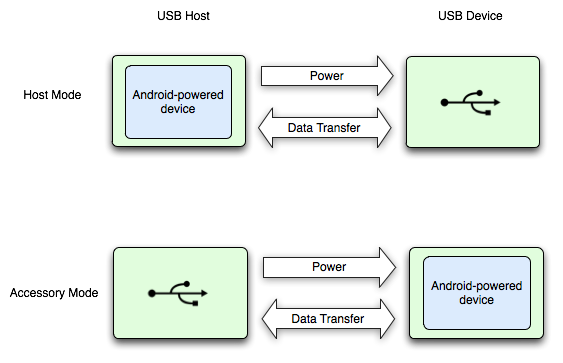 Android USB 主機(Host)與配件(Accessory)開發指南
原文地址:https://developer.android.com/guide/topics/connectivity/usb/host.html Android 支援
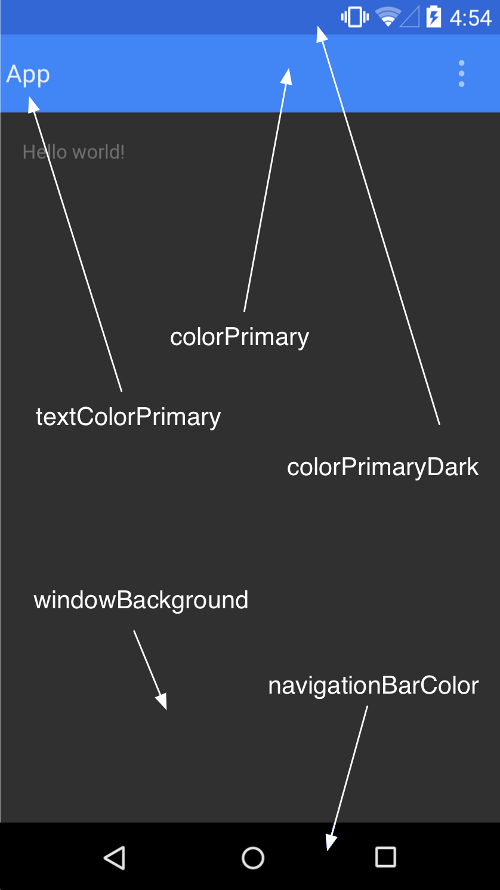 Android 5.x Theme 與 ToolBar 實戰指南
隨著 Material Design 逐漸普及,Android 5.x 之後的介面設計越來越重視色彩、層次與操作一致性。開發者可以透過自訂 Theme 調整應用程式的整體
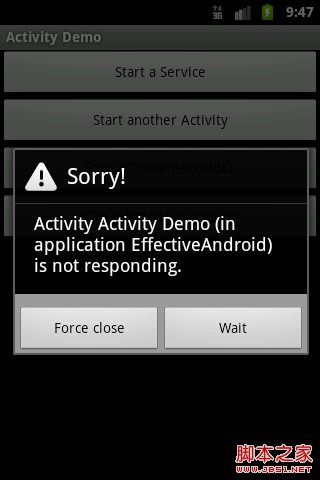 深入 Android 執行緒模型:一個進程為什麼只有一條執行緒在跑
預設情況下,一個進程只有一條執行緒 這點跟 C/C++、Java 等語言的預設模型一致:在 Android 應用程式裡,一個進程只有一條執行緒,所有組件都跑在它上面。 應