

編輯:關於 Android 程式設計
日常開發裡,表單校驗幾乎無處不在。把常見的校驗規則沉澱成一個工具類,比到處複製貼上正則表達式要可靠得多。下面這個 RegexUtils 涵蓋了郵箱、手機號、固定電話、身分證號、整數、小數、空白字元、中文、日期、URL、郵遞區號與 IP 地址等常用場景。
核心實現依賴 Pattern.matches() 做整體字串匹配,等價於:
Pattern p = Pattern.compile(regex);
Matcher m = p.matcher(input);
return m.matches();
需要留意的是,正則本身沒有「唯一正解」。運營商號段會隨時間變化,身分證校驗若要嚴謹,還需加上加權驗證碼演算法。如果你有更完善的表達式,歡迎一起討論。源碼地址:https://download.csdn.net/detail/u014608640/7316565
/**
 * 正則工具類
 * 提供驗證郵箱、手機號、電話號碼、身份證號碼、數字等方法
 */
public final class RegexUtils {

    /** 驗證 Email */
    public static boolean checkEmail(String email) {
        String regex = "\\w+@\\w+\\.[a-z]+(\\.[a-z]+)?";
        return Pattern.matches(regex, email);
    }

    /** 驗證身份證號碼(15 位或 18 位,最後一位可能是數字或字母) */
    public static boolean checkIdCard(String idCard) {
        String regex = "[1-9]\\d{13,16}[a-zA-Z0-9]{1}";
        return Pattern.matches(regex, idCard);
    }

    /**
     * 驗證手機號碼(支持國際格式,如 +86135xxxx、+00852137xxxx)
     * 大陸號段包含移動、聯通、電信三大運營商
     */
    public static boolean checkMobile(String mobile) {
        String regex = "(\\+\\d+)?1[3458]\\d{9}$";
        return Pattern.matches(regex, mobile);
    }

    /**
     * 驗證固定電話號碼
     * 格式:國家(地區)電話代碼 + 區號(城市代碼) + 電話號碼
     * 例:+8602085588447
     */
    public static boolean checkPhone(String phone) {
        String regex = "(\\+\\d+)?(\\d{3,4}\\-?)?\\d{7,8}$";
        return Pattern.matches(regex, phone);
    }

    /** 驗證整數(正整數和負整數) */
    public static boolean checkDigit(String digit) {
        String regex = "\\-?[1-9]\\d+";
        return Pattern.matches(regex, digit);
    }

    /** 驗證整數和浮點數(正負整數與正負浮點數),如 1.23、233.30 */
    public static boolean checkDecimals(String decimals) {
        String regex = "\\-?[1-9]\\d+(\\.\\d+)?";
        return Pattern.matches(regex, decimals);
    }

    /** 驗證空白字元:空格、\t、\n、\r、\f、\x0B */
    public static boolean checkBlankSpace(String blankSpace) {
        String regex = "\\s+";
        return Pattern.matches(regex, blankSpace);
    }

    /** 驗證中文 */
    public static boolean checkChinese(String chinese) {
        String regex = "^[\u4E00-\u9FA5]+$";
        return Pattern.matches(regex, chinese);
    }

    /** 驗證日期(年月日),格式:1992-09-03 或 1992.09.03 */
    public static boolean checkBirthday(String birthday) {
        String regex = "[1-9]{4}([-./])\\d{1,2}\\1\\d{1,2}";
        return Pattern.matches(regex, birthday);
    }

    /** 驗證 URL 地址 */
    public static boolean checkURL(String url) {
        String regex = "(https?://(w{3}\\.)?)?\\w+\\.\\w+(\\.[a-zA-Z]+)*(:\\d{1,5})?(/\\w*)*(\\??(.+=.*)?(&.+=.*)?)?";
        return Pattern.matches(regex, url);
    }

    /** 匹配中國郵政編碼 */
    public static boolean checkPostcode(String postcode) {
        String regex = "[1-9]\\d{5}";
        return Pattern.matches(regex, postcode);
    }

    /**
     * 匹配 IP 地址(簡單格式匹配,如 192.168.1.1、127.0.0.1)
     * 注意:此表達式不校驗每段數值是否超過 255
     */
    public static boolean checkIpAddress(String ipAddress) {
        String regex = "[1-9](\\d{1,2})?\\.(0|([1-9](\\d{1,2})?))\\.(0|([1-9](\\d{1,2})?))\\.(0|([1-9](\\d{1,2})?))";
        return Pattern.matches(regex, ipAddress);
    }
}
/** 正則表達式工具類測試 */
public class RegexUtilsTest {

    @Test
    public void testCheckEmail() {
        Assert.assertTrue(RegexUtils.checkEmail("zha2_ngsan@sina.com.cn"));
    }

    @Test
    public void testCheckIdCard() {
        Assert.assertTrue(RegexUtils.checkIdCard("432403193902273273"));
    }

    @Test
    public void testCheckMobile() {
        Assert.assertTrue(RegexUtils.checkMobile("+8613620285733"));
    }

    @Test
    public void testCheckPhone() {
        Assert.assertTrue(RegexUtils.checkPhone("+860738-4630706"));
    }

    @Test
    public void testCheckDigit() {
        Assert.assertTrue(RegexUtils.checkDigit("123132"));
    }

    @Test
    public void testCheckDecimals() {
        Assert.assertTrue(RegexUtils.checkDecimals("-33.2"));
    }

    @Test
    public void testCheckBlankSpace() {
        Assert.assertTrue(RegexUtils.checkBlankSpace(" "));
    }

    @Test
    public void testCheckChinese() {
        Assert.assertTrue(RegexUtils.checkChinese("中文"));
    }

    @Test
    public void testCheckBirthday() {
        Assert.assertTrue(RegexUtils.checkBirthday("1992/09/03"));
    }

    @Test
    public void testCheckPostcode() {
        Assert.assertTrue(RegexUtils.checkPostcode("417100"));
    }

    @Test
    public void testCheckURL() {
        Assert.assertTrue(RegexUtils.checkURL(
            "https://blog.csdn.com:80/xyang81/article/details?name=&abc=中文"));
    }

    @Test
    public void testCheckIpAddress() {
        Assert.assertTrue(RegexUtils.checkIpAddress("192.1.22.255"));
    }
}
正則校驗的性能開銷主要來自正則編譯,如果同一條表達式會被高頻呼叫,建議把 Pattern 提取為靜態常量預先編譯,避免重複 compile。另外,正則只適合作「格式預檢」,涉及唯一性、真實性的判斷(例如手機號是否已註冊)仍需交由服務端確認。
 狀態列沉浸式實作,以及它帶來的鍵盤與版面適配難題
這個需求是因為專案要求才去研究的。身為 Android 新手,我原本完全沒碰過狀態列整合這件事,第一反應当然是上網搜尋。網路資料確實幫了大忙,但對我這種入門者來說仍不夠細
 微信換手機號了怎麼辦?更換綁定號碼教學
如今我們大部分人都在玩微信,並用手機綁定了微信帳號。手機功能太重要,萬一手機遺失,或需要更換號碼該怎麼辦?別擔心,騰訊自然也想到了這個問題,以下就為大家詳細介紹。微信在不
 Android 基礎入門:Toast(吐司)提示框的基本使用
學完 Adapter 相關的控件後,本節來認識一個極為常用的提示元件——Toast(吐司)。它會在螢幕上顯示一個方形提示框,沒有任何按鈕、也不會取得焦點,一段時間後自動消
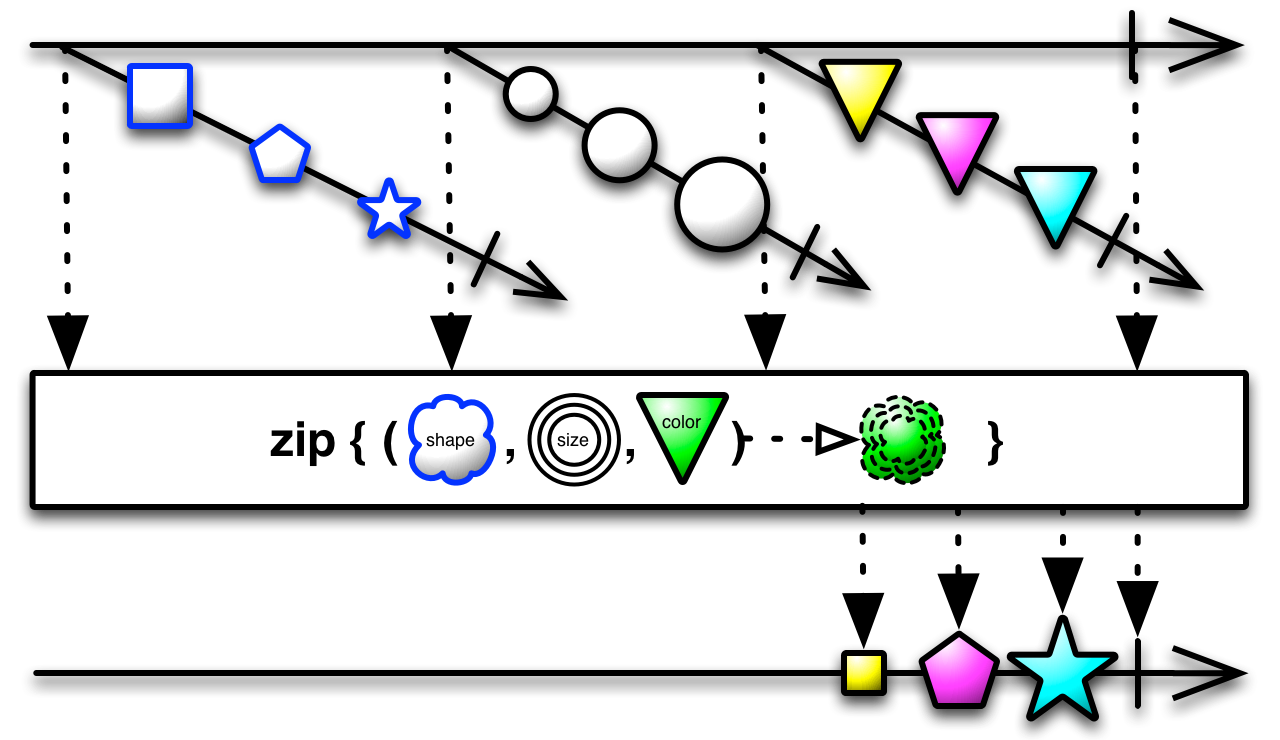 RxJava zip 操作符在 Android 中的實際應用場景
一、zip 操作符是什麼 官方文件的描述是: Returns an Observable that emits the results of a specified co