

編輯:關於 Android 程式設計
你可以直接把資料存進內部儲存。預設情況下,寫到內部儲存的檔案是私有的,其他應用程式無法存取;使用者卸載應用程式時,這些檔案也會一併被移除。這樣的特性讓它很適合存放不該外流的資料。
方法一:使用 Java 原生的檔案 API
FileOutputStream writeStream = null;
FileOutputStream fileOutputStream = null;
switch (view.getId()) {
    case R.id.button1:
        // 創建的文件其他程序不能訪問
        File file1 = new File(getFilesDir(), FILE1);
        try {
            // 寫入數據
            writeStream = new FileOutputStream(file1);
            writeStream.write("haha".getBytes());
        } catch (FileNotFoundException e) {
            e.printStackTrace();
        } catch (IOException e) {
            e.printStackTrace();
        } finally {
            try {
                if (writeStream != null) writeStream.close();
            } catch (IOException e) {
                e.printStackTrace();
            }
        }
這裡的 getFilesDir() 會回傳應用專屬的內部目錄,比硬編碼路徑安全得多。
方法二:使用 android.content 提供的便捷方法
// 使用的是 android.content
try {
    /*
     * 設置成 MODE_PRIVATE,其他程序不能訪問。
     * 這種是默認的構造方式,可以去設置成其他的方式來使其可讀寫。
     */
    fileOutputStream = openFileOutput(FILE2, Context.MODE_PRIVATE);
    // 寫入數據
    fileOutputStream.write("hehe".getBytes());
} catch (FileNotFoundException e) {
    e.printStackTrace();
} catch (IOException e) {
    e.printStackTrace();
} finally {
    try {
        if (fileOutputStream != null) fileOutputStream.close();
    } catch (IOException e) {
        e.printStackTrace();
    }
}
openFileOutput() 的回報三步驟——取得串流、呼叫 write()、關閉串流——就是內部儲存寫入的標準骨架。讀檔的流程基本相同,只是把 openFileOutput() 換成 openFileInput()。
如果要在編譯期就把一份固定檔案打包進應用,可以把它放在 res/raw/ 目錄,再以 openRawResource() 開啟。這個方法會回傳一個 InputStream,你可以從中讀取內容,但無法寫回原始檔。這個技巧在需要攜帶一份預設設定或初始資料時特別好用。
若只是想暫存一些資料而非長期保存,可用 createTempFile() 建立檔案,並以 getCacheDir() 取得存放位置。系統在內部儲存不足時可能會自行清除這些檔案,因此不該依賴它們長期存在。
上述檔案在一般檔案總管中看不到,要確認內容得動用 adb。先列出裝置:
~$ adb devices
List of devices attached
emulator-5554   device
再進入 shell:
~$ adb -s emulator-5554 shell
#
內部儲存的目錄由應用程式的套件名決定,預設情況下其他程式無法存取;除非你明確使用了可讀或可寫的模式,否則這層隔離會一直存在。
參考資料:
https://developer.android.com/guide/topics/data/data-storage.html
https://developer.android.com/training/basics/data-storage/files.html
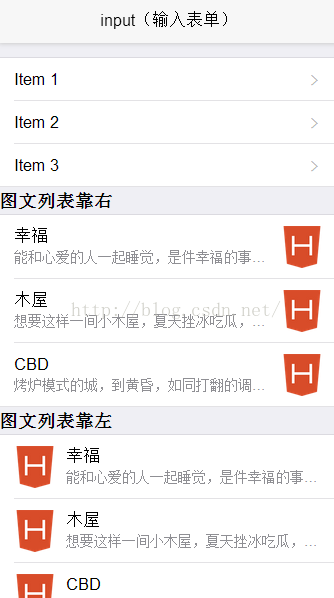 MUI組件詳解(三):列表、遮罩蒙版、數字輸入框、側滑導航與彈出菜單
本篇聚焦MUI的五個常用組件:列表、遮罩蒙版、數字輸入框、側滑導航和彈出菜單,逐一說明其結構與用法。 一、List(列表) 列表是最常用的UI控件之一。MUI封裝的列表很
 Android自定義View實戰:打造帶數字的進度條NumberProgressBar
第一步、效果展示 圖1、藍色的進度條 圖2、紅色的進度條 圖3、多條顏色不同的進度條 圖4、多條顏色不同的進度條 版權聲明:本文為【歐陽鵬】原創文章,歡迎
 Android 四大元件之一:Activity 知識全景整理
Activity 是 Android 應用與使用者互動的入口,也是大多數學習者接觸 Android 時寫下的第一個類。正因為它太常見,反而容易只學會「怎麼用」,而沒搞清楚
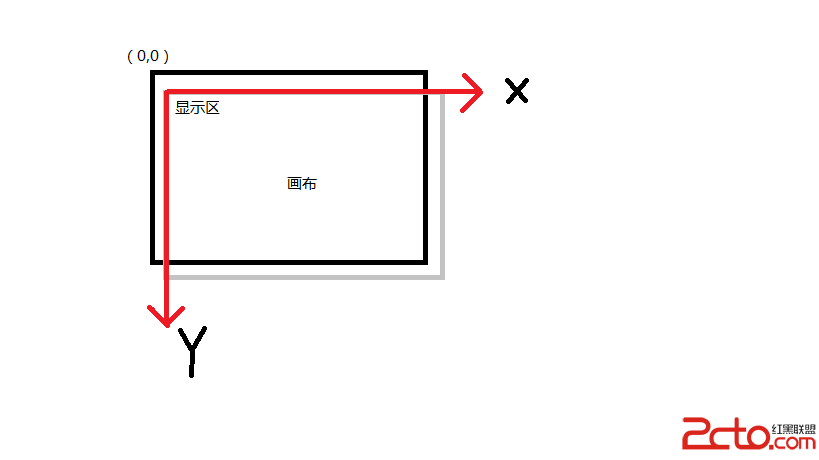 Android 畫布的移動與翻轉技巧
Canvas 的變換在圖像處理上是一大利器。靠著 translate 與 rotate,不必進行陣列的轉置顛倒等繁瑣運算,就能輕鬆改變原點位置與方向。 初始狀態下,畫