

編輯:關於 Android 程式設計
先看成品:
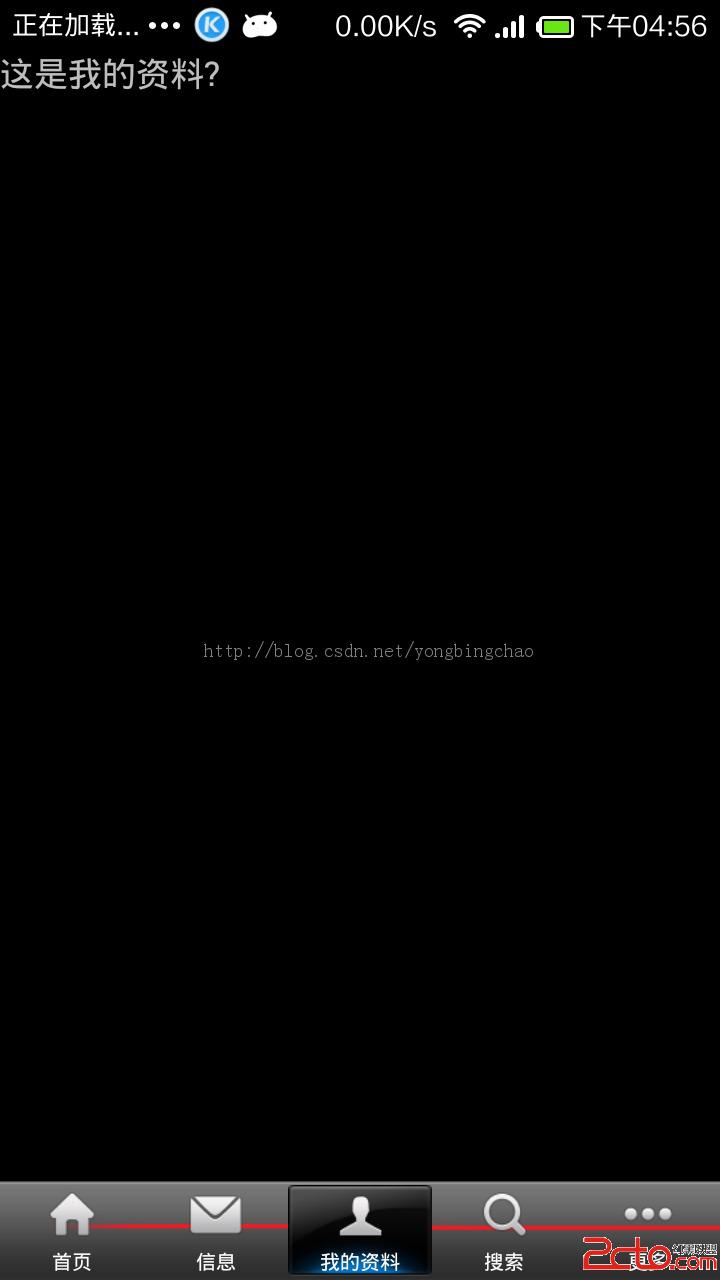
TabHost 需要三個特定 id 的子元件:@android:id/tabhost、@android:id/tabcontent、@android:id/tabs。這裡把 TabWidget 隱藏起來,改用自訂的 RadioGroup 作為底部工具列。
<?xml version="1.0" encoding="utf-8"?>
<TabHost xmlns:android="https://schemas.android.com/apk/res/android"
    android:id="@android:id/tabhost"
    android:layout_width="fill_parent"
    android:layout_height="fill_parent" >

    <LinearLayout
        android:layout_width="fill_parent"
        android:layout_height="fill_parent"
        android:orientation="vertical" >

        <!-- 後面的會覆蓋前面的 -->
        <FrameLayout
            android:id="@android:id/tabcontent"
            android:layout_width="fill_parent"
            android:layout_height="0.0dip"
            android:layout_weight="1.0" />

        <TabWidget
            android:id="@android:id/tabs"
            android:layout_width="fill_parent"
            android:layout_height="wrap_content"
            android:layout_weight="2.0"
            android:visibility="gone" />

        <RadioGroup
            android:id="@+id/main_tab"
            android:layout_width="fill_parent"
            android:layout_height="wrap_content"
            android:layout_gravity="bottom"
            android:background="@drawable/maintab_toolbar_bg"
            android:gravity="center_vertical"
            android:orientation="horizontal" >

            <RadioButton
                android:id="@+id/radio_button0"
                android:layout_marginTop="2.0dip"
                android:drawableTop="@drawable/icon_1_n"
                android:text="@string/main_home" />
            <RadioButton
                android:id="@+id/radio_button1"
                android:layout_marginTop="2.0dip"
                android:drawableTop="@drawable/icon_2_n"
                android:text="@string/main_news" />
            <RadioButton
                android:id="@+id/radio_button2"
                android:layout_marginTop="2.0dip"
                android:drawableTop="@drawable/icon_3_n"
                android:text="@string/main_my_info" />
            <RadioButton
                android:id="@+id/radio_button3"
                android:layout_marginTop="2.0dip"
                android:drawableTop="@drawable/icon_4_n"
                android:text="@string/menu_search" />
            <RadioButton
                android:id="@+id/radio_button4"
                android:layout_marginTop="2.0dip"
                android:drawableTop="@drawable/icon_5_n"
                android:text="@string/more" />
        </RadioGroup>
    </LinearLayout>
</TabHost>
<?xml version="1.0" encoding="utf-8"?>
<resources>
    <style name="main_tab_bottom">
        <item name="android:textSize">@dimen/bottom_tab_font_size</item>
        <item name="android:textColor">#ffffffff</item>
        <item name="android:ellipsize">marquee</item>
        <item name="android:gravity">center_horizontal</item>
        <item name="android:background">@drawable/home_btn_bg</item>
        <item name="android:paddingTop">@dimen/bottom_tab_padding_up</item>
        <item name="android:layout_width">fill_parent</item>
        <item name="android:layout_height">wrap_content</item>
        <item name="android:button">@null</item>
        <item name="android:singleLine">true</item>
        <item name="android:drawablePadding">@dimen/bottom_tab_padding_drawable</item>
        <item name="android:layout_weight">1.0</item>
        <item name="android:layout_marginBottom">2.0dip</item>
    </style>
</resources>
其中 android:button=@null 很重要,它拿掉了 RadioButton 預設的圓點,讓版面只剩圖標與文字。
<?xml version="1.0" encoding="utf-8"?>
<resources>
    <!-- 圖片和文字之間距離 -->
    <dimen name="bottom_tab_padding_drawable">5.0dip</dimen>
    <!-- 和上方距離 -->
    <dimen name="bottom_tab_padding_up">3.0dip</dimen>
    <dimen name="bottom_tab_font_size">10.0dip</dimen>
</resources>
<?xml version="1.0" encoding="utf-8"?>
<resources>
    <string name="app_name">SinaWeibo</string>
    <string name="main_home">首頁</string>
    <string name="main_news">信息</string>
    <string name="main_my_info">我的資料</string>
    <string name="menu_search">搜索</string>
    <string name="more">更多</string>
</resources>
package com.chao.demo;

import android.app.TabActivity;
import android.content.Intent;
import android.os.Bundle;
import android.view.Window;
import android.widget.RadioGroup;
import android.widget.RadioGroup.OnCheckedChangeListener;
import android.widget.TabHost;

public class MainTabActivity extends TabActivity implements OnCheckedChangeListener {

    private RadioGroup mainTab;
    private TabHost tabhost;
    private Intent iHome, iNews, iInfo, iSearch, iMore;

    @Override
    public void onCreate(Bundle savedInstanceState) {
        super.onCreate(savedInstanceState);
        requestWindowFeature(Window.FEATURE_NO_TITLE);
        setContentView(R.layout.main);

        mainTab = (RadioGroup) findViewById(R.id.main_tab);
        mainTab.setOnCheckedChangeListener(this);

        tabhost = getTabHost();

        iHome = new Intent(this, HomeActivity.class);
        tabhost.addTab(tabhost.newTabSpec("iHome")
                .setIndicator(getResources().getString(R.string.main_home),
                              getResources().getDrawable(R.drawable.icon_1_n))
                .setContent(iHome));

        iNews = new Intent(this, NewsActivity.class);
        tabhost.addTab(tabhost.newTabSpec("iNews")
                .setIndicator(getResources().getString(R.string.main_news),
                              getResources().getDrawable(R.drawable.icon_2_n))
                .setContent(iNews));

        iInfo = new Intent(this, MyInfoActivity.class);
        tabhost.addTab(tabhost.newTabSpec("iInfo")
                .setIndicator(getResources().getString(R.string.main_my_info),
                              getResources().getDrawable(R.drawable.icon_3_n))
                .setContent(iInfo));

        iSearch = new Intent(this, SearchActivity.class);
        tabhost.addTab(tabhost.newTabSpec("iSearch")
                .setIndicator(getResources().getString(R.string.menu_search),
                              getResources().getDrawable(R.drawable.icon_4_n))
                .setContent(iSearch));

        iMore = new Intent(this, MoreActivity.class);
        tabhost.addTab(tabhost.newTabSpec("iMore")
                .setIndicator(getResources().getString(R.string.more),
                              getResources().getDrawable(R.drawable.icon_5_n))
                .setContent(iMore));
    }

    // 監聽點擊的按鈕,切換對應頁面
    @Override
    public void onCheckedChanged(RadioGroup group, int checkedId) {
        switch (checkedId) {
            case R.id.radio_button0: tabhost.setCurrentTabByTag("iHome");   break;
            case R.id.radio_button1: tabhost.setCurrentTabByTag("iNews");   break;
            case R.id.radio_button2: tabhost.setCurrentTabByTag("iInfo");   break;
            case R.id.radio_button3: tabhost.setCurrentTabByTag("iSearch"); break;
            case R.id.radio_button4: tabhost.setCurrentTabByTag("iMore");   break;
        }
    }
}
package com.chao.demo;

import android.app.Activity;
import android.os.Bundle;
import android.widget.TextView;

public class HomeActivity extends Activity {
    @Override
    protected void onCreate(Bundle savedInstanceState) {
        super.onCreate(savedInstanceState);
        TextView textView = new TextView(this);
        textView.setText("這是首頁");
        setContentView(textView);
    }
}
其他頁面的實作方式類似,此處不再贅列。
@android:id/ 引用。完整工程:https://download.csdn.net/detail/u014071669/7187077
 Android 自適應鍵盤製作教學:打造漂亮的數字輸入介面
最近做了一個自定義鍵盤,卻遇到一個難題:面對各種不同解析度的機型,數字鍵盤無法依介面大小自動鋪滿,但也不可能為每種機型各做一套。因此必須做成自適應。本文就重點講解實作思路
 Struts Action 取得請求參數的三種寫法
在 Struts 中接收請求參數並非只有一種做法,實務上常見的有三種。以下依序說明各自的結構與注意事項。 方式一:Action 本身作為 Model,用屬性注入 最直接的
 Android 數據存儲(四種方式之二):讀寫 SD 卡實戰練習
1 保存到 SDK —— 字串方式 package com.example.jreduch08.SDK; import android.content.DialogI
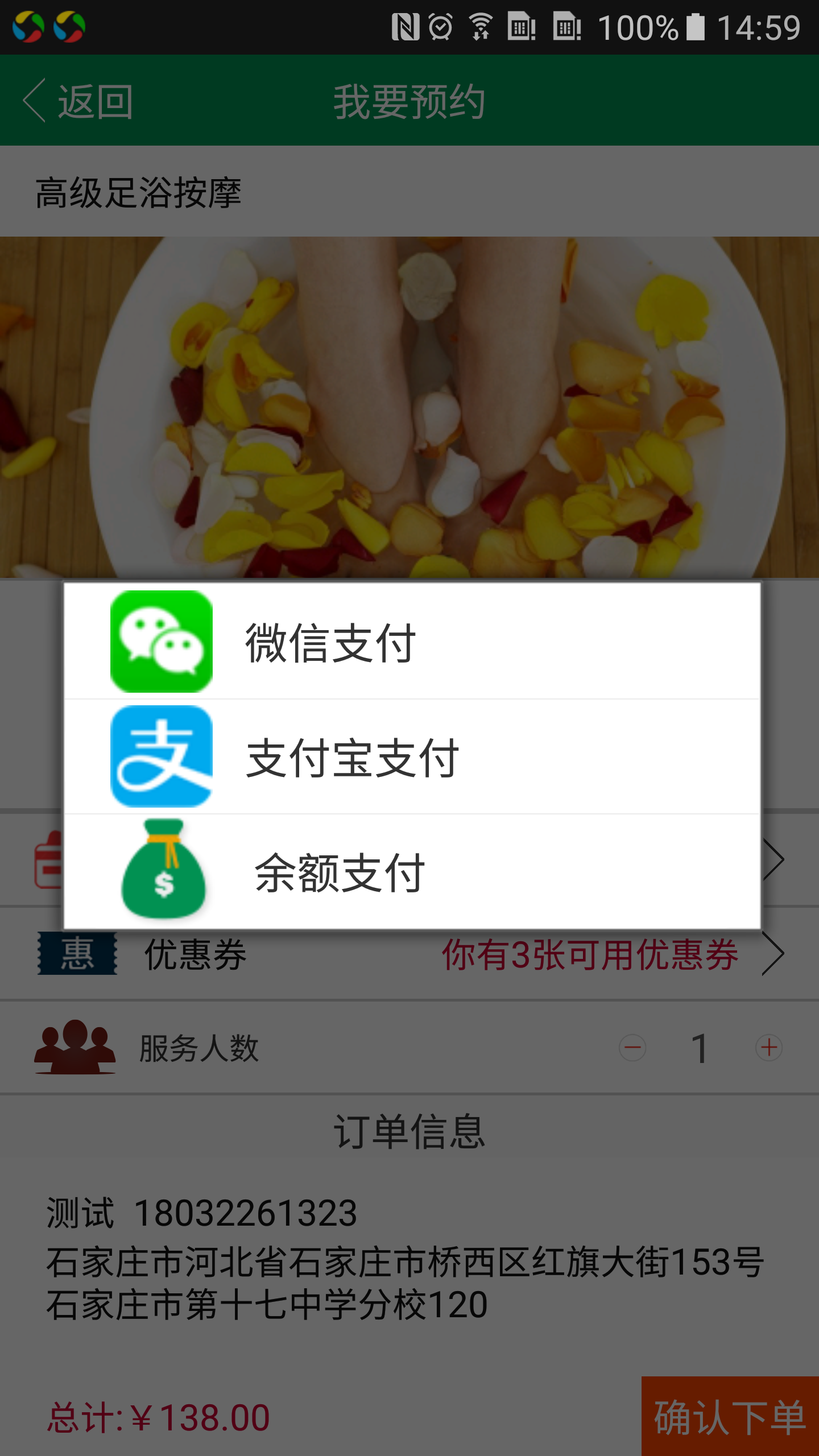 Android 系統對話框加上圖片:SimpleAdapter 客製列表這樣做
開發環境:Android Studio。 這次 UI 要求把選擇型的對話框加上圖示。以前沒做過,趁機學了一下,記錄成篇。 先看效果: 一、單行項目的佈局 新增 dial