

編輯:關於 Android 程式設計
Android 並沒有對外公開「結束通話」的 API。如果要在程式裡掛斷電話,必須透過 AIDL 與電話管理服務(Telephony)溝通,再呼叫服務中隱藏的介面來達成。以下說明完整流程。
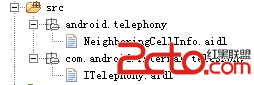
從 Android 原始碼中複製兩個檔案進專案:
com.android.internal.telephony 包下的 ITelephony.aidlandroid.telephony 包下的 NeighboringCellInfo.aidl注意:必須在專案裡建立與原始碼完全相同名稱的包來存放這兩個檔案,因為 AIDL 產生的 Java 檔會帶有原封不動的 package 宣告,包名對不上就會編譯失敗。開發工具會在 gen/ 目錄下自動產生 ITelephony.java。
核心是透過反射取得 Binder,再轉成 ITelephony 介面:
Method method = Class.forName("android.os.ServiceManager")
        .getMethod("getService", String.class);
IBinder binder = (IBinder) method.invoke(null, new Object[]{ TELEPHONY_SERVICE });
ITelephony telephony = ITelephony.Stub.asInterface(binder);
telephony.endCall();
記得在 AndroidManifest.xml 加上權限:
<uses-permission android:name="android.permission.CALL_PHONE" />
package cn.itcast.endcall;

import java.lang.reflect.Method;
import com.android.internal.telephony.ITelephony;
import android.app.Activity;
import android.os.Bundle;
import android.os.IBinder;
import android.os.RemoteException;
import android.view.View;

public class DemoActivity extends Activity {
    ITelephony iTelephony;

    @Override
    public void onCreate(Bundle savedInstanceState) {
        super.onCreate(savedInstanceState);
        setContentView(R.layout.main);
        try {
            // 取得系統電話管理服務
            Method method = Class.forName("android.os.ServiceManager")
                    .getMethod("getService", String.class);
            // 以反射取得 binder 物件
            IBinder binder = (IBinder) method.invoke(null,
                    new Object[] { TELEPHONY_SERVICE });
            iTelephony = ITelephony.Stub.asInterface(binder);
        } catch (Exception e) {
            e.printStackTrace();
        }
    }

    public void endcall(View view) {
        try {
            // iTelephony.endCall();      // 掛斷通話
            iTelephony.call("15139394270"); // 主動撥號
        } catch (RemoteException e) {
            e.printStackTrace();
        }
    }
}
NeighboringCellInfo.aidl:
package android.telephony;

parcelable NeighboringCellInfo;
ITelephony.aidl(節錄主要方法):
package com.android.internal.telephony;

import android.os.Bundle;
import java.util.List;
import android.telephony.NeighboringCellInfo;

interface ITelephony {
    /** 開啟撥號盤,可預填號碼,但不直接撥出 */
    void dial(String number);

    /** 直接撥出電話 */
    void call(String number);

    /** 若有通話進行中,顯示通話畫面 */
    boolean showCallScreen();
    boolean showCallScreenWithDialpad(boolean showDialpad);

    /** 掛斷通話 */
    boolean endCall();

    /** 接聽來電(若已有通話則自動保留) */
    void answerRingingCall();

    /** 靜音來電铃声 */
    void silenceRinger();

    /** 是否正在通話中(OFFHOOK) */
    boolean isOffhook();

    /** 是否有來電響鈴(RINGING) */
    boolean isRinging();

    /** 是否閒置(IDLE) */
    boolean isIdle();

    boolean isRadioOn();
    boolean isSimPinEnabled();
    void cancelMissedCallsNotification();
    boolean supplyPin(String pin);
    boolean handlePinMmi(String dialString);
    void toggleRadioOnOff();
    boolean setRadio(boolean turnOn);
    void updateServiceLocation();
    void enableLocationUpdates();
    void disableLocationUpdates();

    int enableApnType(String type);
    int disableApnType(String type);
    boolean enableDataConnectivity();
    boolean disableDataConnectivity();
    boolean isDataConnectivityPossible();

    Bundle getCellLocation();
    List<NeighboringCellInfo> getNeighboringCellInfo();

    int getCallState();
    int getDataActivity();
    int getDataState();
    int getActivePhoneType();
    int getCdmaEriIconIndex();
    int getCdmaEriIconMode();
    String getCdmaEriText();
    boolean getCdmaNeedsProvisioning();
    int getVoiceMessageCount();
    int getNetworkType();
    boolean hasIccCard();
}
把上面的能力跟來電廣播結合起來,就是一個完整的攔截方案:
AndroidManifest.xml 註冊 android.intent.action.PHONE_STATE 的 Receiver,並加上 READ_PHONE_STATE 權限。onReceive() 中透過 TelephonyManager.getCallState() 判斷是否為 CALL_STATE_RINGING。getExtras().getString(TelephonyManager.EXTRA_INCOMING_NUMBER) 取出來電號碼。iTelephony.endCall() 掛斷。這個做法雖然常見,但屬於非官方途徑,實務上有幾個明確限制:
com.android.internal.telephony.ITelephony 是隱藏 API,不同 Android 版本、不同廠商 ROM 的方法簽名都可能不同,endCall() 甚至在某些版本需要參數。endCall() 的公開替代方案:TelecomManager.endCall() 或 CallScreeningService。因此,若是新專案,建議直接採用官方 API:Android 10 以上請用 CallScreeningService 在來電階段就拒接,並搭配 ANSWER_PHONE_CALLS 權限;較舊版本則用 TelecomManager.endCall()。上面這套 AIDL 反射的做法,比較適合維護老專案或需要深度客製系統 ROM 的情境。
 百度一鍵 Root 怎麼取得權限?電腦版圖文操作
百度一鍵 Root 是一款介面乾淨、操作直覺的工具,對剛入門的使用者相當友善。Root 的作用是把系統的最高權限交到你的手上,讓你能處理原本做不到的事——例如移除內建軟體
 用 WindowManager 在應用最上層繪製懸浮 View
一般來說,Android 顯示一個 View 都是透過 Activity 的 setContentView 來設定。但其實還有一條路:直接用 WindowManager
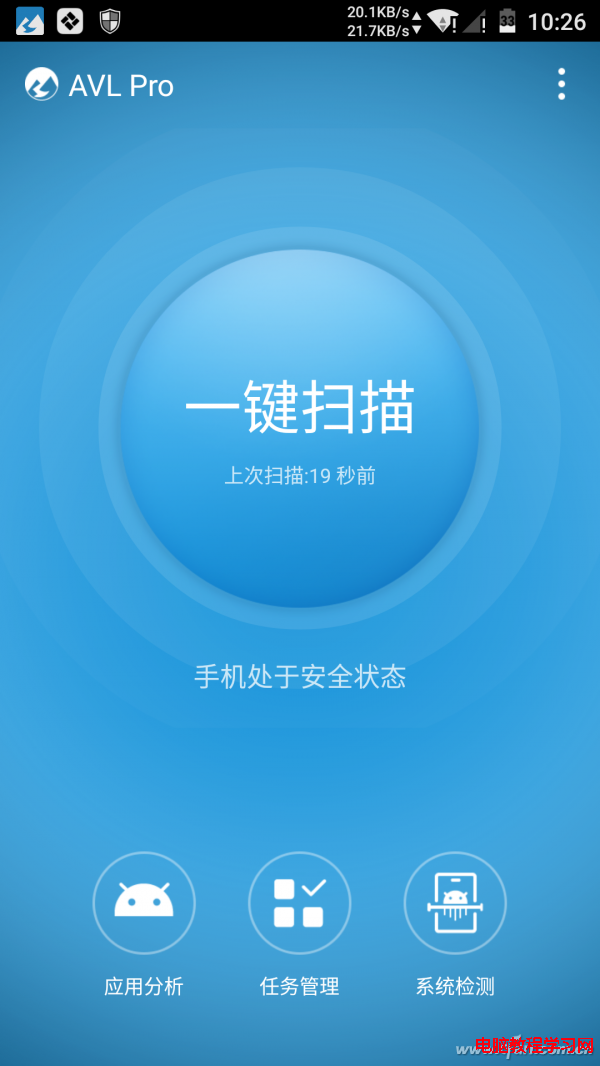 如何對手機應用進行安全分析?辨識未知風險
手機殺毒軟體大多透過特徵碼判斷病毒,在尚未攔截到某支手機病毒之前,是無法對其進行防範的。PC 端殺毒軟體裡都有一項「檔案分析器」功能,那麼在手機上又該如何對未知應用進行安
 自定義View仿淘寶物流時間軸:StaticLayout換行與多條目繪製
效果展示 本文將實作一個類似淘寶物流資訊的時間軸效果。整體畫面由物流描述、時間、垂直線與節點圓圈組成,最新節點通常會以較醒目的顏色呈現。 自定義View的基本思路 物