

編輯:關於 Android 程式設計
要實現 Android 應用的在線安裝(即軟體的在線升級),除了要撰寫 Android 客戶端程式碼,還需要搭建一個服務器端,模擬並驅動整個升級流程。本文完整分享這套實作的源碼。
Android 客戶端的主要程式碼如下。
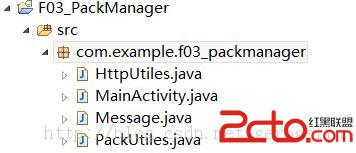
先在清單檔中加上網路訪問權限與讀寫 sdcard 的權限。整體流程為:查詢版本更新資訊 → 比較本地與伺服器版本 → 提示下載 → 下載並觸發安裝。
package com.example.f03_packmanager;

import java.util.concurrent.ExecutionException;
import android.net.Uri;
import android.os.AsyncTask;
import android.os.Bundle;
import android.app.Activity;
import android.app.AlertDialog;
import android.app.ProgressDialog;
import android.content.DialogInterface;
import android.content.Intent;
import android.content.DialogInterface.OnClickListener;
import android.util.Log;
import android.view.View;
import android.widget.Button;

public class MainActivity extends Activity {
    private Button button;
    private ProgressDialog dialog; // 查詢版本更新資訊的進度對話框
    private String messagePath = "https://111.0.124.108:8080/http/servlet/Install"; // 獲取版本更新的 URL
    private Message message;
    private PackUtiles packUtiles; // 獲取當前版本資訊的封裝類
    private AlertDialog.Builder builder; // 下載更新的對話框

    @Override
    protected void onCreate(Bundle savedInstanceState) {
        super.onCreate(savedInstanceState);
        setContentView(R.layout.activity_main);
        dialog = new ProgressDialog(MainActivity.this);
        dialog.setTitle("提示");
        dialog.setMessage("download.....");
        builder = new AlertDialog.Builder(MainActivity.this);
        builder.setTitle("下載更新");
        builder.setMessage("是否下載最新的版本?");
        builder.setCancelable(false);
        button = (Button) this.findViewById(R.id.button1);
        packUtiles = new PackUtiles(MainActivity.this);
        button.setOnClickListener(new View.OnClickListener() {
            @Override
            public void onClick(View v) {
                try {
                    message = new getAPKUrl().execute(messagePath).get();
                    boolean flag = packUtiles.update(packUtiles.getVersion(), message.getVsersionCode());
                    if (flag) {
                        builder.setPositiveButton("確定", new OnClickListener() {
                            @Override
                            public void onClick(DialogInterface arg0, int arg1) {
                                new downLoadAPK().execute(message.getApkUrl());
                            }
                        });
                        builder.setNegativeButton("取消", new OnClickListener() {
                            @Override
                            public void onClick(DialogInterface arg0, int arg1) { }
                        });
                        builder.create().show();
                    }
                } catch (InterruptedException e) {
                    e.printStackTrace();
                } catch (ExecutionException e) {
                    e.printStackTrace();
                }
            }
        });
    }

    // 獲取版本更新資訊的非同步任務
    public class getAPKUrl extends AsyncTask<String, Void, Message> {
        @Override protected void onPreExecute() { super.onPreExecute(); dialog.show(); }
        @Override protected Message doInBackground(String... params) {
            return HttpUtiles.getMessage(params[0]);
        }
        @Override protected void onPostExecute(Message result) {
            super.onPostExecute(result);
            dialog.dismiss();
        }
    }

    public class downLoadAPK extends AsyncTask<String, Void, Void> {
        @Override protected Void doInBackground(String... params) {
            String uri = HttpUtiles.downLoadApk(params[0]);
            // 透過檔案路徑安裝指定版本
            Uri uri2 = Uri.fromFile(new File(uri));
            Intent intent = new Intent(Intent.ACTION_VIEW);
            intent.setDataAndType(uri2, "application/vnd.android.package-archive");
            startActivity(intent);
            return null;
        }
    }
}
一個方法以 JSON 格式取得版本資料,另一個方法負責把最新版本下載到 sdcard:
public class HttpUtiles {
    // 下載版本資訊,格式為 json
    public static Message getMessage(String path) {
        Message message = new Message();
        HttpClient client = new DefaultHttpClient();
        HttpPost httpPost = new HttpPost(path);
        try {
            HttpResponse httpResponse = client.execute(httpPost);
            if (httpResponse.getStatusLine().getStatusCode() == 200) {
                String json = EntityUtils.toString(httpResponse.getEntity());
                JSONObject jsonObject = new JSONObject(json).getJSONObject("message");
                message.setVsersionCode(jsonObject.getInt("vsersionCode"));
                message.setApkUrl(jsonObject.getString("apkUrl"));
            }
        } catch (Exception e) {
            e.printStackTrace();
        }
        return message;
    }

    // 下載指定版本到 sdcard
    public static String downLoadApk(String path) {
        byte[] data = null;
        String uri = null;
        HttpClient client = new DefaultHttpClient();
        HttpPost httpPost = new HttpPost(path);
        FileOutputStream fileOutputStream = null;
        try {
            HttpResponse httpResponse = client.execute(httpPost);
            if (httpResponse.getStatusLine().getStatusCode() == 200) {
                data = EntityUtils.toByteArray(httpResponse.getEntity());
                if (Environment.getExternalStorageState().equals(Environment.MEDIA_MOUNTED)) {
                    File file = Environment.getExternalStorageDirectory();
                    String name = path.substring(path.lastIndexOf("/") + 1);
                    fileOutputStream = new FileOutputStream(new File(file, name));
                    fileOutputStream.write(data, 0, data.length);
                    uri = file.getAbsolutePath() + "/" + name;
                }
            }
        } catch (Exception e) {
            e.printStackTrace();
        } finally {
            if (fileOutputStream != null) {
                try { fileOutputStream.close(); } catch (IOException e) { }
            }
        }
        return uri;
    }
}
public class PackUtiles {
    private PackageInfo info;

    public PackUtiles(Context context) {
        initDate(context);
    }

    public void initDate(Context context) {
        PackageManager manager = context.getPackageManager();
        try {
            info = manager.getPackageInfo(context.getPackageName(), PackageManager.GET_ACTIVITIES);
        } catch (NameNotFoundException e) {
            e.printStackTrace();
        }
    }

    public int getVersion() { return info.versionCode; }
    public String getVersionName() { return info.versionName; }

    // 比較本地版本與伺服器版本號大小
    public boolean update(int oldVersion, int newVersion) {
        return newVersion > oldVersion;
    }
}
服務器端需事先匯入 JSON 的 jar 包。使用時別忘了把程式碼中的 HTTP 位址改成你自己電腦的 IP,並把待更新的 apk 放到 webroot 目錄下。
public class Install extends HttpServlet {
    public void doPost(HttpServletRequest request, HttpServletResponse response)
            throws ServletException, IOException {
        response.setContentType("text/html");
        PrintWriter out = response.getWriter();
        Message message = new Message();
        message.setVsersionCode(2);
        message.setApkUrl("https://111.0.124.108:8080/http/F03_PackManager.apk");
        Map<String, Object> map = new HashMap<String, Object>();
        map.put("message", message);
        out.print(JSONSerializer.toJSON(map));
        out.flush();
        out.close();
    }
}
至此,Android 客戶端與服務器端的程式碼都已完成。整套流程展示了如何透過 AsyncTask 異步請求伺服器、比對版本、下載 APK 並呼叫系統安裝器,完成應用的在線升級。
 帶你實現開發者頭條 App(五)——RecyclerView 下拉刷新與上拉加載
一、前言 最近實在太忙,一個多禮拜沒更新文章了,於是今晚加班加點把 demo 寫出來,寫到現在都十二點了才動筆記錄。 1. 我們的目標 把下拉刷新、上拉加載更多集成進我們
 用 WebView 實作一個簡易瀏覽器:返回、前進、首頁、網址輸入
WebView 是 Android 內建的網頁檢視元件,包一層操作列就能做出一個雛形瀏覽器。本篇實作的功能包含:網址輸入與跳轉、返回上一頁、前進下一頁、回到首頁、退出,
 Android 中 JSON 的封裝與解析實戰
JSON 定義: JSON(JavaScript Object Notation)是一種輕量級的數據交換格式。它基於 JavaScript(Standard ECMA-2
 Android 自訂 View:打造會旋轉並帶漣漪的甜甜圈進度環(二)
先看最終效果。 靜態: 動態: 一、建立骨架 public class DoughnutProgress extends View { } 二、常數、變數與初