

編輯:關於 Android 程式設計
由於 AndroidAsyncHttp 1.4.4 版本的 JsonHttpResponseHandler 存在死循環的 BUG(伴隨 GC_CONCURRENT 頻繁觸發),而 1.4.5 版本的發布時間又遙遙無期,因此只能採取臨時方案:自行替換該類來修復這個錯誤。
這是 loopj 開源庫 android-async-http 中 JsonHttpResponseHandler 的問題。以下提供一個覆寫版本 ZJsonHttpResponseHandler 作為臨時替代:
package com.ai9475.extend;

import com.ai9475.meitian.AppManager;
import com.ai9475.meitian.R;
import com.loopj.android.http.JsonHttpResponseHandler;
import android.app.AlertDialog;
import android.content.DialogInterface;
import android.util.Log;
import org.apache.http.Header;
import org.apache.http.HttpStatus;
import org.json.JSONArray;
import org.json.JSONException;
import org.json.JSONObject;
import org.json.JSONTokener;
import java.io.UnsupportedEncodingException;

/**
 * 復寫 AndroidAsyncHttp 1.4.4 開源庫的 JsonHttpResponseHandler 類
 * 當 1.4.5 released 後失效
 */
public class ZJsonHttpResponseHandler extends JsonHttpResponseHandler {
    private static final String LOG_TAG = "JsonHttpResponseHandler";

    public void onSuccess(int statusCode, Header[] headers, JSONObject response) { }
    public void onSuccess(int statusCode, Header[] headers, JSONArray response) { }
    public void onFailure(int statusCode, Header[] headers, Throwable throwable, JSONObject errorResponse) { }
    public void onFailure(int statusCode, Header[] headers, Throwable throwable, JSONArray errorResponse) { }

    @Override
    public void onFailure(int statusCode, Header[] headers, String responseString, Throwable throwable) {
        final AlertDialog.Builder dialog = new AlertDialog.Builder(AppManager.ActivityManager.current());
        dialog.setIcon(android.R.drawable.ic_dialog_info);
        dialog.setTitle(R.string.app_error);
        dialog.setMessage(responseString);
        dialog.setNegativeButton(R.string.sure, new DialogInterface.OnClickListener() {
            @Override
            public void onClick(DialogInterface dialog, int which) {
                dialog.dismiss();
            }
        });
        dialog.show();
    }

    @Override
    public void onSuccess(int statusCode, Header[] headers, String responseString) { }

    @Override
    public final void onSuccess(final int statusCode, final Header[] headers, final byte[] responseBytes) {
        if (statusCode != HttpStatus.SC_NO_CONTENT) {
            new Thread(new Runnable() {
                @Override
                public void run() {
                    try {
                        final Object jsonResponse = parseResponse(responseBytes);
                        postRunnable(new Runnable() {
                            @Override
                            public void run() {
                                if (jsonResponse instanceof JSONObject) {
                                    onSuccess(statusCode, headers, (JSONObject) jsonResponse);
                                } else if (jsonResponse instanceof JSONArray) {
                                    onSuccess(statusCode, headers, (JSONArray) jsonResponse);
                                } else if (jsonResponse instanceof String) {
                                    onFailure(statusCode, headers, (String) jsonResponse, new JSONException("Response cannot be parsed as JSON data"));
                                } else {
                                    onFailure(statusCode, headers, new JSONException("Unexpected response type " + jsonResponse.getClass().getName()), (JSONObject) null);
                                }
                            }
                        });
                    } catch (final JSONException ex) {
                        postRunnable(new Runnable() {
                            @Override
                            public void run() {
                                onFailure(statusCode, headers, ex, (JSONObject) null);
                            }
                        });
                    }
                }
            }).start();
        } else {
            onSuccess(statusCode, headers, new JSONObject());
        }
    }

    protected Object parseResponse(byte[] responseBody) throws JSONException {
        if (null == responseBody) return null;
        Object result = null;
        String jsonString = getResponseString(responseBody, getCharset());
        if (jsonString != null) {
            jsonString = jsonString.trim();
            if (jsonString.startsWith("{") || jsonString.startsWith("[")) {
                result = new JSONTokener(jsonString).nextValue();
            }
        }
        if (result == null) {
            result = jsonString;
        }
        return result;
    }

    public static String getResponseString(byte[] stringBytes, String charset) {
        try {
            return stringBytes == null ? null : new String(stringBytes, charset);
        } catch (UnsupportedEncodingException e) {
            Log.e(LOG_TAG, "Encoding response into string failed", e);
            return null;
        }
    }
}
經過這樣的修改後,當再次遇到 HTTP 500 或其他服務器錯誤(回傳非 JSON 字串)時,程式會直接彈出一個顯示服務器頁面內容的對話框,方便進行除錯。在官方發布新版本之前,這不失為一個實用的應急方案,待新版本推出後再切換回官方實作即可。
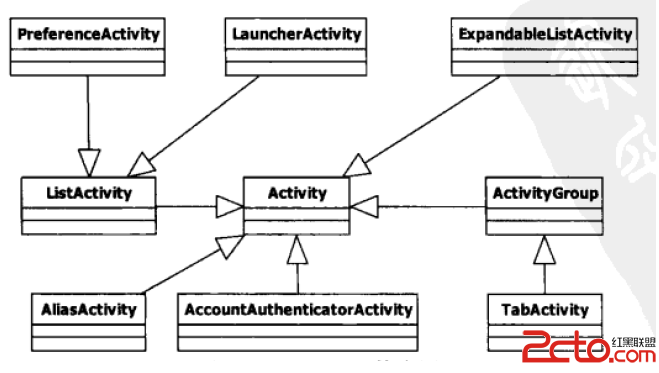 Android 常用控件全覽:Activity 類列表控件與適配器體系
列表與適配器是 Android UI 開發的地基。本文把 Activity 層面幾個常用列表類控件、以及適配器的類型劃分與工作流程做系統整理,適合當作速查手冊。 一、Ac
 Qt on Android:Android SDK 安裝圖文全解
先前在〈Windows 下 Qt 5.2 for Android 開發入門〉一文中,我已經介紹了 Windows 環境下 Qt on Android 開發環境的建置,但跳
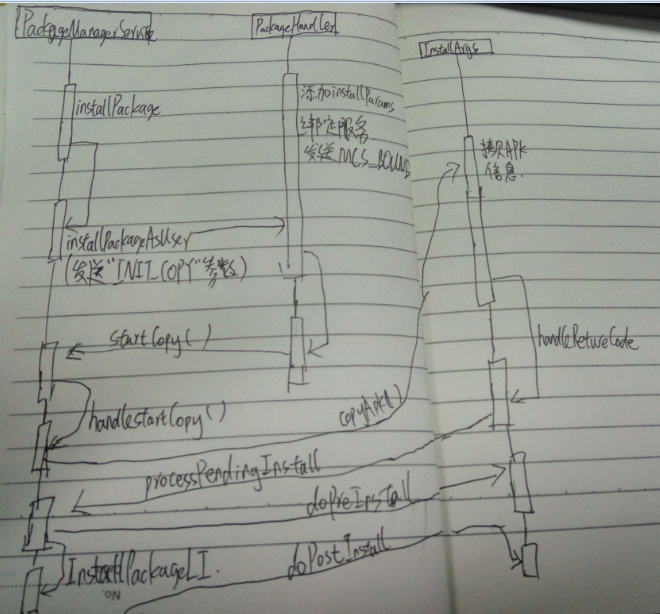 Android APK 安裝流程全解析:從 PackageInstallerActivity 到 PackageManagerService
這篇來把 APK 的安裝流程走一遍。先看應用內最常見的安裝寫法: Intent intent = new Intent(Intent.ACTION_VIEW); inte
 魅族MX6跑分多少?Geekbench 曝光的多核表現與規格
魅族MX6在真機圖頻繁曝光之後,正式現身 Geekbench 跑分網站,發表時間也確定為 7 月 19 日。對於評估它的效能定位,跑分資料提供了第一個可參考的依據。跑分資