

編輯:關於 Android 程式設計
一直覺得用原始的 SQLiteHelper 操作數據庫有些繁瑣,上網查了些 Android 的 ORM 框架對比之後,發現目前用 ORMLite 的人似乎挺多。於是照著官方文檔寫了個 demo,主要實現用戶注冊、用戶信息查看以及刪除功能。以前也用過另一款 ORM 框架 Afinal,但感覺沒有 ORMLite 強大。
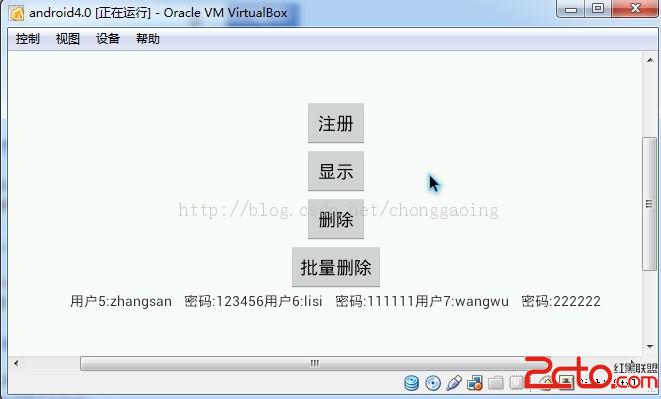
運行效果如圖:
ORMLite 官網:https://ormlite.com/
官網提供了 jar 包下載,使用前需要引入 ormlite-android-4.48.jar 與 ormlite-core-4.48.jar。
ORMLite 既支持自己的注解(@DatabaseTable 和 @DatabaseField),也支持來自 javax.persistence 包的標準 JPA 注解。
@DatabaseTable(tableName = "tb_user") // 若特別指出 tableName = "tb_user",否則默認把類名作為表名
public class User {
    /**
     * id:是否為主鍵,默認 false
     * generatedId:字段是否自動遞增,默認 false
     * 注意:id 和 generatedId 只能指明一個,否則會報錯
     */
    @DatabaseField(generatedId = true)
    private int userId;

    @DatabaseField
    private String userName;

    @DatabaseField
    private String password;

    public User() {
        // 必須提供無參構造函數,這樣查詢時才能返回對象
    }

    public User(int userId, String userName, String password) {
        this.userId = userId;
        this.userName = userName;
        this.password = password;
    }

    // getter / setter 省略
}
這裡有兩個比較重要的類:OrmLiteSqliteOpenHelper(應用加載時負責創建和更新數據庫,並為其他類提供 DAO,必須實現 onCreate 和 onUpgrade)以及 RuntimeExceptionDao(用來封裝運行時異常,因為 Android 平台上絕大多數異常都繼承自 RuntimeException)。
public class DatabaseHelper extends OrmLiteSqliteOpenHelper {
    // 數據庫名稱
    private static final String DATABASE_NAME = "helloAndroid.db";
    // 數據庫版本
    private static final int DATABASE_VERSION = 1;

    /**
     * 包含兩個泛型:
     * 第一個表示 DAO 操作的類
     * 第二個表示主鍵類型
     */
    private Dao<User, Integer> userDao = null;
    private RuntimeExceptionDao<User, Integer> simpleRuntimeDao = null;

    public DatabaseHelper(Context context) {
        super(context, DATABASE_NAME, null, DATABASE_VERSION);
    }

    @Override
    public void onCreate(SQLiteDatabase sqliteDatabase, ConnectionSource connectionSource) {
        try {
            TableUtils.createTable(connectionSource, User.class);
        } catch (SQLException e) {
            throw new RuntimeException(e);
        }
    }

    /** 插入一條數據 */
    public void insert(User user) {
        RuntimeExceptionDao<User, Integer> dao = getSimpleDataDao();
        int returnValue = dao.create(user);
    }

    /** 查詢所有用戶 */
    public List<User> findAllUser() {
        RuntimeExceptionDao<User, Integer> dao = getSimpleDataDao();
        return dao.queryForAll();
    }

    /** 刪除第一條用戶信息 */
    public void deleteById() {
        RuntimeExceptionDao<User, Integer> dao = getSimpleDataDao();
        List<User> list = dao.queryForAll();
        if (list.size() > 0) {
            dao.deleteById(list.get(0).getUserId());
        }
    }

    /** 批量刪除用戶 */
    public void deleteByIds() {
        RuntimeExceptionDao<User, Integer> dao = getSimpleDataDao();
        List<User> list = dao.queryForAll();
        List<Integer> ids = new ArrayList<Integer>();
        if (list.size() > 0) {
            for (User u : list) {
                ids.add(u.getUserId());
            }
            dao.deleteIds(ids);
        }
    }

    public RuntimeExceptionDao<User, Integer> getSimpleDataDao() {
        if (simpleRuntimeDao == null) {
            simpleRuntimeDao = getRuntimeExceptionDao(User.class);
        }
        return simpleRuntimeDao;
    }

    /** 應用升級時調用 */
    @Override
    public void onUpgrade(SQLiteDatabase sqliteDatabase, ConnectionSource connectionSource,
                          int oldVersion, int newVersion) {
        try {
            // 刪掉舊版本的數據
            TableUtils.dropTable(connectionSource, User.class, true);
            // 創建新的版本
            onCreate(sqliteDatabase, connectionSource);
        } catch (SQLException e) {
            throw new RuntimeException(e);
        }
    }
}
MainActivity:程序運行後進入該類,負責顯示頁面按鈕以及查詢出來的用戶信息。
public class MainActivity extends Activity {
    Button button1; // 注冊按鈕
    Button button2; // 顯示按鈕
    Button button3; // 刪除按鈕
    Button button4; // 批量刪除按鈕
    TextView textView; // 顯示查詢到的用戶信息
    DatabaseHelper helper = new DatabaseHelper(this);

    @Override
    protected void onCreate(Bundle savedInstanceState) {
        super.onCreate(savedInstanceState);
        setContentView(R.layout.main);
        button1 = (Button) findViewById(R.id.main_btn_regist);
        button2 = (Button) findViewById(R.id.main_btn_show);
        button3 = (Button) findViewById(R.id.main_btn_delete);
        button4 = (Button) findViewById(R.id.main_btn_deleteAll);
        textView = (TextView) findViewById(R.id.main_show_user);

        // 點擊注冊按鈕跳轉到注冊頁面
        button1.setOnClickListener(new OnClickListener() {
            @Override
            public void onClick(View v) {
                Intent intent = new Intent();
                intent.setClass(MainActivity.this, RegistActivity.class);
                startActivity(intent);
            }
        });

        // 點擊顯示按鈕,展示所有注冊用戶
        button2.setOnClickListener(new OnClickListener() {
            @Override
            public void onClick(View v) {
                List<User> userList = helper.findAllUser();
                String str = "";
                if (userList.size() > 0) {
                    for (User user : userList) {
                        str += "用戶" + user.getUserId() + ":" + user.getUserName()
                                + " 密碼:" + user.getPassword();
                    }
                    textView.setText(str);
                } else {
                    textView.setText("親!還沒注冊吧!");
                }
            }
        });

        // 刪除一條記錄
        button3.setOnClickListener(new OnClickListener() {
            @Override
            public void onClick(View v) {
                helper.deleteById();
            }
        });

        // 批量刪除
        button4.setOnClickListener(new OnClickListener() {
            @Override
            public void onClick(View v) {
                helper.deleteByIds();
            }
        });
    }
}
對應布局文件 main.xml:
<LinearLayout xmlns:android="https://schemas.android.com/apk/res/android"
    android:layout_width="match_parent"
    android:layout_height="match_parent"
    android:orientation="vertical"
    android:gravity="center">

    <Button android:id="@+id/main_btn_regist"
        android:layout_width="wrap_content"
        android:layout_height="wrap_content"
        android:text="注冊" />
    <Button android:id="@+id/main_btn_show"
        android:layout_width="wrap_content"
        android:layout_height="wrap_content"
        android:text="顯示" />
    <Button android:id="@+id/main_btn_delete"
        android:layout_width="wrap_content"
        android:layout_height="wrap_content"
        android:text="刪除" />
    <Button android:id="@+id/main_btn_deleteAll"
        android:layout_width="wrap_content"
        android:layout_height="wrap_content"
        android:text="批量刪除" />
    <TextView android:id="@+id/main_show_user"
        android:layout_width="wrap_content"
        android:layout_height="wrap_content" />
</LinearLayout>
RegistActivity:用戶注冊類。
public class RegistActivity extends Activity {
    EditText userNameEdit; // 用戶名編輯框
    EditText passwordEdit; // 密碼編輯框
    Button reButton; // 注冊按鈕
    DatabaseHelper helper = new DatabaseHelper(this);

    @Override
    protected void onCreate(Bundle savedInstanceState) {
        super.onCreate(savedInstanceState);
        setContentView(R.layout.activity_main);
        userNameEdit = (EditText) findViewById(R.id.et_username);
        passwordEdit = (EditText) findViewById(R.id.et_password);
        reButton = (Button) findViewById(R.id.btn_regist);
        reButton.setOnClickListener(new myClickListener());
    }

    class myClickListener implements OnClickListener {
        @Override
        public void onClick(View v) {
            String userName = userNameEdit.getText().toString();
            String password = passwordEdit.getText().toString();
            User user = new User();
            user.setUserName(userName);
            user.setPassword(password);
            // 插入注冊用戶信息
            helper.insert(user);
            Intent intent = new Intent();
            intent.setClass(RegistActivity.this, MainActivity.class);
            startActivity(intent);
        }
    }
}
對應布局文件 activity_main.xml:
<LinearLayout xmlns:android="https://schemas.android.com/apk/res/android"
    android:layout_width="match_parent"
    android:layout_height="match_parent"
    android:orientation="vertical"
    android:gravity="center">

    <TextView android:layout_width="wrap_content"
        android:layout_height="wrap_content"
        android:textSize="20dp"
        android:text="用戶注冊" />

    <LinearLayout android:layout_width="fill_parent"
        android:layout_height="wrap_content"
        android:gravity="center"
        android:orientation="horizontal">
        <TextView android:layout_width="wrap_content"
            android:layout_height="wrap_content"
            android:text="用戶名:" />
        <EditText android:id="@+id/et_username"
            android:layout_width="200px"
            android:layout_height="wrap_content" />
    </LinearLayout>

    <LinearLayout android:layout_width="fill_parent"
        android:layout_height="wrap_content"
        android:gravity="center"
        android:orientation="horizontal">
        <TextView android:layout_width="wrap_content"
            android:layout_height="wrap_content"
            android:text="密碼:" />
        <EditText android:id="@+id/et_password"
            android:layout_width="200px"
            android:layout_height="wrap_content"
            android:password="true" />
    </LinearLayout>

    <Button android:id="@+id/btn_regist"
        android:layout_width="wrap_content"
        android:layout_height="wrap_content"
        android:text="注冊" />
</LinearLayout>
總體來說,ORMLite 通過注解聲明表結構,再用 DatabaseHelper 封裝增刪查改,讓數據庫操作變得簡潔直觀。
 Android一鍵切換應用主題顏色(二):讓圖標跟隨變色
上一篇我們聊了一鍵切換應用主題顏色,今天接著往下講:如何讓應用裡的一些圖標也跟隨主題色一起變化。比如首頁固定的展示圖標、單選框與複選框的圖標,還有一些功能按鈕的圖標等等。
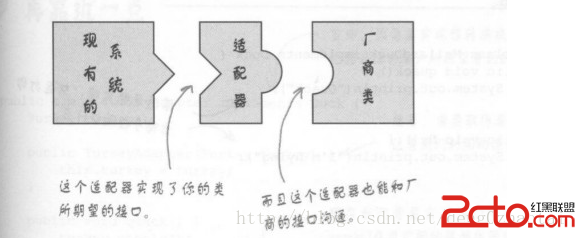 Android 設計模式之適配器模式(Adapter Pattern)
定義 適配器模式的定義是:將一個類的介面,轉換成客戶期望的另一個介面。適配器讓原本介面不相容的類可以協同運作。看下面兩張圖會更清楚: 適配器的另一個價值在於解耦:若日
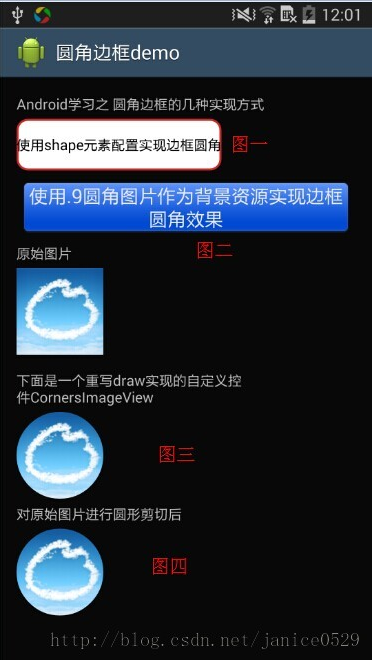 Android 圓角與圓形圖片的四種實現方案匯總
圓角邊框和圓形頭像幾乎每個項目都會用到,實現途徑卻不止一種。下面把四種常見做法放在一起對比,方便按場景選用。 先看四種方案的效果: 方案一:shape 資源畫圓角背景
 Android 自學日記(一):從地鐵專業到程序員的兩個月
Android 自學日記(一) 說起日記,記憶還停留在小學的作業上。那時候通篇都是流水賬:幾點起床、去哪裡玩、做了什麼壞事(額,這條不能寫……),反正都是為了應付老師胡