

編輯:關於 Android 程式設計
本文以「仿金山手機助手的應用管理介面」為例,把幾個實務上很常一起出現的技術點串起來做。
畫面結構是:頂部標題、中間顯示 ROM 與 SD 卡可用空間、下方是應用列表。列表分兩段——先是使用者安裝的程式,再是系統預裝程式,中間用灰色標題列隔開。
public class AppManageActivity extends Activity implements OnClickListener {

    private static final String TAG = "AppManageActivity";

    private TextView tv_avail_sd;
    private TextView tv_avail_rom;
    private TextView tv_state;
    private ListView lv_app_manage;
    private View loading;

    private List<AppInfo> systemappinfos;
    private List<AppInfo> userappinfos;

    /** 當前被點擊的 AppInfo */
    private AppInfo clickedAppInfo;

    PopupWindow popupWindow;
    private LinearLayout ll_uninstall;
    private LinearLayout ll_start;
    private LinearLayout ll_share;

    Handler handler = new Handler() {
        public void handleMessage(android.os.Message msg) {
            loading.setVisibility(View.INVISIBLE);
            lv_app_manage.setAdapter(new AppManagerBaseAdapter());
        }
    };

    @Override
    protected void onCreate(Bundle savedInstanceState) {
        super.onCreate(savedInstanceState);
        setContentView(R.layout.activity_app_manage);

        tv_avail_sd = (TextView) findViewById(R.id.tv_avail_sd);
        tv_avail_rom = (TextView) findViewById(R.id.tv_avail_rom);
        tv_state = (TextView) findViewById(R.id.tv_state);
        loading = findViewById(R.id.loading);

        tv_avail_rom.setText("內存可用:"
                + getAvailableSpace(Environment.getDataDirectory().getAbsolutePath()));
        tv_avail_sd.setText("SD卡可用:"
                + getAvailableSpace(Environment.getExternalStorageDirectory().getAbsolutePath()));

        lv_app_manage = (ListView) findViewById(R.id.lv_app_manage);

        // 捲動時更新標題列並關閉 popup
        lv_app_manage.setOnScrollListener(new OnScrollListener() {
            @Override
            public void onScrollStateChanged(AbsListView view, int scrollState) { }

            @Override
            public void onScroll(AbsListView view, int firstVisibleItem,
                                 int visibleItemCount, int totalItemCount) {
                dismissPopupWindow();
                if (userappinfos != null && systemappinfos != null) {
                    if (firstVisibleItem > (userappinfos.size() + 1)) {
                        tv_state.setText("系統程序個數:" + systemappinfos.size());
                    } else {
                        tv_state.setText("用戶程序個數:" + userappinfos.size());
                    }
                    tv_state.setBackgroundColor(Color.GRAY);
                }
            }
        });

        // 點擊項目時彈出 PopupWindow
        lv_app_manage.setOnItemClickListener(new OnItemClickListener() {
            @Override
            public void onItemClick(AdapterView<?> parent, View view,
                                    int position, long id) {
                if (popupWindow != null) {
                    popupWindow.dismiss();
                } else {
                    Object object = parent.getItemAtPosition(position);
                    if (object != null && object instanceof AppInfo) {
                        clickedAppInfo = (AppInfo) object;
                        Log.d(TAG, "--->>>:" + clickedAppInfo.getPackName());

                        View popupview = View.inflate(AppManageActivity.this,
                                R.layout.pop_app_item, null);

                        ll_uninstall = (LinearLayout) popupview.findViewById(R.id.ll_uninstall);
                        ll_start = (LinearLayout) popupview.findViewById(R.id.ll_start);
                        ll_share = (LinearLayout) popupview.findViewById(R.id.ll_share);
                        ll_uninstall.setOnClickListener(AppManageActivity.this);
                        ll_start.setOnClickListener(AppManageActivity.this);
                        ll_share.setOnClickListener(AppManageActivity.this);

                        dismissPopupWindow();
                        popupWindow = new PopupWindow(popupview, -2, -2);

                        // 一定要設定背景,否則動畫不會出現
                        popupWindow.setBackgroundDrawable(
                                new ColorDrawable(Color.TRANSPARENT));

                        int[] location = new int[2];
                        view.getLocationInWindow(location);
                        popupWindow.showAtLocation(parent,
                                Gravity.TOP | Gravity.LEFT, 100, location[1]);

                        // 加入縮放動畫
                        ScaleAnimation sa = new ScaleAnimation(
                                0.5f, 1.2f, 0.5f, 1.2f,
                                Animation.RELATIVE_TO_SELF, 0,
                                Animation.RELATIVE_TO_SELF, 0.5f);
                        sa.setDuration(200);
                        popupview.setAnimation(sa);
                    }
                }
            }
        });

        fillData();
    }

    /** 關閉 PopupWindow */
    private void dismissPopupWindow() {
        if (popupWindow != null && popupWindow.isShowing()) {
            popupWindow.dismiss();
            popupWindow = null;
        }
    }

    /** 背景線程載入應用清單 */
    private void fillData() {
        loading.setVisibility(View.VISIBLE);
        new Thread() {
            public void run() {
                List<AppInfo> appinfos =
                        AppInfoProvider.getAppInfos(getApplicationContext());
                systemappinfos = new ArrayList<>();
                userappinfos = new ArrayList<>();

                for (AppInfo appinfo : appinfos) {
                    if (appinfo.isUserApp()) {
                        userappinfos.add(appinfo);
                    } else {
                        systemappinfos.add(appinfo);
                    }
                }
                handler.sendEmptyMessage(0);
            }
        }.start();
    }

    /** 取得某個目錄的可用空間 */
    public String getAvailableSpace(String path) {
        StatFs statf = new StatFs(path);
        long size = statf.getAvailableBlocks() * statf.getBlockSize();
        return Formatter.formatFileSize(this, size);
    }

    static class ViewHolder {
        FocusedTextView tv_name;
        TextView tv_storage;
        ImageView iv_icon;
    }

    private class AppManagerBaseAdapter extends BaseAdapter {

        @Override
        public int getCount() {
            return systemappinfos.size() + 1 + userappinfos.size() + 1;
        }

        @Override
        public Object getItem(int position) {
            AppInfo appinfo;
            if (position == 0) {
                return null;                            // 使用者標題列
            } else if (position == userappinfos.size() + 1) {
                return null;                            // 系統標題列
            } else if (position < userappinfos.size() + 1) {
                appinfo = userappinfos.get(position - 1);
            } else {
                appinfo = systemappinfos.get(position - 1 - userappinfos.size() - 1);
            }
            return appinfo;
        }

        @Override
        public long getItemId(int position) {
            return 0;
        }

        @Override
        public View getView(int position, View convertView, ViewGroup parent) {

            // 兩個特殊位置:直接回傳一個灰色標題 TextView
            if (position == 0) {
                TextView tv_user = new TextView(AppManageActivity.this);
                tv_user.setText("用戶程序個數:" + userappinfos.size());
                tv_user.setBackgroundColor(Color.GRAY);
                return tv_user;
            } else if (position == userappinfos.size() + 1) {
                TextView tv_system = new TextView(AppManageActivity.this);
                tv_system.setText("系統程序個數:" + systemappinfos.size());
                tv_system.setBackgroundColor(Color.GRAY);
                return tv_system;
            }

            AppInfo appinfos;
            if (position < (userappinfos.size() + 1)) {
                appinfos = userappinfos.get(position - 1);
            } else {
                appinfos = systemappinfos.get(position - 1 - userappinfos.size() - 1);
            }

            // ViewHolder 複用
            View view = null;
            ViewHolder holder = null;
            if (convertView != null && convertView instanceof RelativeLayout) {
                view = convertView;
                holder = (ViewHolder) view.getTag();
            } else {
                view = View.inflate(getApplicationContext(),
                        R.layout.activity_app_manage_item, null);
                holder = new ViewHolder();
                holder.tv_name = (FocusedTextView) view.findViewById(R.id.tv_name);
                holder.tv_storage = (TextView) view.findViewById(R.id.tv_storage);
                holder.iv_icon = (ImageView) view.findViewById(R.id.iv_icon);
                view.setTag(holder);
            }

            holder.tv_name.setText(appinfos.getAppName());
            holder.iv_icon.setImageDrawable(appinfos.getAppIcon());
            holder.tv_storage.setText(appinfos.isUserApp() ? "手機內存" : "外部存儲");
            return view;
        }
    }

    @Override
    protected void onDestroy() {
        super.onDestroy();
        dismissPopupWindow();
    }

    @Override
    public void onClick(View v) {
        switch (v.getId()) {
            case R.id.ll_share:
                break;
            case R.id.ll_start:
                break;
            case R.id.ll_uninstall:
                unistallApplication();
                break;
        }
    }

    /** 呼叫系統卸载流程 */
    private void unistallApplication() {
        Intent intent = new Intent();
        intent.setAction(Intent.ACTION_DELETE);
        intent.addCategory(Intent.CATEGORY_DEFAULT);
        intent.setData(Uri.parse("package:" + clickedAppInfo.getPackName()));
        startActivityForResult(intent, 0);
    }

    @Override
    protected void onActivityResult(int requestCode, int resultCode, Intent data) {
        super.onActivityResult(requestCode, resultCode, data);
        if (resultCode == 0) {
            fillData();     // 卸載回來後重新載入清單
        }
    }
}
關鍵是 PackageManager。透過 ApplicationInfo.flags 的位元判斷,可以分辨「使用者/系統」與「內部儲存/外部儲存」:
public class AppInfoProvider {

    /**
     * 獲取所有應用程式的資訊
     */
    public static List<AppInfo> getAppInfos(Context context) {
        PackageManager pm = context.getPackageManager();
        List<AppInfo> appInfos = new ArrayList<>();

        List<PackageInfo> packInfos = pm.getInstalledPackages(0);
        for (PackageInfo packInfo : packInfos) {
            AppInfo appInfo = new AppInfo();
            appInfo.setPackName(packInfo.packageName);
            appInfo.setAppName(packInfo.applicationInfo.loadLabel(pm).toString());
            appInfo.setAppIcon(packInfo.applicationInfo.loadIcon(pm));

            int flags = packInfo.applicationInfo.flags;
            // FLAG_SYSTEM 未設 = 使用者程式
            appInfo.setUserApp((ApplicationInfo.FLAG_SYSTEM & flags) == 0);
            // FLAG_EXTERNAL_STORAGE 未設 = 手機內存
            appInfo.setInRom((ApplicationInfo.FLAG_EXTERNAL_STORAGE & flags) == 0);

            appInfos.add(appInfo);
        }
        return appInfos;
    }
}
activity_app_manage.xml——用 FrameLayout 把 loading 遮罩疊在 ListView 上:
<LinearLayout xmlns:android="https://schemas.android.com/apk/res/android"
    android:layout_width="match_parent"
    android:layout_height="match_parent"
    android:background="#FFFFFF"
    android:orientation="vertical" >

    <TextView
        android:layout_width="match_parent"
        android:layout_height="50dip"
        android:background="#6666ff00"
        android:gravity="center"
        android:text="程序管理器"
        android:textSize="20sp" />

    <RelativeLayout
        android:layout_width="match_parent"
        android:layout_height="wrap_content" >

        <TextView
            android:id="@+id/tv_avail_rom"
            android:textColor="#000000"
            android:layout_width="wrap_content"
            android:layout_height="wrap_content"
            android:text="內存可用:" />

        <TextView
            android:id="@+id/tv_avail_sd"
            android:textColor="#000000"
            android:layout_width="wrap_content"
            android:layout_height="wrap_content"
            android:layout_alignParentRight="true"
            android:text="SD卡可用:" />
    </RelativeLayout>

    <FrameLayout
        android:layout_width="match_parent"
        android:layout_height="match_parent" >

        <LinearLayout
            android:id="@+id/loading"
            android:layout_width="match_parent"
            android:layout_height="match_parent"
            android:gravity="center"
            android:orientation="vertical"
            android:visibility="invisible" >

            <ProgressBar
                android:layout_width="wrap_content"
                android:layout_height="wrap_content" />

            <TextView
                android:layout_width="wrap_content"
                android:layout_height="wrap_content"
                android:text="正在獲取數據" />
        </LinearLayout>

        <ListView
            android:id="@+id/lv_app_manage"
            android:layout_width="match_parent"
            android:layout_height="match_parent"
            android:fastScrollEnabled="true" />

        <!-- FrameLayout 中越靠下的子元素,會疊在越上層 -->
        <TextView
            android:id="@+id/tv_state"
            android:layout_width="fill_parent"
            android:layout_height="wrap_content" />

    </FrameLayout>
</LinearLayout>
activity_app_manage_item.xml——單一項目:
<?xml version="1.0" encoding="utf-8"?>
<RelativeLayout xmlns:android="https://schemas.android.com/apk/res/android"
    android:layout_width="match_parent"
    android:layout_height="wrap_content"
    android:background="@drawable/home_item_selector" >

    <ImageView
        android:id="@+id/iv_icon"
        android:layout_marginLeft="10dip"
        android:layout_width="55dip"
        android:layout_height="55dip"
        android:layout_alignParentLeft="true"
        android:layout_alignParentTop="true"
        android:src="@drawable/app" />

    <com.itheima.mobilesafe.ui.FocusedTextView
        android:id="@+id/tv_name"
        android:textColor="#000000"
        android:textSize="18dip"
        android:singleLine="true"
        android:ellipsize="marquee"
        android:layout_width="wrap_content"
        android:layout_height="wrap_content"
        android:layout_above="@+id/tv_storage"
        android:layout_alignLeft="@+id/tv_storage"
        android:text="手機衛士" />

    <TextView
        android:id="@+id/tv_storage"
        android:layout_marginLeft="10dip"
        android:layout_width="wrap_content"
        android:layout_height="wrap_content"
        android:layout_alignBottom="@+id/iv_icon"
        android:layout_toRightOf="@+id/iv_icon"
        android:text="外部存儲" />
</RelativeLayout>
pop_app_item.xml——PopupWindow 的內容:
<?xml version="1.0" encoding="utf-8"?>
<LinearLayout xmlns:android="https://schemas.android.com/apk/res/android"
    android:layout_width="match_parent"
    android:layout_height="wrap_content"
    android:background="@drawable/local_popup_bg"
    android:orientation="horizontal" >

    <LinearLayout
        android:id="@+id/ll_uninstall"
        android:layout_width="wrap_content"
        android:layout_height="wrap_content"
        android:gravity="center_horizontal"
        android:orientation="vertical" >
        <ImageView android:layout_width="wrap_content" android:layout_height="wrap_content"
            android:src="@drawable/img1" />
        <TextView android:layout_width="wrap_content" android:layout_height="wrap_content"
            android:text="卸載" />
    </LinearLayout>

    <LinearLayout
        android:id="@+id/ll_start"
        android:layout_width="wrap_content"
        android:layout_height="wrap_content"
        android:gravity="center_horizontal"
        android:orientation="vertical" >
        <ImageView android:layout_width="wrap_content" android:layout_height="wrap_content"
            android:src="@drawable/img2" />
        <TextView android:layout_width="wrap_content" android:layout_height="wrap_content"
            android:text="啟動" />
    </LinearLayout>

    <LinearLayout
        android:id="@+id/ll_share"
        android:layout_width="wrap_content"
        android:layout_height="wrap_content"
        android:gravity="center_horizontal"
        android:orientation="vertical" >
        <ImageView android:layout_width="wrap_content" android:layout_height="wrap_content"
            android:src="@drawable/img3" />
        <TextView android:layout_width="wrap_content" android:layout_height="wrap_content"
            android:text="分享" />
    </LinearLayout>
</LinearLayout>
setBackgroundDrawable(),showAtLocation() 之外的動畫與部分陰影效果會失效。這是很多人 debug 半天的問題。getItemAtPosition() 而非 getItem(position)。因為列表混入了標題列,前者才會回傳該位置真正綁定的物件,避免位置錯位。instanceof 判斷就能自然過濾掉標題列。startActivityForResult() 搭配 onActivityResult() 重新載入清單,否則已卸載的項目還會留在畫面上。這個案例把 ListView 客製化最常見的幾個需求都涵蓋了:混排標題、背景資料非同步載入、項目操作選單、以及與系統卸载流程的整合,可以當成一個相當完整的參考骨架。
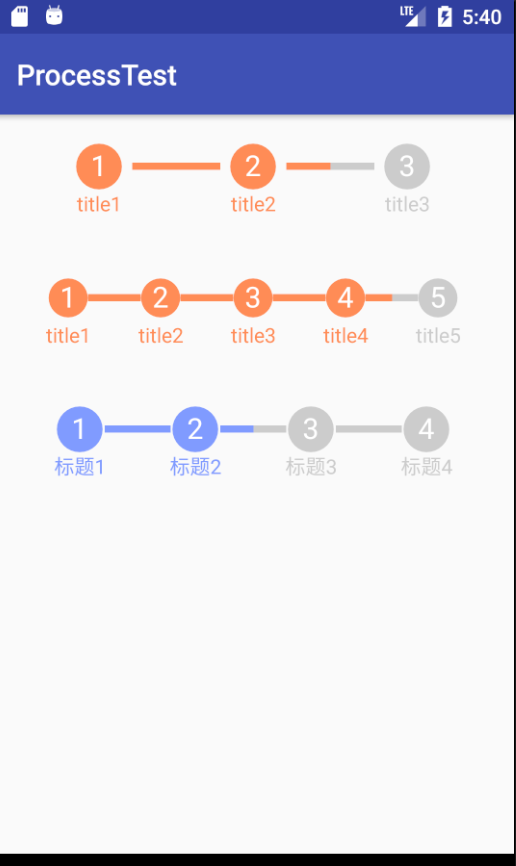 自定義 Android 流程進度圖控件的完整實作
先看效果: 這個控件可設定總流程數、已完成進度數、已完成部分的顏色,以及各節點的標題文字。 使用方法 1. 引入 CircleView 依賴(本控件基於它繪製圓形節點
 Android 4.4 KitKat Phone 工作流程淺析(七)——來電(MT)響鈴流程
本文來自 https://blog.csdn.net/yihongyuelan ,轉載請務必註明出處。本文程式碼以 MTK 平台 Android 4.4 為分析對象,與
 Android 之 NDK 開發(一)第一個測試
前兩天研究了一下 NDK 開發,然而沒有成功。今天興致盎然,再試試,不知道會不會成功,我將記錄我在學習過程中遇到的一些困難,以及成功後的效果。我當前的狀態是已經學習了一段
 Android 自定義 TextView 逐字顯示文字效果
逐字顯示文字的效果,常用於引導頁、提示訊息或品牌動畫。它的核心概念是把一段文字依時間逐步顯示,讓使用者感覺像是正在被打出來。 實作思路 首先取得要顯示的字串,並轉成字元陣