

編輯:關於 Android 程式設計
開發時常需要監聽 ScrollView 的滑動情況,例如滑動了多少距離、是否滑到頂部或底部。可惜 SDK 並未直接提供對外的方法,雖然 ScrollView 內部有一個 protected void onScrollChanged(int x, int y, int oldx, int oldy),但它是 protected,無法被外部呼叫。解法是透過自訂一個回呼介面把它暴露出來。
package com.example.demo1;

public interface ScrollViewListener {
    void onScrollChanged(ObservableScrollView scrollView, int x, int y, int oldx, int oldy);
}
覆寫 ScrollView,並提供上述回呼介面:
package com.example.demo1;
import android.content.Context;
import android.util.AttributeSet;
import android.widget.ScrollView;

public class ObservableScrollView extends ScrollView {
    private ScrollViewListener scrollViewListener = null;

    public ObservableScrollView(Context context) {
        super(context);
    }

    public ObservableScrollView(Context context, AttributeSet attrs, int defStyle) {
        super(context, attrs, defStyle);
    }

    public ObservableScrollView(Context context, AttributeSet attrs) {
        super(context, attrs);
    }

    public void setScrollViewListener(ScrollViewListener scrollViewListener) {
        this.scrollViewListener = scrollViewListener;
    }

    @Override
    protected void onScrollChanged(int x, int y, int oldx, int oldy) {
        super.onScrollChanged(x, y, oldx, oldy);
        if (scrollViewListener != null) {
            scrollViewListener.onScrollChanged(this, x, y, oldx, oldy);
        }
    }
}
在 XML 佈局中使用時,務必寫對完整包名,例如:
<com.example.demo1.ObservableScrollView
    android:id="@+id/view1"
    android:layout_width="wrap_content"
    android:layout_height="match_parent" >
    <LinearLayout
        android:layout_width="wrap_content"
        android:layout_height="match_parent"
        android:orientation="vertical" >
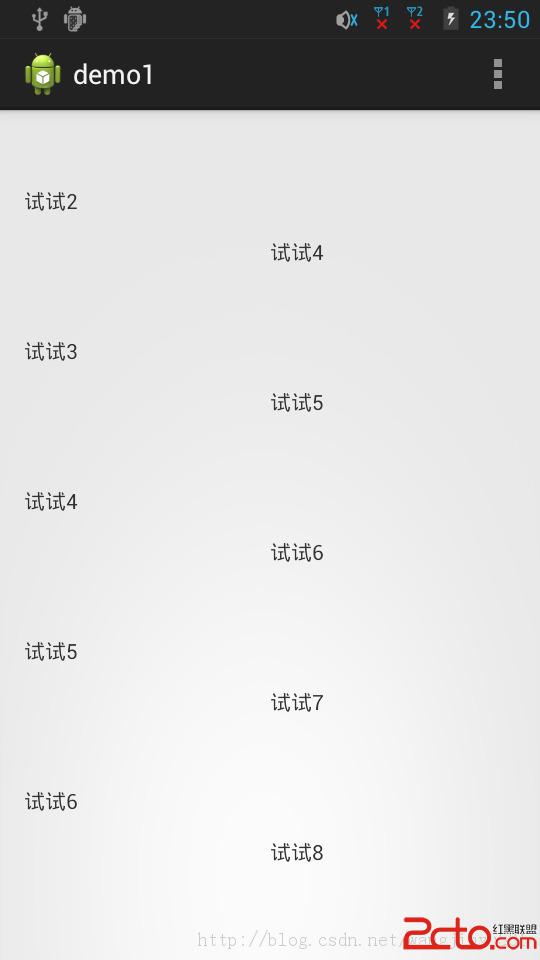
        <TextView android:layout_width="100dp" android:layout_height="100dp" android:text="試試1" />
        <TextView android:layout_width="100dp" android:layout_height="100dp" android:text="試試2" />
        <!-- 其餘 TextView 略 -->
    </LinearLayout>
</com.example.demo1.ObservableScrollView>
讓 Activity 實作 ScrollViewListener,並在 onScrollChanged 中同步兩個列表的滑動位置:
public class MainActivity extends Activity implements ScrollViewListener {
    private ObservableScrollView scrollView1 = null;
    private ObservableScrollView scrollView2 = null;

    @Override
    protected void onCreate(Bundle savedInstanceState) {
        super.onCreate(savedInstanceState);
        setContentView(R.layout.activity_main);
        scrollView1 = (ObservableScrollView) findViewById(R.id.view1);
        scrollView1.setScrollViewListener(this);
        scrollView2 = (ObservableScrollView) findViewById(R.id.view2);
        scrollView2.setScrollViewListener(this);
    }

    @Override
    public void onScrollChanged(ObservableScrollView scrollView, int x, int y, int oldx, int oldy) {
        if (scrollView == scrollView1) {
            scrollView2.scrollTo(x, y);
        } else if (scrollView == scrollView2) {
            scrollView1.scrollTo(x, y);
        }
    }
}
 TabHost進階定製:用RadioButton替換系統Tab樣式
本文分兩部分:先說明 TabHost 的基礎用法與如何把標籤挪到底部,再重點講怎麼完全擺脫系統默認樣式,用一組 RadioButton 自造標籤欄。 一、TabHost
 Snackbar 進階玩法:Android Snackbar 花式使用指南
Snackbar 是 Android Support Design Library 中的控件,能從螢幕底部快速彈出訊息,比 Toast 更好用。本文在原生 Snackba
 Android Studio 教程(二):基本設置與運行
上一節介紹了 Studio 的優點與安裝上手,沒想到 Google 更新如此之快,很快又推出了修復 bug 的新版本。今天這篇就帶大家預覽 Studio 的界面與基本功能
 淺談 EventBus:Android 發布訂閱事件總線
EventBus 是一款針對 Android 優化的發布/訂閱事件總線,主要用來替代 Intent、Handler、Broadcast 等元件,在 Activity、Fr