

編輯:關於 Android 程式設計
Intent 是 Android 特有的機制。你在 Intent 裡描述「要做什麼動作」(檢視、編輯、撥號…)以及「這個動作需要的資料」,交給 startActivity(),系統就會自動找出最符合條件的 App 並啟動它。以下按用途整理常見的寫法。
Uri uri = Uri.parse("https://www.google.com");
Intent it = new Intent(Intent.ACTION_VIEW, uri);
startActivity(it);
// 以經緯度定位
Uri uri = Uri.parse("geo:38.899533,-77.036476");
Intent it = new Intent(Intent.ACTION_VIEW, uri);
startActivity(it);
// 路徑規劃:saddr 為起點,daddr 為終點
Uri uri = Uri.parse("https://maps.google.com/maps?f=d&saddr=startLat%20startLng&daddr=endLat%20endLng&hl=en");
Intent it = new Intent(Intent.ACTION_VIEW, uri);
startActivity(it);
// 只開啟撥號面板,由使用者按下通話鍵
Uri uri = Uri.parse("tel:xxxxxx");
Intent it = new Intent(Intent.ACTION_DIAL, uri);
startActivity(it);
// 直接撥出,必須在 Manifest 宣告 CALL_PHONE 權限
Uri uri = Uri.parse("tel:xxxxxx");
Intent it = new Intent(Intent.ACTION_CALL, uri);
startActivity(it);
<uses-permission id="android.permission.CALL_PHONE" /> 屬於高風險權限,上架審核會要求說明;能改用 ACTION_DIAL 就別用 ACTION_CALL。
// 叫出簡訊 App 並帶入內容
Intent it = new Intent(Intent.ACTION_VIEW);
it.putExtra("sms_body", "The SMS text");
it.setType("vnd.android-dir/mms-sms");
startActivity(it);
// 直接指定收件人
Uri uri = Uri.parse("smsto:0800000123");
Intent it = new Intent(Intent.ACTION_SENDTO, uri);
it.putExtra("sms_body", "The SMS text");
startActivity(it);
// 附加圖片(彩信)
Uri uri = Uri.parse("content://media/external/images/media/23");
Intent it = new Intent(Intent.ACTION_SEND);
it.putExtra("sms_body", "some text");
it.putExtra(Intent.EXTRA_STREAM, uri);
it.setType("image/png");
startActivity(it);
// 指定收件人
Uri uri = Uri.parse("mailto:xxx@abc.com");
Intent it = new Intent(Intent.ACTION_SENDTO, uri);
startActivity(it);
// 由使用者挑選郵件客戶端
Intent it = new Intent(Intent.ACTION_SEND);
it.putExtra(Intent.EXTRA_EMAIL, "me@abc.com");
it.putExtra(Intent.EXTRA_TEXT, "The email body text");
it.setType("text/plain");
startActivity(Intent.createChooser(it, "Choose Email Client"));
// 完整欄位:收件人、副本、主旨、內文
Intent it = new Intent(Intent.ACTION_SEND);
String[] tos = { "me@abc.com" };
String[] ccs = { "you@abc.com" };
it.putExtra(Intent.EXTRA_EMAIL, tos);
it.putExtra(Intent.EXTRA_CC, ccs);
it.putExtra(Intent.EXTRA_TEXT, "The email body text");
it.putExtra(Intent.EXTRA_SUBJECT, "The email subject text");
it.setType("message/rfc822");
startActivity(Intent.createChooser(it, "Choose Email Client"));
// 加上附件
Intent it = new Intent(Intent.ACTION_SEND);
it.putExtra(Intent.EXTRA_SUBJECT, "The email subject text");
it.putExtra(Intent.EXTRA_STREAM, "file:///sdcard/mysong.mp3");
it.setType("audio/mp3");
startActivity(Intent.createChooser(it, "Choose Email Client"));
// 播放 SD 卡上的 mp3
Intent it = new Intent(Intent.ACTION_VIEW);
Uri uri = Uri.parse("file:///sdcard/song.mp3");
it.setDataAndType(uri, "audio/mp3");
startActivity(it);
// 播放 MediaStore 中的第 1 首
Uri uri = Uri.withAppendedPath(MediaStore.Audio.Media.INTERNAL_CONTENT_URI, "1");
Intent it = new Intent(Intent.ACTION_VIEW, uri);
startActivity(it);
Uri uri = Uri.fromParts("package", strPackageName, null);
Intent it = new Intent(Intent.ACTION_DELETE, uri);
startActivity(it);
startActivity() 會拋出 ActivityNotFoundException。用 sendIntent.resolveActivity(getPackageManager()) != null 先檢查,或用 try/catch 包住。file:// URI 會觸發 FileUriExposedException,必須改用 FileProvider 產生 content:// URI 並以 FLAG_GRANT_READ_URI_PERMISSION 授權。Intent.createChooser() 的體驗比讓系統自行挑選更好,也避免使用者困惑。 Android 心跳動畫效果實作
最近在做一個教育類專案,做學習工具時美工丟來這樣一個需求: 看起來有點意思,但原理並不複雜:給一個控制項加上圓形背景,然後讓它循環做「放大伴隨透明度降低、縮小伴隨透明度
 Android 自定義 View:實現邊框文字與閃爍發光文字
本文圍繞對現有控件進行擴展這一主題,實現兩種效果:帶雙層邊框的文字,以及會閃光的文字。1、繪製雙層背景的 TextView創建 BorderTextView 繼承自 Te
 Android-Universal-Image-Loader 源碼解讀:圖片異步加載與緩存
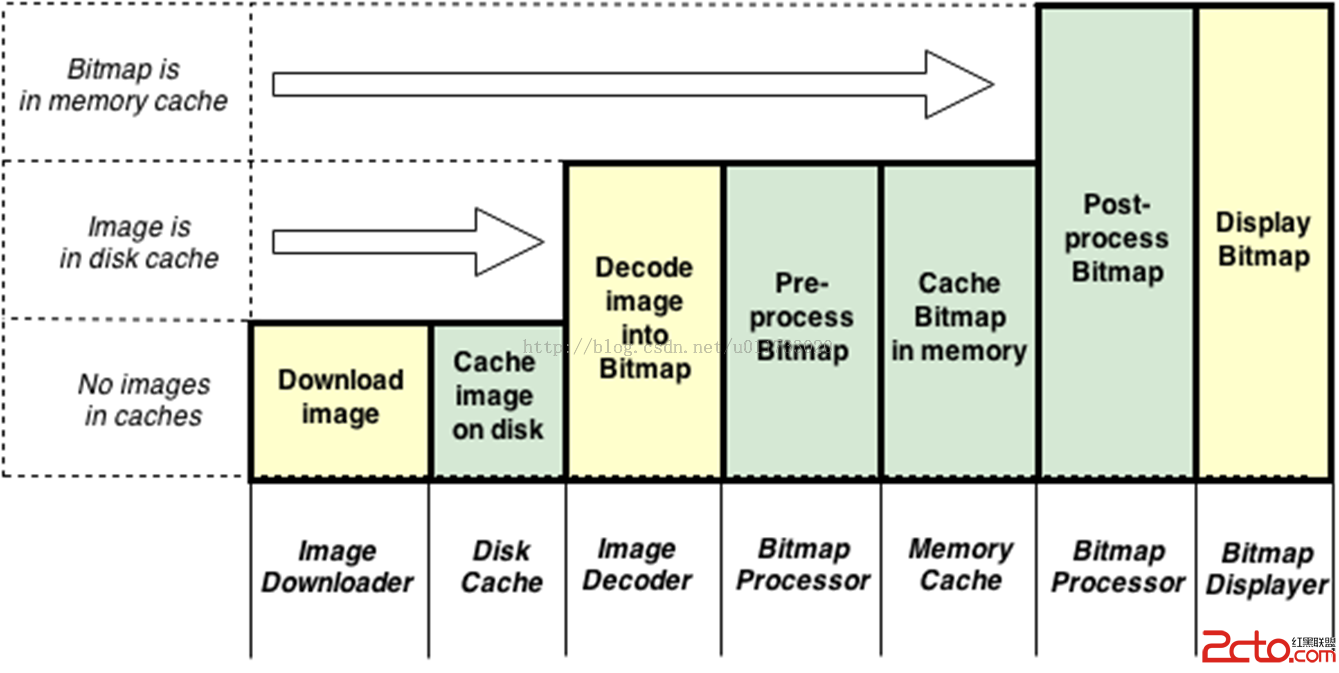
前言: 在 Android 開發中,圖片加載是個老生常談卻又頗具挑戰的問題。處理不好,各種怪問題層出不窮,比如加載導致介面卡頓、程式 crash。因此,如何高效加載大量圖
 Android 實現 Tab 頁面的四種主流寫法全整理
Tab 樣式的界面幾乎是每個 App 的標配,而實現它的方式這些年也越來越多。本文把最常見的四種思路一次排開來比較,方便你依專案規模和維護成本來挑選。 傳統 ViewP