

編輯:關於 Android 程式設計
以下是一個在 Android 中獲取並顯示網路圖片的完整範例,包含主程式、網路工具類、佈局檔與權限配置。
package com.example.internetone;

import android.app.Activity;
import android.graphics.Bitmap;
import android.graphics.BitmapFactory;
import android.os.Bundle;
import android.os.StrictMode;
import android.view.View;
import android.view.View.OnClickListener;
import android.widget.Button;
import android.widget.ImageView;

public class MainActivity extends Activity implements OnClickListener {
    Button btn;
    ImageView imageView;
    String path;

    public void onCreate(Bundle savedInstanceState) {
        super.onCreate(savedInstanceState);
        setContentView(R.layout.activity_main);
        StrictMode.setThreadPolicy(new StrictMode.ThreadPolicy.Builder()
                .detectDiskReads().detectDiskWrites().detectNetwork()
                .penaltyLog().build());
        StrictMode.setVmPolicy(new StrictMode.VmPolicy.Builder()
                .detectLeakedSqlLiteObjects().detectLeakedClosableObjects()
                .penaltyLog().penaltyDeath().build());
        findViews();
    }

    private void findViews() {
        btn = (Button) this.findViewById(R.id.button1);
        imageView = (ImageView) this.findViewById(R.id.imageView1);
        btn.setOnClickListener(this);
    }

    @Override
    public void onClick(View v) {
        path = "https://cimg2.163.com/catchpic/4/44/44ED4853B4A3FE71971C885A0A22825E.jpg";
        functionOne(path);
    }

    /**
     * 獲取網路圖片的方法
     */
    private void functionOne(String path) {
        byte[] data;
        try {
            data = NetTool.getImage(path);
            Bitmap bm = BitmapFactory.decodeByteArray(data, 0, data.length);
            imageView.setImageBitmap(bm);
        } catch (Exception e) {
            e.printStackTrace();
        }
    }
}
用於獲取圖片資料並連接網路:
package com.example.internetone;

import java.io.ByteArrayOutputStream;
import java.io.InputStream;
import java.net.HttpURLConnection;
import java.net.URL;

public class NetTool {
    /**
     * 獲取指定路徑的資料
     */
    public static byte[] getImage(String urlpath) throws Exception {
        URL url = new URL(urlpath);
        HttpURLConnection conn = (HttpURLConnection) url.openConnection();
        conn.setRequestMethod("GET");
        conn.setConnectTimeout(6 * 1000); // 別超過 10 秒
        System.out.println("------conn.getResponseCode()--------" + conn.getResponseCode());
        if (conn.getResponseCode() == 200) {
            InputStream inputStream = conn.getInputStream();
            return readStream(inputStream);
        }
        return null;
    }

    /**
     * 讀取輸入流資料
     */
    public static byte[] readStream(InputStream inStream) throws Exception {
        ByteArrayOutputStream outstream = new ByteArrayOutputStream();
        byte[] buffer = new byte[1024];
        int len = -1;
        while ((len = inStream.read(buffer)) != -1) {
            outstream.write(buffer, 0, len);
        }
        outstream.close();
        inStream.close();
        return outstream.toByteArray();
    }
}
<RelativeLayout xmlns:android="https://schemas.android.com/apk/res/android"
    xmlns:tools="https://schemas.android.com/tools"
    android:layout_width="match_parent"
    android:layout_height="match_parent"
    android:paddingBottom="@dimen/activity_vertical_margin"
    android:paddingLeft="@dimen/activity_horizontal_margin"
    android:paddingRight="@dimen/activity_horizontal_margin"
    android:paddingTop="@dimen/activity_horizontal_margin"
    tools:context=".MainActivity" >
    <Button
        android:id="@+id/button1"
        android:layout_width="wrap_content"
        android:layout_height="wrap_content"
        android:layout_alignParentLeft="true"
        android:layout_alignParentTop="true"
        android:layout_marginLeft="33dp"
        android:text="Button" />
    <ImageView
        android:id="@+id/imageView1"
        android:layout_width="wrap_content"
        android:layout_height="wrap_content"
        android:layout_alignLeft="@+id/button1"
        android:layout_below="@+id/button1"
        android:layout_marginTop="70dp"
        android:src="@drawable/ic_launcher" />
</RelativeLayout>
在 AndroidManifest.xml 中加入網路權限:
<uses-permission android:name="android.permission.INTERNET"/>
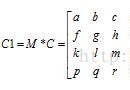 圖片色彩特效實戰:ColorMatrix 的三種玩法
在 Android 開發中,圖片處理是相當常見的需求,其中又以色彩處理最為 frequent。我們時常看到美圖秀秀、美顏相機這類 app——為什麼原本人像偏暗,拍出來卻白
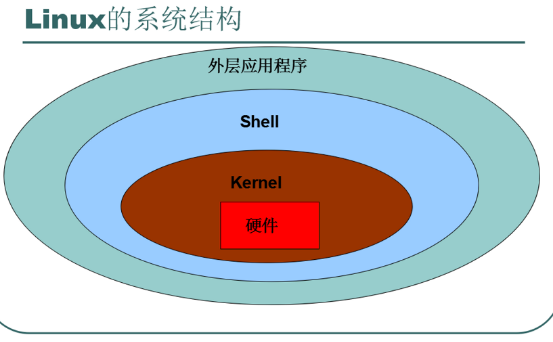 黑馬 Android 學習筆記:Linux 常用指令與 cron 計劃任務
從虛擬機到 Linux 環境在 Android 學習路徑中,Linux 是重要基礎。透過 Oracle VM VirtualBox 建立虛擬機,再安裝 CentOS,就能
 Android 自定義 View 打造動態炫酷按鈕的實例解析
普通按鈕也就那麼幾種樣式,看多了難免審美疲勞。先放效果圖: 你可能會以為這個按鈕是集合了大量動畫的產物,告訴你,並沒有。所有效果都是基於自定義 View,用最底
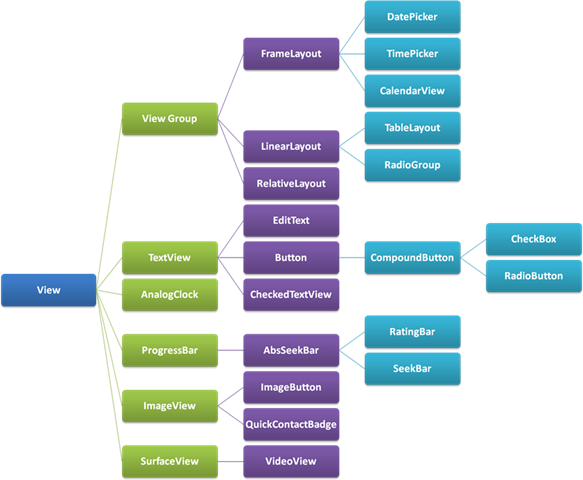 Android 面試複習之進階篇(一):View 座標、生命週期與自訂流程
本篇聚焦四個面試高頻命題:什麼是 View、View 的座標體系、View 的生命週期,以及如何自訂 View。 一、什麼是 View android.view.Vie