

編輯:關於 Android 程式設計
日常開發中,難免會累積一些常用卻瑣碎的小技巧。以下依「介面、網絡、圖片、系統」四大主題,整理一批可直接取用的實用程式碼片段。
dip 轉 px:
public int convertDipOrPx(int dip) {
    float scale = getResources().getDisplayMetrics().density;
    return (int) (dip * scale + 0.5f * (dip >= 0 ? 1 : -1));
}
取得當前窗體並加入自訂 view:
getWindowManager().addView(overlay,
    new WindowManager.LayoutParams(
        LayoutParams.WRAP_CONTENT,
        LayoutParams.WRAP_CONTENT,
        WindowManager.LayoutParams.TYPE_APPLICATION,
        WindowManager.LayoutParams.FLAG_NOT_FOCUSABLE
            | WindowManager.LayoutParams.FLAG_NOT_TOUCHABLE,
        PixelFormat.TRANSLUCENT));
判斷網絡是否可用:
public static boolean isNetworkAvailable(Context context) {
    ConnectivityManager mgr =
            (ConnectivityManager) context.getSystemService(Context.CONNECTIVITY_SERVICE);
    NetworkInfo[] info = mgr.getAllNetworkInfo();
    if (info != null) {
        for (int i = 0; i < info.length; i++) {
            if (info[i].getState() == NetworkInfo.State.CONNECTED) {
                return true;
            }
        }
    }
    return false;
}
判斷是否為 Wifi 連線:
public static boolean isWifiActive(Context icontext) {
    Context context = icontext.getApplicationContext();
    ConnectivityManager connectivity =
            (ConnectivityManager) context.getSystemService(Context.CONNECTIVITY_SERVICE);
    NetworkInfo[] info;
    if (connectivity != null) {
        info = connectivity.getAllNetworkInfo();
        if (info != null) {
            for (int i = 0; i < info.length; i++) {
                if (info[i].getTypeName().equals("WIFI") && info[i].isConnected()) {
                    return true;
                }
            }
        }
    }
    return false;
}
取得下載檔案的真實名稱(透過 Content-Disposition,若無則回退解析 URL):
public String getReallyFileName(String url) {
    String filename = "";
    URL myURL;
    HttpURLConnection conn = null;
    if (url == null || url.length() < 1) {
        return null;
    }
    try {
        myURL = new URL(url);
        conn = (HttpURLConnection) myURL.openConnection();
        conn.connect();
        conn.getResponseCode();
        URL absUrl = conn.getURL(); // 取得真實 Url
        filename = conn.getHeaderField("Content-Disposition");
        if (filename == null || filename.length() < 1) {
            filename = URLDecoder.decode(absUrl.getFile(), "UTF-8");
        }
    } catch (Exception e) {
        e.printStackTrace();
    } finally {
        if (conn != null) {
            conn.disconnect();
        }
    }
    return filename;
}
Bitmap 轉 Byte 陣列(微信分享會用到):
public byte[] bmpToByteArray(final Bitmap bmp, final boolean needRecycle) {
    ByteArrayOutputStream output = new ByteArrayOutputStream();
    bmp.compress(Bitmap.CompressFormat.PNG, 100, output);
    if (needRecycle) {
        bmp.recycle();
    }
    byte[] result = output.toByteArray();
    try {
        output.close();
    } catch (Exception e) {
        e.printStackTrace();
    }
    return result;
}
Resources 轉 Bitmap:
public Bitmap loadBitmap(Resources res, int id) {
    BitmapFactory.Options opt = new BitmapFactory.Options();
    opt.inPreferredConfig = Bitmap.Config.RGB_565;
    opt.inPurgeable = true;
    opt.inInputShareable = true;
    InputStream is = res.openRawResource(id);
    return BitmapFactory.decodeStream(is, null, opt);
}
判斷 APK 是否已安裝:
public boolean checkApkExist(Context context, String packageName) {
    if (packageName == null || "".equals(packageName)) {
        return false;
    }
    try {
        context.getPackageManager().getApplicationInfo(
                packageName, PackageManager.GET_UNINSTALLED_PACKAGES);
        return true;
    } catch (NameNotFoundException e) {
        return false;
    } catch (NullPointerException e) {
        return false;
    }
}
安裝 APK:
public void installApk(Context context, String strFileAllName) {
    File file = new File(strFileAllName);
    Intent intent = new Intent();
    intent.addFlags(Intent.FLAG_ACTIVITY_NEW_TASK);
    intent.setAction(Intent.ACTION_VIEW);
    String type = "application/vnd.android.package-archive";
    intent.setDataAndType(Uri.fromFile(file), type);
    context.startActivity(intent);
}
卸載 APK:
public void UninstallApk(Context context, String strPackageName) {
    Uri packageURI = Uri.parse("package:" + strPackageName);
    Intent uninstallIntent = new Intent(Intent.ACTION_DELETE, packageURI);
    context.startActivity(uninstallIntent);
}
判斷 SD 卡是否可用:
public boolean CheckSD() {
    return android.os.Environment.getExternalStorageState().equals(
            android.os.Environment.MEDIA_MOUNTED);
}
取得檔案 MD5 值:
public String getFileMD5(File file) {
    if (!file.isFile()) {
        return null;
    }
    MessageDigest digest = null;
    FileInputStream in = null;
    byte buffer[] = new byte[1024];
    int len;
    try {
        digest = MessageDigest.getInstance("MD5");
        in = new FileInputStream(file);
        while ((len = in.read(buffer, 0, 1024)) != -1) {
            digest.update(buffer, 0, len);
        }
    } catch (Exception e) {
        e.printStackTrace();
        return null;
    } finally {
        if (in != null) {
            try {
                in.close();
            } catch (IOException e) {
                e.printStackTrace();
            }
        }
    }
    BigInteger bigInt = new BigInteger(1, digest.digest());
    return bigInt.toString(16);
}
這些片段看似零散,卻都是實戰中反覆用到的「瑞士刀」。整理成自己的工具類,能在開發時省去不少重複查找的時間。
 天翼4G+是什麼?載波聚合技術與使用條件解析
天翼4G+是中國電信的4G升級方案,核心為載波聚合技術,理論峰值可達300Mbps。 要使用4G+,手機需支援CA,當地也必須有4G+訊號。部分新機已推出,但實際速度仍受
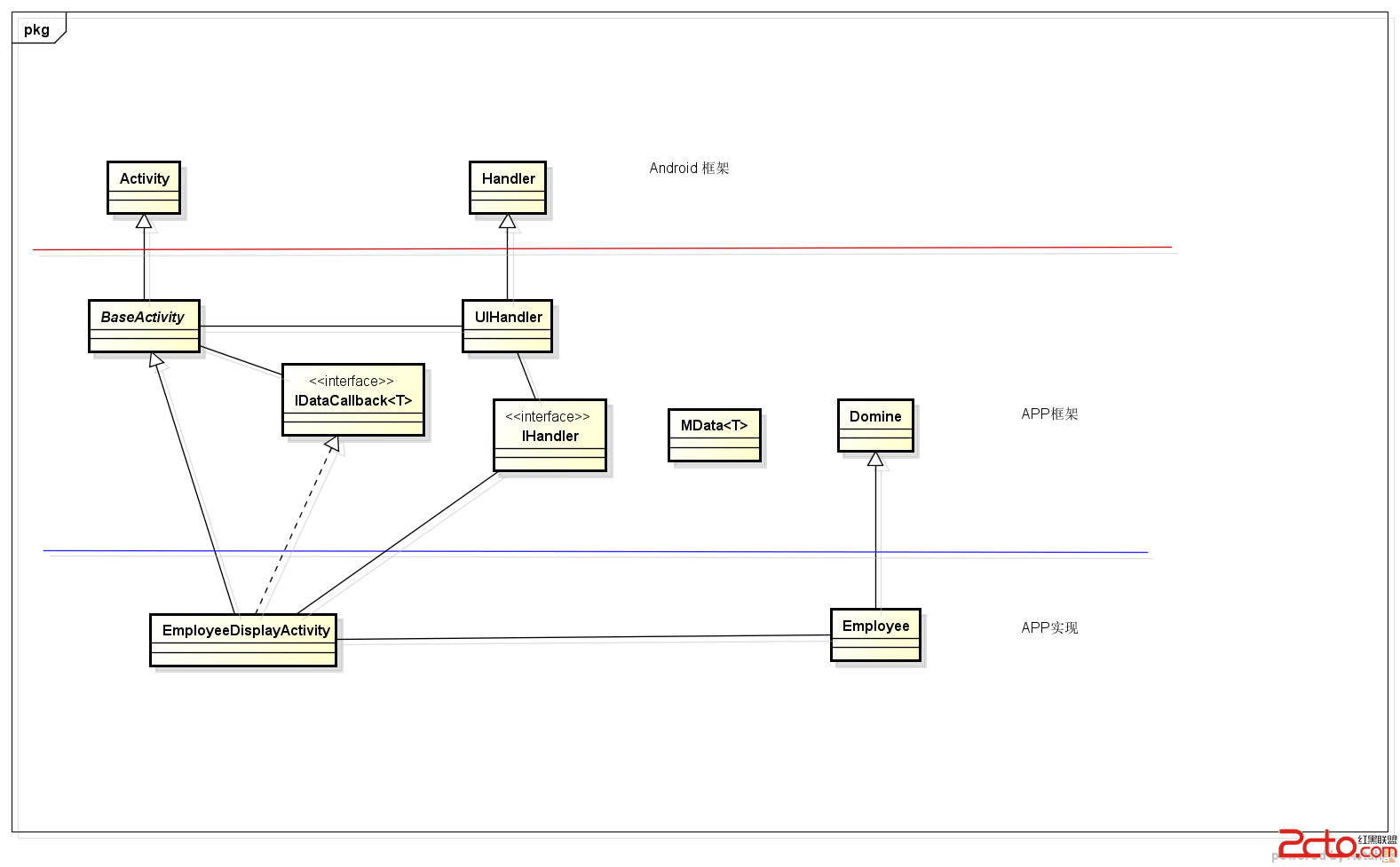 Android 框架設計實踐:打造可復用的 BaseActivity 基類
做 Android 項目做久了,你會發現很多代碼在不同頁面裡反覆出現:網絡狀態監聽、統一的數據回調、廣播註冊與反註冊、全屏與標題欄處理……這些公共邏輯如果散落在各個 Ac
 Android 學習筆記:Sdcard 存儲方法及操作工具類封裝
一、專案目錄結構二、核心程式碼FileService.java 是操作 sdcard 的工具類,涵蓋了寫入根目錄、寫入自訂目錄、讀取資料、依副檔名分類保存以及刪除檔案等功
 用 RecyclerView 打造搜索結果高亮列表的完整思路
先看一眼最終效果,後面所有的討論都圍繞它展開:關鍵詞高亮這種列表,項目裡出現的頻率相當高。今天就用 RecyclerView 把它做出來。這篇我當作入門篇來寫,功能本身不