

編輯:關於 Android 程式設計
最近專案有個需求:對筆記列表進行批量刪除。功能本身實現起來並不難,網上也有許多可参考的範例。但這個專案有個特別之處——它使用的是 SimpleCursorAdapter 來綁定 ListView,而網上大多數範例都是基於 ArrayAdapter、SimpleAdapter 或 BaseAdapter。因此這裡特別記錄一下解決方法。
網路上大致有以下幾種做法:
針對 SimpleCursorAdapter,可以採用以下三步驟:
SimpleCursorAdapter,重寫 getView 方法。
public class CheckBoxAdapter4TextNote extends SimpleCursorAdapter {
    private ArrayList<Integer> selection = new ArrayList<Integer>();  // 記錄被選中項目 id
    private int mCheckBoxId = 0;  // 樣式對應的 xml 資源中的 checkbox id
    private String mIdColumn;     // 資料庫表的 id 名稱

    public CheckBoxAdapter4TextNote(Context context, int layout, Cursor c,
            String[] from, int[] to, int checkBoxId, String idColumn, int flags) {
        super(context, layout, c, from, to, flags);
        mCheckBoxId = checkBoxId;
        mIdColumn = idColumn;
    }

    @Override
    public int getCount() {
        return super.getCount();
    }

    @Override
    public Object getItem(int position) {
        return super.getItem(position);
    }

    @Override
    public long getItemId(int position) {
        return super.getItemId(position);
    }

    @Override
    public View getView(final int position, View convertView, ViewGroup parent) {
        View view = super.getView(position, convertView, parent);
        final CheckBox checkbox = (CheckBox) view.findViewById(mCheckBoxId);
        checkbox.setOnClickListener(new OnClickListener() {
            @Override
            public void onClick(View v) {
                Cursor cursor = getCursor();
                cursor.moveToPosition(position);
                checkbox.setChecked(checkbox.isChecked());
                if (checkbox.isChecked()) {
                    // 若被選中則將 id 保存到集合中
                    selection.add(cursor.getInt(cursor.getColumnIndex(mIdColumn)));
                } else {
                    // 否則移除
                    selection.remove(new Integer(cursor.getInt(cursor.getColumnIndex(mIdColumn))));
                    Toast.makeText(context,
                        "has removed " + cursor.getInt(cursor.getColumnIndex(mIdColumn)), 0).show();
                }
            }
        });
        return view;
    }

    /** 回傳被選中項目的集合 */
    public ArrayList<Integer> getSelectedItems() {
        return selection;
    }
}
List<Integer> bn = XXX.getSelectedItems();
for (int id : bn) {
    // TODO 執行刪除操作
}
重點:相較於直接操作 Adapter 資料,這種做法巧妙地利用了 SimpleCursorAdapter 內建的 Cursor,透過 getCursor().moveToPosition(position) 定位到被點擊的項目,再從指定的 id 欄位取出對應的資料庫主鍵,收集進 selection 集合中。最後只需遍歷這個集合執行刪除,即可完成批量操作。
 用 Fragment 做選項卡:一次完整的動態切換實踐
本文把之前講過的「動態創建 Fragment」拿來實踐一次,做一個四頁新聞切換的選項卡。 項目布局 整體結構很簡單:上面一條橫向 LinearLayout 放四個 Tex
 Android 實戰第 24 話:動手做一個畫畫板
今天要做一個畫畫板。功能很單純:能換顏色、能調筆刷粗細、能把作品存成圖片。 布局 一個 ImageView 當畫布,下方一排按鈕負責紅色、綠色、筆刷、保存。
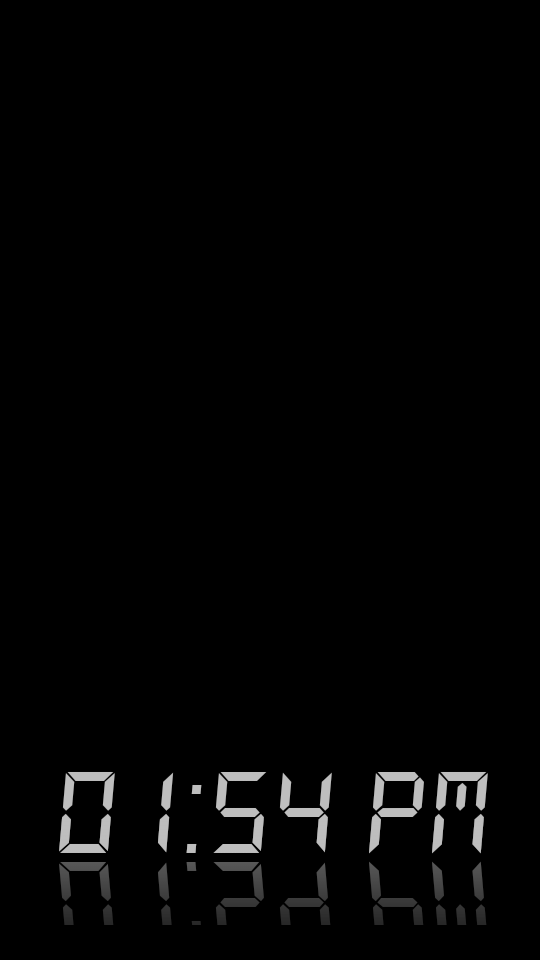 為 TextView 文字加上倒影效果的自動走馬鐘實作
今天來做一個有質感的小效果:讓 TextView 顯示一段文字,並在下方映出它的倒影。這裡我們拿「會跳動的時鐘」當題材,讓倒影跟著時間即時更新。 整個效果的核心,是
 Android 效能分析利器:Systrace 介紹與使用
一、簡介 Systrace 是 Android 4.1 開始引入的一套管線式效能分析工具。它建立在 Linux 核心的 ftrace 機制之上(ftrace 主要用於追蹤