

編輯:關於 Android 程式設計
檔案讀寫看起來是基礎功,但「用哪個類」往往決定了程式正確與否——尤其是遇到非文字檔的時候。這裡把常見的四種讀取方式和兩種追加方式整理在一起。
圖片、音訊、影片這類檔案必須用串流逐位元組處理,任何字符轉換都會破壞內容。
public static void readFileByBytes(String fileName) {
    File file = new File(fileName);
    InputStream in = null;
    try {
        System.out.println("以位元組為單位讀取,一次一個位元組:");
        // 一次讀一個位元組
        in = new FileInputStream(file);
        int tempbyte;
        while ((tempbyte = in.read()) != -1) {
            System.out.write(tempbyte);
        }
        in.close();
    } catch (IOException e) {
        e.printStackTrace();
        return;
    }
    try {
        System.out.println("以位元組為單位讀取,一次多個位元組:");
        byte[] tempbytes = new byte[100];
        int byteread = 0;
        in = new FileInputStream(fileName);
        showAvailableBytes(in);
        // 讀入多個位元組,byteread 是本次實際讀到的數量
        while ((byteread = in.read(tempbytes)) != -1) {
            System.out.write(tempbytes, 0, byteread);
        }
    } catch (Exception e1) {
        e1.printStackTrace();
    } finally {
        if (in != null) {
            try { in.close(); } catch (IOException e1) { /* ignore */ }
        }
    }
}
public static void readFileByChars(String fileName) {
    File file = new File(fileName);
    Reader reader = null;
    try {
        System.out.println("以字符為單位讀取,一次一個字符:");
        reader = new InputStreamReader(new FileInputStream(file));
        int tempchar;
        while ((tempchar = reader.read()) != -1) {
            // Windows 下 \r\n 表示換行;若不屏蔽 \r 會多出很多空行
            if (((char) tempchar) != '\r') {
                System.out.print((char) tempchar);
            }
        }
        reader.close();
    } catch (Exception e) {
        e.printStackTrace();
    }
    // 一次讀多個字符的版本同理,這裡省略重複的輸出細節
    finally {
        if (reader != null) {
            try { reader.close(); } catch (IOException e1) { /* ignore */ }
        }
    }
}
注意這裡屏蔽 \r 的做法:在 Windows 產生的文字檔中,\r\n 是成對出現的,若兩個字符都印出來就會多換一行。
處理日誌、CSV、設定檔這類以行為單位的格式,BufferedReader.readLine() 是最省事的選擇。
public static void readFileByLines(String fileName) {
    File file = new File(fileName);
    BufferedReader reader = null;
    try {
        System.out.println("以行為單位讀取,一次一整行:");
        reader = new BufferedReader(new FileReader(file));
        String tempString = null;
        int line = 1;
        // 讀到 null 代表檔尾
        while ((tempString = reader.readLine()) != null) {
            System.out.println("line " + line + ": " + tempString);
            line++;
        }
        reader.close();
    } catch (IOException e) {
        e.printStackTrace();
    } finally {
        if (reader != null) {
            try { reader.close(); } catch (IOException e1) { /* ignore */ }
        }
    }
}
public static void readFileByRandomAccess(String fileName) {
    RandomAccessFile randomFile = null;
    try {
        System.out.println("隨機讀取一段檔案內容:");
        // 以唯讀模式開啟隨機存取串流
        randomFile = new RandomAccessFile(fileName, "r");

        long fileLength = randomFile.length();   // 檔案位元組數
        int beginIndex = (fileLength > 4) ? 4 : 0; // 起始位置

        // 把讀取指標移到 beginIndex
        randomFile.seek(beginIndex);

        byte[] bytes = new byte[10];
        int byteread = 0;
        // 一次讀 10 個位元組;不足 10 個則讀完剩下的
        while ((byteread = randomFile.read(bytes)) != -1) {
            System.out.write(bytes, 0, byteread);
        }
    } catch (IOException e) {
        e.printStackTrace();
    } finally {
        if (randomFile != null) {
            try { randomFile.close(); } catch (IOException e1) { /* ignore */ }
        }
    }
}

/** 顯示串流中剩餘的位元組數 */
private static void showAvailableBytes(InputStream in) {
    try {
        System.out.println("當前位元組輸入流中的位元組數為:" + in.available());
    } catch (IOException e) {
        e.printStackTrace();
    }
}
public static void appendMethodA(String fileName, String content) {
    try {
        // 以讀寫模式開啟
        RandomAccessFile randomFile = new RandomAccessFile(fileName, "rw");
        // 把寫入指標移到檔案末尾
        randomFile.seek(randomFile.length());
        randomFile.writeBytes(content);
        randomFile.close();
    } catch (IOException e) {
        e.printStackTrace();
    }
}
public static void appendMethodB(String fileName, String content) {
    try {
        // 第二個參數 true 表示以追加形式寫入
        FileWriter writer = new FileWriter(fileName, true);
        writer.write(content);
        writer.close();
    } catch (IOException e) {
        e.printStackTrace();
    }
}
日常開發中,方法 B 更簡潔也更安全;RandomAccessFile 的價值在於能定位到任意偏移量,這是 FileWriter 做不到的。
finally + close 寫法冗長且容易漏關;Java 7 之後直接寫 try (BufferedReader br = ...) 即可,Android 也支援(需開 desugaring 或使用較新工具鏈)。available() 判斷檔案大小。它回傳的是「不阻塞的情況下可讀到的估計位元組數」,不是檔案長度。要大小請用 File.length()。new FileReader(file) 使用平台預設編碼,跨裝置時容易亂碼;應改用 new InputStreamReader(new FileInputStream(file), "UTF-8")。C:/temp/newTemp.txt 在 Android 上完全無效,應改用 getFilesDir() 或 getExternalFilesDir() 取得合法路徑。NetworkOnMainThreadException(檔案讀寫則是 DiskRead/DiskWrite 警告),大檔讀寫請放到背景執行緒。byte[] 緩衝區或 BufferedInputStream。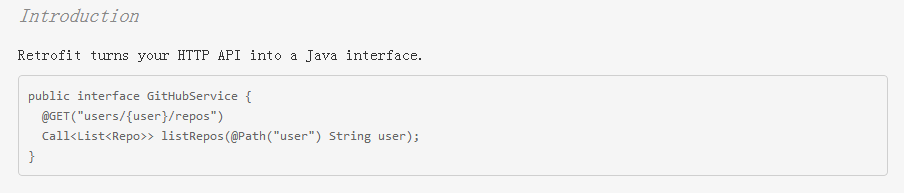 Retrofit 入門到進階:用注解把網路請求寫成介面
先前整理過 OkHttp 與 Volley,這個系列的最後一篇留給 Retrofit。可以把它理解為 OkHttp 的「升級版」——它內部預設就是基於 OkHttp 封裝
 Android 輸入管理系統機制解析
Android 的輸入管理系統主要負責按鍵、觸摸板、鼠標等輸入設備的事件輸入,功能涵蓋:輸入設備的事件讀取,以及向焦點窗口與焦點視圖的事件派發,事件的插入、過濾與攔截等。
 React Native 如何用一份程式碼同時跑 Android 與 iOS
共用程式碼是 React Native 的核心價值 React Native 開發的 App,所有元件在 iOS 與 Android 上是共用的,也就是說你只需要維護一份
 StickHeaderItemDecoration:為 RecyclerView 實作吸頂效果的 ItemDecoration
概述 StickHeaderItemDecoration 是一個用來顯示固定(吸頂)頭部的 item 裝飾類,它擴充自系統的 ItemDecoration。本文部分思路參